The Tool Desk
Outbyte Driver Updater FREEScan for outdated or missing drivers - takes under a minuteDriver Scan →Outbyte PC Repair FREERepair Windows errors before they cause bigger problemsFix Now →Yes, a Nintendo Switch Lite can generally be modded—but not through the simple, software-only RCM method associated with some launch-model Switch consoles. A Switch Lite normally requires an internally installed, compatible modchip before it can load custom firmware. That means difficult board-level microsoldering, possible warranty loss, data and hardware risks, and no guarantee that Nintendo online services will remain available.
For most owners, the sensible route is to use an experienced Switch microsoldering technician, follow the current NH Switch Guide, create verified backups, and keep homebrew experimentation separate from the console’s stock environment. Modding does not make unauthorized copies of commercial games legal.
As an Amazon Associate I earn from qualifying purchases.
What “modding” a Switch Lite means
“Modding” can describe several different things:
Quick wins for a faster PC:
Scan for outdated or missing drivers - takes under a minuteDriver Scan →Repair Windows errors before they cause bigger problemsFix Now →Fix the driver behind crashes, sound loss and screen glitchesFind Drivers →- Custom firmware (CFW): Modified system software such as Atmosphère.
- Homebrew: Unofficial applications, utilities, original games, save-management tools, accessibility projects, and other hobbyist software.
- Game modding: Applying modifications to legally obtained games.
- Hardware modification: Installing a modchip inside the console so custom software can be loaded.
- Cosmetic modification: Replacing shells, buttons, joysticks, batteries, or other components without installing custom firmware.
These are not interchangeable. A shell swap is a repair or cosmetic project; a modchip installation changes the console’s boot process and involves considerably greater risk. The NH Switch Guide also distinguishes custom firmware from homebrew and explains why most Switch homebrew requires CFW.
#1 Best Overall

- Compatibility: The 2PCS 3D Joysticks is for Nintendo Switch Lite replacement for Joy-con controller stick repair. NOT for other model,it only suits for the controller for Nintendo Dualsense. Please confirm your model before placing the order. In order to better help to replace joystick, we had change the new screwdriver, it will more Professional, if you receive the old screwdriver(Not the same with photo) please do not worry, it still could normal to use to replace.
- Application: The replacement for Nintendo Switch Lite joystick are apply to the problem of the drifting, blind spots, dead spots, can't center, damaged or broken, long time to use, not sensitive, etc. The joystick for Nintendo Switch Lite will better to solve the problem of drifting.
- Good Protection: The 2pcs thumbstick caps protects the Joystick from scratches, corrosion, fragments, or other damage. It is made of high-quality silicone materials, featuring a unique wave point for enhanced grip. It is non-slip and fingerprint-free, providing a secure, soft, and comfortable grip. It allows for easy control for Nintendo Switch Lite joystick module.
- Screws and Convenient Installation: Comes with set of console screws(helps replace the controller cover screw during installation). It also comes with a tool kit: screwdriver, opening tool, pry tool, and tweezers. Helps disassemble and replace for Nintendo Switch Lite joystick more conveniently.
- Suggestion and Service: The Switch Lite joystick to replace need to weld, if do not have any installation experience, we suggest to find the professional to replace the joystick. After replacing the joystick for Nintendo Switch Lite , if it show the problem of drifting not center, it means it will need to manual calibrate.If you have any problem about the product or need installation guide, please leave a message to us.
Can every Switch Lite be soft-modded?
No. A Switch Lite is generally not compatible with the simple, non-soldered RCM exploit used by some unpatched first-generation Switch consoles. Lite hardware is patched against that route, so a normal Lite usually needs a compatible hardware modchip.
The important distinction is:
| Console type | Typical modification situation |
|---|---|
| Some launch-model “V1” Switch consoles | May support software-only homebrew through the RCM exploit. |
| Patched V1/V2 Switch consoles | Generally require specialized hardware. |
| Switch Lite | Normally requires an internally installed modchip. |
| Switch OLED | Also belongs to the hardware-installation category. |
Firmware version alone does not turn a Switch Lite into an easy software-only mod. Compatibility can depend on the console board revision, modchip revision, installation method, and current software support. Do not assume that any particular PicoFly, HWFLY, or other chip will work with every Lite.
A used or pre-modded Lite deserves extra caution. Ask for proof of installation quality, NAND backups, successful stock and custom-environment booting, repair history, and a written return policy. Avoid listings promising “all games included,” “undetectable” operation, or guaranteed online play.
Free tools Windows power users keep installed
One-click scans. No signup required.
What can you do with a modded Switch Lite?
Lawful uses can include:
- Running community-made homebrew utilities and original games.
- Managing or backing up saves where the software and use comply with applicable rules.
- Accessibility and interface experimentation.
- Applying modifications to games you legally own, where permitted.
- Experimenting with alternative operating systems or custom tools.
- Using emulators only for software and materials you are legally entitled to use.
Downloading, distributing, or using unauthorized copies of commercial games is piracy. Nintendo states that unauthorized copies and circumvention devices are subject to its anti-piracy policies; see its intellectual-property and piracy FAQ. This article does not provide instructions for pirated games, authentication bypasses, ban evasion, or sharing console keys.
What you need
Hardware
- A Nintendo Switch Lite in good working condition.
- A genuine, reliable microSD card bought from a reputable or authorized seller.
- A computer and dependable card reader.
- A compatible modchip and installation cable or flex, if the console is unmodified.
- For self-installation: a temperature-controlled fine-tip soldering iron, suitable flux and solder, magnification or a microscope, fine tweezers, a multimeter, ESD protection, Kapton tape, and electronics-cleaning supplies.
Hot-air equipment should be used only by someone experienced with board-level repair. A basic soldering kit and a large tip are not adequate for this work.
Software
Use maintained, official sources rather than old “packs” or random video-description downloads:
Rank #2

- 🎮 MONEY SAVER - Original joysticks to repair your broken or drifting analog, everybody is able to save a new console or controller in 10 minutes or less.
- 🎮 OEM FLAWLESS PERFORMANCE JOYSTICKS - Exactly the same as the joysticks that comes on your console or controller, perfectly fit for your device.
- 🎮 EASY INSTALLATION - Comes with everything you need to take apart the console or JoyCon controller easily, you’d better check out any of the Youtube videos on 'how to', then disassemble your controller and screw (snap) in the new precise replacement analog stick.
Do not hard-code an old Atmosphère version, Hekate version, Switch firmware version, or chip firmware into a long-lived guide. These change, and compatibility must be checked against the current release notes.
What’s actually slowing this PC down?
Pick the symptom - the matching free tool is one click away.
Should you install the modchip yourself?
For beginners, no. Modchip installation is a fine-pitch microsoldering job, not an introductory electronics project. A mistake can lift pads, tear traces, short a power rail, damage eMMC or SoC-related circuitry, or leave the console unable to boot. The cost of repairing a failed installation can exceed the cost of hiring a specialist in the first place.
| Option | Advantages | Risks and drawbacks |
|---|---|---|
| Self-installation | Lower labor cost and useful for an experienced board technician. | High risk of permanent damage; requires microscope work, diagnosis, and recovery skills. |
| Professional installation | Lower chance of solder damage; may include testing, backups, and an installation warranty. | Costs labor and shipping; quality varies between providers. |
Choose a technician who can demonstrate previous Switch Lite installations, fine-pitch board-repair experience, and the ability to repair lifted pads or damaged traces. Ask about the installation warranty, backup process, pre-existing damage, and return-shipping insurance. A generic phone-repair shop is not automatically qualified.
A safer high-level setup process
1. Decide whether the project is worthwhile
Start with the goal, not the hardware. Homebrew, save management, accessibility tools, legal game modifications, or experimentation may justify the risks for some owners. If the only goal is playing downloaded commercial games, do not proceed under the assumption that this is a legitimate shortcut. It carries legal, account, malware, and console-enforcement risks.
2. Document the console before opening it
- Record the serial number and current system version.
- Confirm that charging, buttons, sticks, Wi-Fi, game-card functions, and the display work normally.
- Photograph the exterior and note existing scratches or defects.
- Back up saves through Nintendo-supported methods where available.
- Understand that opening the console and installing an unauthorized device may affect warranty coverage.
Nintendo’s warranty terms exclude damage caused by unauthorized modifications or tampering, although consumer-law rights vary by country. Review the applicable Nintendo warranty information for your region.
Outdated Drivers Are Slowing You Down
One free scan finds every outdated or missing driver and matches the right update for your exact hardware.Free scan · exact hardware matchPC Slower Than It Used to Be?
A free scan shows the junk files, broken settings and background clutter dragging Windows down - then fixes them in one click.Free scan · Windows 10 & 113. Have the hardware installed and tested
A qualified installer should test basic hardware operation, boot behavior, charging, storage, and the ability to reach the bootloader. Ask for documentation of the work and copies of your own backup files. Do not accept bundled unauthorized games or promises that the console will be safe from Nintendo enforcement.
Rank #3
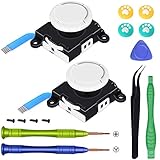
- Replacement analog joystick for Nintendo Switch Lite and Joy-con. Works for Left or Right joy-con controller
- Fix common joystick problems and revitalize your controller new again
- NOTE: Please make sure you calibrate after installation
- Comes with the "Y" Tri-wing Screwdriver and "+" Cross Screwdriver repair tools, tweezers, pry tools and "Y" Screws
- Warm Tips: When disassembling the joycon, please be careful of those cables, the movements should be as slight and slow as possible
4. Prepare the microSD card from current sources
Follow the current NH Switch Guide rather than a static video or prepackaged download. The guide warns that videos and bundled files can become outdated or contain errors. Format the card as the current guide instructs, download Atmosphère and Hekate from their official repositories, and copy only the files and configuration that the current instructions require.
Keep an untouched copy of the original card contents. Do not mix old “all-in-one” packs, random sigpatch bundles, or files from unrelated tutorials. Verify release notes and compatibility before replacing anything.
5. Boot Hekate and create backups
Hekate is a bootloader and management environment commonly used for boot selection and backups. After the modchip and SD setup are working, use the current guide to:
- Reach Hekate.
- Create a complete NAND/eMMC backup.
- Verify that the backup finishes without errors.
- Store it in more than one location, including at least one offline copy.
- Record console-unique identity information only as instructed by the current guide.
Never publish or share console-unique keys or personal backup files. A backup that was never verified or exists only on the same microSD card as the operating files is not a reliable recovery plan.
6. Separate stock firmware and homebrew environments
The stock internal environment is commonly called sysNAND. An emuMMC is a separate system environment stored on the microSD card. For risk reduction, many users keep legitimate online activity on a clean sysNAND and use emuMMC for homebrew experimentation.
That separation can reduce accidental exposure, but it is not an anti-ban guarantee. Misconfiguration, unsafe software, identifying data, cheating, unauthorized content, or an incorrect boot can still create risk. Use only the current guide’s supported configuration and do not treat DNS settings or emuMMC as a promise of online safety.
Rank #4

- Compatibility: High quality replacement analog joystick for Nintendo Switch/Switch OLED Joycon controllers and Switch Lite joystick. Works for Left or Right joy con controller. NOT compatible with Nintendo Switch 2.
- Feature: Replaces you worn-out or damaged analog joystick. Fix the joystick drift issues and bring your controller back to life.
- Extra Accessories 2*Screwdriver, 1*Pry Tool, 1*Tweezer, the accessories make your work more convenient.
- Please Note: please calibrate the joystick using Switch setting after install.If you experience any drift or sudden movement issues with your replacement joystick, please try recalibrating the controller.
- Attention: Please confirm this item is the right model you need before placing order. Most repair parts is only suitable for special model. This item comes with No Manual , No Instruction Guide, No Video Guide. Professional installation skill is needed. To guarantee all replacement parts is in good condition, we had tested it before shipping. We do not hold any responsibility for damaging of this item cause by your wrong installation or your wrong purchasing.
7. Install lawful homebrew only
Atmosphère is custom firmware for Switch and includes configuration and system extensions; its documentation is available in the official repository. Use the current guide to access the Homebrew Menu and install applications from trustworthy sources. Keep commercial game files out of the setup unless you have independently confirmed that your use is lawful.
What not to do
- Do not use a jig, RCM injector, or USB payload as though it were sufficient to mod a Switch Lite.
- Do not assume every PicoFly or HWFLY revision supports every Lite board.
- Do not use random all-in-one packs or old tutorial files.
- Do not share NAND backups, console keys, or identifying files.
- Do not install unauthorized commercial game copies.
- Do not assume emuMMC or DNS settings make a console ban-proof.
- Do not update immediately after a Nintendo firmware release without checking Atmosphère, Hekate, chip, emuMMC, and homebrew compatibility.
- Do not keep powering a console that becomes unusually hot or shows signs of a short.
Troubleshooting and recovery
The console does not boot
Possible causes include incomplete SD files, an unsupported chip or chip firmware, a bad flex cable, a poor solder joint, a shorted component, a corrupt NAND backup, or an incompatible Atmosphère/Hekate combination.
- Stop repeated power attempts, especially if the console becomes hot.
- Remove external accessories and test methodically.
- Try a known-good, correctly prepared microSD card.
- Follow the current NH Switch Guide troubleshooting path.
- If the console was recently opened, return it to the installer or a board-repair specialist.
- Do not flash random “fix packs” from video descriptions.
Black screen after installation
Treat a new black screen first as a possible hardware fault, not merely a missing file. Disconnect power and avoid probing live circuitry unless you have the equipment and board-level experience to do so. Contact the installer or a qualified repair technician.
Hekate loads but Atmosphère does not
Record the exact error and check the current compatibility requirements for Atmosphère, Hekate, the console system version, and the modchip firmware. Also check whether the issue occurs only in emuMMC or in both environments. Do not blindly replace files until you know which component changed.
Backup failure or SD-card errors
Stop and resolve the storage problem before continuing. Test the card with a reputable card-testing utility, check the card reader, and use a genuine replacement card if necessary. A failed or incomplete NAND backup should not be treated as a usable recovery image.
Error codes or LED indicators
Write down the exact message or LED pattern, console model, Atmosphère version, Hekate version, system firmware version, environment affected, and what changed immediately before the failure. That information is far more useful than repeatedly reinstalling unrelated files.
Best Value

- The Joycon Replacement Joystick works for the Joycon controller of Nintendo Switch (2017 Release), Nintendo Switch lite (2019 Release) and Ninetndo Switch OLED Model (2021 Release)
- TRUE OEM and High Quality joystick replacement fixing the Joy-Con drift, stuttering, blind spots, dead zones, no click, non-centered issues, bring your controller back to life.
- Complete tool set to finish the repair, this is the perfect solution to make your controller working like new again. No need to spend $80 for a brand new controller. Package inlude the "Y1.5" Screwdriver and "+1.5" Cross Screwdriver repair tools, tweezers, and pry tools.
- NOTE: Please Calibrate the Joy-Con by Using Nintendo Switch Setting After Installation.
- We back on our products! If you are not satisfied with your purchase within 90 days, please feel free to contact us. We will reply you within 24 hours.
Warranty, bans, and legal risk
Nintendo identifies devices such as PicoFly and HWFLY as modchips or circumvention devices. Its support material says unauthorized modifications can affect warranty coverage and online functionality, and warns that a console may become unusable after network updates. Read Nintendo’s official piracy and circumvention guidance.
That does not mean every modified console will definitely be banned. The outcome depends on what is installed, how it is used, what services are accessed, and Nintendo’s enforcement. Conversely, no setup can guarantee continued online access. Keep the following distinctions clear:
- Warranty: Unauthorized modification or resulting damage may be excluded; regional consumer protections differ.
- Online access: A ban is not guaranteed, but custom firmware, unauthorized content, cheating, and misuse of services can create risk.
- Legality: Laws vary by jurisdiction and use. Homebrew and piracy are not the same thing, and a modchip does not legalize unauthorized copies.
Alternatives to modding
You may not need a modchip for your actual goal. Consider:
- Nintendo-supported accessibility and system settings.
- Official save backup or cloud features where available.
- Legal game modifications on a PC or another platform that supports them.
- A separate, inexpensive console for experimentation so your primary online system is not exposed.
- A reputable pre-modded console with a written warranty and documented backups.
- Cosmetic shell, button, joystick, or case changes if appearance is the only objective.
Is modding a Switch Lite worth it?
It can be worthwhile for an experienced homebrew user who understands microsoldering, accepts the possibility of losing warranty and online access, and has a clear lawful use. For most owners, professional installation is the better choice. It is usually a poor fit for someone seeking only online play or a piracy shortcut.
The practical decision is simple: if you want homebrew and accept hardware risk, budget for a qualified Switch Lite microsoldering specialist and follow the maintained NH guide. If you are uncomfortable with board-level repair, cannot afford to lose the console, or only want downloaded commercial games, do not mod your primary Lite.
Quick Recap
Product prices and availability are accurate as of the date/time indicated and are subject to change. Any price and availability information displayed on Amazon at the time of purchase will apply.




