Player discussions most commonly describe a perfect cast as pressing M1 immediately after activating a mantra. Treat that as a community-reported technique, not a guaranteed rule for every mantra: try the sequence with the specific ability you want to use and watch how the game responds.
What input should you try?
- Activate the mantra you want to test.
- Press M1 immediately afterward.
- Pay attention to the resulting in-game behavior and adjust your timing for that mantra.
A Reddit community discussion gives this mantra-then-M1 sequence, but it is a player report rather than authoritative developer guidance: player discussion about perfect casting.
Is there one confirmed timing for every mantra?
The available community descriptions do not establish an exact timing window or a verified list of compatible mantras. A Fandom forum discussion mentions other descriptions, including pressing the mantra again while it is glowing and entering a mantra input after an M1 feint. These may refer to different techniques or misunderstandings, so they should not be treated as confirmed alternatives: Fandom discussion about perfect casting.
Mantras cover a broad range of in-game abilities, including combat, mobility, and support roles. General fan references explain what mantras are, but do not settle perfect-cast inputs: Deepwoken Wiki: Mantras and Deepwoken Builder: Mantras.
Free tools Windows power users keep installed
One-click scans. No signup required.
#1 Best Overall
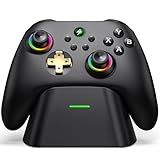
- 【Hall Effect & 1000Hz Polling】Permanently eliminate joystick drift with Hall Effect sensors in both sticks and triggers, delivering pinpoint accuracy for shooters and racers. With 1000Hz polling rate in 2.4GHz and wired modes, this PC controller registers every input instantly — zero lag, true competitive edge.
- 【Wide Compatibility】Perfectly designed for Windows PC and fully compatible with Switch/Switch 2, Android, and iOS systems. Works flawlessly with HID games, MFi titles, Luna, Stadia, Steam, and more.( –💔 Not compatible with Xbox)
- 【 Power Up & Declutter】 Just place the controller on the included dock for hassle-free charging. It auto-reconnects to your last device when picked up. LED lights show charge status. The controller sleeps after 5 minutes of inactivity to save power and wakes instantly when lifted off the dock.
- 【Dual Back Buttons with Macro Programming】 Two customizable back buttons support mapping for up to 16 functions (A/B/X/Y, triggers, D-pad, etc.), giving you a competitive edge with complex command execution.
- 【Dual-Mode Hall Triggers 】Fast Trigger mode delivers instant shots. Linear Trigger mode gives you precise throttle control. Both are drift-free and built to last.
Is perfect casting the same as Chain of Perfection?
No connection between the two mechanics is established in the cited references. Deepwoken Builder describes Chain of Perfection as a talent that gains Perfection stacks when weapon attacks or mantras hit mobs; mantra hits are worth half a stack. Its listed quest requirement is to slay any boss solo without taking damage. That is a separate talent mechanic, not an explanation of perfect-cast timing: Deepwoken Builder: Chain of Perfection.
Do you need special equipment?
No specific physical product is established as necessary to learn or perform this input technique. The practical step is to try the reported input sequence with the mantra you intend to use.
Quick Recap
Best Value

- 【Wide Compatibility】Perfectly designed for Windows PC and fully compatible with Switch/Switch 2, Android, and iOS systems. Works flawlessly with HID games, MFi titles, Luna, Stadia, Steam, and more.
- 【Dual Back Buttons with Macro Programming】 Two customizable back buttons support mapping for up to 16 functions (A/B/X/Y, triggers, D-pad, etc.), giving you a competitive edge with complex command execution.
- 【Motion Control & Adjustable Vibration】Experience immersive gaming with 6-axis gyro motion sensing (Switch only🧡) and 4-level adjustable vibration feedback (excludes Android/iOS💔).
- 【Turbo & Rapid Fire】 Enable manual or auto rapid fire for A/B/X/Y/L/R/ZL/ZR buttons, with 3 adjustable speeds. Clear all settings instantly with a simple button combo.
- 【Long-Lasting 1000mAh Battery】 Enjoy up to 16 hours of gameplay on a single 3-hour charge, plus an auto-shutdown feature to conserve power.
Rank #4
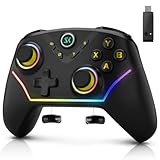
- 【Multi-Device Connection】For bluetooth (PC/iOS/Android), Hold "BT" for 2s until the light flashes green, Select the controller in your device's Bluetooth settings,A vibration and solid green light confirm connection; for 2.4G Wireless (PC), Hold "NS.2.4G" for 2s until the pink light flashes, Plug the receiver into a USB port and press its button, Auto-pairing is confirmed by a solid light; for Nintendo Switch (Switch/OLED/Lite), Hold "NS.2.4G" for 2s until the pink light flashes, On the console, enter "Change Grip/Order" and press LB/RB, Vibration and a solid pink light indicate successful linking.
- 【Multi-Platform Wireless Controller】This wireless PC controller is your ultimate all-in-one gaming key. It seamlessly connects to PC (Windows 7/8.1/10/11), Switch/OLED/Lite, iOS, and Android devices. Enjoy versatile connectivity via Bluetooth 5.0, low-latency 2.4GHz wireless (receiver included), or wired USB-C. Switch between platforms and play your way, anytime. (Not support for Xbox)
- 【Hall Effect Joysticks & Triggers for Ultimate Precision】Equipped with advanced magnetic Hall Effect sensors, this PC game controller eliminates stick drift and delivers flawless, lifelong accuracy. The triggers offer silky-smooth, linear feedback for perfect control in racing and shooting games. Experience pixel-perfect aim and unparalleled durability that far surpasses traditional potentiometer-based controllers.
- 【1200 mAh Large Capatity Battery】Powered by a robust 1200mAh battery, this game controller provides over 10 hours of continuous gameplay on a single charge. A quick 2-hour full charge gets you back in the action fast. Spend more time playing and less time plugged in, perfect for long gaming sessions and tournaments.
- 【4 Programmable Back Buttons 】Gain a competitive edge with four fully customizable M1-M4 back buttons. Map complex macros (like builds or fighting game combos) or single keys(A,B,X,Y,LB,RB,LT.......L Joystick) to reduce finger strain, execute commands faster, and protect your main face buttons from wear. Unlock a new level of customization and control.
Rank #3

- 【Universal Switch Compatibility】Designed for Switch/Switch 2/Switch Lite/Switch OLED with seamless connectivity. Also works with Steam Deck & Windows 10/11 PCs (Perfect for Zelda, Mario Kart, Fortnite & PC Gaming)
- 【Dual-Mode Wireless Freedom】Switch between Bluetooth 5.0 (mobile gaming) and 2.4G dongle (PC/console) with <10ms latency. 30ft stable range & 20hr playtime (USB-C fast charging in 2.5hrs)
- 【Smart Console Wake-up】Revive sleeping Switch consoles without touching the dock – Unique one-button activation
- 【Tactile RGB Immersion】16.8 million color combinations with 8 lighting modes (pulsing/breathing/static). Discreet stealth mode for distraction-free play
- 【Enhanced Ergonomics】Military-grade textured grips + 6-axis motion control. 30% lighter than official Pro Controller (10.5oz) with 1000mAh battery
Rank #2
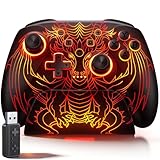
- 🎮 【Multi-Platform Wireless Controller for PC/Switch 2/Switch】 – No more switching between multiple controllers! This gaming controller works seamlessly with Windows PC (via included 2.4G adapter, ultra-low latency & plug-and-play), Switch/Switch 2, Android, and iOS (via Bluetooth). The dedicated PC adapter delivers tournament-grade responsiveness, while one-click shortcuts let you switch devices in seconds. Perfect for PC gaming, Switch titles, and mobile games – one controller, all platforms.
- 🎮 【Hall Effect Joysticks PC Controller with 1000Hz Polling Rate】 – Experience pro-level precision! Hall Effect joysticks eliminate drift permanently, with dual-mode toggle (0% raw deadzone for competitive play / factory-tuned anti-drift for daily use). 1000Hz high polling rate ensures instant input registration (no lag) in fast-paced PC games, while Hall Effect triggers provide smooth, accurate pressure-sensitive control for racing/shooting games.
- 🎮 【Programmable PC Controller with Keylinker App】 – Unlock full customization via the Keylinker App: remap buttons, create complex macros, or assign 21 functions to each of the 2 back paddles (M1/M2). No software? No problem – program directly on the controller! Press M + M1/M2 to enter programming mode, and M + Minus to clear mappings. Get a competitive edge in PC multiplayer games with one-tap combos and shortcut actions.
- 🎮 【RGB Light PC Controller with Charging Dock】 – Personalize your wireless PC controller with 7 RGB lighting modes and 4 brightness levels (25%-100%). The included charging dock serves as a charging station and storage stand – simply place the controller down to charge, and it auto-connects when you pick it up. The iconic dragon design glows from controller to dock, creating a stunning look gamers love.
- 🎮 【Long-Lasting 1000mAh Battery – 10+ Hours of Gaming】 Powered by a 1000mAh rechargeable battery, enjoy 10+ hours of gameplay with RGB lights on. Fully recharges in just 3 hours via USB-C. Auto-sleep after 20 minutes of inactivity saves power when you forget to turn it off. Game longer, charge less – this wireless PC controller keeps up with your longest sessions.
Product prices and availability are accurate as of the date/time indicated and are subject to change. Any price and availability information displayed on Amazon at the time of purchase will apply.
Independent reader supportYour contribution helps us test, update, and keep practical guides available for everyone.



