Recommended Free Tools
For a sharp moving-train photograph, start around 1/500 sec, use continuous autofocus and burst mode, then adjust for the train’s apparent speed, distance, light and the motion effect you want. A slower shutter can create a panning image, while lens choice determines how much scenery or locomotive detail fits in the frame. Most importantly, photograph only from an authorized, safe viewing area and follow railway staff instructions.
What camera settings should you start with?
There is no single exposure that works for every steam train. The train’s speed and direction, your distance from it, available light and focal length all affect the result. Treat these values as field starting points, not guarantees; they are practical recommendations from Traintrack’s steam-train photography guide, not controlled test results.
| Goal | Starting approach | What to adjust |
|---|---|---|
| Freeze a moving train | About 1/500 sec; use a faster shutter if motion blur remains. | A close, fast train passing broadside may need a faster speed. Raise ISO or open the aperture if the image is too dark. |
| Pan with the train | About 1/60 sec as a starting point. | Follow the train smoothly while taking a burst. The background may blur, but expect fewer sharply captured frames and practise only from a safe, stable position. |
Choose an exposure mode
- Shutter priority is useful when controlling motion is the main goal: choose the shutter speed and let the camera select an aperture.
- Manual exposure can give consistent results across a sequence when the light is steady.
- Auto ISO can help maintain your chosen shutter speed when the light changes quickly.
Track focus and capture the pass
Use continuous autofocus—often called AF-C or AI Servo, depending on the camera—and burst mode to take several frames as the train approaches and passes. If your camera supports RAW capture, it can give you more latitude to adjust exposure and white balance later. After the first safe opportunity, review focus and exposure and make any needed changes.
Expose for steam as well as the locomotive
A bright plume against a dark locomotive or background can make exposure tricky. If the locomotive looks too dark against a bright plume or sky, try exposure compensation or adjust exposure manually. Check the highlights in the plume so they retain texture rather than becoming featureless white.
What’s actually slowing this PC down?
Pick the symptom - the matching free tool is one click away.
#1 Best Overall

- [HIGH RESOLUTION IMAGING] stunning 16MP photos and 1080P HD videos with this digital camera. The 2.4 inch TFT LCD screen provides clear image previews while the 16x digital zoom lets you get closer to distant subjects without losing quality.
- [ADVANCED FEATURES] Enjoy versatile photography with image stabilization, face detection, and smile . Multiple scene modes including night portrait, beach, and high sensitivity settings adapt to various lighting conditions for perfect shots every time.
- [EXPANDABLE STORAGE CAPACITY] The camera supports up to 32GB memory cards (sold separately), providing ample space for thousands of high-quality photos and hours of HD video recording. Never miss a moment due to limited storage.
- [ULTRA PORTABLE DESIGN] Weighing just under 1 pound with compact , this micro SLR camera is perfect for travel and everyday use. The lightweight ABS construction makes it durable yet easy to carry anywhere.
- [PERFECT FOR BEGINNERS] Designed with in mind, this user-friendly camera is ideal for first-time users, students, and families. The intuitive controls and automatic modes help beginners professional-looking photos effortlessly.
Which lens suits the photograph?
Choose a lens for the framing and distance available from your authorized viewpoint—not as a reason to move closer to the railway. The focal lengths below are examples from Traintrack’s guide; the result also depends on camera format, viewpoint and distance.
| Lens range | Useful for | Trade-off |
|---|---|---|
| Wide angle, such as 14–35 mm | Showing station architecture, surrounding scenery, foreground and a broad plume. | Strong perspective can make nearby objects look exaggerated. Compose from a safe, approved location rather than approaching the track. |
| Standard zoom, such as 24–70 mm | Flexible framing for a three-quarter locomotive view, train context or details when there is room to move within an approved area. | It may not reach distant details as effectively as a telephoto. |
| Telephoto zoom, such as 70–200 mm or 100–400 mm | Isolating the locomotive, photographing details from farther away or compressing the train against the landscape. | Check that the lens mount and sensor-format coverage suit your camera. A longer lens does not make an unsafe position acceptable. |
When choosing between lenses, consider whether you want context or detail, how far away you must remain, how much light is available, and the lens’s size and weight. A wider maximum aperture can help in low light, but may mean carrying a larger or heavier lens.
Rank #2

- Improved Dual Pixel CMOS AF and eye detection AF 24.1 Megapixel CMOS (APS-C) sensor with is 100–6400 (H: 12800)
- Built-in Wi-Fi and NFC technology working temperature range: 32-104°F/0-40°C
- 9-Point AF system and AI Servo AF
- Optical Viewfinder with approx 95% viewing coverage
- Use the EOS Utility Webcam Beta Software (Mac and Windows) to turn your compatible Canon camera into a high-quality webcam
How do you compose a steam-train photograph?
- Three-quarter front view: Show the locomotive’s face and some of its length, using a clear view from an authorized position.
- Landscape with plume: Include the station or surrounding scenery to give the train context and space for the steam.
- Locomotive details: Use a standard zoom or telephoto to emphasize features such as the wheels or cab without moving toward the track.
- Panning frame: Follow the train with a slower shutter to keep the subject relatively sharp while blurring the background. It takes practice and is not a reason to stand in an unstable or restricted place.
Backlight can make steam glow or create a silhouette, but it may also reduce detail and cause flare. Decide whether the bright plume or the locomotive’s details matter most, expose for that effect, and use a lens hood if available.
Independent reader supportYour contribution helps us test, update, and keep practical guides available for everyone.What safety and permission rules apply?
Rules depend on the country, railway operator, station, heritage site and event. The guidance below is UK-specific; check the exact venue’s current policy before you go. Authorized public or visitor areas are the only appropriate places to photograph from, and staff directions take priority over getting a shot.
Outdated Drivers Are Slowing You Down
One free scan finds every outdated or missing driver and matches the right update for your exact hardware.Free scan · exact hardware matchWindows Errors? Fix Them Before They Spread
Repair common Windows errors and clear accumulated junk for a smoother, more stable PC - no reinstall needed.Free scan · no reinstallRank #3

- EF Mount; Aperture Range: f/4-45; DC Autofocus Motor; 4.9' Minimum Focus Distance; 58mm Filter Thread Diameter
- 4.9-foot closest focusing distance; 32- to 8-degree diagonal angle of view
- Measures 2.8 inches in diameter and 4.8 inches long; weighs 16.8 ounces
- Improved mechanism makes zooming smoother; front part of zoom ring sports silver ring.
At UK National Rail stations
National Rail’s railway photography guidance says personal-use photos and videos are allowed at stations, but commercial photography requires prior permission from Network Rail or the relevant train company. The guidance says, “Flash photography is not allowed.” It also advises photographers to remain behind yellow lines, avoid trespass or obstruction, follow staff instructions and avoid high-visibility clothing that could be mistaken for staff safety clothing. Tripods may be restricted at busy stations; keep legs away from the platform edge and behind the yellow line.
At Network Rail-managed stations
Network Rail’s photography guidance says to stay behind yellow lines where provided, avoid trespassing or climbing structures, and keep clear of signs and railway equipment. Tell reception staff when required and follow staff requests. Network Rail advises avoiding tripods where possible; if one is needed, consult staff and keep it clear of the platform edge. Respect people who do not want to be photographed.
Rank #4
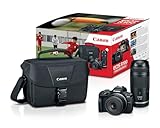
- EOS R100 Mirrorless camera.
- RF75-300mm F4-5.6 telephoto zoom lens (approx.120-480mm on APS-C equipped bodies).
- RF-S 18-45mm F4.5-6.3 lens (approx. 29-72mm on APS-C equipped bodies).
- Shoulder Bag 200 ES provides a protective space for carrying around a pair of lenses.
- Excellent introduction lenses to telephoto (zoom) shooting.
Other operators and heritage venues
Policies differ even within the UK. ScotRail allows private photography at stations but requires permission for commercial use. STEAM Museum welcomes private, non-commercial photography and asks visitors to contact it about non-private or commercial photography. Selling station photographs to a company or stock-image agency is considered commercial under Network Rail’s guidance. Check with the relevant operator or venue if your intended use is not clearly private.
Quick Recap
Best Value

- This Al’s Variety Camera Bundle Includes Transcend 64GB Class 10 SD Memory Card,58mm 3 Piece Filter Kit , 58mm 4 Piece Macro Kit ,58mm .43 Wide Angle Lens, 58mm 2.2x Telephoto Lens, 58mm Tulip Hood, Tripod, Canon Sling Case, Gripster tripod, Video/Photo Editing Software Pack, Battery Charger ,Spare High Capacity Battery , Spare travel Charger , Slave Flash, Remote, Lens Cap , Body Cap ,Neck Strap , AL’s Variety Lens Cleaning Cloth + 1 Year Seller Supplied Warranty , And Includes :
- Canon EOS Rebel T7 DSLRCamera Body (International Version )- 24.1MP APS-C CMOS Sensor, DIGIC 4+ Image Processor, 3.0" 920k-Dot LCD Monitor, Full HD 1080/30p Video Recording, 9-Point AF with Center Cross-Type Point, ISO 100-6400, Up to 3 fps Shooting, Built-In Wi-Fi with NFC, Scene Intelligent Auto Mode , Creative Filters and Creative Auto Modes
- Canon EF-S 18-55mm f/3.5-5.6 IS II Lens - EF-S-Mount Lens/APS-C Format, 28.8-88mm (35mm Equivalent), Aperture Range: f/3.5 to f/38, One Aspherical Element, Super Spectra coating, Optical Image Stabilizer, Rounded six-blade diaphragm, standard zoom is designed for APS-C-format Canon EF-S-mount DSLRs
- High-Power 420-800mm f/8.3 HD Manual Telephoto Lens+ T-mount adapter for your Nikon Camera-A versatile lens for photographing distant subjects, the 420-800mm f/8.3 HD Telephoto Zoom features a convenient threaded T-mount for adapting to a wide variety of camera types. Its 4 elements, 2 groups optical design features a super HD multi-coating, and a lens hood is incorporated into the design, to suppress lens flare, ghosting, and surface
- 24.1MP APS-C CMOS sensor and DIGIC 4+ image processor, which combine to provide both speed throughout the camera system as well as notable image quality. Up to 3 fps shooting is possible to suit photographing moving subjects—for up to 150 consecutive JPEGs in a burst or up to 11 consecutive raw frames—and Full HD 1080p video at 30 fps can also be recorded. For working in a variety of lighting conditions, the sensitivity range of ISO 100-6400 can be further expanded to ISO 12800
Before setting up
- Confirm that photography is permitted at the station, railway or event, and obtain permission if your use is commercial.
- Stay in authorized public or visitor areas, behind yellow lines where provided; never trespass or climb structures.
- Keep yourself, your camera and any tripod clear of the platform edge, signs, equipment and other passengers.
- Do not use flash at UK National Rail stations under the cited National Rail guidance.
- Ask staff before using a tripod where required, and follow any instruction to move or stop photographing.
Product prices and availability are accurate as of the date/time indicated and are subject to change. Any price and availability information displayed on Amazon at the time of purchase will apply.




