Recommended Free Tools
Age of Empires IV did not have a native macOS version in 2023. Mac owners could still play it by streaming the Windows game from the cloud, running it through CrossOver, installing Windows with Parallels or Boot Camp, or using a Windows PC. Current catalogs and compatibility can change, so treat the methods below as a decision guide rather than a guarantee for every Mac or future update.
Was there a native Mac version of Age of Empires IV?
No native macOS build was listed or documented for Age of Empires IV in 2023. The official requirements specified 64-bit Windows 10 or Windows 11, DirectX 12 and an AVX-capable processor. They listed 8GB of RAM as the minimum, 16GB as recommended and 50GB of storage, with Intel HD 520 or Radeon RX Vega 11-class graphics at minimum and a GeForce GTX 970 or Radeon RX 570 with 4GB VRAM as recommended. See the official requirements.
| # | Preview | Product | Price | |
|---|---|---|---|---|
| 1 |
![Age of Empires IV – Anniversary Edition – Windows [Digital Code]](https://m.media-amazon.com/images/I/51NQnflAhRL._SL160_.jpg)
|
Age of Empires IV – Anniversary Edition – Windows [Digital Code] | $39.99 | Buy on Amazon |
| 2 |

|
Age of Empires Collector's Edition - PC | $89.99 | Buy on Amazon |
| 3 |

|
Age Of Empires: Gold (Jewel Case) - PC | $72.55 | Buy on Amazon |
| 4 |
|
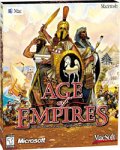
Age of Empires | $75.01 | Buy on Amazon |
| 5 |

|
Age of Empires III | $37.55 | Buy on Amazon |
As an Amazon Associate I earn from qualifying purchases.
The Steam listing does not change that. Buying the Steam or Microsoft Store edition gives you access to the Windows game; it does not create a Mac-compatible version. You need a separate way to execute or stream Windows software.
Choose the right method
| Method | Best for | Main drawback |
|---|---|---|
| Cloud gaming | The easiest setup, including on older Macs | Latency, bandwidth and catalog availability |
| CrossOver | Local play without installing Windows | Game and update compatibility can change |
| Parallels | A broader Windows environment | Needs Windows and shares Mac resources |
| Boot Camp | Intel Macs wanting direct Windows access | Requires rebooting and does not apply normally to Apple silicon |
| Windows PC | The most predictable competitive experience | Requires separate hardware |
1. Play through cloud gaming
Cloud gaming runs Age of Empires IV on a remote Windows gaming machine and streams the video to your Mac. Your Mac sends back mouse and keyboard input, so it does not need to meet the game’s local Windows GPU requirements.
#1 Best Overall
- The award-winning and best-selling strategy franchise continues to delight fans worldwide with Age of Empires IV: Anniversary Edition, putting you at the center of even more epic historical battles that shaped the world.
- Featuring 2 brand new civilizations: the Ottomans and Malians for a total of 10 diverse civilizations with unique playstyles and abilities.
- Play how you want with user-generated content, tools, and mods for custom games (Beta).
- 8 new maps; new masteries, challenges, taunts, and cheats; and additional in-game updates and languages included.
- Cooperate or spectate with up to 7 of your friends in PVP and PVE multiplayer modes, and now with ranked seasons!
GeForce NOW supports Macs introduced in 2009 or later running macOS 10.15 or newer, according to NVIDIA’s system requirements. NVIDIA recommends at least 15Mbps for HD at up to 60fps, 25Mbps for 1080p at 60fps and latency below 80ms to an NVIDIA data center. A fast download speed alone is not enough: packet loss, Wi-Fi interference and distance from the server can still make an RTS feel sluggish.
How to set it up
- Search the provider’s live catalog for Age of Empires IV.
- Confirm whether the available listing uses Steam, Microsoft Store, PC Game Pass or another supported entitlement.
- Sign in to the cloud service and link the account that owns the game if required.
- Install the Mac client or use the provider’s supported browser.
- Launch the game from the cloud library.
- Use Ethernet or 5GHz Wi-Fi where possible, then begin with 1080p or a balanced streaming setting.
Do not subscribe solely because an old article says the game is supported. Cloud catalogs can change, and a provider may support one store edition but not another. Test a complete campaign, skirmish or multiplayer match rather than judging the service only from its launcher. Data caps, queues and cloud-save behavior are additional considerations.
2. Run it locally with CrossOver
CrossOver uses compatibility technology derived from Wine-style software translation to run some Windows applications directly on macOS. It does not require a separate Windows installation or Windows license. CodeWeavers currently lists Age of Empires IV: Anniversary Edition in its compatibility database, but that listing is not a promise of identical performance on every Mac.
Typical CrossOver workflow
- Download CrossOver from CodeWeavers and use the trial first.
- Open CrossOver and search for Age of Empires IV.
- Choose the recommended installation recipe or bottle.
- Install Steam or the launcher offered by the recipe.
- Sign in to the account that owns the game and install it.
- Test campaign, skirmish and multiplayer separately.
CrossOver supports both Intel and Apple-silicon Macs, but the result depends on your Mac’s memory, graphics capability, macOS release and CrossOver version. A game update, Steam update, macOS update or CrossOver update can introduce rendering glitches or stop a previously working setup from launching. If that happens, check the current compatibility page and its recommended recipe before changing unrelated settings. Anti-cheat and online services may also behave differently from single-player mode.
3. Use Parallels to install Windows
Parallels Desktop creates a virtual machine containing Windows. You then install Steam or the appropriate Microsoft/Xbox launcher inside Windows and run the game there. This is not native Mac support: it is the Windows PC version running inside a virtual machine.
Rank #2
- 11 New Units: Including the Huns' Tarkan, the Korean War Wagon and Turtle Ship, plus the Aztecs' Plumed Archer 26 New Technologies: One for each civilization, including Chinese Rocketry and British Yeoman
- New Game Types: Experience new challenges with `Wonder Race', `Defend the Wonder' and `King of the Hill' Real World Maps: Based on geographical locations such as Britain, France, and Italy
- Command Allied Computer Players: Use chat commands to order allies to attack, tribute resources, and build an economy or military Smart Villagers: Villagers work smarter, build walls more intelligently, and gather resources automatically after constructing a drop-off building.
- Farms Automatically Replant: Queue farms so they replant after being harvested Battering Rams: Units can garrison inside Battering Rams for protection, or to increase the Ram's speed when attacking foes.
Parallels advertises support for multiple Age of Empires games, including Age of Empires IV, but performance remains dependent on the Mac, Windows build, Parallels version, graphics settings and available resources. See its compatibility page.
Typical Parallels workflow
- Install Parallels Desktop.
- Create a Windows virtual machine. On Apple-silicon Macs, follow the current Windows-on-ARM installation path in Parallels.
- Finish Windows updates and install Parallels Tools.
- Install Steam or the relevant Microsoft/Xbox launcher inside Windows.
- Sign in and install Age of Empires IV.
- Allocate enough RAM and CPU cores while leaving adequate resources for macOS.
- Use a performance profile and start with a conservative resolution and graphics preset.
Parallels is more flexible than a compatibility layer and lets you use other Windows software, but it requires Windows as well as the virtualization software. CPU, RAM, storage and graphics resources are shared with macOS. Apple-silicon Macs run Windows for ARM rather than conventional Intel Windows, adding another compatibility variable. No universal frame-rate claim is reliable without specifying the Mac model, Windows version, Parallels release and settings.
4. What about Boot Camp?
Boot Camp is mainly relevant to Intel Macs. It installs Windows on a separate partition and lets you boot directly into Windows, generally providing more direct hardware access than virtualization. You need suitable installation media, drivers, Windows storage and a restart whenever you switch between macOS and Windows.
It is not the normal Boot Camp solution for Apple-silicon Macs. For those systems, consider cloud gaming, CrossOver or current Windows-on-ARM virtualization instead. Boot Camp also consumes a large amount of disk space and does not offer the convenience of switching operating systems without rebooting.
Intel versus Apple silicon
Intel Macs may have more traditional Windows options, including Boot Camp where the specific model supports it, plus Parallels and CrossOver. Apple-silicon Macs cannot use Intel-Mac Boot Camp in the same way, but modern virtualization and compatibility tools remain possible.
The model name alone is not enough to predict the result. RAM, integrated or discrete graphics, cooling, storage space, macOS version and network quality all matter. Fanless MacBook Air models may be especially vulnerable to memory pressure and thermal throttling during long local sessions.
The Tool Desk
Outbyte Driver Updater FREEFix the driver behind crashes, sound loss and screen glitchesFind Drivers →Outbyte PC Repair FREERepair Windows errors before they cause bigger problemsFix Now →Can Mac players play multiplayer with PC users?
Usually, the important distinction is the edition and execution method, not the fact that the screen is connected to a Mac. A Mac running the Steam edition through CrossOver or Windows virtualization is still using the PC/Steam ecosystem. A cloud service exposes whichever supported store edition it provides.
Official Age IV support documentation describes cross-network multiplayer across Microsoft Store, Xbox, PlayStation and Steam, with platform and input filters. Steam cross-network play is described as always on, while custom matches can use cross-input settings. Check the current cross-network and input guidance.
Cross-platform support does not eliminate cloud latency, compatibility-layer problems or version mismatches. If multiplayer fails, update the game, sign in to the correct Steam or Microsoft/Xbox account, check the cross-network and cross-input filters, then leave and recreate the lobby if necessary. Some filters cannot be changed during particular lobby or gameplay states.
Storage requirements
The official download guidance distinguishes between editions. Steam reserves or downloads about 50GB for one language. The Microsoft Store/Xbox PC app can require up to 93GB of free space before downloading because language content may be included. Language selection and downloadable content can change the final size; consult the official size information.
Free tools Windows power users keep installed
One-click scans. No signup required.
Rank #4
Virtualization needs substantially more room than the game figure alone: Windows, updates, the launcher, virtual-disk overhead, saves, caches and future content all need space. Leave a generous amount of free storage and expand the virtual disk before it becomes full.
Independent reader supportYour contribution helps us test, update, and keep practical guides available for everyone.Troubleshooting
The game is missing from a cloud library
- Search the provider’s current catalog, not an old compatibility article.
- Confirm the supported store edition and account entitlement.
- Check for maintenance or temporary removal after a game update.
The game launches with glitches or poor performance
- Lower resolution and graphics quality.
- Close other Mac and Windows applications.
- Connect a MacBook to power.
- For cloud play, check latency and packet loss rather than download speed alone.
- For virtualization, reduce background Windows tasks and verify that the virtual disk has free space.
Input feels delayed
Use Ethernet or 5GHz Wi-Fi, move closer to the router and choose a nearby cloud region where available. Real-time strategy games expose input delay because precise mouse control is central to play. If the delay remains, local execution or a Windows PC is a better choice.
A CrossOver update breaks the game
Check CodeWeavers’ current title notes, try its recommended bottle or updated recipe and back up a working bottle before deleting it. Test campaign mode before assuming multiplayer works. If stability remains poor, switch to cloud gaming or a Windows installation.
The installer reports insufficient storage
Free more space than the nominal 50GB Steam figure, and remember that the Microsoft Store route may need 93GB before download begins. Remove unused content where the launcher allows it and enlarge a virtual disk before macOS or Windows reaches its limit.
Quick wins for a faster PC:
Clear out junk files and repair common Windows errorsFree Scan →Scan for outdated or missing drivers - takes under a minuteDriver Scan →Which option should you choose?
Choose cloud gaming if convenience, an older Mac or avoiding Windows matters most and the game is confirmed in the provider’s live catalog.
Best Value
- Start out playing as the British and begin with a solid economy, or lead the French into an easy alliance with Native Americans - 8 total civilizations to choose from
- Work with Native Americans to your tactical advantage, for the first time ever
- Develop your own Home City, and customize it make it wealthier and more powerful as you take over Europe
- Explore the New World and create colonies while seeking out new resources and making alliances with the Native Americans
- Recover buried treasure from the Caribbean, hunt bison on the Great Plains, compete for trade routes and fortify the coast of New England
Choose CrossOver if you want local play without Windows and are willing to use the trial and troubleshoot title-specific compatibility.
Choose Parallels if you need a broader Windows environment and have enough RAM and storage for Windows, the virtual machine and the game.
Choose Boot Camp only if you have a compatible Intel Mac and do not mind rebooting into Windows.
What’s actually slowing this PC down?
Pick the symptom - the matching free tool is one click away.
Choose a Windows PC for the fewest compatibility variables, especially for ranked multiplayer, extensive mod use, overlays or peripherals that may not work through a compatibility layer.
Quick Recap
Product prices and availability are accurate as of the date/time indicated and are subject to change. Any price and availability information displayed on Amazon at the time of purchase will apply.




