Do these 3 things before closing this tab:
1Fix the driver behind crashes, sound loss and screen glitches2Clear out junk files and repair common Windows errors3Scan for outdated or missing drivers - takes under a minuteShort answer: Supercell’s official Brawl Stars support materials reviewed do not document native controller support or provide controller setup steps. You can pair a controller with an Android phone, but that alone does not mean the game will respond to it. Some players report using touch-mapping workarounds, though compatibility is unverified and may depend on the device, software and game version.
Does Brawl Stars support controllers?
Native controller support is not established in the Brawl Stars Support Portal: the official support material reviewed contains no controller compatibility list or setup instructions. That is different from a claim that no controller or workaround can ever work; it means Supercell’s reviewed support information does not confirm it.
In practice, distinguish two things: whether your phone recognizes a controller, and whether Brawl Stars accepts its inputs. The first does not guarantee the second.
How to pair a controller with Android
Google documents connecting compatible Android controllers by cable or Bluetooth. Menu labels can vary by phone manufacturer and Android version.
Free tools Windows power users keep installed
One-click scans. No signup required.
#1 Best Overall

- Multi Device Compatible and One Key Pairing: The switch pro controller is compatible with Switch, Lite, OLED, PC need a cable; 2 Pairing Methods, B and HOME or One Key pairing; Press the HOME button to wake up the console. 10 meters transmission range
- Cool Lights: Our wireless switch controller with 8 colors and 1 rainbow light; 5 switching lighting modes, colorful, strobe, breathing, static mode, light; The first time starting is default color mode; you can turn off the light circle and star light or adjust the brightness
- Programmable and Turbo Function: The pro switch controller has programmable function allows you to map more than 1 button function to M1 or M2 key. 2 mapping modes: single or multiple mapping. Turbo button with 3 burst speeds: 5 shots/s, 12 shots/s, 25 shots/s
- 4 Speeds HD Vibration and 6 Axis Gyro Control: Built in dual vibration motors with 4 levels vibration: none, weak, medium, strong; One key to adjust the vibration mode to restore the real HD vibration of the game; The pro controller switch comes with 6-axis gyro sensor
- Long Lasting: The wireless controller built-in rechargeable battery which provide a longer game time, about 10 to15 hours on LED lit mode is turned on; Fully charge takes only 3 to 4 hours with an included USB type c fast charging cable
- For Bluetooth: Put the controller into pairing mode.
- On the phone, open Settings and tap Connected devices.
- Tap Pair new device, then select the controller when it appears.
- To review controller settings, check under Connected devices or System, depending on the connection type and device.
These steps follow Google’s Android controller guidance. A successful connection only confirms that Android paired with the controller; it does not confirm that Brawl Stars supports its input.
What if the controller connects but Brawl Stars does not respond?
That does not necessarily mean you paired it incorrectly. The phone may recognize the controller while the game itself does not accept controller input. The official support material reviewed does not provide a native controller setting to enable or troubleshoot.
Rank #2

- Brawl Stars Blindbag Collectible Figure - 1 Pack (S1) (Random)
Some players describe using touch-mapping features to translate controller buttons into screen taps. A January 2025 community post mentions Backbone and TouchSync for Brawl Stars, and a May 2025 video describes third-party mapping on iOS. These are user reports, not verified setup instructions or confirmed compatibility recommendations: results may vary by phone, controller, mapping software and current game version.
Touchscreen controls or a mapping workaround?
| Option | What to expect | Trade-off |
|---|---|---|
| Touchscreen controls | Play using the game’s on-screen controls. | No controller pairing or mapping setup; you use the mobile touch interface. |
| Controller plus touch mapping | Pair a controller where supported by the phone, then try a mapping feature if available. | Requires extra setup, and compatibility and control accuracy are not confirmed for a particular device or game version. |
No specific controller model is confirmed as plug-and-play for Brawl Stars. If you experiment, check that your exact phone, controller and mapping feature work together rather than assuming that any Bluetooth gamepad will control the game.
Crashes, No Sound, or Screen Glitches?
Random freezes, missing sound and display glitches usually trace back to one bad driver. Find and replace yours safely.Free scan · under a minutePC Slower Than It Used to Be?
A free scan shows the junk files, broken settings and background clutter dragging Windows down - then fixes them in one click.Free scan · Windows 10 & 11Rank #3
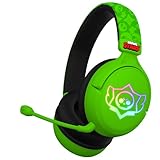
- OFFICIAL BRAWL STARS DESIGN: Gaming headset featuring the iconic Brawl Stars skull logo in striking black and yellow colors for an authentic gaming experience
- PREMIUM AUDIO: 40mm drivers deliver precise stereo sound and powerful bass, perfect for immersive gaming and team communication
- VERSATILE COMPATIBILITY: Works with multiple platforms via 3.5mm jack and USB-C adapter, including consoles, PC, smartphones, and tablets
- COMFORT-FOCUSED: Ultra-cushioned ear pads with over-ear design provide sound isolation and lasting comfort during extended gaming sessions
- INTEGRATED CONTROLS: Features convenient volume control and mute function, plus a detachable microphone for clear team communication
Fair-play and account safety
Supercell says gaining an unfair advantage through foul play, including third-party software, is not allowed, and that it regularly checks for unsupported third-party software. Its published guidance does not specify the status of every accessibility feature or touch mapper. Avoid modified game clients, scripts, automation or software that alters gameplay. If you are unsure whether a particular tool is acceptable, consult Supercell’s current account-penalty guidance and fair-play guidance before using it.
Quick Recap
Best Value

- To Brawl Showdown Stars Fun Gamer Don't Have Time Brawl Bro This Design is a perfect gifts a gamer, an esport athlete, a computer nerd, a programmer, a fan and lover of video games and slot machines, online gaming, live streaming, or a PC or console game.
- The perfect pick for any brother, gamer, or dad who lives for retro console battles. This funny and bold quote brings colorful nostalgia and edgy gamer attitude in one look.Great for birthdays, christmas, or gaming nights with the crew.
- Dual wall insulated: keeps beverages hot or cold
- Stainless Steel, BPA Free
- Leak proof lid with clear slider
Rank #4

- OFFICIAL BRAWL STARS DESIGN: Gaming headset featuring the iconic Brawl Stars skull logo in striking black and yellow colors for an authentic gaming experience
- PREMIUM AUDIO: 40mm drivers deliver precise stereo sound and powerful bass, perfect for immersive gaming and team communication
- VERSATILE COMPATIBILITY: Works with multiple platforms via 3.5mm jack and USB-C adapter, including consoles, PC, smartphones, and tablets
- COMFORT-FOCUSED: Ultra-cushioned ear pads with over-ear design provide sound isolation and lasting comfort during extended gaming sessions
- INTEGRATED CONTROLS: Features convenient volume control and mute function, plus a detachable microphone for clear team communication
Product prices and availability are accurate as of the date/time indicated and are subject to change. Any price and availability information displayed on Amazon at the time of purchase will apply.



