The Tool Desk
Outbyte PC Repair FREERepair Windows errors before they cause bigger problemsFix Now →Outbyte Driver Updater FREEScan for outdated or missing drivers - takes under a minuteDriver Scan →You cannot play Clash Royale on a PC through a verified official no-download browser version. The official Windows route is Google Play Games on PC, which requires downloading the Windows app and then installing the game.
No verified official no-download option exists. Clash Royale is officially playable on Windows, but Supercell’s PC release runs through Google Play Games on PC. That means you must download Google’s Windows app and then install Clash Royale inside it. If the computer blocks downloads or installations—common on school and work devices—the official PC route is not available on that machine.
As an Amazon Associate I earn from qualifying purchases.
This is not the same as saying Clash Royale has no PC version. It does: Supercell supports the Android version on Windows through Google Play Games, with mouse controls, optimized graphics, and progress syncing between mobile and PC. The limitation is specifically the request to play with no download at all.
What works—and what does not
| Situation | Official answer |
|---|---|
| Play in Chrome or another browser without installing anything | No official browser-play option was verified. |
| Play on a Windows PC with downloads allowed | Yes, through Google Play Games on PC after downloading the platform and installing the game. |
| Play on a managed school or work PC that blocks installs | Not through the official PC method unless the administrator permits the required installation. |
| Keep the same Clash Royale progress on mobile and PC | Yes. Supercell describes seamless sync between mobile and PC for its official release. |
The official PC setup, if downloads are allowed
- Download Google Play Games on PC on an eligible Windows desktop or laptop.
- Open the downloaded Windows
.exeinstaller and complete setup. - Sign in with a personal Google Account.
- Search for Clash Royale in Google Play Games.
- Select Install, then launch the game.
- Use the same account consistently if you want the expected cross-device progress experience.
Google’s PC-game instructions use this download, setup, search, and install sequence. There is therefore no step that turns the official Windows release into a browser-only game.
#1 Best Overall

- Massive Game Library with 128GB Storage - Enjoy thousands of classic retro games, including 3D titles, pre-installed on a 64GB memory card. No downloads or internet needed—just plug in and play instantly.
- 25 Emulators in One System - Compatible with 25 popular emulators that cover a wide range of vintage gaming systems. Explore titles from arcade classics to handheld hits, all in one sleek device.
- Smooth 4K HD Output via HDMI - Plug directly into your TV or monitor using the included HDMI cable. Experience enhanced visuals with crisp 1080P resolution for a modern take on retro fun.
- Dual 2.4GHz Wireless Controllers - Includes two ergonomic 2.4GHz wireless controllers with responsive buttons and stable connectivity. Enjoy smooth multiplayer sessions from up to 10 meters away.
- Save & Load Anytime - Pick up right where you left off using the save/load feature. Ideal for longer play sessions and preserving your progress in challenging games.
Check whether the PC can run it first
Google Play Games on PC has eligibility checks, so permission to download is not the only requirement. Google currently lists these baseline requirements:
- Windows 10, version 2004 or later
- An SSD with at least 10 GB of available space
- 8 GB of RAM
- Intel UHD Graphics 630 or comparable graphics
- Four physical CPU cores
- A Windows administrator account
- Hardware virtualization enabled
- A personal Google Account whose Play country is set to a supported region
Missing administrator rights, disabled virtualization, insufficient storage, or an unsupported country setting can stop setup even when the PC otherwise seems capable. Clash Royale’s official Play listing is for Android and Windows and requires a network connection.
If the computer does not allow downloads
The practical options are limited:
- Use an approved Android or iOS device. This is the straightforward way to play without installing software on that PC.
- Ask the device administrator. On a personal, school, or work-managed Windows device, only the administrator can decide whether Google Play Games and Clash Royale may be installed.
- Use a different eligible personal Windows PC. It still requires the official downloads, but avoids bypassing restrictions on the managed device.
Do not try to work around school, workplace, library, or parental device controls. Those controls can prevent the installer, the required administrator permissions, virtualization changes, or the game itself for reasons that the user cannot resolve from the Clash Royale website.
Free tools Windows power users keep installed
One-click scans. No signup required.
Be careful with “unblocked” and instant-play claims
Sites advertising “Clash Royale unblocked,” browser emulators, free gems, account boosting, or instant browser play should not be treated as official merely because they use the game’s name or artwork. Supercell warns players about third-party software and says external gem-selling sites are not sponsored and can be unsafe.
That warning does not, by itself, establish that every third-party cloud-gaming service is prohibited. It does mean that an unverified page should not be assumed safe, compatible, available in your region, or accepted by Supercell. Before trusting any named third-party service, verify its current availability, price, regional access, account policy, and whether Supercell or Google recognizes it. None is needed for the official method—and none removes the official method’s download requirement.
Rank #2
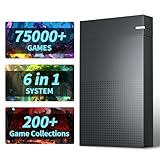
- 【6 Game Systems In 1】:Kinhank 4TB Retro Gaming Hard Drive Includes 6 Game Front Ends built-in 75000+ Games, 200+ game collections. Allow you to play your favorite Arcade, home-console, and classic PC games etc. And you can relive the arcade experience and recreate memorable funny moments
- 【Powerful Performance】:3.5-inch kinhank Game Drive, rotating speed 7200 rpm, cache 256MB, speed 6GB/s, equipped with SATA 3.0 to USB 3.0 interface, ensuring a smooth gaming experience with stable and faster transfer speeds
- 【Widely Compatible】: Retro Hard Drive is compatible with Win7 and above systems, turning your old computer into a game console in an instant. Note: If you want to run large games smoothly, it is recommended to have a processor above i5 and a graphics card above 1050ti
- 【Easy Operation】: This retro hard drive game console does not require complicated settings, you only need to install some simple plug-ins, and you can add or delete games according to your preferences
- 【Adaptive Screen】: Kinhank 6-in-1 gaming hard drive can automatically adapt to screens of different sizes to give you a better gaming experience.
Do you need any accessories?
No. A controller, gaming mouse, keyboard, guidebook, collectible, or Clash Royale merchandise will not make browser-only or no-download PC play possible. The official Windows release supports mouse and keyboard, but those are optional enhancements after installation, not a solution to installation restrictions.
Bottom line
Clash Royale is officially available on Windows, but only through the download-and-install workflow of Google Play Games on PC. If you cannot download software on that computer, use an approved mobile device or request permission from the device administrator rather than relying on unverified “play instantly” pages.
What’s actually slowing this PC down?
Pick the symptom - the matching free tool is one click away.
Frequently Asked Questions
Can I play Clash Royale in Chrome without installing anything?
No official browser-play option was verified. Supercell’s official Windows release uses Google Play Games on PC, which must be downloaded, and Clash Royale is then installed inside it.
Is Clash Royale officially available for Windows?
Yes. Supercell supports Clash Royale on Windows through Google Play Games on PC. It is the Android version running through Google’s PC platform, not a separate browser version.
Rank #3

- MASSIVE 20,000 CLASSIC GAMES: Built-in 20,000 classic video retro stick with 4k hdmi, games and 23 emulators console for retro gaming, game emulators support arcade, tv game, video gaming nostalgia.
- ULTRA 4K HD EXPERIENCE: Retro gaming console 4k hdmi video game, hdmi tv game console, retro gaming console for tv in classic white, 4k hd hdmi tv retro stick design for gaming and console nostalgia.
- DUAL 2.4G WIRELESS CONTROLLERS: Wireless controllers for game console, 2.4g wireless tv game console with low-latency response, play video game console for tv with family, no tangled cables.
- EASY PLUG & PLAY SETUP: Plug and play video games for tv via hdmi tv gaming console with 4k hdmi game experience, connect the retro game console to hd hdmi tv in seconds, ideal for all ages.
- WHAT YOU GET: Retro wireless gaming console stick video retro stick built-in, console stick with 23 emulators, dual 2.4g controllers, hdmi cable, user guide, compact white retro stick for travel.
Will my mobile progress sync to PC?
Supercell says its official PC release supports seamless syncing between mobile and PC. Sign in consistently to preserve the expected cross-device progress experience.
Why can’t I install Clash Royale on this PC?
The computer may block downloads or administrator access, or it may not meet Google Play Games on PC requirements such as supported Windows version, SSD space, RAM, graphics, CPU cores, hardware virtualization, or supported-region account eligibility.
The Bottom Line
Official Windows play exists, but it is not download-free: Google Play Games on PC and Clash Royale both need to be installed.
Quick Recap
Product prices and availability are accurate as of the date/time indicated and are subject to change. Any price and availability information displayed on Amazon at the time of purchase will apply.




