Quick wins for a faster PC:
Scan for outdated or missing drivers - takes under a minuteDriver Scan →Clear out junk files and repair common Windows errorsFree Scan →Fix the driver behind crashes, sound loss and screen glitchesFind Drivers →Yes—a PS4 PlayStation Camera works with some Just Dance editions, but support depends on the exact game. Official listings confirm it for Just Dance 2016 and Just Dance 2022 on PS4. Connect the camera to the console’s AUX port, aim it at the play area, and check your game’s listing before relying on it. You can also play supported editions with other control methods, including a smartphone controller app.
Which Just Dance games support the PS4 camera?
Compatibility is edition-specific, not guaranteed for every Just Dance game on PS4. The PlayStation Store lists Just Dance 2016 as “PlayStation®Camera Compatible,” while Ubisoft lists PlayStation Camera as a supported peripheral for the PS4 version of Just Dance 2022.
| # | Preview | Product | Price | |
|---|---|---|---|---|
| 1 |

|
Sony Camera V2 for PlayStation 4 (Renewed) | $53.37 | Buy on Amazon |
| 2 |

|
Sony PlayStation 4 Camera | $36.99 | Buy on Amazon |
| 3 |
|
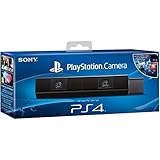
Sony Playstation 4 Camera (PS4) (Renewed) | $51.99 | Buy on Amazon |
| 4 |

|
Sony Playstation PS4 Camera, 9845252 | $39.99 | Buy on Amazon |
Those official listings confirm support for these two examples. Before buying a camera or a used copy of another edition, check that exact game’s PlayStation Store page or official support information for PlayStation Camera compatibility. Older-game availability and listings can change.
How to connect and position the PlayStation Camera
- Connect it to the console. Plug the camera cable into the AUX port on the back of the PS4, following Sony’s PlayStation Camera setup instructions.
- Place it facing the play area. Sony’s manual says the camera can sit centered on top of or in front of the TV. Adjust the angle so it captures the area where you will dance.
- Start the compatible game. Use an edition that specifically lists PlayStation Camera support.
- If the PS4 does not recognize it, reconnect it. Sony recommends disconnecting and reconnecting the camera. Restart the PS4 if that does not resolve the issue.
Sony describes the PlayStation Camera as an optional PS4 accessory; it is required for PlayStation VR, but it is not a general requirement for using the console.
#1 Best Overall
Choose a control method that fits your game
| Control method | What official sources establish | What to check |
|---|---|---|
| PS4 PlayStation Camera | Supported for Just Dance 2016 and Just Dance 2022 on PS4 in their cited official listings. | Confirm camera support for your exact game edition. |
| Smartphone controller app | The Just Dance 2016 listing says its app can control the game without an additional camera or accessory; Ubisoft also lists the app for Just Dance 2022 on PS4. | Check that your phone is compatible and that the app supports your game. |
| PlayStation Move | Ubisoft lists Move as a supported peripheral for Just Dance 2022 on PS4. | Check support for your edition and whether you have the required controller. |
| Smartphone Camera Controller mode | Ubisoft describes this as phone-camera motion detection in newer Just Dance editions, not as a PS4 Camera feature. | Check the game edition, choreography, app and device requirements. |
For Just Dance 2022, Ubisoft lists the DualShock 4 for menu navigation, alongside the app, PlayStation Move and PlayStation Camera as supported PS4 peripherals. The published information cited here does not compare scoring accuracy or performance between control methods, so it does not establish that one is more accurate or easier than another.
Independent reader supportYour contribution helps us test, update, and keep practical guides available for everyone.PS4 Camera versus the newer Camera Controller feature
“Camera Controller” can mean a separate Just Dance feature that uses a smartphone’s camera through the mobile app. It is not the Sony PlayStation Camera connected to the PS4.
Rank #2
- Broadcast yourself in play with PlayStation Camera.
- Become a community sensation by adding a picture-in-picture video of yourself in gameplay livestreams.
- When combined with the DUALSHOCK 4 wireless controller's light bar, the evolutionary 3D depth-sensing technology in the PlayStation Camera enables precise player tracking.
- Log in and navigate your PlayStation 4 system immediately and hands-free with facial recognition and voice commands.
- Sony PlayStation 4 Camera PS4 and PC compatible. Item only PS5 compatible with PS Camera Adapter provided through PlayStation support free of charge. Can only be used for backward compatible PSVR games.
Ubisoft’s December 2023 announcement described phone-camera motion detection for 15 solo maps in Just Dance 2023 and Just Dance 2024. Ubisoft’s October 6, 2025 patch notes said Camera Controller was officially out of beta in Just Dance 2026 and that all choreographies from Just Dance 2025 and Just Dance 2026 work with it. These details do not make the PS4 camera compatible with editions that do not list it.
Quick Recap
Rank #4
- Stream yourself while gaming with PlayStation Camera
- Add a picture-in-picture video of yourself to gameplay livestreams
- Precise player tracking with PlayStation Camera's 3D depth-sensing tech and DUALSHOCK 4 light bar
- Instant, hands-free login and navigation using facial recognition and voice commands
- PS4 and PC compatible. PS5 compatible with adapter. Limited to backward compatible PSVR games
Rank #3
- Bar shape that rests on TV
- Works with PlayStation Move
- Capture 85 degrees of activity
- Tracks movement and syncs with what's going on onscreen.
Sources
- PlayStation Store: Just Dance 2016
- Ubisoft: Supported peripherals in Just Dance 2022
- PlayStation Support: Set up PlayStation Camera
- PlayStation 4 User’s Guide: Camera
- Ubisoft: Camera Controller beta announcement
- Ubisoft: Just Dance 2026 Edition patch notes
- PlayStation Store: Just Dance+ listing
Product prices and availability are accurate as of the date/time indicated and are subject to change. Any price and availability information displayed on Amazon at the time of purchase will apply.
Free tools Windows power users keep installed
One-click scans. No signup required.



