The Tool Desk
Outbyte PC Repair FREERepair Windows errors before they cause bigger problemsFix Now →Outbyte Driver Updater FREEScan for outdated or missing drivers - takes under a minuteDriver Scan →To play Mario Kart 8 Deluxe online, connect your Nintendo Switch or Switch 2 to the internet, update the game, then open Online or Online Play from the title menu. Choose 1P or 2P, then select Worldwide, Regional, Friends, or Tournaments. A paid Nintendo Switch Online membership is required.
What you need before starting
- A Nintendo Switch or Nintendo Switch 2 and a copy of Mario Kart 8 Deluxe.
- An internet connection.
- A Nintendo Switch Online membership. Nintendo says this membership is required for online play. Nintendo’s multiplayer instructions and its official game page confirm the requirement.
- The latest game update. Nintendo says the update is required for internet features and players must use the same software version to play together. Its listed Version 4.0.0 was released September 1, 2026. Check Nintendo’s update instructions and history.
How to start an online race
- Connect to the internet and update the game. From the HOME Menu, highlight Mario Kart 8 Deluxe without opening it, press + or −, select Software Update, then choose Via the Internet.
- Launch the game and choose Online or Online Play. The precise title-menu wording may vary; follow the on-screen prompts.
- Select 1P or 2P. Choose 1P for one player on this console or 2P to play online with a second person on the same console. Online play with more than one player on a console is not available in Handheld Mode. Detach the Joy-Con controllers or connect additional controllers if prompted.
- Choose an online mode. Pick Worldwide or Regional for matchmaking, Friends for a private group, or Tournaments to find or enter a tournament.
- Finish the lobby prompts. Select a character and kart, vote for a course when prompted, and wait for the lobby or match to fill.
Nintendo’s step-by-step multiplayer guide covers Switch and Switch 2 and includes the current menu flows.
Which online option should you choose?
| Option | What it does | Players or requirements |
|---|---|---|
| Worldwide | Matchmaking for races with players around the world. | Nintendo lists online play for up to 12 players; Nintendo Switch Online is required. Nintendo’s official game page. |
| Regional | Online matchmaking focused on your region. | Online play for up to 12 players; Nintendo Switch Online is required. Nintendo’s official game page. |
| Friends | Create or join a private room with friends. | The host creates a room and sets race or battle options; other players choose the host’s lobby entry. Nintendo lists online play for up to 12 players. Nintendo’s guide. |
| Tournaments | Search for a tournament or join one using its code. | Search by tournament type or active tournaments, or enter a 12-digit code. Nintendo Switch Online is required. Nintendo’s guide. |
The player limits above are Nintendo-published specifications, not independent test results. Online play supports up to two players on one console; the second player cannot join online multiplayer in Handheld Mode.
How to play online with friends
- Open Online Play and choose Friends.
- If you are hosting, create a room and set the race or battle type and other options.
- Ask friends to open the Friends option and select your lobby entry to join.
- Choose characters and karts, vote for a course, and wait for the room to begin.
For the current menu sequence, see Nintendo’s official instructions.
#1 Best Overall
![Mario Kart 8 Deluxe - Nintendo Switch [Digital Code]](https://m.media-amazon.com/images/I/517O3bI45YL._SL160_.jpg)
- Hit the road with the definitive version of Mario Kart 8 and play anytime, anywhere! Race your friends or battle them in a revised battle mode on new and returning battle courses
- Play locally in up to 4-player multiplayer in 1080p while playing in TV Mode. Every track from the Wii U version, including DLC, makes a glorious return
- Plus, the Inklings appear as all-new guest characters, along with returning favorites, such as King Boo, Dry Bones, and Bowser Jr.
- Players can choose a new Smart Steering feature which makes driving and staying on the track easy for novice players and kids even at 200cc
How to find or join a tournament
Choose Tournaments from Online Play. You can search by tournament type, search active tournaments, or enter a tournament’s 12-digit code. After joining, select your character and kart, then vote for a course when prompted. The available tournament search labels are described in Nintendo’s guide.
Online play, local wireless, and LAN are different
Choose Online Play for internet matchmaking. If you want to play nearby without internet matchmaking, the game also offers local options:
Rank #2

- Nuevos personajes: Inkling, Rey Boo, Huesitos y Bowsy
- Inclusi n de circuitos in ditos en el modo batalla
- Los pilotos cuentan con el volante inteligente, que ayuda a no salirse de la pista
- Hasta 8 pilotos en partidas de multijugador local
| Mode | Connection | Capacity and setup |
|---|---|---|
| Online Play | Internet matchmaking | Up to 12 players online; paid Nintendo Switch Online membership required. Nintendo’s official game page. |
| Wireless Play | Local wireless between consoles | Up to eight players, according to Nintendo’s official game page. Source. |
| LAN Play | Wired local network | Up to 12 players; Nintendo’s instructions require consoles to connect to the same shared router. Nintendo’s guide. |
Local Multiplayer on a single console is another separate option; its supported player count varies by console generation and game update.
Independent reader supportYour contribution helps us test, update, and keep practical guides available for everyone.Do you need the Booster Course Pass?
No. The Booster Course Pass is optional and is not a substitute for Nintendo Switch Online. Nintendo says it adds 48 remastered courses across six waves; the final wave released November 8, 2023. You can race on an eligible pass course online without owning the pass if someone in the matched group has access and that course is voted for. Online play still requires a Nintendo Switch Online membership. See Nintendo’s Booster Course Pass FAQ.
Rank #3
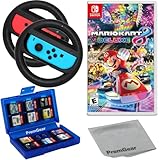
- Included is the following: Mario Kart 8 Deluxe - Nintendo Switch Game, 2x PremGear Steering Driving Wheels to use with your Joy-Con Controllers (NOT COMPATIBLE WITH SWITCH 2), PremGear 24 Slot Game card Case/Holder with 2 Slot MicroSD Memory Card Adapter and PremGear Quality Cleaning Cloth
- RACE ANYTIME, ANYWHERE! Hit the road with the definitive version of Mario Kart 8. Race your friends or battle them in a revised battle mode on new and returning battle courses
- Play locally in up to 4-player multiplayer in 1080p while playing in TV Mode. Every track from the Wii U version, including DLC, makes a glorious return
- Plus, the Inklings appear as all-new guest characters, along with returning favorites, such as King Boo, Dry Bones, and Bowser Jr.!
- Players can choose a new Smart Steering feature which makes driving and staying on the track easy for novice players and kids even at 200cc
If you cannot join a match
- Check the game version. Update through the HOME Menu using + or − > Software Update > Via the Internet. Nintendo says all players must use the same software version.
- Confirm your membership and connection. Nintendo Switch Online is required for online play, and the console must be connected to the internet.
- For 2P online play, leave Handheld Mode. Nintendo does not support online multiplayer with multiple players on one console in Handheld Mode.
- For a friends room, check that the host has created a room. Other players join by selecting that host’s lobby entry.
If a screen’s exact wording differs, follow the prompts shown in your game; Nintendo’s support pages provide the current documented flows.
Quick Recap
Product prices and availability are accurate as of the date/time indicated and are subject to change. Any price and availability information displayed on Amazon at the time of purchase will apply.



