To play multiplayer in The Long Drive, both players need to opt into the Steam multiplayer_test beta branch. The host then creates a lobby from the game’s Multiplayer menu, and the other player joins from the same menu. The feature is experimental, so matching branches and builds matters.
1. Switch to the multiplayer beta in Steam
- Open Steam and go to Library.
- Right-click The Long Drive and choose Properties.
- Select Betas.
- Choose
multiplayer_testfrom the beta participation dropdown. The official Steam announcement archive says no access code is required: Steam announcements. - Let Steam download any update, then launch the game.
Have every player select the same branch. If the branch name is missing or has changed, check the current Steam beta list and the latest official announcements; the available material does not establish that this branch is always the newest multiplayer build.
2. Create a lobby as the host
- Open or create a save in the game.
- Press Esc and choose Multiplayer.
- Set up the lobby and select Create.
These in-game menu steps are described in a player-written Steam Community guide, rather than a current official manual: How to Play Multiplayer on The Long Drive.
3. Join a friend’s lobby
- Ask your friend to select
multiplayer_testin Steam and launch the game. - Have them open Multiplayer from the game menu.
- Look for the host’s lobby. The community guide says it appears under the host’s Steam nickname; menu behavior may differ if the guide is out of date.
If you cannot see or join the lobby
- Confirm that both players are on
multiplayer_testand running compatible builds. Official Steam notes warn that version differences can cause multiplayer problems. - Restart the game after changing branches or updating, then check the Multiplayer menu again.
- Review the latest official announcements for branch updates, fixes, or known issues: The Long Drive Steam announcements.
What to expect from multiplayer
This is an experimental feature, not a separate confirmed multiplayer mode with established stability. The official Steam notes document multiplayer fixes and known issues. One past note described a bug where having someone in the front-right seat could prevent the driver from starting or stopping the engine, and said it was being fixed; that note does not establish whether the issue persists now. Check the latest announcements for current details.
Do these 3 things before closing this tab:
1Repair Windows errors before they cause bigger problems2Scan for outdated or missing drivers - takes under a minute3Clear out junk files and repair common Windows errors#1 Best Overall
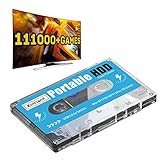
- 【Plug and Play】: No need for any drivers, just a data cable connection, the computer will instantly turn into a game console, you can enjoy the joy of games anytime, anywhere.
- 【111000+ Games】: 84 game collections and simulators are pre-installed, 111000+ games including 5000+ 3D games are built-in. You can also add games yourself, which is very convenient.
- 【Batocera 33 System】: The latest Batocera 33 system is pre-installed, which can be directly read in the Windows system, which is convenient for adding and deleting games.
- 【Wide Compatibility】: The 500G HDD is compatible with Windows XP, Windows Vista, Win7-10/Mac OS 10.2, suitable for PC, Laptop, etc.
- 【USB 3.0 High-speed Transmission】: USB 3.0 interface, fast transmission, save more time, backward compatible with earlier versions such as USB2.0, this HDD hard drive supports 26 languages, English, French, German, etc.
Steam’s support listing labels The Long Drive as single-player and also lists Remote Play Together: Steam store listing. That listing does not explain whether Remote Play Together offers the same shared-world behavior as the beta, so it should not be treated as a confirmed substitute for the multiplayer_test branch.
Quick Recap
Best Value

- 【4-Port USB 3.0 Hub for PC】Arvitek USB Multiport Adapter equipped with 4 USB 3.0 ports, easily connect multiple devices such as keyboards, mouse, and external hard drives, putting an end to the hassle of insufficient ports. Pefect for desktop, pc, computer, laptop, etc.
- 【High Transfer Speed】Supports data transfer speeds of up to 5Gbps—up to 10 times faster than USB 2.0! Ideal for transferring large files, backing up data, editing HD videos, or loading game resources in an instant. Perfect for photographers, video editors, gamers, and multi-tasking professionals.
- 【10Ft Long Cable】Design with a 10 feet (3-meter) extended cable for flexible adaptation to various desk layouts—whether for office, study, or gaming. Manage your cables centrally to create a tidy and organized workspace, enhancing both efficiency and aesthetics.
- 【Plug & Play】Built with dual high-performance chips, fully compatible with Windows, Mac OS, and Linux systems—plug and play with no drivers required. Please note: This product is designed solely for data transmission, NOT Charging!
- 【What You Get】Packing List: 1 x 4-Port USB 3.0 Hub with 10ft long cable. Focused on delivering high-speed, stable data exchange for all your connected devices.
Rank #4

- 4-port at Same Time-The small and speedy USB Multiport Adapter can easily expand one of your computer’s USB ports into four USB 3.0 Ports to iMac, Macbook, Mac Pro / mini, Surface Pro, XPS, Notebook PC, Mobile HDD, and More. Just Plug and play, you don't need a driver and it's easy to use. That’s fine for keyboards, mice, and memory sticks.(Does not support charging for phone or other device!)
- 5Gbps Data Transfer-With high efficient USB3.0,This ORICO 4-port USB splitter provides 5 Gbps stable data transfer(10 times faster than usb 2.0) and can transfer a HD movie in seconds.Easy to read hard drive. Also, for a stable connection, please avoid connecting devices that exceed a total of 900 mA
- Perfect Protection&Durability-With years of experience in multiple port hubs, ORICO USB hub built-in high-performance chip to keep your devices and data safe, and supports hot swapping. Has over-current protection built in each port to protect both connected devices and your hub from power surges
- Wide Compatibility-This portable USB splitter for laptops is the reverse and is compatible with USB 2.0(480Mbps) and USB 1.1(12Mbps) devices. Use with PC, MacBook, iMac, Mac mini, XPS, Flash Drives, & any other USB-compatible devices
- Super Slim and Portable-The thin, lightweight design make this hub a great travel companion to expand one USB 3.0 port into four no matter where you are: office, cafes, outdoors, or forests away from the city, you can work freely anywhere. Package Includes: 1x 4 ports USB hub with 6ft Cable(180cm/1.8M), 1xUser Maunal
Rank #3

- 【Professional USB Expansion】Get more done with the JoyReken 7 port USB hub in sleek silver. Designed for creators and professionals, this vertical usb hub for laptop and PC expands a single USB port into seven high-speed USB 3.0 data ports. Whether you’re connecting external hard drives, flash drives, webcams, or drawing tablets, this versatile USB hub gives you the flexibility to manage your workflow without clutter. It’s ideal for anyone who needs extra USB ports for PC or laptop setups in a clean, efficient layout.
- 【RGB Lighting, Refined Look】Unlike flashy gaming hubs, the JoyReken silver model features a refined RGB usb hub design that gently cycles through seven soft colors behind a laser-etched wolf emblem. It adds just the right touch of character to your workspace—stylish enough for creative environments, and subtle enough for professional settings. The upright, vertical usb tower hub layout also maximizes space while keeping all ports easily accessible.
- 【High-Speed File Transfers】This usb 3.0 hub offers blazing-fast data transfers up to 5Gbps, allowing you to move large video files, high-resolution photos, or music libraries in seconds. Ideal for photographers, video editors, and designers, it helps reduce waiting time and boosts productivity. Whether you're backing up your content or syncing between multiple devices, this usb hub for desktop provides consistent and stable speed—even under heavy use.
- 【Flexible Desk Placement】The included 2FT extension cable allows you to position the laptop usb hub where it fits best—next to your docking station, under your monitor, or mounted to the side of your desk. Its vertical build minimizes footprint while improving cable access. A reusable cable tie and double-sided adhesive are included to help keep your setup clean, organized, and optimized for multitasking.
- 【USB C Port Functionality】This USB C port on the side cannot be used for data transfer or charge other devices.it can only supply power to the hub,which helps ensure more stable data transfer, especially when using external hard drives and other power-demanding peripherals.
Rank #2

- Gaming Console Device Supported - USB 3.2Specifications
- Device Supported: Gaming Console
- Drive Type: External
- External Drive Type: Portable
- Host Interface: USB 3.2
Product prices and availability are accurate as of the date/time indicated and are subject to change. Any price and availability information displayed on Amazon at the time of purchase will apply.
Independent reader supportYour contribution helps us test, update, and keep practical guides available for everyone.



