Crashes, No Sound, or Screen Glitches?
Random freezes, missing sound and display glitches usually trace back to one bad driver. Find and replace yours safely.Free scan · under a minuteWindows Errors? Fix Them Before They Spread
Repair common Windows errors and clear accumulated junk for a smoother, more stable PC - no reinstall needed.Free scan · no reinstallTo repair a weapon in STALKER 2: Heart of Chornobyl, take it to a settlement Technician, open the upgrade menu, select the weapon, check the coupon fee shown on screen, and confirm using the prompt currently displayed in your game. The price depends on the item and its condition; there is no reliable universal repair price or durability cutoff.
How to repair weapons in STALKER 2
- Travel to a settlement and locate its Technician. Older guides describe the map marker as a wrench or spanner.
- Speak to the Technician and open the upgrade or repair interface.
- Find the weapon in the equipment or inventory list, then highlight it.
- Read the displayed coupon cost before committing. If the fee makes sense for the weapon, use the on-screen prompt to confirm the repair.
Repair is an in-game service performed through a Technician, not by using a real-world cleaning product. The consulted guides describe repairs as restoring an item’s condition for a coupon fee.
| # | Preview | Product | Price | |
|---|---|---|---|---|
| 1 |
|
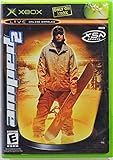
Amped 2 - Xbox | $69.99 | Buy on Amazon |
| 2 |

|
Mafia 2 - Xbox 360 | $15.48 | Buy on Amazon |
| 3 |

|
The Art of S.T.A.L.K.E.R. 2: Heart of Chornobyl | $31.19 | Buy on Amazon |
| 4 |

|
Halo 2 - Xbox | $36.95 | Buy on Amazon |
| 5 |

|
The Crew 2 - Xbox one | $8.99 | Buy on Amazon |
Where to find a Technician
Technicians are found in settlements. Lens in Zalissya is an early-game example identified by the 2024 guides. Look for the Technician marker on your map; if you are unsure which character provides the service, interact with the settlement’s service NPCs and check the available menu.
How much does weapon repair cost?
The game shows the fee in coupons before you confirm. It varies by weapon and its damage or value, so use the current displayed price rather than relying on a guide’s example. The available sources do not establish a universal price or a condition percentage at which repair is always worthwhile.
The Tool Desk
Outbyte PC Repair FREERepair Windows errors before they cause bigger problemsFix Now →Outbyte Driver Updater FREEFix the driver behind crashes, sound loss and screen glitchesFind Drivers →#1 Best Overall
- Amped 2 offers a freestyle snowboarding experience with a large and varied trick library. You'll explore vast areas of wide-open, real mountains packed with terrain parks. Play head-to-head with friends in the various multiplayer modes. When you're ready to take it to the next level, connect to Xbox Live to check rankings and challenge the world's best virtual riders. Travel the globe, and pull sick tricks in front of sponsors, photographers, and fans. The latest snowboarding magazines or videos
To decide, weigh the displayed fee against the weapon’s value, rarity, condition, and usefulness in combat. Also consider whether you can replace a common weapon from loot. A badly damaged weapon may not be worth carrying just to sell: older guides warn that broken weapons may be unsellable or not worth repairing.
Why weapon condition matters
The consulted 2024 guides report that low durability can reduce a weapon’s effectiveness and make jams more likely. If a weapon is becoming unreliable in combat, inspect its condition and compare the repair fee with the cost of switching to another usable weapon.
Rank #2
Which repair controls should you use?
Use the input prompt shown in your current game. Published PC guides from November 2024 disagree about which key opens the relevant menu, and some report a keyboard key for confirming repair. Those instructions should not be treated as universal for consoles, remapped controls, or the current build.
GSC Game World’s Update 2.0 announcement described the release as a major overhaul, and its official patch archive lists later 2.0 updates, including version 2.0.5 dated September 10, 2026. Those pages establish that the game has moved beyond the version covered by the repair guides, but do not specify whether the repair interaction or its controls changed. Follow the labels and prompts in your installed version.
What’s actually slowing this PC down?
Pick the symptom - the matching free tool is one click away.
Quick Recap
Best Value
- The Crew 2 - Xbox one
Rank #4
- Master Chief can now wield two weapons at once, board Covenant vehicles and steal Covenant weapons like the incredible double energy sword
- Lead an all-new unit of super-soldiers, the ODST -- tougher, badder and deadlier versions of your old comrades
- New enemies, allies and surprises around every corner - intense combat action with enhanced AI and real-time lighting
- Immense single-player action with maassive landscapes and huge cities to explore and defend - destructible and interactive environments
- Take the action online with your Xbox Live and switch sides, to become a Covenant Elite!
Rank #3
Product prices and availability are accurate as of the date/time indicated and are subject to change. Any price and availability information displayed on Amazon at the time of purchase will apply.




