Free tools Windows power users keep installed
One-click scans. No signup required.
Set limits through the child’s family account or the console’s parental-controls system, then choose both a schedule and what happens when time runs out. The setup differs by platform: PlayStation offers console, web, and app controls; Nintendo uses its console settings for some restrictions and its companion app for play-time controls; Xbox limits are set through Microsoft Family Safety.
Before you start: use the right child or family account
Check that the child uses their own account or supervised profile. On PlayStation, the child must be a family member, and the adult making changes must be the family manager or an appointed parent or guardian. Nintendo and Microsoft settings also depend on the relevant family or supervised account being selected. If several children use one console, confirm which account or users the setting will actually cover before relying on it.
Set play-time limits on PlayStation 5 or PlayStation 4
PlayStation lets a parent manage controls on the console, on the web, or in the PlayStation Family app. These console paths set playtime for the selected child account.
PS5
- Sign in to the adult account with family-manager or parent/guardian permissions.
- Open Settings > Family and Parental Controls > Family Management.
- Select the child, set the time zone, then open Playtime Settings.
- Choose whether to restrict playtime, set the daily duration and playable hours, and select what happens when time is up: Notify Only or log the child out.
- Save the settings. Set different durations or playable hours for individual days if needed.
PS4
- Sign in to the adult account with the required family permissions.
- Open Settings > Parental Controls/Family Management > Family Management.
- Select the child, set the time zone, and choose Playtime Settings.
- Choose whether to restrict playtime, set the daily duration and playable hours, and choose notification-only or log-out behavior.
- Save the settings; you can customize the schedule by day.
A child’s playtime restrictions apply across PS4 and PS5. If you change a setting while the child is playing, have them sign out and back in so the change can take effect. PlayStation also allows a child to request more time, which the parent can respond to.
#1 Best Overall

- 【Amazing Stable Connection-Quick Access to Games】Real-time gaming audio with our 2.4GHz USB & Type-C ultra-low latency wireless connection. With less than 30ms delay, you can enjoy smoother operation and stay ahead of the competition, so you can enjoy an immersive lag-free wireless gaming experience.
- 【Game Communication-Better Bass and Accuracy】The 50mm driver plus 2.4G lossless wireless transports you to the gaming world, letting you hear every critical step, reload, or vocal in Fortnite, Call of Duty, The Legend of Zelda and RPG, so you will never miss a step or shot during game playing. You will completely in awe with the range, precision, and audio quality your ears were experiencing.
- 【Flexible and Convenient Design-Effortless in Game】Ideal intuitive button layout on the headphones for user. Multi-functional button controls let you instantly crank or lower volume and mute, quickly answer phone calls, cut songs, turn on lights, etc. Ease of use and customization, are all done with passion and priority for the user.
- 【Less plug, More Play-Dual Input From 2.4GHz & Bluetooth】 Wireless gaming headset adopts high performance dual mode design. With a 2.4GHz USB dongle, which is super sturdy, lag<30ms, perfectly made for gamers. Bluetooth mode only work for phone, laptop and switch. And 3.5mm wired mode (Only support music and call).
- 【Wide Compatibility with Gaming Devices】Setup the perfect entertainment system by plugging in 2.4G USB. The convenience of dual USB work seamlessly with your PS5,PS4, PC, Mac, Laptop, Switch and saves you from swapping cables.
Set play-time limits on Nintendo Switch or Switch 2
Some Nintendo restrictions are available directly on the system, but the Nintendo Switch Parental Controls smart-device app is needed for play-time limits and gameplay history. Nintendo says the app supports both Switch and Switch 2; feature availability and labels can vary as software changes.
Configure app limits and bedtime
- On the console, open System Settings > Parental Controls > Parental Controls Settings for system-based age or custom restrictions.
- In the Nintendo Switch Parental Controls app, select Parental Controls.
- Set Play-Time Limit, choosing a daily allowance and adjusting individual days if desired. The available daily cap ranges from no limit up to six hours.
- Optionally set Bedtime to define when play should stop for the day.
- Choose whether to enable Suspend Play When Time’s Up. When enabled, the software is suspended at the limit; when disabled, the console displays a notification and play may continue.
If both a daily limit and bedtime are active, whichever comes first applies. Settings take effect when the console connects online.
Rank #2

- 【Multi-Platform Compatible】Support PlayStation 4, PlayStation 5, Xbox, Xbox Series X|S, Xbox One, PC, Nintendo 3DS, Laptop, PSP, Tablet, iPad, Computer, Mobile Phone. Please note you need an extra Microsoft Adapter (Not Included) when connect with an old version Xbox One controller.
- 【7.1 Surround Sound】Clear sound operating strong brass, splendid ambient noise isolation and high precision 40mm magnetic neodymium driver, acoustic positioning precision enhance the sensitivity of the speaker unit, bringing you vivid sound field, sound clarity, shock feeling sound. Perfect for various games like Halo 5 Guardians, Metal Gear Solid, Call of Duty, Star Wars Battlefront, Overwatch, World of Warcraft Legion, etc.
- 【Noise Isolating Microphone】Headset integrated onmi-directional microphone can transmits high quality communication with its premium noise-concellng feature, can pick up sounds with great sensitivity and remove the noise, which enables you clearly deliver or receive messages while you are in a game. Long flexible mic design very convenient to adjust angle of the microphone.
- 【Great Humanized Design】Superior comfortable and good air permeability protein over-ear pads, muti-points headbeam, acord with human body engineering specification can reduce hearing impairment and heat sweat.Skin friendly leather material for a longer period of wearing. Glaring LED lights desigend on the earcups to highlight game atmosphere.
- 【Effortlessly Volume Control】High tensile strength, anti-winding braided USB cable with rotary volume controller and key microphone mute effectively prevents the 49-inches long cable from twining and allows you to control the volume easily and mute the mic as effortless volume control one key mute.
Understand Nintendo’s console-wide scope
Nintendo’s play-time limit applies to the console, not as separate allowances for each local system user; it restricts all users equally. That makes it less suitable when children sharing one system need different daily budgets.
Review other Nintendo restrictions
In addition to time settings, review age categories or custom restrictions, communication, user-generated content and social posting. eShop purchasing restrictions are also available, but some purchase controls are managed through Nintendo Account settings rather than only in the console app. For Switch 2 GameChat, a parent or guardian must be involved for players under 16 and supervised users; under-16 players can use GameChat only with parent-approved friends. GameChat requirements vary by country, so check Nintendo’s current local guidance.
Rank #3

- 【Universal 3-Mode Connectivity】Engineered for total compatibility, the TA2000 headset seamlessly connects to all your devices. ① Experience lag-free wireless audio on PC, PS5, PS4, and laptops via the 2.4GHz USB receiver. ② Directly connect to Mac, mobile phones, and modern devices using the included Type-C cable. ③ Enjoy wireless freedom with Bluetooth mode for Switch, Mac, and mobile. (Note: Bluetooth is not compatible with PS5/PS4). ④ For Xbox One, Xbox Series X|S, and other classic consoles, simply use the universal 3.5mm wired connection.
- 【Immersive Spatial Audio with Effective Noise Isolation】Dive into a 360° soundscape powered by 50mm drivers and HRTF(Head-Related Transfer Function) -tuned Spatial Audio. Pinpoint enemy movements with precision. The closed-back, over-ear design with memory foam seals out background noise, ensuring total immersion and a competitive edge.
- 【Clear Communication with Flexible Microphone】Team chat stays crystal clear. The 120° adjustable, noise-cancelling microphone focuses on your voice and minimizes background sound. All essential controls—including a dedicated mic mute button—are conveniently placed on the earcup for instant command.
- 【Marathon Battery with On-Device Controls & Status】Power through extended sessions with up to 48 hours of continuous play on a single charge. All controls are on the earcup: adjust volume, mute the mic, switch between 2.4G/Bluetooth, and check connection status via indicator lights—all without touching your device.
- 【All-Day Comfort & Ergonomic Design】Designed for extended wear with ergonomic, adjustable headbands and breathable protein leather earcups. The soft, memory foam padding conforms to your ears, effectively reducing heat and pressure for lasting comfort. This humanized design ensures a perfect fit for various head shapes, allowing you to focus entirely on your performance.
Set Xbox app and game limits with Microsoft Family Safety
Microsoft’s documented route is Family Safety, rather than a console-local Xbox menu. The controls apply to apps and games for the selected family member.
- Open the Microsoft Family Safety app and choose the family member.
- Select the Windows/Xbox/Mobile platform.
- Choose Set time limits > Apps, features, and games.
- Turn on app and game limits, select the game, then set the daily time allowance and the hours it can be used.
- Use a repeated schedule or customize the limits for individual days.
The web route is through the family account’s Apps, features, and games tab. Microsoft’s cited instructions document time and allowed-hour limits, but do not specify an equivalent setting for choosing whether the console notifies, blocks, or signs the child out when time expires.
Rank #4

- Hi-Fi Stereo Sound: This gaming headset delivers professionally tuned sound—crisp in-game audio to pinpoint enemies, rich detailed music, and immersive movie soundscapes—ideal for gamers to elevate every audio moment.
- Clear Sound Transmission Mic: Featuring a cardioid (unidirectional) microphone, this gaming headset enables precise directional sound pickup—it filters side/rear ambient noise, locks front sound sources within a 120° pickup angle for controllable range, and delivers pure, clear sound transmission, perfect for in-game calls and voice chat.
- Ergonomic Key Layout: The mute button and volume wheel of this gaming headset boast an ergonomic layout—fitting hand movement naturally, easy to locate by touch, minimizing misoperations, comfortable to adjust, reducing fatigue in extended use, never disrupting your gaming or calls.
- Design Fit for Long Wear: Our over-ear gaming headset’s earcups last over 2 years—surpassing typical durability—with full ear coverage, memory foam padding, and breathable leather, ensuring all-day comfort free from pressure or sweat.
- Anti-Tangling Braided Cable: This gaming headphones feature a braided cable and 1.5m length—the braided cable resists stretching/wear and avoids tangling for durability; 1.5m enables free desk movement, fits devices well, no tripping—ideal for smooth, hassle-free gaming.
Choose the platform route and enforcement that fit your household
| Platform | Where to configure | Schedule and time-up behavior | Scope |
|---|---|---|---|
| PlayStation 5 / 4 | Console, web, or PlayStation Family app | Daily duration and playable hours, including day-specific schedules; notify only or log out | Child family account; restrictions carry across PS4 and PS5 |
| Nintendo Switch / Switch 2 | System settings for some controls; companion app for playtime and history | Day-specific limits and bedtime; notify or suspend software | Console-wide; applies equally to all users |
| Xbox | Microsoft Family Safety app or web | Daily app/game limits and allowed hours, with day-by-day schedules; time-up enforcement behavior is not specified in the cited guidance | Selected family member’s apps and games |
Check more than playtime
A time limit does not address what a child can access or do while playing. Review the platform’s age-rating and content settings, communication permissions, user-generated content and privacy controls, and purchase restrictions. On PlayStation, relevant options include age levels for games and apps, communication and user-generated content, privacy, allowed-game exceptions, browser access, and spending limits. Settings are account-linked, so a change can affect the child on other devices as well.
Quick Recap
Best Value
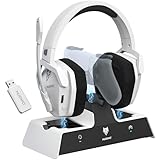
- Dual Charging, Zero Downtime: It is designed for the PS5 ecosystem, which can charge your PS5 controller & gaming headset at the same time, fully charging devices in just 6 hours. Featuring charging contacts/interfaces fully compatible with official PS5 accessories, this charging dock eliminates cable clutter and reduces outlet congestion – all designed to maintain a clean, battle-ready setup. The dock does not support charging XBOX series controllers.
- Battle-Ready Glow & Anti-Slip Design: Plug in, power up—the moment your G06 Pro headset and PS5 controller touch the base station, immersive LED lights pulse like a victory countdown, transforming your desk into a warzone. When fully charged or on standby, the base's indicator glows tactical green, signaling your device is primed for the next raid. The charger also comes with double-sided anti-slip pads, ensuring your gear stays rooted through even the most chaotic combos. The base station charges your headsets while keeping the dongle securely stored—no more worrying about misplacing it.
- Seamless PS5 + Phone Battle Sync: Our PS5 headset hardwire your focus with 2.4GHz audio for PS5, while Bluetooth keeps your phone stealth-linked. One tap toggles between annihilating bosses and taking IRL calls—no pause, no rage-quit guilt. Your focus shouldn’t have a ‘connection lost’ screen. When the "low battery" alert hits mid-raid, plug in the 3.5mm cable—your comms stay live even as you scavenge for power like a post-apocalyptic hero. Connects to PS4/PS5 via 2.4GHz only, not Bluetooth!
- Lower latency & Immersive Sound: Equipped with 50mm dynamic drivers, this PS5 gaming headset delivers explosive bass and crisp highs that bring every explosion, gunshot, and environmental sound to life, engineered to dominate every battlefield with crystal-clear precision. With an impressive 17ms low-latency performance, you’ll capture every critical audio cue instantly—giving you the edge in intense battles and team play. Experience the ultimate sound effects now and win at every moment!
- 120-Hour Endurance & Nonstop Domination: Charge once, conquer a week-long siege—G06 Pro wireless gaming headset ’s battery delivers 120hrs of runtime. Recharge in just 6 hours via USB-C or the dedicated charging dock—no more frustrating downtime. No more missing critical operations due to low power, allowing you to win in the fierce battle and play for days without pressure! Say goodbye to charging anxiety and enjoy an immersive gaming experience.Does not support charging while playing!
Product prices and availability are accurate as of the date/time indicated and are subject to change. Any price and availability information displayed on Amazon at the time of purchase will apply.
Quick wins for a faster PC:
Scan for outdated or missing drivers - takes under a minuteDriver Scan →Repair Windows errors before they cause bigger problemsFix Now →



