Crashes, No Sound, or Screen Glitches?
Random freezes, missing sound and display glitches usually trace back to one bad driver. Find and replace yours safely.Free scan · under a minuteWindows Errors? Fix Them Before They Spread
Repair common Windows errors and clear accumulated junk for a smoother, more stable PC - no reinstall needed.Free scan · no reinstallCheck the death screen and the post-raid killed-player list. Escape from Tarkov’s changelog says the death screen displays a player’s nickname when a Player Scav kills you, and the game’s official Steam page describes a list that lets you view or report PMC and player Scav entries. Those screens can help identify a human player, but the available official information does not define a universal name, color, or icon that always distinguishes a Player Scav from a PMC.
Where to check after a raid
- Open the death screen or post-raid results. Look for the killer’s entry and the killed-player list.
- Inspect the entry and its available controls. The official Escape from Tarkov Steam page says the killed-player list lets you view the profile of or report a PMC or player Scav. These options are useful evidence that the entry is being treated as a player, though the page does not document every icon or screen state. Official Escape from Tarkov Steam news and patch notes
- Read the displayed killer name. A changelog entry records that the death screen shows a player’s nickname if a Player Scav killed them. The Escape from Tarkov Wiki’s changelog is community-maintained, so it documents a feature change rather than guaranteeing that every current mode or interface layout behaves identically. Escape from Tarkov Wiki changelog
What the name can—and cannot—tell you
Some players report seeing a Scav character name followed by a player’s profile name in parentheses when a Player Scav is responsible. Treat that format as a clue, not a confirmed rule: it comes from community discussion, and the reviewed official material does not establish it as the current, universal format. Community report of the name format
The game’s official Steam page distinguishes PMCs from player Scavs in its descriptions and patch notes, but its killed-player-list description does not provide a complete guide to how each role is labeled on every post-raid screen. Official Escape from Tarkov Steam news and patch notes
Player or AI? Role or faction?
These are two separate questions. A nickname or profile/report option can help show that an entry belongs to a human-controlled player. Identifying whether that player entered as a PMC or a Scav is a separate step, and the reviewed official descriptions do not document a role-format convention that works in every case. A community answer links a report control with human player killers, but that does not distinguish a PMC from a player Scav. Community discussion of the report control
What’s actually slowing this PC down?
Pick the symptom - the matching free tool is one click away.
#1 Best Overall

- Custom made based on beanie from Escape from Tarkov
- A great gift for the holidays or to add to your Tarkov collection
- Perfect for raiding!
Clues not to rely on
- Name color or a particular icon: the reviewed official material does not establish either as a definitive PMC-versus-player-Scav indicator.
- Clothing, equipment, or movement: appearance and behavior are not documented here as dependable tests of the killer’s role.
- A Scav name followed by a profile name in parentheses: community-reported, not an official guarantee.
Why the answer may vary
Official feature descriptions support checking post-raid killer details, but they do not provide a mode-by-mode reference for every name format, report control, color, or edge case. Interface updates and PvE behavior may differ. If the role matters, check the killer entry and any profile options in your current game client rather than treating a visual convention as conclusive.
Quick Recap
Best Value

- Exclusive Top Customs design - Inspired by the iconic Customs boss from Escape from Tarkov, this Reshala figurine is designed for fans who want a piece of Tarkov on their shelf.
- Made using durable PVC injection molding for consistent detail and a clean finish — not 3D printed.
- Stands approx. 9 cm (3.54 inches) tall, ideal for desks, shelves, gaming setups, or collector displays.
- A unique collectible for Tarkov players, streamer fans, or anyone building a Tarkov-themed collection.
Rank #4
![TOP CUSTOMS Escape from Tarkov - Tagilla Figurine Replica [Updated Packaging]- Collectible Figurine Statue- FactoryBoss - Gift Idea - Gamers](https://m.media-amazon.com/images/I/41EZSWsEqsL._SL160_.jpg)
- Exclusive Top Customs design – crafted to closely resemble Tagilla’s in-game appearance with premium attention to detail
- Made from durable hard PVC, NOT 3D printed, using high-quality injection molding for a clean, professional finish
- Perfect for collection and display alongside your Tarkov gear or gaming setup!
- Ideal gift for your squadmates, friends, boyfriends/girlfriends
- A must-have for Tarkov fans. Whether you’re messing around in the hideout or building the ultimate 'Chad' loadout, this collectible hits hard.
Rank #3
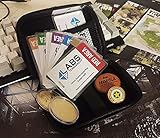
- Brand: Zhipengwen
- Included components: Cards
- Quantity: 1
Rank #2

- Card's inspiration comes from Game, high similarity to the original.
- The cards is made of PVC.And all cards have a card holder to protect them.
- Excellent material and thickness.A great replica!
- Best choice for game fans,halloween cosplay prop and even cards collectors.
- Include:7pcs cards
Product prices and availability are accurate as of the date/time indicated and are subject to change. Any price and availability information displayed on Amazon at the time of purchase will apply.




