The Legend of Zelda: Temple of Seasons is a fan-made patch for The Legend of Zelda: Oracle of Seasons, not an official Nintendo release. The available reporting does not establish widespread lag, low frame rates, or launch failures. If your copy will not patch or start, first check the patch version and the base-game file; if you are stuck in-game, check whether you are using the updated release.
What kind of problem are you seeing?
Separate a failed patch, a game that will not launch, and a progression blocker. They can have different causes. The available reports identify version and progression issues, but do not document a general Temple of Seasons performance fault or a supported emulator list.


- The patch will not apply: check that you have the intended patch and a compatible Oracle of Seasons base file.
- The patched game will not launch: confirm that the resulting file is the expected Temple of Seasons build before changing emulator settings.
- You cannot progress: verify the patch version; earlier player reports described progression problems that a creator reply said had been patched.
- The game seems slow or unstable: the reviewed sources do not identify a verified performance issue or a title-specific emulator fix.
Confirm the patch version and file
PlayCentral reports that Temple of Seasons was released on August 31, 2026, and identifies version 1.072, dated September 14, 2026, as a later release. Check the creator’s current release page for the latest instructions and version; the reported version may no longer be current.
RetroAchievements lists a supported Game Boy Color file named LoZOoS - Temple of Seasons (v1.072) (Jay).gbc with hash a898918990b5da7d92879e3e9458998c. If you have that same file type and build, comparing its hash can help confirm whether it matches the listed file. A different hash does not by itself prove your file is faulty: it could be another version or a differently prepared file.
The Tool Desk
Outbyte PC Repair FREEClear out junk files and repair common Windows errorsFree Scan →Outbyte Driver Updater FREEFix the driver behind crashes, sound loss and screen glitchesFind Drivers →#1 Best Overall

- The land of Holodrum is slowly withering. Onox, the General of Darkness, has imprisoned the Oracle of Seasons and is draining the very life out of the land. With the seasons in tumult and the forces of evil running rampant, the world looks for a hero... and finds Link. His quest won't be easy - he'll have to master the seasons themselves if he's to turn back the evil tide.
Check the base game before patching again
Temple of Seasons is distributed as a patch, so it is not a complete game file by itself. PlayCentral says a suitable US Oracle of Seasons ROM is required. The exact dump and revision specified by the creator were not established in the available sources, so consult the creator’s current instructions rather than assuming every US copy will work.
- Read the creator’s release instructions and identify the required base-game region, revision, patch format, and patching method.
- Make sure the base file and patch are the intended pair. General ROM-hack guidance warns that a mismatch in game version or language can prevent patching or produce an incorrect result.
- If patching fails, recheck those source files and requirements before troubleshooting the emulator. The sources do not verify a Temple of Seasons-specific patching tool.
These are compatibility checks, not confirmation that a particular patcher or ROM revision is supported by the project.
Rank #2
If the game launches but you cannot progress
The report on version 1.072 mentions bug fixes, unintended shortcuts, and possible softlocks or other progression blockers. Community discussion also includes earlier reports of progression problems and a creator reply saying those issues had been patched. That anecdotal discussion is not a complete current bug list.
- Check which patch version produced your game file.
- If it predates the reported fixes, compare your situation with the creator’s current release notes and update only using the creator’s instructions and a compatible base file.
- If the issue persists on the latest listed build, note the game version and the point where progress stops, then check the creator’s release page or community channel for a matching report.
What to do about lag, crashes, or a blank launch
The sources reviewed do not substantiate widespread lag, slow frame rates, crashes, or blank-screen launch failures for Temple of Seasons. They also do not establish an officially supported emulator or a reliable list of emulator settings. There is therefore no evidence-based Temple of Seasons setting to recommend as a universal fix.
Quick wins for a faster PC:
Repair Windows errors before they cause bigger problemsFix Now →Fix the driver behind crashes, sound loss and screen glitchesFind Drivers →Clear out junk files and repair common Windows errorsFree Scan →Rank #3

- Used Book in Good Condition
First verify that you are opening the intended patched file and that it matches the project’s current requirements. Then consult the creator’s live instructions for emulator or file-format guidance. Avoid treating generic emulator tweaks or PC optimizer software as confirmed remedies for this Game Boy Color ROM hack.
Independent reader supportYour contribution helps us test, update, and keep practical guides available for everyone.Know what this patch is—and is not
Temple of Seasons modifies The Legend of Zelda: Oracle of Seasons. RetroDodo attributes to creator Jay this description of the design: “Here more than ever, your growing arsenal is necessary for both traversal and combat, and expect a few brand-new items to add a fresh take on navigation even for Oracles veterans.” That is a creator statement reproduced by a secondary source, not a verified technical support claim.
Rank #4
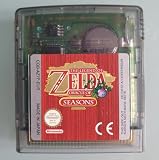
- AUTHENTIC CARTRIDGE & BRAND NEW BATTERY: Genuine Zelda Oracle of Seasons game cartridge, fitted with a brand new battery. Authenticated using software and experience. The cart and label are in great condition. The save files are refreshed and reset ready for a new adventure!
- This renewed game will not come with the original case or manual; cartridge only. It has been cleaned, tested, and is in nice condition.
- REGION FREE: This game is region free and works on ALL Game Boy Color consoles around the world.
- ENGLISH LANGUAGE GAME: This game plays in English
- PLATFORM COMPATIBILITY: Designed for the Nintendo Game boy Color console system, this cartridge is also compatible with the Nintendo GBA & GBA SP Consoles
Because the patch modifies the original game, having an original cartridge is not the same as having a pre-patched Temple of Seasons game. The patch’s availability and its exact installation requirements should be checked on the creator’s release page.
Quick Recap
Best Value
Sources
- PlayCentral’s Temple of Seasons report for reported release and version information, base-game requirements, and the update’s fixes.
- RetroAchievements’ Temple of Seasons listing for its supported v1.072 file name and hash.
- RetroDodo’s coverage for the creator statement and discussion of the base game.
- Community discussion for anecdotal early progression reports and the creator reply about fixes.
- RetroDodo’s general ROM-hack guide for the compatibility caution that base-game version and language can matter.
Product prices and availability are accurate as of the date/time indicated and are subject to change. Any price and availability information displayed on Amazon at the time of purchase will apply.
Do these 3 things before closing this tab:
1Clear out junk files and repair common Windows errors2Scan for outdated or missing drivers - takes under a minute3Repair Windows errors before they cause bigger problems



