Free tools Windows power users keep installed
One-click scans. No signup required.
In Mario Kart 8 Deluxe on Nintendo Switch, open the assist icons from the vehicle-selection screen or the in-race pause screen, then press the button shown beside Auto-Accelerate. The original Wii U version is outside the scope of these instructions.
Turn on Auto-Accelerate before a race
-
Choose your character and continue to the vehicle-selection screen.
-
Press + or − to show the vehicle stats and assist icons.
-
Find the Auto-Accelerate icon and press the button displayed beside it. The icon indicates whether the assist is on.
Quick wins for a faster PC:
Fix the driver behind crashes, sound loss and screen glitchesFind Drivers →Clear out junk files and repair common Windows errorsFree Scan →Scan for outdated or missing drivers - takes under a minuteDriver Scan →Special offer. See more information about Outbyte and uninstall instructions. Please review EULA and Privacy policy.#1 Best Overall
![Mario Kart 8 Deluxe - Nintendo Switch [Digital Code]](https://m.media-amazon.com/images/I/517O3bI45YL._SL160_.jpg) Mario Kart 8 Deluxe - Nintendo Switch [Digital Code]
Mario Kart 8 Deluxe - Nintendo Switch [Digital Code]- Hit the road with the definitive version of Mario Kart 8 and play anytime, anywhere! Race your friends or battle them in a revised battle mode on new and returning battle courses
- Play locally in up to 4-player multiplayer in 1080p while playing in TV Mode. Every track from the Wii U version, including DLC, makes a glorious return
- Plus, the Inklings appear as all-new guest characters, along with returning favorites, such as King Boo, Dry Bones, and Bowser Jr.
- Players can choose a new Smart Steering feature which makes driving and staying on the track easy for novice players and kids even at 200cc
Nintendo’s support instructions describe the vehicle stats panel; its support Q&A says to use the corresponding button shown with an icon to toggle it.
Turn it on during a race
-
Press + or − to open the pause screen.
-
Find the Auto-Accelerate icon and press its displayed button to toggle it on.
Rank #2
 Mario Kart 8 Deluxe (Non-US Version)
- Nuevos personajes: Inkling, Rey Boo, Huesitos y Bowsy
- Inclusi n de circuitos in ditos en el modo batalla
- Los pilotos cuentan con el volante inteligente, que ayuda a no salirse de la pista
- Hasta 8 pilotos en partidas de multijugador local
The same icon-control method applies in the pause screen, so you can change the setting without waiting to start another race.
What Auto-Accelerate does
With Auto-Accelerate enabled, your kart continues accelerating even when you are not holding the acceleration button. Nintendo recommends it for players who want to focus on practicing drifts and jump actions. This description appears in Nintendo’s beginner guide, dated 2023-04-19, whose contributor is identified as Gordon of the GameWith editorial team: Nintendo’s guide to Auto-Accelerate.
What’s actually slowing this PC down?
Pick the symptom - the matching free tool is one click away.
Rank #3
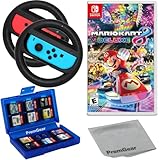
- Included is the following: Mario Kart 8 Deluxe - Nintendo Switch Game, 2x PremGear Steering Driving Wheels to use with your Joy-Con Controllers (NOT COMPATIBLE WITH SWITCH 2), PremGear 24 Slot Game card Case/Holder with 2 Slot MicroSD Memory Card Adapter and PremGear Quality Cleaning Cloth
- RACE ANYTIME, ANYWHERE! Hit the road with the definitive version of Mario Kart 8. Race your friends or battle them in a revised battle mode on new and returning battle courses
- Play locally in up to 4-player multiplayer in 1080p while playing in TV Mode. Every track from the Wii U version, including DLC, makes a glorious return
- Plus, the Inklings appear as all-new guest characters, along with returning favorites, such as King Boo, Dry Bones, and Bowser Jr.!
- Players can choose a new Smart Steering feature which makes driving and staying on the track easy for novice players and kids even at 200cc
Auto-Accelerate is not Smart Steering
Auto-Accelerate handles acceleration; Smart Steering is a separate assist that can automatically slow and steer when you are at risk of going off course. Nintendo also notes that Ultra Mini-Turbo, the third Mini-Turbo stage, is unavailable while Smart Steering is on. See Nintendo’s explanation of the assists.
The official game site identifies Mario Kart 8 Deluxe as a Nintendo Switch title: Nintendo’s game page.
Quick Recap
Product prices and availability are accurate as of the date/time indicated and are subject to change. Any price and availability information displayed on Amazon at the time of purchase will apply.



