Free tools Windows power users keep installed
One-click scans. No signup required.
Update a product’s dimensions in Products > All Products > edit product > Product data > Shipping. Enter the packed shipping length, width and height in the units configured under WooCommerce > Settings > Products, then select Update. Use the measurements of the item ready to hand to a carrier, including padding and other protective material—not the bare product. For variable products, enter dimensions on each variation that has a different packed size.
Antihost offers managed WordPress hosting with free migration, one-click staging and a 14-day free trial.
What WooCommerce package dimensions control
WooCommerce stores one shipping dimension set for a product: length, width and height. Shipping methods and carrier integrations can use those values with the product weight to calculate a rate, decide which package can contain an item, and determine whether a package exceeds a service limit. The same stored values can also appear in the product’s customer-facing Additional information area.
As an Amazon Associate I earn from qualifying purchases.
Quick wins for a faster PC:
Clear out junk files and repair common Windows errorsFree Scan →Fix the driver behind crashes, sound loss and screen glitchesFind Drivers →Repair Windows errors before they cause bigger problemsFix Now →Because the fields serve shipping calculations, they are not a place to record marketing dimensions or a catalog specification unless those measurements happen to be the size of the prepared parcel. A game console’s retail carton, a boxed collector’s edition or a padded mailer can all be materially larger than the item inside. Enter the size that will actually be presented to the carrier.
Before editing: confirm units and measure the packed item
Check the store’s unit settings
- In the WordPress administrator, open WooCommerce > Settings.
- Open the Products tab.
- Confirm the store’s weight and dimension units. Record the dimension unit before measuring or converting stock data.
Every product’s numbers are interpreted using these store-level units. If a supplier’s spreadsheet is in centimetres while the store is configured for inches, convert the values before saving. A correct number in the wrong unit can multiply or shrink a parcel in a carrier calculation.
#1 Best Overall

- Accurate to 0.1oz: High precision for postage, packaging, or food preparation.
- Solid design with high weight limit: 50Lbs
- Smart Tare & Hold Functions: Effortlessly subtract container weight or lock readings for larger boxes.
- Clear LCD Display: Large, backlit screen makes weights easy to read, even in dim rooms.
- Multi-measuring units: Kg, lb/oz, oz
Measure the parcel, not just the merchandise
Pack one representative unit exactly as it ships: use the final carton or envelope, inserts, void fill, corner protection, tape and any other material that changes the outside dimensions. Measure the outside length, width and height at their largest points. If a flexible mailer bulges, measure the packed bulge rather than the flat mailer dimensions. Keep a measuring tape beside the packing station; a shipping scale is useful when the weight is also being corrected.
- Length: the longest outside dimension of the packed parcel.
- Width: the next-longest outside dimension, measured perpendicular to length.
- Height: the remaining outside dimension, including the depth created by padding or a box lid.
- Decimals: enter decimal values only, without unit symbols, quotation marks or other special characters.
Do not round down to make a package fit a rate band. If packing varies, use a value that represents the normal shipment or standardize the packing process first. Oversized orders may require a separate package configuration or shipping rule.
Update a simple product’s dimensions
- Go to Products > All Products.
- Find the product and select Edit.
- In the Product data panel, open Shipping.
- Enter the packed parcel’s Length, Width and Height as decimal values. Populate all three fields; do not leave one blank when the carrier or box-packing method needs a complete cuboid.
- Review the product’s weight at the same time if a package was remeasured.
- Select Update to save the product.
Open the product again after saving and verify the values persisted. Then place a test order or use the shipping method’s rate preview, when available, to confirm that the quote reflects the new parcel.
Update dimensions for variable products
A variable product can inherit a parent product’s dimensions, but inheritance is only safe when every variation ships in the same-size package. When sizes differ, set dimensions on each relevant variation.
- Edit the variable product from Products > All Products.
- In Product data, open Variations.
- Expand a variation and locate its shipping fields. Enter that variation’s packed length, width and height.
- Repeat for every variation whose parcel differs, then save the variation changes and select the product’s Update button.
If a variation has no dimensions of its own, WooCommerce uses the parent product’s values. This fallback is helpful for identical-size options, but it can produce incorrect rates for, for example, a standard game versus a bundle with a larger box. Check a cart containing each size tier after editing.
Why the Shipping tab is missing
The Shipping tab is shown for eligible simple and variable products. Several product configurations intentionally do not expose those fields.
Rank #2

- Digital tabletop postal scale for quickly and precisely weighing items
- Includes a shipping postal scale and AC adapter; made of durable black ABS, aluminum, and iron
- 65 pound (30kg) capacity reads to 0.1 ounce (1g) in 0.1 ounce increments; minimum load weight is 0.2 ounces (5g)
- Extra large LCD display for easy viewing; measuring units in ounces, pounds, g, and kg
- Tare function for resetting the scale to zero after setting a container on the platform; great for net weights
| Product configuration | Expected dimension fields | What to do |
|---|---|---|
| Simple product that is shippable | Shipping tab available | Enter packed dimensions and save. |
| Variable product | Shipping tab on the product; variation-level fields when applicable | Set values per variation when package sizes differ. |
| Virtual product | Shipping fields hidden because no shipment is expected | Edit the product and clear the Virtual setting only if it really requires physical fulfillment. |
| Grouped product | Shipping tab absent | Maintain shipping data on the individual child products that are shipped. |
| External/Affiliate product | Shipping tab absent | Maintain shipping data in the system that fulfills the order, if your store does not ship it directly. |
If a product appears to be shippable but the tab is still absent, check its product type and the Virtual checkbox first. Also verify that you are editing the product itself rather than a read-only list view or an externally managed catalog record.
Should you enter physical size or packed shipping size?
Enter the packed shipping size. WooCommerce’s box-packing guidance defines shipping dimensions as the size of the item “as it will be packaged and shipped,” not the unpackaged measurements. Include the retail box when the retail box is shipped, and include the outer carton or mailer when you add one.
For a boxed video game, the jewel case or cartridge case is not the shipping parcel if it travels inside a padded envelope. Measure the complete envelope. For a console bundle, measure the carton containing the console, power supply, controllers and protective inserts. If an order combines products, the packing method may place them together or in separate packages; accurate individual dimensions give the packer better data in either case.
Keep a measurement record
- Product or variation SKU and pack configuration.
- Date measured and the person or station that measured it.
- Outside length, width and height in the store’s units.
- Packed weight, if corrected alongside dimensions.
- Notes about alternate cartons, bundles or seasonal inserts.
This record prevents a later catalog import from replacing a carefully measured parcel with a manufacturer’s bare-product dimensions.
Will changing dimensions change shipping rates?
It can. Live carrier methods and shipping extensions may use length, width, height and weight when selecting a service or calculating a quote. A larger parcel can trigger dimensional-weight pricing, an oversize surcharge or a different service. A smaller value can undercharge the customer and leave the store paying the difference.
The exact result depends on the carrier, destination, service, account rules and the shipping extension’s packing logic. WooCommerce identifies incorrect weight and dimension settings as a common reason for unexpectedly high rates. After changing dimensions:
Rank #3

- Lightweight Postal Scale - Max. Capacity: 440lb/200kg, Min. Readability: 40g, Display Resolution: 10g. Features a Carbon Fiber platform paired with a durable ABS housing. Lightweight + sturdy, easy to clean, move, and store.
- Digital Shipping Scale - 3 weighing Modes: kg/lb/lb:oz. Separate large back-lit LCD display with adjustable/disable Auto-off. Easy to handhold or wall-mount with the included drywall anchors and screws.
- User Friendly Design - Ships pre-calibrated and can also be easily calibrated. Dual powered by 2 x AAA batteries or AC adapter (both included).
- Hold & Tare Function - Locks readings and removes container weight for multiple weighing needs. Ideal for post offices, warehouses, commercial and home use.
- Fuzion Support - We offer 2-Year Warranty and Lifetime Support for this digital scale. Full day service by our support team. We are always glad to help with all your questions or concerns.
- Check the product’s saved dimensions and weight in the store’s configured units.
- Use the shipping extension’s rate calculator or create a test order for representative destinations.
- Enter the same packed weight and dimensions in the carrier’s own rate tool, using the same service and destination.
- Compare the two results and inspect extension settings for dimensional-weight formulas, handling fees, minimums, packaging rules or rounding.
- Check a cart with multiple quantities and a cart combining different products; packing behavior can differ from a single-item quote.
Do not treat a lower quote as proof that the new values are correct. Compare the parcel on a ruler and scale first, then investigate the carrier or extension when the measured package still produces an unexpected rate.
Do not remove dimensions to hide them from the product page
WooCommerce uses the stored weight and dimension values for carrier calculations and can display them in the customer-facing Additional information area. Deleting the values to suppress that display also removes the data needed for shipping rates and box packing.
What’s actually slowing this PC down?
Pick the symptom - the matching free tool is one click away.
If shoppers should not see a dimension row, keep the shipping values populated and change the presentation instead. Depending on your setup, use a product attribute for a customer-friendly specification, a translation string, or a theme customization to alter the label or hide the row. Treat the shipping fields as operational data and the product-page display as a separate presentation concern.
Configure reusable boxes and envelopes
Product dimensions describe the item as packed for shipment. WooCommerce Shipping can also store the outer packages your operation uses. Create a reusable Box or Envelope, enter its length, width and height, and save it as a template.
Box-packing logic compares a product’s dimensions with the available package dimensions. It can also consider the product’s weight and a package’s maximum weight. A package template therefore needs realistic inside capacity, not merely the manufacturer’s outside size if walls or padding reduce usable space.
When a package template helps
- You ship many products in a small, repeatable set of cartons.
- Several variations use the same mailer or box.
- You want packing calculations to account for a package weight limit.
- You need consistent quotes without manually selecting a box for every order.
When to review the template
Recheck templates when you change carton suppliers, add thicker protection, change the maximum package weight or discover that a product only fits diagonally or with a particular orientation. Product dimensions and package templates work together; updating one while leaving the other stale can still produce a poor quote.
The Tool Desk
Outbyte Driver Updater FREEScan for outdated or missing drivers - takes under a minuteDriver Scan →Outbyte PC Repair FREERepair Windows errors before they cause bigger problemsFix Now →Rank #4

- Digital shipping postal scale for weighing items; heavy duty yet lightweight, portable design
- Includes a postal scale and an AC adapter; black ABS with an aluminum anti-skid platform
- 660 pound (300kg) capacity reads to 0.11 pound/50g/2 ounce in 0.1 ounce increments; minimum load weight is 6 ounces (150g)
- Measuring units in kg, ounces, and pounds
- Additional separated large back-lit LCD display allows for reading the weighing data from a distance of up to 2m
Choose an update method for your catalog
| Method | Best fit | Per-variation handling | Automation frequency | Box-packing support | Main risk |
|---|---|---|---|---|---|
| Manual product editing | A small catalog or occasional corrections | Open and update each variation that differs | One-off or infrequent | Uses the saved values; package templates remain separate | Typing or unit-conversion errors across many products |
| REST API update | An inventory, ERP or warehouse system that owns measurements | Synchronize each variation record when it has its own dimensions | Scheduled or event-driven | Depends on the store’s shipping and packing configuration | An import can overwrite accurate packed measurements with bare-product data |
| Shipping or packing extension | Stores needing carrier-specific rules, reusable packages or advanced packing | Uses product or variation data supplied to the extension | Continuous at checkout | Can compare items with Box or Envelope templates and weight limits | Extra rules may alter rates; inaccurate package data remains inaccurate |
Regardless of method, establish one authoritative measurement source. If an ERP supplies dimensions, make clear whether its fields represent the packed parcel. Add a validation step that rejects blank, zero or implausibly large values before synchronization.
Update dimensions programmatically with the REST API
The WooCommerce REST API product schema exposes writable string properties for dimensions.length, dimensions.width and dimensions.height. A system that already knows the packed measurements can send those fields in a product update instead of relying on manual edits.
A typical update payload is:
{
  "dimensions": {
    "length": "30.5",
    "width": "22",
    "height": "4.5"
  }
}
Use the authentication, product identifier and API endpoint already configured for your store, and send decimal values as strings in the store’s configured dimension unit. For variations, update the variation record rather than assuming the parent value will be appropriate. After an automated run:
- Read the product or variation back and confirm the three saved strings match the source record.
- Log the SKU, old values, new values and synchronization timestamp.
- Spot-check a rate for a product whose dimensions changed materially.
- Alert on missing values, nonnumeric characters, negative numbers or unexpected unit conversions.
Automation should never silently replace measured shipping dimensions with a supplier’s catalog dimensions. Store the source-unit metadata or convert before transmission so a value such as 30.5 has an unambiguous meaning.
Crashes, No Sound, or Screen Glitches?
Random freezes, missing sound and display glitches usually trace back to one bad driver. Find and replace yours safely.Free scan · under a minuteWindows Errors? Fix Them Before They Spread
Repair common Windows errors and clear accumulated junk for a smoother, more stable PC - no reinstall needed.Free scan · no reinstallTroubleshoot common dimension problems
The Shipping tab is not visible
Confirm the product is simple or variable, is not marked Virtual, and is not Grouped or External/Affiliate. If the product is managed by an import or a custom product editor, make the change in the system that ultimately writes WooCommerce’s product data.
The rate became unexpectedly high
Recheck units, decimal placement, packed rather than unpacked measurements, and the product weight. Compare the exact parcel with the carrier’s calculator. Then inspect the extension for dimensional-weight settings, handling adjustments, package limits and rounding. Test one product at a time before changing a whole catalog.
Best Value
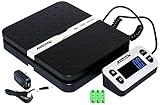
- Solid structure & Sleek/Modern Design – ACCUTECK postal scale is designed with durable plastic platform, user-friendly buttons, backlit extended display and two way 90 degree-opened lid.
- Enhanced capacity with higher precision- This new postal scale can hold a max weigh up to 110 lbs in 0.1 oz graduation. It can meet all your needs from a first-class package to parcel packages. Start weight: 10g.
- Multi Measuring Units with extra Large LCD display. Measure in oz, g, lb/oz. The extra large back-lit LCD display allows you to work under any environment.
- Convenient Tare/Hold Function and the shipping postal scale features are tare function which allows you to zero out the number for multi-packages purpose. Hold function allows you to lock the number after you take the package off the platform.
- Power supply: Batteries, USB cable Charger, AC adapter (All Included). When using on Battering, it will turn off automatically after 90 seconds. When using Ac adapter for power supply, it won't turn off automatically.
The rate is suspiciously low
Look for a missing field, a parent dimension being inherited by a larger variation, or a value entered in the wrong unit. Measure the sealed parcel again. A low quote can be an undercharge that appears only when the carrier audits the shipment.
Dimensions save but do not affect checkout
Not every shipping method uses dimensions. Confirm that the selected carrier integration or packing extension reads product dimensions, that the product is assigned to the intended shipping method, and that cached rates have been refreshed. Test with a destination and cart for which the method should calculate a live quote.
Customers see an unwanted dimension row
Keep the values for shipping. Change the customer-facing Additional information presentation with an attribute, translation or theme customization rather than deleting operational data.
A variation receives the wrong package
Open the variation and enter its own dimensions. WooCommerce falls back to the parent’s values when the variation fields are empty, so inheritance is the likely cause when only one size or bundle is wrong.
A safe maintenance workflow
- Define the packing standard: decide which carton, mailer and protective materials count as the shipped parcel.
- Confirm units: check WooCommerce > Settings > Products before measuring or importing.
- Measure and record: capture outside length, width, height and weight for each distinct pack configuration.
- Update the source: edit products manually, synchronize through the REST API, or update the catalog system that owns the data.
- Handle variations: add values to every variation whose packed size differs; leave inheritance only for genuinely identical parcels.
- Configure packages: maintain reusable Box and Envelope templates with realistic dimensions and maximum weights.
- Validate rates: test single-item, multi-quantity and mixed-product carts against the carrier or extension.
- Monitor exceptions: flag missing, zero, implausible or abruptly changed dimensions for review.
This workflow keeps the values useful to both the checkout calculation and warehouse packing without sacrificing the customer-facing product specification.
Quick Recap
Key decisions at a glance
| Question | Correct decision |
|---|---|
| What numbers belong in the fields? | The parcel’s packed length, width and height, including protective material. |
| Where are they edited? | Products > All Products > edit > Product data > Shipping. |
| What if variations differ? | Set dimensions on each differing variation; otherwise the parent values are used. |
| Why are fields absent? | The product may be Virtual, Grouped or External/Affiliate, or otherwise not an eligible shippable simple/variable product. |
| Can dimensions change rates? | Yes, when the carrier method or extension uses parcel size, weight or packing rules. |
| Can values be hidden from shoppers by deleting them? | No. Keep operational values and customize the Additional information display instead. |
Product prices and availability are accurate as of the date/time indicated and are subject to change. Any price and availability information displayed on Amazon at the time of purchase will apply.
Do these 3 things before closing this tab:
1Clear out junk files and repair common Windows errors2Scan for outdated or missing drivers - takes under a minute3Repair Windows errors before they cause bigger problems



