To use WoW’s built-in voice chat, join a party or raid voice channel using the group or chat controls shown in your current client. Then make sure the intended microphone and speaker or headset are selected, unmuted, and at a usable volume. Blizzard introduced voice chat for party and raid play, where the game can also show who is speaking. Blizzard’s announcement described the launch as: “For starters, we’re integrating Blizzard Voice Chat into World of Warcraft.”
Join your party or raid voice channel
First, join or form the party or raid whose members you want to talk with. Use the voice-channel controls available in your installed client to join the channel for that group; labels and placement can change, so follow the controls currently displayed rather than relying on an older menu path. WoW’s built-in voice chat is intended for party and raid communication, not as a general voice room for every player online.
Once connected, check the channel’s participant or speaker indicator while someone talks. If you can see activity but cannot hear anything, check your output device and volume. If the channel shows no voice activity when you speak, check your microphone selection, mute state, and whether the account is allowed to use voice chat.
Set up your microphone and audio output
You need a working microphone to speak, but you do not need to buy a headset if you already have a microphone that works with your computer. In Windows, confirm that the microphone is available and permitted for apps to use. In WoW’s audio controls, select the intended input and output devices if those options are available, then check that neither the microphone nor the speakers or headset are muted and that their volumes are audible.
Free tools Windows power users keep installed
One-click scans. No signup required.
#1 Best Overall

- WORLD OF WARCRAFT EDITION — Showcase your allegiance to the Horde with these unique speaker plates and headband
- FREE IN-GAME ITEM — Receive the Battle Turtle mount as a digital reward in-game
- MAGNETIC SPEAKER PLATES — Transparent speaker plates easily snap and display the insignia and color motifs of the Horde
- ADJUSTABLE HEADBAND — Nylon headband stretches overhead and distributes weight for optimal comfort; embossed with the warcry: "For the Horde!"
- COMPATIBILITY — Fits SteelSeries Arctis Nova Pro line and Nova 7 Wireless headsets
- Standalone microphone: A suitable choice if you already have one and prefer separate headphones or speakers.
- Headset with microphone: Combines listening and speaking in one device. Consider comfort, wired or wireless connection, and Windows compatibility.
Bluetooth devices may not function properly with WoW voice chat, according to Blizzard’s troubleshooting information; this is a possible compatibility issue, not proof that all Bluetooth devices are unsupported. If voice fails, test another compatible input or output device before concluding that the voice service itself is unavailable.
Troubleshoot when you cannot hear or be heard
Work through these checks in order. They separate account restrictions from local audio, software, and connection problems.
Rank #2

- 【MULTI-PLATFORM GAMING HEADSET】Mpower is a multi-platform gaming headset, which can connect to PS4 / XBOX ONE ( 2015 Version ) / Laptop / VR/ Mobile Devices via the 3.5mm audio+mic combined jack. The conversion cable with dual 3.5mm audio and mic jacks is for connecting to PC.
- 【EXCELLENT STEREO AUDIO】Mpower is equipped with 50mm speakers and makes the stereo sound powerful. The retractable and flexible microphone picks up your voice clearly and the big leather earmuffs provide an extreme noise-cancellation function.
- 【SUPERIOR USING EXPERIENCES ON MOBILES AND CONSOLES】Convenient in-line control is easy to adjust while gaming. The compatible L-shape jack at the end of cable makes it easy to put the hands in the right position with comfortable posture while playing mobile games.
- 【COMFORTABLE TO WEAR】The ear muffs are padded with skin-friendly leather, which feels extremely soft.This comfortable earmuffs and headband are breathable and skin-friendly to wear for a long while.
- 【Perfect After-sales Service】 Please kindly know that all the products would be checked or tested before shipping out to ensure a good shopping experience. We promised to bring the best quality gaming headset to our customers. We offer 18 months after-sale service to our customer.
- Check account eligibility and restrictions. Blizzard says first-time accounts cannot use WoW voice chat, and an account under a silence penalty cannot use it. If the feature worked before and stopped, check whether a silence restriction applies.
- Check parental controls. Confirm that the account’s parental-control settings allow voice communication.
- Check Windows audio access. Make sure Windows recognizes the microphone and selected playback device, and that the microphone is not muted or blocked from app access.
- Check WoW audio settings. Select the intended input and output devices where the controls are available, and verify mute and volume settings.
- Update drivers and the operating system. Install applicable updates for the audio device and operating system, then restart the game and test again.
- Check network configuration. Firewall, router, or port settings can interfere with voice connections. Review the relevant configuration if account and audio checks do not help.
- Close conflicting applications. Exit other programs that may be taking control of the microphone or audio devices, then reconnect to the group voice channel.
If the voice setting is missing or these checks do not resolve the problem, consult current Blizzard voice-chat troubleshooting guidance or contact Blizzard Support. Menu options and support instructions may change; follow the current client and support pages rather than deleting configuration files based on an unverified workaround.
Use text-to-speech and voice transcription
Blizzard has documented two accessibility features for voice chat. Voice transcription turns other players’ speech into text for the session. Speak for Me reads text you enter in the Voice tab aloud to other people in a voice channel. Blizzard’s announcement says Speak for Me is available only on English clients; it describes the Voice tab in Communities, raid, custom-channel, party, and Battle.net group contexts. Availability and placement can vary in the current client, so check the relevant voice controls. Read Blizzard’s feature announcement.
Recommended Free Tools
Rank #3
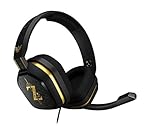
- The A10’s durable aluminum headband with damage-resistant rubberized cover and detachable cable system is designed to withstand wins, losses, and everything in between.
- Tuned for Gaming, ASTRO Audio was developed with pro gamers and game designers to deliver clarity and detail at every frequency and volume level.
- Featuring over-the-ear construction with premium ear cushions and headband, these lightweight ASTROs lower fatigue and extend the duration of any gaming session.
- Crystal clear communication and easy flip-to-mute action puts you in control of your voice com.
- The A10 connects to any audio source with a 3.5 millimeter jack – perfect for console controllers and most PCs and Macs.
Built-in WoW voice chat and guild Discord are different
Built-in WoW voice chat connects members of the relevant party or raid. Guild Discord integration is a separate route that depends on Battle.net account linking and guild configuration. Blizzard described setup through Game Menu (Escape) > Options > Social, where players enable Discord functionality and link accounts. The integration’s availability and current setup can change, so verify that the option appears in your client and that your guild has configured it. See Blizzard’s Discord integration announcement.
Quick Recap
Rank #4

- WORLD OF WARCRAFT EDITION — Decorate your station with the WoW-themed QcK XXL, showcasing the history-altering Sword of Sargeras in its devastating, epic glory
- FREE IN-GAME ITEM — Receive the Battle Turtle mount as a digital reward in-game
- LEGENDARY MICRO WOVEN CLOTH — The top choice of esports pros for nearly 20 years gives you every advantage to top your meters and slay your foes
- PINPOINT MOUSE ACCURACY — Every ability click matters when your mousepad has a high thread count and smooth surface to optimize mouse tracking for low and high DPI
- NEVER-SLIP BASE — The durable, non-slip rubber base is designed to eliminate unwanted movement and provide a solid platform, while showcasing the Sword of Sargeras from World of Warcraft
Product prices and availability are accurate as of the date/time indicated and are subject to change. Any price and availability information displayed on Amazon at the time of purchase will apply.



