To win Dual Front, advance the enemy lane by clearing its objective room, planting and defending the sabotage kit, and capturing sectors until your team can sabotage the enemy Base. At the same time, keep enough players defending your own lane to stop the opposing push. Ubisoft announced that Dual Front would be removed at the start of Year 11 Season 2, so check the live playlist before trying these tactics; Ubisoft’s announcement does not establish whether removal has taken effect as of October 8, 2026.
How Dual Front’s win condition worked
Ubisoft’s March 13, 2025 mode overview describes Dual Front as a 6v6 mode with two live objectives: each team attacks the other team’s lane while defending its own. Capturing a sector required planting a sabotage kit in the opposing objective room and protecting it. The push then advanced toward the enemy Base, where sabotage won the match. Kills matter when they open a route, protect a plant, or buy time to defend; they do not replace objective progress. Ubisoft’s Dual Front overview
How to play for the win
1. Track both lanes and assign roles
Before committing to a fight, identify who is pushing the enemy objective and who is holding your lane. Both objectives remain live, so sending everyone forward can give the opposing team an uncontested route to sector progress. Reassign players as pressure shifts rather than treating attack and defense as separate phases.
2. Clear, plant, and protect as a group
Move together to clear defenders from the objective room, then plant the sabotage kit and stay close enough to deny a defuse or retake. Avoid chasing isolated kills away from the objective while the plant is exposed. Once the sector is captured, regroup and continue the push toward the Base.
#1 Best Overall

- Get the Elite Edition of Rainbow Six Siege X to get access to all game modes and instantly unlock 16 additional operators!
- High stakes 5v5 attack vs. Defense - Alternate between attack and defense, adapting your approach to operators and maps. Feel the thrill and intensity of the action as you leverage next-level destruction and gadgetry to outsmart your opponents in every round.
- Tools of destruction - Destruction is more than chaos: it is a key tool for your success. Use the environment to your advantage – turn walls into windows of opportunity.
- Dual front: dynamic tactical 6v6 warfare - Engage in intense 6v6 battles, where attackers and defenders fight side by side and push to capture enemy sectors while defending their own.
- From recruit to elite - A solid onboarding journey for new players, including a new clearance level path that helps you learn the basics progressively and build the skills and confidence you need before jumping into tactical action.
3. Rotate through District with communication
Ubisoft describes District as a large map with playable exterior routes and a neutral sector between the two lanes. Use those routes to flank, reposition, ambush, or reinforce the other lane. Call out the rotation and who is covering your original position; a useful flank can still cost the team if it leaves an objective undefended.
4. Use respawns to adapt, not to rush alone
Players respawn, and a team can include operators suited to both attacking and defending. After a respawn, check which lane needs help, regroup with teammates, and choose a gadget that supports the current push or hold. Returning alone without a clear objective usually gives the other team an easier fight.
Rank #2

- Jump into the latest expansion, Operation Phantom Sight, and play as the two new operators, Nokk and Warden
- Command an arsenal of gadgets to secure the win: Set traps, fly drones, track footsteps, see through walls, and more
- Lead your teammates to victory in intense, fast paced PVP matches across a wide variety of destructible arenas
- Join a massive online community of over 45 million players as you fight for supremacy
- An ever expanding universe of Operators, gadgets, items, and events updated all year long
5. Weigh neutral-sector assignments against lane urgency
Time-limited assignments can appear in the neutral sector and reward the team that completes them. Check the active assignment and its reward, then decide whether enough teammates can contest it without yielding a more urgent objective. The value and mechanics of assignments can vary by season, so do not assume an older reward applies to a later version.
Season-specific mechanics are not a universal strategy
In its Year 11 Season 1 Operation Silent Hunt notes, Ubisoft described Malware Containment as an assignment involving an access key and antennas. The key-holder had to shut down five active antennas without using weapons, relying on gadgets; three of six antennas were active at a time. Completing five shutdowns secured two thirds of an enemy sector. Those notes also said supported operators would be available that season, objectives would keep accumulated progress rather than use three checkpoints, and playable operators would receive an extra secondary gadget. These are season-specific details, not a dependable description of a currently available mode. Ubisoft’s Operation Silent Hunt notes
What’s actually slowing this PC down?
Pick the symptom - the matching free tool is one click away.
Rank #3

- ONE Blind Bag Included – Each purchase contains one sealed blind bag with a 5" collectible bag clip featuring a surprise character from the series.
- Official Licensed Merchandise – Authentic character designs made with high-quality sculpting, bold colors, and durable foam material built to last.
- Display or Clip Anywhere – Attach to backpacks, keychains, totes, lanyards, or display at home or work to showcase your fandom.
- Perfect for Fans & Collectors – A fun surprise for collectors of blind bags and mystery figures, and a must-have for fans of the featured series.
- Gift-Ready & Fun to Trade – Great for birthdays, holidays, party favors, or conventions—collect the full wave or trade with friends to complete the set.
Earlier, Operation Tenfold Pursuit brought back a Hostage assignment involving a VIP to protect and extract, alongside an operator rotation and penalties for abandoning a live match without reconnecting. Those details describe that earlier season and should not be treated as current rules. Ubisoft’s Operation Tenfold Pursuit notes
Independent reader supportYour contribution helps us test, update, and keep practical guides available for everyone.Check whether Dual Front is playable
Ubisoft’s Year 11 Season 1 notes announced that Dual Front would be removed at the start of Year 11 Season 2. The announcement alone does not confirm the live playlist state on October 8, 2026. Check the in-game playlist; if Dual Front is absent, the tactics above explain the mode as documented rather than describing a playable current option. Ubisoft’s removal announcement
Quick Recap
Best Value
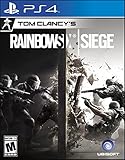
- Jump into the latest expansion, Operation Phantom Sight, and play as the two new operators, Nokk and Warden
- Command an arsenal of gadgets to secure the win: Set traps, fly drones, track footsteps, see through walls, and more
- Lead your teammates to victory in intense, fast paced PVP matches across a wide variety of destructible arenas
- Join a massive online community of over 45 million players as you fight for supremacy
- An ever expanding universe of Operators, gadgets, items, and events updated all year long
Rank #4

- Dive into the heart of the mission with Rainbow Six Siege Action.
- OFFICIALLY LICENSED UBISOFT GEAR
- Lightweight, Classic fit, Double-needle sleeve and bottom hem
Product prices and availability are accurate as of the date/time indicated and are subject to change. Any price and availability information displayed on Amazon at the time of purchase will apply.



