Nintendo’s built-in Zoom feature magnifies the screen in supported menus and game modes on Nintendo Switch, Switch Lite, Switch OLED, and Switch 2. Turn it on in System Settings first, then press the HOME button twice while playing to enter Zoom. Nintendo notes that some game modes are unsupported, so it does not work in literally every game or mode.
Turn on Zoom for your Switch model
The setting is in a different menu on Switch 2. Choose the instructions for your console:
- Nintendo Switch, Nintendo Switch Lite, and Nintendo Switch – OLED Model: From the HOME Menu, open System Settings > System > Zoom, then turn Zoom on. Nintendo’s Zoom instructions for the original Switch family cover these three models.
- Nintendo Switch 2: From the HOME Menu, open System Settings > Accessibility > Zoom, then turn Zoom on. See Nintendo’s Switch 2 Zoom instructions.
Zoom is a system feature, so enable it before using the HOME-button shortcut in a game.
Zoom in while playing
- Start a game or open a system menu that you want to magnify.
- Press the HOME button twice to enter Zoom mode. On Switch 2, press it twice quickly.
- Press X to zoom in or Y to zoom out. On a touchscreen, pinch to adjust magnification.
- Use either control stick to move the enlarged focus area on Switch 2. Nintendo documents this control in its Switch 2 accessibility guide.
Lock, unlock, or exit Zoom
- Press HOME once to lock the current magnification.
- Press HOME once more to unlock the view and adjust it again.
- Press HOME twice to exit Zoom mode.
What Zoom does not do
Zoom is not supported in every game mode; Nintendo specifically gives VR Mode as an example for the original Switch family. If the shortcut does not work during a particular mode, that mode may not support the feature.
Quick wins for a faster PC:
Fix the driver behind crashes, sound loss and screen glitchesFind Drivers →Repair Windows errors before they cause bigger problemsFix Now →#1 Best Overall

- Portable gaming monitor and speaker system to expand Nintendo Switch
- Charges your Switch while you play, it also works with any console or smart phone
- 11.6 HD IPS Screen with dual speakers and a headphone jack
- With the new iOS 16, you can now pair your Nintendo controllers to your iPhone allowing you to use the controllers with all iPhone games. With an optional Apple Lightning to Digital AV Adapter plus an HDMI Cable, you can now use the UpSwitch and controllers with all iPhone games, plus enjoy movies and videos!
A screenshot captured while the screen is zoomed saves the standard, non-zoomed view. Zoom magnifies what you see on the display; it does not produce an enlarged screenshot.
Using Zoom on the Switch 2 touchscreen
On Switch 2, touchscreen pinch adjustment is available in handheld or tabletop mode. The Accessibility menu also has system-menu text-size options, but Nintendo distinguishes those from display settings inside games; Zoom is the magnification control described here.
Quick Recap
Best Value

- Specifically designed for Nintendo Switch 2017 6.2" (2017)
- Ultra-clear High Definition with 99.9% transparency to allow an optimal, natural viewing experience
- Ultra thin-0.3mm thickness is reliable and resilient, and promises full compatibility with touchscreen sensitivity
- Highly durable, and scratch resistant - surface hardness 9H and topped with oleophobic coating to reduce fingerprints.
- Includes: 2x GLASS Screen Protector, Wipes, Micro-Fiber Cleaning Cloth, Easy Installation Use Guide, Hinge Stickers
Rank #4

- 【14 Inch Screen Magnifier】- 2023 new upgraded 14'' 3D c screen amplifier can magnify your phone screen 2-3times, fully fit the curvature of the human eye, more comfortable to watch. The screen magnifier will reduce the discomfort and visual fatigue caused by long-term focus on the small screen, and can effectively reduce the radiation.
- 【Hight Quality Fresnel Lens and HD Zoom】- The upgraded 3d phone projector adopt fresnel lens ,HD zoom optical and blue-ray radiation protection technology, to provide high-definition image and reduce visual fatigue,the screen is more clear than other screen at the market. Even if you force the screen to flatten, but when you let go,The screen will still be restored to a curved screen.
- 【Adjustable Focal Length & Portable】- The phone screen magnifier with adjustable focal length fully fit for most of mobile phone. Folding design, lightweight and compact, convenient carrying, suitable for indoor, office, desktop, travel, journey. Free your hands when using this cell phone screen magnifier to watch films and videos , enjoying your time everywhere.
- 【Compatible With Your Device】- The screen magnifier is specifically designed to fit most smartphones, such as iPhone 17/17 Pro Max /16/16 Pro Max/15/15 Pro Max/14/13/12/XR/8/7/6, Samsung Galaxy Note 10/9/8/7/6/5 Edge Android phone smartphones.
- 【Best Gifts】- Simple and stylish design, it is best choice of holiday gifts for your friends or familys. We’re convinced you will love your new Screen Magnifier, If you have any queries with your purchase, our support team is available to assist within 24 hours.
Rank #3
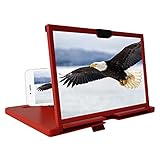
- Screen Magnifier Companion with Phone: The 12" phone magnifier enlarge your phone screen 3-4 times,looks like a tablet.It Helps relieve any discomfort and visual fatigue that you might experience by focusing on small screens for long times,Let you watch video and play games at ease.
- Drawer & Foldable Design: With Drawer design, you just need pull the screen out from the protective cover which is important so it doesn’t scratch the screen. Foldable and easy to carry design,simple and generous appearance,10mm light weight design,booksize feels good when carried.
- HD Blue-ray: The 3D phone projector provide high-definition image and reduce visual fatigue,the screen is more clear than other screen at the market. With silicone pad on the phone stand,which can prevents the phone from slipping, this 3D HD phone screen magnifier bring you a good visual experience
- Compatible with Your Device: The screen magnifier is specifically designed to fit most smartphones, so whether you have an for iPhone or an Android phone, the magnifier projector screen is sure to work with your device. Moreover, the screen magnifier required no battery
- Best Gifts: 3D phone screen enlarger, the best gifts to friends or family who like to watch movies, watch 3D mobile movies with more stereo effects. A Good Gift for kids, help them protect their eyes from close viewing distance. The Best Gift for the elderly, help them to see the small screen more clear
Rank #2

- 【Compatible Models】Compatible with Nintendo Switch OLED (2021 Model). Specifically designed for the original Nintendo Switch OLED version. NOT compatible with Nintendo Switch , Nintendo Switch Lite. You can check the model on the external panel on the back of the machine.
- 【Perfect Screen Repair Solution】Very suitable for replacing Nintendo Switch OLED screens with cracks, damage, malfunctions, blurriness, or dead pixels. Effectively fixes display issues and restores your console to like new condition.
- 【 Package Details 】 Includes Nintendo Switch OLED screen assembly and complete repair tools. All necessary tools are provided, so no extra purchases are required for your replacement.
- 【Quality & Installation Tips】Each screen is fully tested before shipping to ensure perfect performance. LCD replacement requires professional skills and careful operation. We recommend installation by experienced technicians. Not recommended for inexperienced users to install alone.
- 【Reliable After-Sales Support】Customer satisfaction is our top priority. If you receive any defective item or encounter functional problems, please contact our support team anytime. We will reply quickly and provide you with a satisfying solution.
Product prices and availability are accurate as of the date/time indicated and are subject to change. Any price and availability information displayed on Amazon at the time of purchase will apply.
Independent reader supportYour contribution helps us test, update, and keep practical guides available for everyone.



