The wired HyperX Cloud III is a good gaming headset for players who prioritize comfort, durability, voice chat, and broad platform support over wireless freedom or audiophile sound. Its closed-back memory-foam fit is excellent for long sessions, the removable microphone is dependable for Discord and in-game chat, and the included USB sound device adds EQ and virtual DTS Headphone:X support on compatible systems.
Its weaknesses are equally important: it has no wireless mode, Bluetooth, or active noise cancellation; its soundstage is fairly narrow; its tuning can sound dark or bass-light depending on the listener and fit; and DTS is not automatically better than ordinary stereo. At around $80 it is easy to recommend. At its $99.99 MSRP, comparison shopping matters more.
As an Amazon Associate I earn from qualifying purchases.
HyperX Cloud III: quick verdict
| Best for | Not ideal for |
|---|---|
| Long gaming sessions, PC and console flexibility, wired reliability, and clear voice chat | Wireless play, Bluetooth, ANC, wide soundstages, powerful cinematic bass, or recording-quality microphones |
- Connection: Wired 3.5mm analog or USB
- Launch MSRP: $99.99
- Observed HyperX US price: $79.99, with the checked black SKU listed out of stock during the page check
- Recommended price: Around $70–$80
- Warranty: Two years
The price and stock signal are time-sensitive; check the official HyperX product page before buying.
Crashes, No Sound, or Screen Glitches?
Random freezes, missing sound and display glitches usually trace back to one bad driver. Find and replace yours safely.Free scan · under a minuteWindows Errors? Fix Them Before They Spread
Repair common Windows errors and clear accumulated junk for a smoother, more stable PC - no reinstall needed.Free scan · no reinstallDesign, comfort, and build quality
Comfort is the Cloud III’s strongest reason to exist. It is a closed-back, over-ear headset with memory foam in both the headband and ear cushions. The leatherette covering feels soft and helps create a consistent seal, while the flexible headband and aluminum frame give it a sturdier feel than many budget plastic headsets.
#1 Best Overall

- Comfort is King: Comfort’s in the Cloud III’s DNA. Built for gamers who can’t have an uncomfortable headset ruin the flow of their full-combo, disrupt their speedrun, or knocking them out of the zone.
- Audio Tuned for Your Entertainment: Angled 53mm drivers have been tuned by HyperX audio engineers to provide the optimal listening experience that accents the dynamic sounds of gaming.
- Upgraded Microphone for Clarity and Accuracy: Captures high-quality audio for clear voice chat and calls. The mic is noise-cancelling and features a built-in mesh filter to omit disruptive sounds and LED mic mute indicator lets you know when you’re muted.
- Durability, for the Toughest of Battles: The headset is flexible and features an aluminum frame so it’s resilient against travel, accidents, mishaps, and your ‘level-headed’ reactions to losses and defeat screens.
Independent testing measured the headset at approximately 308g without the microphone and 320g with it. That is comfortable for many users, but it is not an ultra-light headset. Moderate clamping force, soft pads, and a flexible fit make it suitable for long sessions, including for many glasses wearers. Larger heads should have enough adjustment range, while smaller heads may find the fit less secure depending on shape.
There are caveats. Leatherette pads can become warm, especially in a heated room, and closed-back headphones feel less airy than open-back designs. The earcups move for fit adjustment but the headset is not designed as a particularly compact travel headset. The fixed cable also means cable wear is a more important long-term concern than it would be with a fully detachable headset cable.
The removable boom microphone is convenient: take it off when listening to music or using the headset as ordinary headphones, then reconnect it for gaming. The metal frame improves confidence, but it does not make the hinges, connectors, cable strain points, or earcup swivels indestructible.
Free tools Windows power users keep installed
One-click scans. No signup required.
Sound quality: clear for games, less convincing for music
The Cloud III uses 53mm dynamic drivers, but driver size alone does not predict sound quality. In practice, it is better understood as a clarity-focused gaming headset than a universally exciting audio upgrade.
Competitive games
Footsteps, dialogue, environmental effects, and other positional details are generally easy to follow. Separation is good enough for competitive shooters, and the relatively restrained presentation may be preferable to a headset that buries detail under excessive bass. However, the passive soundstage is not especially wide, so it does not create the spacious presentation associated with open-back headphones or some wider-sounding gaming models.
Rank #2
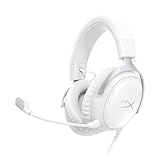
- Comfort is King Comfort’s in the Cloud III’s DNA. HyperX signature memory foam in the headband and ear cushions wrapped in soft, premium leatherette make for a plush, comfortable fit all around.
- Audio Tuned for Your Entertainment Angled 53mm drivers have been tuned by HyperX audio engineers to provide the optimal listening experience that accents the dynamic sounds of gaming.
- Upgraded Microphone for Clarity and Accuracy Captures high-quality audio for clear voice chat and calls. The mic is noise-cancelling and features a built-in mesh filter to reduce disruptive sounds. It also features an LED mic mute indicator that lets you know when you’re muted.
- Durability, for the Toughest of Battles The headset is flexible and features a full metal frame so it’s resilient against travel, accidents, mishaps, and those ‘level-headed’ reactions to losses and defeat screens.
- Quick, Convenient Audio and Mic Controls: Dodge annoying in-game and system menus. Quickly adjust the headphone volume and mute your microphone with controls right on the Cloud III’s earcup.
Reviews disagree on the exact tonal balance. RTINGS describes a fairly neutral midrange, a darker character, weak punchy bass, and a narrow soundstage. Tom’s Hardware heard stronger deep bass but also found the soundstage narrow and music dynamics disappointing. That difference is useful rather than contradictory: fit, seal, head position, and personal taste materially affect how this headset sounds.
Cinematic games, video, and music
For dialogue-heavy games and general video, the Cloud III is clear and easy to listen to. For cinematic games, listeners wanting rumbling explosions and a large, enveloping presentation may find it restrained. Music playback is serviceable, but this is not the first headset to choose for serious music listening. A conventional headphone such as the Sennheiser HD 280 Pro may suit that priority better, although it needs a separate microphone and lacks gaming-headset controls.
USB versus 3.5mm
The USB connection is more than a simple adapter. It provides the headset’s digital audio path and unlocks supported software functions such as EQ, microphone monitoring, and DTS processing. The 3.5mm CTIA connection is simpler and more universally useful, but the source device’s headphone output then influences volume and sound.
USB is the better starting point on PC. Analog is particularly useful when connecting to an Xbox controller, a phone, a handheld console, or another device where USB features may be limited. If the sound seems too quiet or unbalanced, compare both connections before assuming the headset is faulty.
DTS Headphone:X: useful option, not a guaranteed upgrade
DTS Headphone:X is virtual spatial processing applied to stereo headphones; it is not a physical surround-speaker system. HyperX positions it as virtual 3D audio, primarily accessed through the USB connection and compatible software. Depending on the game and listener, it may make placement feel more spacious, or it may add an artificial echo and reduce clarity.
Rank #3

- Up to 120 Hours of Gaming on a Single Charge: Achieve up to 120 hours of gameplay on 2.4GHz. Push the limits even further with up to 200 hours in Bluetooth Mode.
- Works With PC, PS5, PS4, Nintendo Switch, Mac, and Mobile: Connect with the included USB-C or USB-A 2.4GHz dongle, Bluetooth, or Instant Pair with select OMEN laptops. Not compatible with Xbox.
- Connect via 2.4GHz, Bluetooth, or Instant Pair: Gain the convenience and versatility of wireless freedom with 2.4GHz wireless or Bluetooth connectivity. Instant Pair is also available with select OMEN gaming laptops, no dongle required.
- Audio Tuned for Your Entertainment: Angled 53mm drivers have been tuned by HyperX audio engineers to provide an optimized listening experience that accents the dynamic sounds of gaming.
- HyperX Signature Comfort: Comfort is in the Cloud III's DNA. HyperX signature memory foam in the headband and ear cushions wrapped in soft, premium leatherette make for a plush, comfortable fit all around.
Testing from Tom’s Hardware found DTS subtle or apparently ineffective in its setup, while other coverage identifies it as an available NGENUITY feature. The practical recommendation is simple: compare DTS on and off in the games you actually play. Competitive players may prefer stereo; others may like the added spatial effect. Do not buy the Cloud III on the assumption that DTS will automatically improve footsteps.
Do these 3 things before closing this tab:
1Scan for outdated or missing drivers - takes under a minute2Clear out junk files and repair common Windows errors3Fix the driver behind crashes, sound loss and screen glitchesMicrophone quality
The detachable microphone is a clear strength for ordinary voice communication. HyperX lists a 10mm electret-condenser capsule, unidirectional noise-cancelling pickup, a mesh filter, an LED mute indicator, a 50Hz–17kHz response, and -42dBV sensitivity. Those specifications do not make it a broadcast microphone, but the mic is well suited to Discord, party chat, and in-game communication.
RTINGS considers the boom a relative strength. Tom’s Hardware found speech intelligible with reasonable fan-noise rejection, but also reported low recording volume and some sibilance. It is therefore good enough for gaming chat, not a substitute for a dedicated USB microphone for streaming, podcasting, or professional voice recording.
The physical mute control and LED indicator are convenient, although exact behavior can depend on whether the headset is connected through USB or analog. Mic monitoring is a software-controlled feature when supported. If your voice sounds quiet, select the correct input, raise the operating-system or chat-app input level, and move the boom closer to your mouth without placing it directly against your lips.
NGENUITY software
HyperX NGENUITY can expose EQ adjustment, volume controls, microphone monitoring, and DTS Headphone:X for supported devices. That makes the USB connection more useful, particularly for PC players who want to adjust the default sound.
What’s actually slowing this PC down?
Pick the symptom - the matching free tool is one click away.
Rank #4

- 𝗛𝘆𝗽𝗲𝗿𝗫 𝗖𝗹𝗼𝘂𝗱 𝗜𝗜𝗜 𝗴𝗮𝗺𝗶𝗻𝗴 𝗵𝗲𝗮𝗱𝘀𝗲𝘁 - is designed for gamers seeking superior sound quality. Equipped with 53mm drivers and DTS Headphone:X, this headset ensures you can monitor every move your enemies make. Experience the immersive sound of the virtual battleground like never before, feeling the beats as you play. Ideal for an exceptional gaming experience, this gaming headset with mic delivers outstanding performance, making it one of the gaming headphones on the market.
- 𝗪𝗶𝗿𝗲𝗱 𝗚𝗮𝗺𝗶𝗻𝗴 𝗛𝗲𝗮𝗱𝘀𝗲𝘁𝘀 - features an over-ear, closed-back design with signature memory foam and premium leatherette for maximum comfort during long gaming sessions. It's ideal for monitoring beats while gaming on your keyboard. The durable aluminum frame ensures it can withstand the pressure of intense games. Additionally, it includes headphones with a microphone detachable for versatile use, making it perfect for both gaming and everyday audio needs.
- 𝗠𝘂𝗹𝘁𝗶-𝗽𝗹𝗮𝘁𝗳𝗼𝗿𝗺 𝗰𝗼𝗺𝗽𝗮𝘁𝗶𝗯𝗶𝗹𝗶𝘁𝘆 - making it perfect for gamers on various devices. Whether you're using a PC, PS4, PS5, Xbox Series X|S, Xbox One, Nintendo Switch, Mac, or Mobile, this headset delivers exceptional audio quality. With options like the PS4 headset with mic and Xbox Series X headset, it ensures clear communication and immersive sound across all platforms, providing an enhanced gaming experience for every gamer.
- 𝗘𝗾𝘂𝗶𝗽𝗽𝗲𝗱 𝘄𝗶𝘁𝗵 𝗮 𝗱𝗲𝘁𝗮𝗰𝗵𝗮𝗯𝗹𝗲 𝗻𝗼𝗶𝘀𝗲-𝗰𝗮𝗻𝗰𝗲𝗹𝗹𝗶𝗻𝗴 𝗺𝗶𝗰 - providing ultra-clear communication during intense gaming sessions. The LED mute indicator allows you to easily see when your mic is active or muted. Perfect for any setup, this Xbox headset, PS5 headset, and PC headset delivers exceptional audio quality. Whether you’re playing on console or PC, this headset gaming solution ensures you stay connected with teammates. Designed as headphones wired with mic, it offers reliability and clarity.
- 𝗛𝘆𝗽𝗲𝗿𝗫 𝗖𝗹𝗼𝘂𝗱 𝗜𝗜𝗜 𝗵𝗲𝗮𝗱𝘀𝗲𝘁 𝗶𝗻 𝗕𝗹𝗮𝗰𝗸/𝗥𝗲𝗱 - features a 1.2m cable, providing ample length for comfortable use during gaming sessions. With a wired 3.5mm USB connection, this headset ensures seamless connectivity and superior audio quality. Ideal for gamers, this headset is a perfect choice for those seeking reliable PC game headsets and a versatile USB gaming headset. Experience immersive sound and comfort with this essential gamer headset.
Early launch-era testing reported detection problems and controls that did not work reliably. Those complaints should not be treated as proof that every current software build fails, but they are a reason not to make NGENUITY the main justification for buying the headset. The Cloud III remains usable through 3.5mm without relying on the application.
If the headset is not detected, connect the USB device directly rather than through a questionable hub, try another USB port, close and relaunch NGENUITY, temporarily disconnect other HyperX peripherals, and restart the computer. Confirm that the operating system sees both the audio output and microphone. Then test the analog connection to isolate a USB or software problem. Check current HyperX support instructions before applying firmware updates.
Controls and everyday use
The headset has a physical volume wheel and a physical microphone-mute button. The boom is detachable, and the included USB setup provides USB-C connectivity plus a USB-A adapter. Physical controls are more dependable than software controls, but some functions—especially EQ, DTS, and mic monitoring—require USB and compatible software.
Remember that the included USB device is a wired USB sound interface, not a wireless receiver. There is no battery, wireless radio, or Bluetooth in this model.
The Tool Desk
Outbyte Driver Updater FREEFix the driver behind crashes, sound loss and screen glitchesFind Drivers →Outbyte PC Repair FREEClear out junk files and repair common Windows errorsFree Scan →Platform compatibility
| Platform | Best connection and caveat |
|---|---|
| PC | USB for EQ, DTS, and software controls; 3.5mm also works. |
| PS5/PS4 | USB is supported; 3.5mm through the controller is also practical. |
| Xbox One/Series | Use the 3.5mm controller connection as the dependable option. Do not assume every USB or DTS feature works identically. |
| Nintendo Switch | USB and 3.5mm support depend on docked or handheld use. |
| Mac | USB support is listed by HyperX; 3.5mm is also available where supported. |
| Mobile | Use USB-C or 3.5mm according to the phone or tablet’s ports and audio support. |
HyperX lists compatibility with PC, PlayStation, Xbox, Nintendo Switch, Mac, and mobile devices. Available features still depend on the connection method and operating system. See the official specifications for the supported device list.
Best Value

- Headphones fit type:Over-Ear
- Official Xbox licensed headset: CloudX was tested by Microsoft and works with Xbox controllers that have a 3.5 millimeter headset jack..Signature HyperX comfort: Cloud's legendary comfort will keep you gaming strong during those marathon gaming sessions.
- Durable aluminum frame: The sturdy aluminum frame provides reliable durability and stability.
- Immersive in-game audio: Enhanced bass reproduction and crystal clear lows, mids, and highs help fully immerse you in your gaming.
- [Convenient in-line audio control]: Intuitive in-line audio controls allow you to adjust volume and mute mic without having to dig into console settings..Detachable noise-cancellation microphone: The flexible, detachable mic can be easily positioned as you like it, and removed if you're enjoying music..Flexible braided cable: The tough braided cable is engineered to withstand the perils of daily gaming and is flexible to allow you to move freely.
HyperX Cloud III versus Cloud II
For an existing Cloud II owner, the Cloud III is an evolutionary upgrade rather than an automatic transformation. It brings a redesigned driver approach, updated microphone, refreshed earcup and headband treatment, and a more prominent USB/software presentation. The core appeal—comfortable memory foam, a closed-back wired design, and gaming-focused tuning—remains familiar.
Upgrade if your Cloud II is worn out, you specifically want the newer microphone or fit, or you need the Cloud III’s connectivity and software options. Keep the Cloud II if it still sounds good, fits comfortably, and meets your chat and platform needs. A working Cloud II does not become obsolete simply because the Cloud III has larger advertised drivers.
Cloud III wired versus Cloud III Wireless
These are separate products. The wired Cloud III has no battery or wireless connection. The Cloud III Wireless uses a USB wireless dongle and advertises up to 120 hours of battery life, but it has different platform, price, and feature trade-offs. Choose the wireless model only when cable-free play is worth paying for and its exact compatibility meets your needs.
Quick wins for a faster PC:
Repair Windows errors before they cause bigger problemsFix Now →Fix the driver behind crashes, sound loss and screen glitchesFind Drivers →Alternatives
- SteelSeries Arctis Nova 3: Consider it if you prefer SteelSeries’ software ecosystem, fit, or sound signature. See the official product page.
- Razer Barracuda X: A better direction for buyers who prioritize wireless connectivity, though the exact model and current price should be checked because the 2022 version is older. See Razer’s product page.
- Razer BlackShark V2 Pro: A relevant choice for buyers who put microphone quality and wireless operation ahead of the Cloud III’s lower wired price. See Razer’s official page.
- Sennheiser HD 280 Pro: Better suited to conventional headphone listening and isolation, but it requires a separate microphone and has no gaming-headset feature set.
Specifications
| Type | Closed-back, over-ear wired gaming headset |
|---|---|
| Drivers | Dynamic 53mm with neodymium magnets |
| Frequency response | 10Hz–21kHz |
| Impedance | 64Ω |
| Connections | 3.5mm CTIA and USB |
| Microphone | Detachable 10mm electret condenser, unidirectional noise-cancelling |
| Weight | About 308g without microphone or 320g with microphone |
| Battery | None |
| Warranty | Two years |
Who should buy the HyperX Cloud III?
Buy it around $70–$80 if you want a comfortable wired headset for long PC or console sessions, need both USB and analog connectivity, and value a removable mic and sturdy construction. It is especially sensible for players who do not want to charge a battery.
Consider it at $99.99 only if the Cloud III’s fit, compatibility, and wired simplicity matter more to you than exploring newer competitors.
Choose something else if wireless freedom, Bluetooth, ANC, very wide sound, powerful bass, the lightest possible design, or a broadcast-quality microphone is essential. Xbox buyers should also treat analog controller use as the safe default rather than assuming the PC-oriented USB feature set carries over unchanged.
Quick Recap
Product prices and availability are accurate as of the date/time indicated and are subject to change. Any price and availability information displayed on Amazon at the time of purchase will apply.




