Crashes, No Sound, or Screen Glitches?
Random freezes, missing sound and display glitches usually trace back to one bad driver. Find and replace yours safely.Free scan · under a minutePC Slower Than It Used to Be?
A free scan shows the junk files, broken settings and background clutter dragging Windows down - then fixes them in one click.Free scan · Windows 10 & 11Yes—30 FPS can be good enough to play PUBG, but it is the less-smooth option, not a universal target. Whether it feels acceptable depends on your platform, the game’s current graphics modes, your display, and how much you value smoother motion over image sharpness. PUBG’s published console options have changed over time, so check the current in-game settings and latest patch rather than treating an older specification as current.
What 30 FPS means for a PUBG match
At 30 frames per second, the game presents fewer frames each second than it does at 60 or 120 FPS. PUBG’s developers describe their higher-frame-rate console mode as providing smoother motion and faster response times; that is the developer’s characterization, not a published measurement of input lag or proof that every player will perform better.
So “playable” and “smoothest” are different standards. If your current setup runs the game at 30 FPS and you can aim, track movement, and enjoy matches, there is no official rule saying you must upgrade. If motion smoothness or responsiveness is a priority, a higher-frame-rate mode may suit you better—provided your platform and display support it.
Which PUBG frame-rate options are published for consoles?
The figures below come from separate, dated PUBG announcements. They should not be read as one simultaneous list of modes: the November 2025 Series S transition notice and July 2026 console roadmap report different configurations. The 2026 roadmap lists maximum resolutions and says dynamic resolution scaling is used, so the displayed resolution can vary. Check the live game to confirm whether a roadmap mode has reached your region and version.
Quick wins for a faster PC:
Clear out junk files and repair common Windows errorsFree Scan →Scan for outdated or missing drivers - takes under a minuteDriver Scan →Repair Windows errors before they cause bigger problemsFix Now →#1 Best Overall

- 6 FINGERS OPERATION, FULL OF CHICKEN DINNER- Just use your index and middle fingers to press the L1 R1 L2 R2 triggers, that shooting, aiming, left/ right tilted head, moving, jumping, squatting and and lying operations can be performed at the same time, It will be a breeze to defeat the thumb-hold players, also a massive advantage in close range combat because difference in milliseconds can be life or death. No disconnection, response delay, root request or system incompatibility issues.
- UPGRADED 1200mAh EMERGENCY POWER BANK- Portable charging dock to power your phone anywhere, so you’re not tied to a wall when your phone is out of power. Playing without the fear of phone dying in a gameplay, that's a must! Hate that charging cable getting in the way when playing fierce battle royale games? We solved it for you.The triggers are set on the back not shoulder, so there is an angle and distance between index finger and the cable, it won't interfere with your operation at all.
- QUIET COOLING FAN & 180°FLIP DESIGNED TOUCH HEAD- Rotatable touch head for easy installation of the phone and setting buttons. The high conductive silicone head is smaller and more sensitive than other grips, it won't obscure the game map. Alloy l1 r1 buttons are tested over 100,000 times to ensure durability and fast responsive. The powerful cooling fan with switch button protects your smart phone from overheat and reduce heat lag, prolong the service life of the phone and battery.
- ERGONOMIC CONTROLLER & PHONE SECURE LOCKED IN PLACE- People may get hands cramps after playing hours of battle royal games with cellphone. DELAM gamepad is specially designed for mobile shooting games, it extends your phone into a traditional Xbox or PS controller, more comfortable for big hands. Phone body and controller are firmly fixed through three contact points covered of rubber pads to prevent the phone sliding, and won't press your on off button and volume keys, or scratch your phone.
- TELESCOPIC-BOOM GRIP SUPPORT ALL 4.7-6.5 INCH MOBILE PHONES OF IOS & ANDROID DEVICE- Work for PUBG Mobile/ Call Of Duty Mobile/ Free Fire/ Critical Ops/ Rules of Survival/ Knives Out/ Cross Fire/ Terminator 2 Judgment Day/ Survivor Royale as long as the game allows customize and drag the keys. Please feel free to contact us at the first time if you have any questions or problems.
| Platform and source date | Frame Rate Priority | Resolution Priority or other listed choice |
|---|---|---|
| Xbox Series S — November 2025 transition notice | Not listed in this notice | 1080p at 60 FPS or 1440p at 30 FPS, selectable |
| Xbox Series S — July 2026 roadmap | 1080p at 120 FPS maximum | 1440p at 60 FPS maximum |
| Xbox Series X — July 2026 roadmap | 1440p at 120 FPS maximum | 2160p at 60 FPS maximum |
| PlayStation 5 — July 2026 roadmap | 1440p at 120 FPS maximum | 1800p at 60 FPS maximum |
| PlayStation 5 Pro — July 2026 roadmap | 1800p at 120 FPS maximum | 2160p at 60 FPS maximum |
The November 2025 Series S notice makes the 30-FPS trade-off explicit: its listed 30-FPS option pairs a higher resolution with a 60-FPS option at lower resolution. The later July 2026 roadmap describes a different set of Series S modes. Those announcements are snapshots of different updates, not evidence that all the listed choices remain available together.
Do you need a 120Hz display for PUBG at 120 FPS?
For the Frame Rate Priority mode in PUBG’s July 2026 console roadmap, yes: PUBG says a display supporting 120Hz output is required. The console, selected game mode, display’s supported output, and current game implementation all have to align. A 120Hz TV or monitor alone does not guarantee that PUBG will run at 120 FPS.
Rank #2

- ✅【Using Tips】These Mobile Game controllers are using the sensitive real mouse micro switch inside. So there are several phones which have the electromagnetic problems. This will cause the triggers touch the screen automatically. Please do not worry about this and you just need to turn off the screen for 10 seconds and turn on the screen again. This issue will solved right away.
- ✅【Perfect Compatibility】These Mobile Game controllers are compatible with iPhone, iPad and most Android Phones, without even remove your case.(The thickness of the compatible mobile phone should be not more than 13mm.) These 6-fingers-operation mobile game controllers are suitable for a variety of shooting games, including PUBG, Call of Duty, Fortnite, Knives Out, Rules of Survival, Survivor Royale, Critical Ops etc. As long as the game allows customizing and draging the keys.
- ✅【Small and Lightweight】The PUBG game triggers are portable and tiny for you to put them into your pocket, and have them for gaming when in office, school, trip, camping and play games anywhere and anytime. With the 6 trigger PUBG mobile controller, you can simultaneously move, turn, aim and shoot by using the index fingers to press the buttons, which can eliminate the trouble that use thumbs only to make all operations.
- ✅【Mechanical Touch】4 triggers PUBG mobile controller designed for longevity with greater durability and responsiveness, more than 2 million click. Fast mechanical keys with medium resistance, precise actuation, audible click sound, and tactile bump feedback. Easy To Use, High Sensitive, Physical Button Feedback. Using this PUBG mobile game controller, you can move, angle adjust, aim and shoot at the same time with the thumbs and index fingers of the left and right hand.
- ✅【Super Gaming Experience】This PUBG game triggers is made of ABS and alloy, durable and ergonomic. 6 trigger PUBG mobile controller electroplated alloy materials, mouse buttons, smooth touch, six-finger linkage, auxiliary pressure grab, one-second burst, dominate the game battlefield, and enjoy the ultimate gaming experience. Call of Duty mobile controller are sensitive to shoot and aim, no Power supply and driver needed, easy to use and high precision, increase your game score!
If the mode does not appear, check that the display and console are configured for 120Hz output and that the game is running a version with the mode implemented. PUBG also notes that HDR may need to be disabled, depending on the display environment. The roadmap’s 120-FPS and resolution figures are published targets, with dynamic scaling; they are not independent measurements of performance in every match.
What does PUBG recommend for PC?
PUBG Support’s requirements page, updated January 17, 2023, says its recommended specifications are intended to run the game at 144 FPS in most situations. The listed recommended components are Windows 10, an Intel Core i5-6600K or AMD Ryzen 5 1600, 16 GB of RAM, and an NVIDIA GeForce GTX 1060 3GB or AMD Radeon RX 580 4GB. Treat this as PUBG’s dated guidance—not a guarantee for every scene, a current hardware-buying recommendation, or evidence that 30 FPS is unplayable.
Rank #3
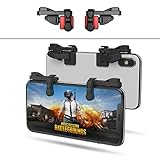
- SUPPORTED DEVICE - Compatible for iPhone and Android Phones(less than 11mm thickness mobile phone with 4.5-6.5 inch screen), the phone can be used with a screen protector and a phone case. SUPPORTED GAMES - Compatible with PUBG Mobile, Fortnitee Mobile, Knives Out, Call of Duty Mobile and the other shooting mobile games.
- GOOD GAME EXPERIENCE - Easy To Use, High Sensitive, Physical Button Feedback. Using our mobile game controller, you can move, angle adjust, aim and shoot at the same time with the thumbs and index fingers of the left and right hand.
- EXCELLENT DESIGN - Compared with similar products, our mobile gaming controller uses a unique clip design that provides long-lasting elasticity and protects the screen from scratches. High-quality ABS conductive plastics are durable, and the minimalist design reduces the use of the phone screen and avoids occlusion of the phone camera and the map in the game.
- 1mm Anti-misoperation Design - Avoid accidental pressing of the mobile phone's side buttons(such as volume buttons, power button and so on) in game, LOW SCREEN OCCUPANCY - Our mobile game controller has the lowest screen usage in the similar products, it can't affect the fluency of the game operation.
- HOW TO USE - Before playing game, customize your shoot and aim buttons(in button setting fo the game) under the touch pad of the our mobile gaming controller.
The same page distinguishes competitive specifications, which target high FPS and a high-refresh-rate monitor. Its stated goal is far above 30 FPS, but it does not establish a universal personal minimum for enjoying PUBG.
How to decide whether to keep 30 FPS
- Keep the 30-FPS option if the game feels comfortable to you and you prefer the higher-resolution choice in the mode available on your platform.
- Try a higher-frame-rate mode if smoother motion matters more than the resolution trade-off, and your console, game version, and display support that mode.
- On console, verify the actual options in your game. PUBG’s published Series S configurations differ between its November 2025 notice and July 2026 roadmap.
- On PC, judge your own system in play. The official recommendation is dated and describes performance in most situations, not a guaranteed frame rate on every hardware setup.
What the official figures cannot tell you
PUBG’s official sources publish platform options and PC requirements, but they do not establish what percentage of players considers 30 FPS acceptable. They also do not provide a controlled PUBG-specific comparison proving how much an individual player’s performance changes at 60 or 120 FPS. The best choice is therefore the one that feels right on your setup, using the available modes as a guide rather than a universal verdict.
Quick Recap
Rank #4

- ⚡ Ultra-Sensitive Capacitive Silicone Contact: Game trigger for pubg controller adopts highly sensitive capacitive silicone pads; zero-delay response, no Bluetooth/APP needed; directly triggers screen touch signals for precise aiming and shooting; trigger controller for ipad gaming accessories works like human finger touch, no damage to screen
- 📱Universal Compatibility for iPad & Android Tablets: 【Light Indicator】Solid red light indicates charging; solid green light indicates fully charged; pressing the trigger button will illuminate a solid blue light for single-fire mode, and flashing blue light for burst-fire mode
- 🎮4-Finger Linkage & Adjustable High Frequency: 【Mode Switching】Press and hold the power button to turn on, press and hold for 2 seconds to turn off. While powered on, briefly press the power button to switch between single-fire and burst-fire modes. In burst-fire mode, pressing and holding the trigger button while briefly pressing the power button will switch the burst-fire frequency between 8, 16, 24, and 32 times per second (recording settings)
- 🛡️Durable Build & Non-Slip Ergonomic Grip: 【Recording Function】In burst-fire mode, simultaneously press and hold the trigger button and the mode switch button. Rapidly flashing blue light indicates entry into recording mode. Clicking the trigger button initiates the recording process, recording your click frequency over the next 8 seconds. The recording is automatically saved to the recording file, overwriting the previous default speed. Recording can be repeated
- 🔧Tool-Free Install & Unobstructed Screen View: 【Recording Function Notes】① At least two clicks are required for a successful recording; ② The maximum recording time is 10 seconds. If it exceeds 10 seconds, the recording is considered complete; ③ The maximum number of clicks per recording session is 80. If it exceeds 80 clicks, the recording is considered complete; ④ If the time interval between two clicks exceeds 10 seconds, the recording is considered complete
Product prices and availability are accurate as of the date/time indicated and are subject to change. Any price and availability information displayed on Amazon at the time of purchase will apply.




