PC Slower Than It Used to Be?
A free scan shows the junk files, broken settings and background clutter dragging Windows down - then fixes them in one click.Free scan · Windows 10 & 11Outdated Drivers Are Slowing You Down
One free scan finds every outdated or missing driver and matches the right update for your exact hardware.Free scan · exact hardware matchYes—but only the right Dell OptiPlex. A Tower or Mini Tower with a reasonably modern processor, 16 GB of RAM, an SSD, and a compatible low-power graphics card can become a capable budget 1080p gaming PC. A Micro, USFF, or older SFF model with integrated graphics is usually a poor choice for modern games.
“OptiPlex” is a business-desktop family, not one fixed computer. The exact CPU generation, chassis, power supply, graphics-card clearance, cooling, and total upgrade cost determine whether a particular system is a bargain or a dead end.
What is a Dell OptiPlex?
Dell OptiPlex desktops are designed primarily for offices, schools, and general productivity. They are commonly sold used or refurbished after businesses replace them, which makes them attractive as inexpensive gaming projects.
However, an OptiPlex model number does not tell the whole story. The same generation may be available in several chassis types:
The Tool Desk
Outbyte Driver Updater FREEFix the driver behind crashes, sound loss and screen glitchesFind Drivers →Outbyte PC Repair FREEClear out junk files and repair common Windows errorsFree Scan →#1 Best Overall

- This Product is professionally inspected and tested to look and work like . The refurbishing process includes functionality testing, basic cleaning, inspection, and repackaging. The product ships with all relevant accessories, a minimum 90-day , and may arrive in a generic box.
- RGB LIGHTS PANEL: The Dell Desktop Computer comes with RGB LED Light on front Panel. Lighting can be changed with a remote controller and quickly adjust the lighting speed, and the mode with several color changing patterns.
- PROCESSOR and STORAGE: Configured with Intel Core i7 Quad Core Processor 3.40 GHz, so you can expect reliable and consistent performance to ensure an exceptional PC experience. 16 GB RAM memory to smoothly run multiple applications and browser tabs all at once. Upgraded with 512GB SSD that can boot very fast and enough storage space to store apps, photos, music, and movies.
- GRAPHICS DETAILS: The GeForce GT 1030 2GB lets you take on the games such as CS GO, DOTA 2, GTA V, and many more, with decent FPS at medium settings. You will get the smoothest experience possible, from the moment you start playing. This is the ultimate gaming display and the go-to equipment for enthusiast gamers.
- Tower or Mini Tower: the best option for gaming upgrades.
- Desktop: model-specific; clearance and expansion vary.
- Small Form Factor (SFF): usable for entry-level gaming with a low-profile graphics card.
- Micro or Ultra Small Form Factor (USFF): generally unsuitable for installing a conventional internal gaming GPU.
The chassis affects whether a full-height graphics card fits, how much cooling is available, what power supply is installed, and how practical future upgrades will be. Dell’s documentation shows materially different expansion capabilities between Mini Tower, Desktop, SFF, and USFF versions, including full-height versus half-height card support. See Dell’s OptiPlex chassis specifications.
Can an OptiPlex run games without a graphics card?
Usually, only lightweight or older games run comfortably without an upgrade. Many OptiPlex configurations use integrated Intel graphics, which share system memory and are far weaker than a dedicated gaming GPU.
Games that may be suitable with integrated graphics
- Older PC games and 2D titles.
- Indie games and older console emulation.
- Browser games.
- Roblox, depending on the experience and settings.
- Minecraft with conservative settings, although Java Edition performance varies considerably.
- Some competitive games at reduced resolution and quality settings.
Games that usually need a dedicated GPU
- Newer demanding AAA games.
- High-quality 1080p gaming.
- 1440p gaming.
- Ray-traced games.
- Stable high-refresh-rate gaming.
- Games with substantial VRAM requirements.
Do not judge performance from the amount of RAM or the presence of an SSD alone. An SSD makes Windows and game loading feel much faster, but it does not replace a graphics card when the GPU is the main limitation.
The best OptiPlex chassis for gaming
| Chassis | Gaming suitability | Typical GPU requirement | Main limitation |
|---|---|---|---|
| Tower/Mini Tower | Best OptiPlex option | Full-height card; sometimes larger cards | Proprietary PSU and less room than a gaming case |
| Desktop | Variable | Depends on the exact model | Seller naming can be ambiguous |
| SFF | Usable for entry-level gaming | Low-profile card | Restricted clearance, power, and cooling |
| Micro/USFF | Poor for internal GPU upgrades | Usually no conventional internal gaming GPU | Tiny chassis and external power adapter |
Tower and Mini Tower
A full-height Tower or Mini Tower is the safest starting point. It generally provides more room for a graphics card, better airflow, easier installation, and more practical upgrade options. Dell’s technical specifications for models such as the OptiPlex 3050 and OptiPlex 7050 distinguish Tower expansion and power-supply configurations from SFF versions.
Recommended Free Tools
A Tower is still not the same as a standard gaming case. Dell may use a proprietary motherboard or power connection, and internal space remains model-specific. Measure the case and inspect the PSU before buying a graphics card.
SFF
An SFF OptiPlex can work as a low-cost gaming PC, but it normally requires a low-profile GPU. A full-height card may not fit even if the motherboard has a PCIe x16 slot. The card’s length, thickness, bracket height, power draw, and airflow all matter.
Dell’s OptiPlex 5070 SFF specifications explicitly distinguish low-profile graphics support from the full-height support available in Tower configurations.
Micro and USFF
Do not buy a Micro or USFF OptiPlex expecting to install a normal desktop graphics card internally. These systems are better suited to productivity, lightweight games, retro gaming, cloud gaming, or streaming games from another PC.
Quick wins for a faster PC:
Clear out junk files and repair common Windows errorsFree Scan →Scan for outdated or missing drivers - takes under a minuteDriver Scan →Repair Windows errors before they cause bigger problemsFix Now →Rank #2

- This Certified Refurbished product is tested and certified to look and work like new. The refurbishing process includes functionality testing, basic cleaning, inspection, and repackaging. The product ships with all relevant accessories, a minimum 90-day warranty, and may arrive in a generic box. Only select sellers who maintain a high-performance bar may offer Certified Refurbished products on Amazon.com.
- System: Intel Core i5-6500 up to 3.6GHz | 16GB DDR4 Memory | 512GB Solid State Drive | Genuine Windows 11 Professional 64-bit
- Graphics: NVIDIA GeForce GTX 750 Ti 4G GDDR5 Video Card | 1x HDMI | 1x DisplayPort | 1x DVI
- Connectivity: USB 3.0 | USB 2.0 | 1x RJ-45 | 1x Serial | 600M Wi-Fi | Bluetooth
- Special feature: RGB Case Lighting | RGB Gaming Mouse & Keyboard
Which OptiPlex processor should you target?
The Core i3, i5, and i7 labels are not enough. An older i7 can be slower or less suitable for current games than a newer i5 because processor generation, core count, platform support, and clock behavior matter more than the branding tier.
As a practical rule:
- 2nd- through 4th-generation Intel systems: avoid for modern gaming unless extremely cheap and intended for older titles.
- 6th- or 7th-generation Core i5/i7: reasonable for older games and some esports-focused systems.
- 8th-generation or newer Core i5/i7: a more balanced minimum for an inexpensive gaming upgrade.
- 10th-generation or newer: preferable when the price remains competitive and the intended games are CPU-demanding.
This is a rule of thumb, not a guarantee. Check the exact CPU model. An 8th-generation Core i5 may be a better platform than an older i7, particularly when the newer chip offers more cores and stronger software compatibility.
RAM and storage requirements
RAM
- 8 GB: a bare minimum and increasingly restrictive.
- 16 GB: the sensible target for a budget gaming OptiPlex.
- 32 GB: useful for heavy multitasking, modded games, simulation titles, or content creation, but not always the best first upgrade.
Check whether the computer has one memory module or two, which memory generation it uses, how many DIMM slots are available, and its maximum supported capacity. Two matched modules can improve integrated-graphics performance through dual-channel memory, making this especially worthwhile when you are gaming without a dedicated GPU.
Storage
An SSD should be considered essential for a comfortable modern Windows experience. It improves startup, game loading, and general responsiveness. It does not substantially increase frame rates in a GPU-limited game, so do not substitute an SSD for a graphics-card upgrade when gaming performance is the main problem.
Adding a graphics card
A compatible PCIe x16 slot is only the beginning. Before purchasing a GPU, verify:
- Full-height versus low-profile bracket requirements.
- Card length and thickness.
- Clearance near the power supply, drive cage, and side panel.
- Whether the card needs a six-pin or eight-pin PCIe power connector.
- Whether the Dell PSU can provide sufficient power and headroom.
- Cooling and airflow around the card.
- BIOS, PCIe, and driver compatibility.
- Whether the CPU will bottleneck the card in the intended games.
A card can fit the PCIe slot but still be electrically, physically, or thermally unsuitable.
Potential low-power GPU choices
Depending on the exact chassis and card variant, buyers commonly consider:
- GTX 1650, particularly low-profile versions.
- Radeon RX 6400, particularly low-profile versions.
- RTX 3050 6 GB models that do not require an auxiliary power connector.
- Intel Arc A380, where the platform, BIOS, clearance, and drivers are appropriate.
These are not universally compatible recommendations. Board partners may produce cards with different dimensions, brackets, cooling designs, and power connectors.
Rank #3

- Processor: Intel Core i5-6500 6th Gen – 3.2GHz Base Speed, Up to 3.6GHz Turbo Boost for Reliable Gaming Performance
- Memory: 16GB DDR4 RAM – Smooth Multitasking and Faster Load Times
- Storage: 512GB SSD – Quick Boot Speeds and Responsive Storage
- GPU: GeForce GT 1030 Graphics 2GB GDDR5 – Enhanced Visuals for Casual and Entry-Level Gaming
- Accesories: RGB Keyboard & Mouse – Stylish Gaming Setup with Customizable Lighting
The distinction between RTX 3050 versions is especially important. NVIDIA lists the RTX 3050 6 GB at 70 W board power and the 8 GB version at 130 W. They should not be treated as interchangeable in a stock OptiPlex. Check NVIDIA’s RTX 3050 specifications.
Intel lists the Arc A380 at 75 W total board power, with PCIe 4.0 x8 operation and an x16 slot requirement. Older OptiPlex platforms may introduce uncertainty around BIOS support, bandwidth, ReBAR-related behavior, physical fit, and power, so consult the exact card and system specifications. See Intel’s Arc A380 specifications.
Why the power supply is often the deal-breaker
Older and smaller OptiPlex systems commonly use power supplies around 180 W, 240 W, 260 W, or similar capacities. Dell’s OptiPlex 3050 documentation, for example, lists different PSU capacities for Tower and SFF configurations, while Micro systems use external adapters.
A stock PSU may lack sufficient wattage, a PCIe power connector, transient-load headroom, or standard modular connections. Never select a GPU based only on whether it physically fits.
What’s actually slowing this PC down?
Pick the symptom - the matching free tool is one click away.
- Read the exact PSU label inside the computer.
- Check the GPU’s rated power draw.
- Confirm whether auxiliary PCIe power is required.
- Allow power headroom rather than designing around the theoretical maximum.
- Validate any Dell-specific replacement against the exact model.
- Do not assume a standard ATX replacement will plug directly into every OptiPlex motherboard.
Dell’s model-specific PSU service documentation illustrates why the replacement path is chassis- and model-dependent.
A “75 W GPU” is not automatically safe in every Dell system. The motherboard slot, PSU condition, airflow, total system load, and card design all matter. Avoid unverified adapters and generic wiring solutions.
What games can an upgraded OptiPlex play?
With a suitable GPU, a reasonably modern OptiPlex can be a sensible entry-level 1080p machine. It is best suited to older AAA games, esports, lightweight competitive titles, and many games at low or medium settings.
Usually realistic after a suitable GPU upgrade
- Older AAA games.
- Popular esports games.
- Older Valve, Blizzard, and Bethesda titles.
- Many indie games.
- 1080p gaming at modest settings.
Configuration-dependent
- Fortnite.
- Apex Legends.
- Call of Duty titles.
- Minecraft with shaders or large modpacks.
- Grand Theft Auto V.
- Recent open-world games.
Results depend on the exact CPU, GPU, RAM configuration, game version, resolution, settings, cooling, and drivers. Avoid treating a benchmark video using a different OptiPlex as a universal prediction.
Rank #4

- This Certified Refurbished product is tested and certified to look and work like new. The refurbishing process includes functionality testing, basic cleaning, inspection, and repackaging. The product ships with all relevant accessories, a minimum 90-day warranty, and may arrive in a generic box. Only select sellers who maintain a high-performance bar may offer Certified Refurbished products on Amazon.com.
- Dell Optiplex 3050 SFF Desktop computer PC, Intel Quad Core i5-6500 up to 3.6GHz, 16GB DDR4, 256GB SSD
- Includes: USB Keyboard & Mouse, USB WiFi adapter, Microsoft office 30 days free trail.
- Port: Front: USB 3.0(2), USB 2.0(2); Rear: DP, HDMI, USB 3.0(2), USB 2.0(2), RJ-45.
- Support 4K (3840x2160) Dual display, makes it easy to connect two monitors at the same time, and you can expand working Windows, mirror content, or expand a single window across multiple monitors.
Usually a poor fit
- Recent AAA games with high VRAM requirements.
- Ray-tracing workloads.
- High-refresh 1440p gaming.
- New games with demanding CPU requirements.
- VR gaming.
- Games that depend heavily on modern upscaling or frame-generation features unavailable or ineffective on the selected GPU.
What should you upgrade first?
The best order depends on the starting configuration, but this is a useful default:
- Install an SSD if the computer has only a mechanical hard drive.
- Upgrade to 16 GB of RAM, preferably using matched modules where supported.
- Add the graphics card after confirming physical and electrical compatibility.
- Upgrade the PSU only when a validated model-specific path exists.
- Clean dust and check cooling before sustained gaming.
If the OptiPlex already has 16 GB of RAM and an SSD, the graphics card is usually the most important gaming upgrade. If the CPU is several generations old, spending heavily on a GPU may create a poor balance.
Used OptiPlex buying checklist
Before buying, ask the seller for:
- The exact OptiPlex model number.
- The exact chassis type.
- The exact CPU model.
- RAM capacity and number of modules.
- SSD or hard-drive information.
- The dedicated GPU model, if included.
- A photo of the PSU label and connectors.
- Internal photos showing the expansion area.
- BIOS and service-tag information.
- Confirmation that it boots without diagnostic-light errors.
- Windows activation information.
- A return policy or warranty.
Do not rely on a seller calling a computer a “gaming PC.” The listing should identify the GPU, PSU wattage, chassis, CPU, RAM, and storage. Official refurbished availability changes over time; current listings can be checked at Dell Refurbished’s Tower catalog.
How to install a compatible GPU
- Shut down the computer.
- Disconnect the power cable and peripherals.
- Press the power button briefly after unplugging.
- Open the side cover.
- Remove the appropriate expansion-slot blank.
- Confirm the card’s dimensions and bracket match the chassis.
- Insert the GPU into the PCIe x16 slot.
- Secure the card.
- Connect auxiliary PCIe power only when the card and PSU specifically support it.
- Close the case and reconnect the power.
- Connect the monitor to the new GPU, not the motherboard video output.
- Boot Windows and install the current manufacturer driver.
- Confirm the card appears in Device Manager and launches games correctly.
- Monitor temperatures, crashes, clock behavior, and unexpected shutdowns.
Dell’s OptiPlex SFF expansion-card instructions show the general process of seating and securing a compatible card, although the exact mechanism varies by model.
Do these 3 things before closing this tab:
1Clear out junk files and repair common Windows errors2Scan for outdated or missing drivers - takes under a minute3Repair Windows errors before they cause bigger problemsTroubleshooting common failures
No video after installing the GPU
- Move the monitor cable to the graphics card.
- Check the monitor input.
- Power down and reseat the card.
- Verify that the card is low-profile or full-height as required.
- Remove the card and test integrated graphics.
- Check PSU capacity and connectors.
- Reset BIOS settings if necessary.
- Test with a known-compatible card.
The computer shuts down during games
Likely causes include PSU overload, GPU or CPU overheating, blocked airflow, a failing PSU, or a loose power connection. Stop stress-testing a system that repeatedly powers off until the cause is identified.
The GPU fits but overheats
The card may be too thick, pressed against the PSU or side panel, blocked by dust, or unable to draw enough cool air. SFF systems are particularly sensitive to this problem. Do not assume physical installation means the cooling solution is adequate.
OptiPlex versus a purpose-built gaming PC
An OptiPlex makes the most sense when the base computer is genuinely cheap and needs only a modest upgrade. Calculate the complete cost:
Total cost = PC price + GPU + RAM + SSD + PSU or adapter + shipping/tax + required accessories
Best Value
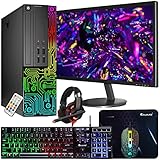
- This Product is professionally inspected and tested to look and work like new. The refurbishing process includes functionality testing, basic cleaning, inspection, and repackaging. The product ships with all relevant accessories, a minimum 90-day , and may arrive in a generic box.
- 🌈 RGB LIGHTS PANEL: The Dell Desktop Computer comes with RGB LED Light on front Panel. Lighting can be changed with a remote controller and quickly adjust the lighting speed, and the mode with several color changing patterns.
- 🗄 PROCESSOR and STORAGE: Configured with Intel Core i7 Quad Core Processor 3.40 GHz, so you can expect reliable and consistent performance to ensure an exceptional PC experience. 16 GB RAM memory to smoothly run multiple applications and browser tabs all at once. Upgraded with 512GB SSD that can boot very fast and enough storage space to store apps, photos, music, and movies.
- 🎮 GRAPHICS DETAILS: This Dell Desktop PC does not come with a Dedicated Graphics Card. However, you can add a low-profile graphics card to make this a gaming PC console and can play beginner level games at decent frame rate! Out of the box, this computer is perfect for remote learning, and everyday personal or professional multitasking.
- 📀 Operating System: With Windows 10 Pro 64-Bit Operating System software installed, this desktop computer load programs, and makes a perfect home or office computer. Optional software such as Anti-Virus and Office 365 can also be easily downloaded through the Microsoft Windows App Store.
A $100 office PC may no longer be a bargain after adding a $150 graphics card, RAM, storage, adapters, and delivery costs. Compare the finished price with a used gaming desktop, a new entry-level gaming desktop, or a DIY build.
| Option | Advantages | Disadvantages |
|---|---|---|
| Upgraded OptiPlex | Low initial cost; widely available; good for modest 1080p gaming | Proprietary parts; restricted PSU and clearance; more compatibility research |
| Used gaming desktop | Standard PSU, larger GPU support, better airflow, easier upgrades | Used hardware risk and variable warranty |
| New budget gaming PC | Warranty, modern platform, simpler setup, better future support | Higher upfront cost and potentially weaker value at the lowest price points |
| Modern mini PC | Compact, quiet, and efficient for light gaming | Limited internal GPU upgrade options |
A current OptiPlex Tower Plus is a different proposition from an older used office OptiPlex. Dell’s OptiPlex Tower Plus 7020 specifications list configurations with discrete graphics including Radeon RX 6300, RX 6500, and GeForce RTX 4060 options. That demonstrates the capability of a current Tower platform, but it does not make an inexpensive older OptiPlex equivalent to the new system.
Who should buy an OptiPlex for gaming?
An OptiPlex is a good candidate when you are comfortable checking hardware details, want inexpensive 1080p gaming, can accept low or medium settings, and have found a Tower or Mini Tower with a modern-enough CPU, SSD, 16 GB of RAM, and a clear low-power GPU path.
It is also a reasonable project for a parent or student who wants to learn basic PC upgrades without starting with an expensive system.
Free tools Windows power users keep installed
One-click scans. No signup required.
Who should avoid it?
Avoid the purchase when the seller cannot identify the chassis or PSU, the system is Micro or USFF but advertised as upgradeable gaming hardware, the CPU is several generations old, or the total upgraded price approaches that of a standard gaming PC.
It is also the wrong platform if you want modern demanding AAA games, high-refresh 1440p gaming, VR, ray tracing, extensive future upgrades, or plug-and-play reliability without troubleshooting.
Final verdict
A Dell OptiPlex can be good for gaming, but “OptiPlex” alone is not a recommendation. The best candidates are Tower or Mini Tower systems with a relatively modern Core i5 or i7, 16 GB of RAM, an SSD, and a compatible low-power graphics card. They can make effective low-cost 1080p gaming PCs.
SFF models can work with careful low-profile GPU and PSU matching. Micro and USFF systems are generally poor choices for internal GPU upgrades. When a proprietary power supply, old CPU, weak cooling, and upgrade costs erase the savings, a used or new purpose-built gaming desktop is the better buy.
Quick Recap
Product prices and availability are accurate as of the date/time indicated and are subject to change. Any price and availability information displayed on Amazon at the time of purchase will apply.



