What’s actually slowing this PC down?
Pick the symptom - the matching free tool is one click away.
Possibly—it depends on your Switch’s exact model, whether an original V1 has a hardware patch, and its firmware. The NH Switch Guide describes a no-modchip RCM route for some unpatched first-generation consoles; patched systems and later revisions follow a different, hardware-modification route in that guide. A model name or serial lookup alone is not a guarantee of compatibility.
What “moddable” means for a Switch
There is no single yes-or-no answer because “moddable” can refer to different methods. The NH Switch Guide distinguishes using the original RCM route on an eligible first-generation console from modifying patched or later hardware with a modchip. It also treats firmware as part of compatibility, so the console’s model alone does not settle the question. Read the NH Switch Guide for its current route guidance.
Homebrew and unauthorized copies of games are not the same thing. This compatibility check concerns hardware and software routes; it does not establish that a particular use is permitted by Nintendo or lawful in every jurisdiction.
Which Switch models may qualify?
| Console or status | Broad route described by the NH Switch Guide | What that does—and does not—tell you |
|---|---|---|
| Original HAC-001/V1, unpatched | The guide describes an RCM route using a bootROM vulnerability in first-generation systems. | Some original units were patched. HAC-001/V1 by itself does not confirm eligibility; check the serial range and firmware guidance. NH Switch Guide: Getting Started |
| Original HAC-001/V1, patched | The guide directs patched systems to its modchip route. | A patched first-generation console should not be assumed to support the no-modchip RCM route. Whether hardware modification is suitable or feasible for an individual console is not guaranteed. NH Switch Guide |
| Revised HAC-001(-01)/V2, Switch Lite, or Switch OLED | The guide identifies later revisions as following its hardware-modification route. | Do not assume the original V1 RCM route applies. Check the guide’s current model and firmware information for the specific console. NH Switch Guide |
How to check your own console
- Identify the model. Find the model number on the console and determine whether it is an original HAC-001/V1 or a later revision such as HAC-001(-01)/V2, Lite, or OLED. Model identification narrows the possibilities but does not establish that an original V1 is unpatched.
- For an original V1, check the serial range. Use the NH Switch Guide’s current serial-range information. It is community-maintained guidance, not an official Nintendo compatibility determination. Treat a range result—especially one the guide presents as uncertain—as an indication rather than proof about an individual used console. Check the guide’s Getting Started page.
- Check the installed firmware against the current guide. The guide lists firmware versions alongside hardware status. Software support can change, so a route shown for one firmware should not be taken as a promise that it works on every current version.
- Match the result to the broad route. The guide describes RCM for eligible unpatched first-generation systems and a modchip route for patched or Mariko systems. If the model, serial result, or firmware does not clearly match a current entry, do not treat the console as confirmed compatible.
What Nintendo says about modification
Nintendo’s US Switch User Agreement says: “Content obtained through the use of an unauthorized device, or through the unauthorized modification of Console hardware or software, may be removed.” The agreement also warns that unauthorized modifications or devices may render a console or software permanently unusable after changes or updates.
Recommended Free Tools
#1 Best Overall

- Quick Switch 2 Pairing & Wake-Up: Detach the Joy-Cons, go to Controllers > Change Grip/Order, then hold the controller Power button for 2 seconds until it flashes. Press HOME and reattach the Joy-Cons within 20 seconds to enable wake-up. After that, just tap HOME for auto-reconnect and instant console wake—fast, seamless, zero hassle
- Loop Macro Function: First record your custom button sequence (30s macros support joysticks, triggers, D-pad, ABXY, and +/-). Then hold Turbo + Macro together to start or stop looping. The controller will replay your actions automatically — ideal for grinding, farming, and other repeated tasks
- Switch Compatible: Works with Nintendo Switch 2, Switch 1, Switch Lite, Switch OLED, and Windows PC (wired connection)
- Customizable Turbo & Vibration: 3 turbo speeds and 4 vibration levels
- 800mAh Battery: 15-20 hours playtime, 2-3 hours charging
Nintendo’s US Intellectual Property & Piracy FAQ describes mod chips as circumvention devices and says damage caused by unauthorized products that circumvent Nintendo’s security measures is not covered by Nintendo’s warranty. These are Nintendo’s stated terms in its US support materials, not a universal statement of the law or warranty treatment in every country.
Quick Recap
Rank #4

- 【TURBO/AUTO 】:The non-slip design of switch controller that allows you to control the game stably . The wireless switch controller with adjustable 3-speed turbo speed and auto fire function, it has fast shooting game turbo speed. A/B/X/Y/L/ZL/R/ZR all buttons can be set to TURBO, which make it easier to win an arcade or action game.
- 【ONE-KEY WAKE-UP FUNCTION】:The first time to use the switch wireless controller,you need to press the "Y + HOME" button to connect with Bluetooth . Then next time just simply presses the "HOME" button of the switch controller to wake up your device. It's very convenient to start the game.
- 【6-AXIS GYROSCOPE】:The gaming controller has a sensitive six-axis gyroscope, which can experience the real feeling of the game, while avoiding problems such as lag and drift.
- 【LONG BATTERY LIFE】:Built-in 400mAh lithium battery can provide you with up to 8 hours of gaming time.And charging time only takes 1-1.5 hours.
- 【5 IN 1】:The exquisite box includes: 1x wireless controller,1x Type-C Cable, 2x thumb grip caps, 1x instruction manual. Feel free to contact us if you have any questions about the product!
Rank #3
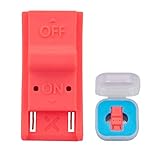
- This product is a tool, specifically modified to play games and other homemade software use.
- Can be used to modify the archive, play GBA/FBA and other simulators.
- The full version of the system is available, the homemade system can already load NS games.
- Made of ABS plastic, Suitable for Switch RCM / NS SX O
Rank #2

- MATERIAL: You will receive 1 piece of RCM jig clip, made of premium plastic, Suitable for long-term use
- SUITABLE: Suitable for Nintendo Switch RCM / NS SX O
- EASY TO USE: Easy to use, slide it into the rail and stop inserting when you feel resistance from the rail.
- PRACTICAL: product can be used for NS switch, quickly enter recovery mode. Convenient and practical.
- PRODUCT SIZE: This RCM tool switch is about 2cm/0.79 inch in length, the width about 1cm/0.39 inch and the height measured about 0.6cm/0.24 inch. Please confirm the size before placing an order.
What a compatibility check cannot guarantee
- A serial-range lookup does not guarantee that an individual console is vulnerable; the guide is community documentation, not Nintendo’s confirmation.
- A model and patch-state match does not guarantee that every firmware version is supported.
- The guide’s broad route distinction does not establish that a hardware modification is safe, feasible, or suitable for every console or owner.
- Compatibility information does not promise account safety, online access, warranty coverage, or legal permission.
Product prices and availability are accurate as of the date/time indicated and are subject to change. Any price and availability information displayed on Amazon at the time of purchase will apply.




