Only in a narrow sense. The AMD A8-7650K can still run older games and some lightweight esports titles at reduced settings, particularly at 720p, if you already own a well-configured system. It is not a sensible choice for a new gaming PC, modern AAA games, or a costly upgrade: its four-thread CPU, Radeon R7 integrated graphics, DDR3 platform, and legacy driver status are all limiting factors.
Who should keep it—and who should avoid it?
| Situation | Verdict |
|---|---|
| You already own a working PC and play older, undemanding games | Keep using it if it meets your needs; aim for 720p and low settings. |
| You have one memory stick or only 4 GB of RAM | Check dual-channel memory and capacity before judging performance. A modest RAM change may be worthwhile if compatible DDR3 is inexpensive. |
| You are buying a complete used PC | Consider it only if the whole system is exceptionally cheap and suitable for your games. Compare its total cost with a newer used platform. |
| You want modern AAA games, stable 60 FPS, or high-refresh-rate play | Avoid it; choose a newer platform, typically with a discrete graphics card for demanding games. |
| You need a new motherboard or several other major components | Price a platform replacement before spending on FM2+ parts. |
What the A8-7650K is
AMD introduced the A8-7650K in the Kaveri generation. It is a 28 nm FM2+ APU with four Steamroller CPU cores and four threads, 4 MB of L2 cache, a 95 W TDP, and an unlocked multiplier. Its integrated Radeon R7 graphics have six compute units, 384 stream processors, and a listed 720 MHz graphics clock. The GPU uses system memory rather than dedicated video memory, so DDR3 bandwidth matters. AMD’s specifications and support page lists dual-channel DDR3 support up to 2133 MT/s.
AMD lists the maximum boost clock as up to 3.8 GHz. AnandTech’s original review documentation described a 3.7 GHz turbo for the tested processor. These figures are not a promise of a sustained all-core clock: actual boost behavior depends on workload, firmware, cooling, and system configuration. The review is useful for historical launch context, but its benchmarks were conducted in 2015, not with current games or drivers. See AnandTech’s A8-7650K review.
Some period AMD marketing called Kaveri models “10 compute cores,” combining four CPU cores with six GPU compute units. That does not mean this processor has ten general-purpose CPU cores: for game performance, it is a four-core, four-thread CPU. AMD’s original 1080p gaming claims likewise referred to selected games and the launch-era environment, not a guarantee for present-day titles.
Quick wins for a faster PC:
Repair Windows errors before they cause bigger problemsFix Now →Fix the driver behind crashes, sound loss and screen glitchesFind Drivers →#1 Best Overall

- 10 Compute Cores: 4 CPU Cores + 6 Graphics Cores
- 3.8 GHz CPU Boost Frequency, 3.3 GHz Base Frequency
- AMD Radeon R7 Graphics with 720 MHz GPU Frequency
- Supports DDR3 2,133 MHz Memory
- FM2+ Socket, 95W TDP
What gaming performance to expect
Older games
Older PC games and modest indie titles are the A8-7650K’s best fit. Start at 720p with low or medium settings, then raise settings only if performance remains smooth. Older versions of games such as League of Legends, Dota 2, Counter-Strike: Global Offensive, Team Fortress 2, Left 4 Dead 2, Portal 2, or Minecraft with modest settings are examples worth checking against the game’s current requirements. Patches, drivers, memory configuration, and game version can change how well any particular title runs; no universal frame rate is guaranteed.
Lightweight esports and competitive play
A title launching is not the same as a stable competitive experience. The four-thread CPU may struggle during crowded scenes or when a browser, voice chat, launcher, recording software, or other background task is active. Average frame rate alone can hide uneven frame times and dips that make play feel choppy. If consistency matters, test the specific game and settings you use rather than relying on a launch-era benchmark.
Rank #2

- Can deliver fast 100 plus FPS performance in the world's most popular games, discrete graphics card required
- 6 Cores and 12 processing threads, bundled with the AMD Wraith Stealth cooler
- 4.2 GHz Max Boost, unlocked for overclocking, 19 MB cache, DDR4-3200 support
- For the advanced Socket AM4 platform
Modern AAA games and 1080p
Do not buy this APU for modern AAA gaming. Its integrated graphics are weak by current standards, and its CPU, shared DDR3 bandwidth, and aging graphics support add further constraints. A current game might refuse to launch, stutter heavily, or require very low settings; outcomes vary by title, so it is not accurate to say every new game is impossible. For integrated graphics, treat 720p low as a more realistic starting point than 1080p. A few older or undemanding games may work at 1080p, but that does not make it a practical modern 1080p gaming solution.
Memory configuration can make or break the integrated graphics
Because Radeon R7 graphics share system memory with the CPU, one DIMM can restrict available bandwidth. Dual-channel operation is especially important when gaming without a separate graphics card. The general principle is clear, though the exact performance penalty varies by system and game; modern APU testing also demonstrates why memory configuration matters, but its results are not an A8-7650K-specific percentage. See Tom’s Hardware’s Ryzen 7 5700G memory testing.
Rank #3
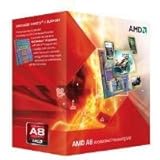
- Unrivaled, discrete-level DirectX 11-capable graphics and powerful AMD processor technology combined on a single chip
- Dual graphics capabilities can boost visual performance up to 75%
- Unlike the competition, AMD A-Series APUs discrete-level graphics cores stay on when paired with select AMD Radeon HD 6000 series graphics cards
- New Unlocked K Series - Over-clockable CPU and GPU potential for even higher performance
- Accelerate the most demanding applications for superb performance with AMD App Acceleration
- Use two matched DDR3 desktop modules and confirm the BIOS reports dual-channel operation.
- Use at least 8 GB for basic gaming; 16 GB can help with multitasking if it is inexpensive, but does not remove the platform’s age-related limits.
- Choose a memory speed supported by both the motherboard and modules. AMD lists up to DDR3-2133; stable DDR3-1866 may be preferable to an unreliable overclocked setting.
- Check that memory is not running at a low fallback speed, that the integrated graphics is enabled, and that cooling is not causing throttling.
- If the game still struggles, reduce resolution and demanding settings such as shadows before concluding that a memory change alone will solve it.
CPU bottlenecks and adding a graphics card
With integrated graphics, the Radeon R7 is often the first constraint. A discrete graphics card can remove much of that graphics limitation and make older games more comfortable, but it cannot modernize the four-thread CPU or the FM2+ platform. CPU-heavy games—such as open-world, simulation, strategy, or large multiplayer titles—can remain limited by the processor. A powerful card is particularly likely to be held back, and the limitation becomes more apparent as GPU capability increases. PassMark’s A8-7650K listing provides comparative database context, not a direct predictor of game frame rates.
If adding a used card, prioritize low power requirements, a reliable power supply, compatible display outputs, and a price that makes sense for an older system. Avoid spending more on the card or its supporting hardware than a complete newer platform would cost. A single discrete GPU is generally more straightforward than trying to use historical Radeon Dual Graphics: AMD listed Dual Graphics support, but compatibility depended on specific cards, drivers, games, and configurations. It is not a general-purpose 2026 upgrade recipe.
Rank #4

- The world's fastest gaming desktop processor and first gaming processor with 3D stacking technology
- 8 Cores and 16 processing threads with AMD 3D V-Cache technology
- 4.5 GHz Max Boost, 100 MB cache, DDR4-3200 support
- For the advanced Socket AM4 platform, can support PCIe 4.0 on X570 and B550 motherboards
- Cooler not included, high-performance cooler recommended
Thermals, power, and overclocking
AMD lists a 95 W TDP and a maximum operating temperature of 72.4°C. TDP is not a measurement of wall power, and it does not describe every system’s actual consumption. Still, the rating is notable for the level of gaming performance available today. Dust, degraded thermal paste, weak airflow, an inadequate cooler, or a low-quality motherboard power-delivery system can undermine sustained performance.
- Clean the heatsink and verify the CPU fan works; replace old thermal paste if needed.
- Monitor CPU temperature during a game and investigate if it approaches AMD’s listed maximum.
- Avoid aggressive overclocking on a low-end FM2+ board or with uncertain cooling.
The “K” suffix means the multiplier is unlocked. An overclock may help a CPU-limited older game, but it cannot turn the Radeon R7 into a modern gaming GPU. It also raises heat and power demands, can cause instability, and stresses motherboard power delivery. Consider it only if the board and cooler are suitable and you are prepared to stability-test; it is not a worthwhile reason to buy into FM2+.
What’s actually slowing this PC down?
Pick the symptom - the matching free tool is one click away.
Best Value

- 1. Powerful functions make the picture clearer.
- 2. Good performance processing ability and fast processing speed.
- 3. Quality assurance makes you feel more at ease.
- 4. It can make you and your family watch videos more harmoniously.
- 5. Central processing unit
Drivers and Windows support
AMD classifies the A8-7650K as a legacy product and says no additional driver releases are planned. Its support page lists Adrenalin Edition 22.6.1 Recommended (WHQL) for Windows 10 64-bit, released June 23, 2022, alongside older packages. AMD’s page does not list a dedicated Windows 11 driver package for this APU. That is not proof Windows 11 cannot run on a particular system, but it does mean buyers should not assume current first-party graphics-driver support. Check AMD’s current support page for available downloads.
- Confirm the processor and motherboard model, then check the support page for the correct legacy package.
- Create a restore point before changing graphics drivers. If replacing another GPU, remove conflicting drivers as appropriate.
- Install the AMD package and reboot; then check Device Manager to confirm the Radeon graphics device appears correctly.
- Test a known-compatible game. If installation fails, consult the motherboard maker’s BIOS and chipset documentation rather than assuming every current Windows build accepts the old installer.
Upgrade options: improve the old PC or replace the platform?
| Option | When it makes sense | Main limitation |
|---|---|---|
| Add matched DDR3 for dual-channel operation | The system has one DIMM, too little memory, and the required DDR3 is cheap. | Improves configuration, not the CPU architecture or platform ceiling. |
| Add a low-cost used graphics card | The existing PC and power supply are reliable, and graphics performance is the main problem. | CPU bottlenecks remain; a large GPU spend is difficult to justify. |
| Replace a failed FM2+ motherboard | You already have the APU and DDR3, and a compatible board costs very little. | Used-board condition and BIOS support need checking; the platform remains obsolete. |
| Move to a Ryzen 5 5600G system | You want a budget replacement with integrated graphics and a substantially newer CPU/platform. | Requires an AM4 motherboard and DDR4; it is not a drop-in FM2+ upgrade. |
| Move to a Ryzen 7 5700G system | You want more CPU cores for multitasking or heavier CPU workloads as well as integrated graphics. | AM4 and DDR4 are required, and the extra cores may not justify the cost for basic gaming alone. |
| Choose a modern CPU plus discrete GPU | You want current AAA gaming or a stronger long-term gaming system. | Best choice depends on budget, resolution, and whether components are new or used. |
The Ryzen 5 5600G has six cores and twelve threads, Zen 3 CPU cores, and Radeon Vega integrated graphics. Tom’s Hardware described it as offering solid 720p and passable 1080p gaming in its review, and as a better value than the 5700G for many integrated-graphics buyers; those assessments reflect that review’s test conditions, not guaranteed results in every game. See Tom’s Hardware’s Ryzen 5 5600G review. The Ryzen 7 5700G has eight cores and sixteen threads; Tom’s Hardware found useful 720p and reduced-quality 1080p integrated-graphics capability in its testing, making it more compelling when its additional CPU cores are useful. See Tom’s Hardware’s Ryzen 7 5700G review. A used Ryzen 3 5300G or similar AM4 APU may also be worth comparing, though local availability varies; AnandTech’s benchmark hierarchy includes newer integrated-graphics processors for context.
Price the complete system change, not just the processor: a used FM2+ motherboard, DDR3, cooler, or power supply may make an apparently cheap repair poor value. A current regional A8-7650K price is not established here, so compare local listings for the whole system rather than using its historical $105 launch price as a present-day valuation.
Quick Recap
Final verdict by reader
- Existing owner: Keep it for older games if it is stable, has dual-channel memory, and you are satisfied with reduced settings.
- Used-PC buyer: Buy only if the complete computer is exceptionally inexpensive and passes checks for memory, cooling, power supply, and the games you want to play.
- New-build buyer: Choose a newer platform; the A8-7650K has no sensible new-build advantage in 2026.
- Modern AAA or stable 60 FPS gamer: Replace the platform rather than trying to rescue it with an expensive GPU or motherboard.
- Older-game or retro player: It can be adequate when the game is compatible and the price is close to negligible.
Product prices and availability are accurate as of the date/time indicated and are subject to change. Any price and availability information displayed on Amazon at the time of purchase will apply.
Free tools Windows power users keep installed
One-click scans. No signup required.




