Yes. Thrustmaster lists the PlayStation version of the T248, the T248PS, as compatible with Gran Turismo 7 on both PS4 and PS5, and provides a GT7-specific control mapping for it. If you are buying a wheel, check that the model is the PlayStation version.
Which T248 works with GT7?
The documented compatibility is for the T248 PlayStation version (T248PS). Thrustmaster identifies the T248 as officially licensed for PS5 and PS4, and its support page lists Gran Turismo 7 in the PS4 and PS5 game compatibility material. The page also provides a mapping labeled “Mapping – GRAN TURISMO® 7 (PS4 & PS5) – T248PS.” Thrustmaster T248PS support and the T248 product page are the manufacturer references to check for current information.
Do not assume that every similarly named T248 variant works on PlayStation: the evidence here does not establish PlayStation compatibility for the Xbox-oriented T248X. Confirm the model designation and platform in the product listing before purchasing.
How to connect the T248 to a PS4 or PS5
Thrustmaster’s manual describes this console setup:
Do these 3 things before closing this tab:
1Repair Windows errors before they cause bigger problems2Scan for outdated or missing drivers - takes under a minute3Clear out junk files and repair common Windows errors#1 Best Overall
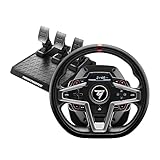
- Premium design with leather wrapping on the outer-facing portion of the wheel
- Versatile wheel shape, well-suited to all racing game styles
- Up to 25 action buttons including 2 dual-position encoders
- Interactive race dashboard with a selection of more than 20 different displays on the wheel’s screen
- Dynamic Force Feedback: on-the-fly Force Feedback level adjustment (3 preset modes included) via the screen, compatible with all games
- Connect the wheel’s power cable and adapter to an electrical outlet.
- Connect the wheel’s USB-A cable to a USB port on the PS4 or PS5.
- Press the PS button on the wheel, then sign in.
The manual notes that a game may recognize the wheel under the name “Thrustmaster T-GT” or “Thrustmaster Advanced Racer.” Those names do not, by themselves, mean you have connected the wrong wheel. See the T248 user manual for the manufacturer’s instructions.
Independent reader supportYour contribution helps us test, update, and keep practical guides available for everyone.Where to find GT7 button assignments
Use Thrustmaster’s current T248PS support page and open the GT7 mapping for PS4 and PS5. The material available here confirms that the mapping exists but does not establish its individual button assignments, so consult the manufacturer’s mapping rather than relying on an assumed layout.
Quick Recap
Rank #3

- Immersive Gaming Experience: Perfect for PlayStation 5, PS4 and PC gaming titles, the Driving Force simulates the feeling of driving a real car with precision steering and pressure-sensitive pedals
- Premium Control: The Driving Force feedback racing wheel provides a detailed simulation of driving a real car, with helical gearing delivering smooth, quiet steering and a hand-stitched leather cover
- Customizable Pedals: These pressure-sensitive nonlinear brake pedals provide a responsive, accurate braking feel on a sturdy base - with adjustable pedal faces for finer control
- 900-Degree Rotation: Lock-to-lock rotation of the Driving Force means you can turn the wheel around two and a half times, hand over hand on wide turns - just like a real F1 race car
- Up Your Game: Take your racing simulation to the next level with Driving Force accessories like the Driving Force Shifter or desk and rig mounts
Rank #2

- Premium design with leather wrapping on the outer-facing portion of the wheel
- Versatile sim racing shifter for all types of vehicles with manual shifting (rally, trucks, GT, NASCAR)
- Versatile wheel shape, well-suited to all racing game styles
- "H"-pattern shift plate with 7 gears plus reverse gear, with direct gear shifting
- Up to 25 action buttons including 2 dual-position encoders on PC
Product prices and availability are accurate as of the date/time indicated and are subject to change. Any price and availability information displayed on Amazon at the time of purchase will apply.




