
Free tools Windows power users keep installed
One-click scans. No signup required.
Usually, no—not for a new buyer paying full price. The Valve Index remains an excellent wired PC-VR headset with wide field of view, high refresh-rate modes, strong Lighthouse tracking, comfortable off-ear speakers, and distinctive finger-sensing controllers. But it launched in 2019, still costs up to $999 for a complete kit when available, requires external base stations and a gaming PC, and is now behind newer headsets in resolution, lens clarity, wireless use, and mixed reality.
It can still be worth buying if you already own SteamVR base stations or controllers, specifically want native DisplayPort PC-VR, or find a complete, tested used kit at a substantial discount. For most first-time buyers, a Quest 3-class headset is the more versatile default.

As an Amazon Associate I earn from qualifying purchases.
This guide keeps the 2025 question in its title but includes pricing and availability signals checked in U.S. dollars on August 16, 2026. Valve’s store listings are dynamic, so stock and prices may change.
Recommended Free Tools
Quick verdict
| Buyer | Should you buy an Index? | Why | Better starting point |
|---|---|---|---|
| First-time VR buyer | Usually no | The complete system is expensive, wired, and complicated compared with newer standalone headsets. | Meta Quest 3 or Quest 3S |
| Quest 3 owner | Usually no | Index may improve tracking consistency, refresh-rate options, and controller ergonomics, but can look worse because its resolution and lenses are older. | Keep Quest 3 unless you specifically need Lighthouse tracking |
| Existing Vive or Lighthouse owner | Often yes | Your existing base stations and controllers reduce the real cost. | Index headset or a newer Lighthouse-compatible headset |
| VRChat enthusiast | Possibly | Index controllers, finger sensing, hand straps, and Lighthouse tracking remain compelling for supported social-VR features. | Index if the ecosystem matters more than visual clarity |
| Sim racer or flight-sim player | It depends | Wide FOV and high refresh rate help immersion, but newer high-resolution headsets make gauges and distant objects easier to read. | Compare a high-resolution PC-VR headset with your priorities |
| Wireless-first user | No | The Index is tethered and needs external tracking hardware. | Quest 3 |
| Used-market buyer | Possibly | A complete, tested system at a large discount can still deliver excellent PC VR. | Buy only with return protection and a full inspection |
What you actually get for the money
The word “Index” can refer to several different purchases. A headset-only listing is not a usable first-time VR system: Valve says the headset requires compatible controllers, SteamVR base stations, and a PC.
#1 Best Overall
| Product | Valve-listed U.S. price | Availability shown when checked |
|---|---|---|
| Index VR Kit | $999 | Out of stock |
| Headset plus controllers | $749 | Out of stock |
| Headset only | $499 | Add to cart; estimated delivery shown |
| Controllers, pair | $279 | Out of stock |
| Base station, each | $149 | Out of stock |
| Replacement tether | $129 | Add to cart; estimated delivery shown |
| Face gasket, two-pack | $39.99 | Out of stock |
Prices and stock signals from Valve’s Index store page, checked August 16, 2026. They are not permanent guarantees.
A first-time buyer must account for the headset, two controllers, two base stations, a compatible gaming PC, power outlets, and a DisplayPort connection. You may also need wall or shelf mounts, tripods, cable-management hardware, replacement parts, shipping, and taxes. Valve recommends two or more base stations for its tracking setup.
That makes the $999 kit a poor value proposition for most new buyers. You are paying premium money for a six-year-old wired ecosystem whose best features are specialized rather than universally superior. The Index is not unusable or automatically obsolete; it is simply difficult to justify at full price when newer products provide better optics, simpler tracking, wireless PC VR, and standalone operation.
What the Valve Index still does exceptionally well
Off-ear audio
The Index’s speakers sit beside, rather than directly on, the ears. Valve designed them for comfort and spatial immersion, and they remain one of the headset’s most consistently praised features. You get an open, room-aware presentation without the pressure and heat of conventional ear cups. That is a meaningful advantage for long sessions, although “best audio” is ultimately subjective and depends on the user and comparison headset.
See Valve’s official Index specifications and feature page.
Index controllers
The “Knuckles” controllers are still the main reason some enthusiasts choose Index hardware. Their hand straps let you open your hands without dropping the controllers, while capacitive sensing can detect fingers and support more expressive gestures in compatible software. That matters particularly in VRChat and other social-VR applications.
They are not universally better than modern Touch-style controllers. Their value depends on the games you play and whether you prefer their shape and grip. They are also expensive to replace: Valve’s listing showed $279 for a pair, or $149 for an individual controller when replacement components are considered. Inspect used units for thumbstick drift, damaged straps, charging problems, button faults, and unreliable finger sensors.
Outdated Drivers Are Slowing You Down
One free scan finds every outdated or missing driver and matches the right update for your exact hardware.Free scan · exact hardware matchPC Slower Than It Used to Be?
A free scan shows the junk files, broken settings and background clutter dragging Windows down - then fixes them in one click.Free scan · Windows 10 & 11Lighthouse tracking
Index uses external SteamVR base stations rather than camera-based inside-out tracking. The stations emit tracking signals that let the headset, controllers, and compatible accessories share a precise room-scale tracking ecosystem.
- Advantages: precise room-scale tracking, strong controller tracking, and support for additional SteamVR-tracked devices.
- Disadvantages: more hardware to place, more power outlets, less portability, and more possible points of failure.
Inside-out tracking has become very good and is much easier to deploy, but Lighthouse remains attractive to enthusiasts who want a fixed room-scale setup or already own compatible stations and trackers.
Rank #2

- VR Experience: Immerse yourself in virtual reality with the Valve Index VR headset, designed specifically for PC and SteamVR platforms for seamless gaming and interactive experiences
- Display Quality: Experience crystal-clear visuals with high-resolution displays and optimized optics that deliver stunning graphics and reduced screen-door effect
- Comfort Design: Ergonomically engineered headset with adjustable head strap and face gasket ensures comfortable extended wear during long gaming sessions
- PC Integration: Seamlessly connects with your PC to access SteamVR's extensive library of virtual reality games, applications, and experiences
- Renewed with CPS 1-Year Warranty for added hardware protection.
Wide FOV, refresh rate, and adjustment
The Index supports refresh-rate modes up to 144 Hz, a broad field of view, and extensive physical adjustment. You can tune lens distance, interpupillary distance, face angle, head strap fit, and speaker position. A high refresh rate can make motion feel smoother, but it also requires enough GPU performance; it does not automatically improve every game.
Comfort is head-shape and fit dependent. The adjustability is a real strength, but it should not be treated as a guarantee that every wearer will find the Index comfortable.
Quick wins for a faster PC:
Scan for outdated or missing drivers - takes under a minuteDriver Scan →Repair Windows errors before they cause bigger problemsFix Now →Where the Index falls behind newer headsets
Resolution and lens clarity
The Index uses 1,440 × 1,600 pixels per eye. That was competitive at launch, but newer headsets offer higher-resolution displays and, in many cases, pancake lenses with a larger clear area.
In practice, the Index is weaker for reading small text, cockpit gauges, distant objects, and productivity interfaces. Screen-door effect may also be more noticeable. Its wide FOV and smooth refresh rates can still feel excellent during movement, so resolution alone does not determine overall image quality; lens design, rendered resolution, persistence, FOV, and game performance matter too.
Road to VR’s headset comparison lists the Index’s resolution and contrasts its older display technology with newer PC-VR hardware.
No standalone mode or modern mixed reality
The Index cannot run games independently. It must remain connected to a gaming PC, and it has no modern color-passthrough mixed-reality feature comparable to current standalone headsets. It also cannot be used wirelessly without relying on a separate, unofficial-style solution that changes the system’s complexity and does not reproduce the simplicity of a native wireless headset.
What’s actually slowing this PC down?
Pick the symptom - the matching free tool is one click away.
Cable and tether risk
The DisplayPort tether provides a direct wired connection, avoiding wireless streaming compression and network variability. The trade-off is physical: the cable can snag, twist, or wear. Valve listed a replacement tether at $129 when checked.
For a used headset, inspect the cable for severe kinks, damaged connectors, intermittent video, audio dropouts, or failures when the headset is moved. A replacement tether can turn an apparently cheap used purchase into an expensive one.
Base-station complexity
Base stations need suitable placement and power. Shelves, tripods, or wall mounts may be necessary, and reflective surfaces or obstructions can interfere with tracking. Moving the system between rooms is inconvenient compared with a headset that maps its surroundings through onboard cameras.
Rank #3
- HEADSET ONLY. (MAY NOT INCLUDE HEAD STRAP ADJUSTMENT PAD). Controllers and base station purchased seperately
- 5x IMPROVEMENT over first-generation PC VR HMDs.
Valve Index versus Quest 3-class headsets
| Category | Valve Index | Quest 3-class headset |
|---|---|---|
| Primary mode | Wired PC VR | Standalone and PC VR |
| Tracking | External SteamVR base stations | Inside-out tracking |
| Connection | DisplayPort and USB tether | Wireless or wired PC connection |
| Optics | Older Fresnel-style design | Newer pancake-style optics on Quest 3 |
| Resolution | 1,440 × 1,600 per eye | Higher-resolution modern display |
| Audio | Integrated off-ear speakers | Integrated speakers; accessories vary |
| Controllers | Index controllers with finger sensing | Touch-style controllers |
| Mixed reality | Limited compared with modern headsets | Color passthrough and mixed-reality features |
| Setup | More involved | Easier for most users |
| Best fit | Enthusiast room-scale PC VR | General-purpose VR and mixed reality |
Quest 3-class hardware is the better general recommendation because it combines standalone games, inside-out tracking, higher resolution, newer lenses, mixed reality, and wireless PC VR. Road to VR also identifies Quest 3’s clearer lenses, higher resolution, simpler tracking, standalone functionality, and wireless SteamVR support as major advantages.
Wireless PC VR is not magic, however. Performance depends on router placement, congestion, encoding settings, and the connection between the PC and router. For best results, connect the gaming PC to the router by Ethernet, keep the headset near the router, and use at least Wi-Fi 5; Wi-Fi 6 or Wi-Fi 6E is preferable. A USB cable remains a fallback when wireless quality is inconsistent.
The Index can feel more direct and predictable because it sends video over DisplayPort. That does not establish a universal measured latency advantage, but it removes wireless network and streaming variables.
Official pages: Meta Quest 3 and Meta Quest 3S.
Other alternatives worth considering
Meta Quest 3S
Quest 3S is the budget-oriented entry into Meta’s standalone and PC-VR ecosystem. It is a sensible choice for first-time users who value low entry cost and easy setup, but it is not a direct visual replacement for the Index’s wider FOV, off-ear audio, high refresh-rate options, or Lighthouse controllers.
Bigscreen Beyond 2
Bigscreen Beyond 2 is a specialized, lightweight PC-VR option for buyers who already have Lighthouse base stations and controllers. Road to VR describes it as compatible with SteamVR-tracked devices, including Index controllers and Tundra trackers. It is not a complete standalone kit, and buyers should verify current pricing, ordering, fit requirements, and bundle contents directly.
High-resolution PC-VR headsets
Pimax’s current headset range is relevant to simulator users who prioritize resolution or wide field of view. It can be a better direction for cockpit readability than Index, but the exact model, price, software, comfort, and availability need to be evaluated individually. Start with the official Pimax store rather than assuming every model offers the same experience.
Should you wait for Steam Frame?
Valve has a Steam Frame page for newer VR hardware intended to combine standalone and PC-VR use, but launch timing, pricing, availability, and compatibility are time-sensitive. Do not buy—or postpone a purchase—based on rumors or estimated specifications. Check Valve’s official page for confirmed information. If the information remains incomplete, the sensible rule is not to delay indefinitely: buy the system that fits your current use case and budget.
Independent reader supportYour contribution helps us test, update, and keep practical guides available for everyone.Is a used Valve Index worth it?
A used Index can make sense at roughly $400–$600 for a complete, tested system, but that range is a buying framework rather than a guaranteed fair-market price. Compare the listing with the current official cost of every missing or damaged component, plus the value of a return policy and remaining warranty.
Test every major component
- Both headset displays, including dead pixels and lens clarity.
- DisplayPort video, USB connection, power supply, cameras, microphone, and speakers.
- Head strap adjustment, face gasket, and tether condition.
- Every controller button, thumbstick, trigger, grip, strap, charging connection, and finger sensor.
- Both base stations, including startup, tracking, and unusual grinding noises.
- SteamVR recognition and a complete room-scale session.
- All required power supplies, cables, and accessories.
Walk away from these red flags
- “Untested” or “for parts” listings.
- A missing controller or base station.
- Controller drift, broken straps, or charging faults.
- Intermittent black screens or flickering.
- A damaged tether.
- A base station that will not spin up or makes abnormal mechanical noise.
- A seller who cannot demonstrate the complete system in SteamVR.
Valve’s listed replacement signals—$149 per base station, $149 per controller, $129 for a tether, and $39.99 for a two-pack of face gaskets—show why a cheap incomplete kit can become expensive quickly. Stock and pricing can change.
Rank #4
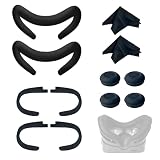
- Ice Silk & High Breathability: Designed specifically for Valve Index VR headset, the ice silk face gasket offers exceptional breathability, keeping your face cool and dry during long gaming sessions
- Machine Washable & Hygienic: The face gasket is machine washable for easy cleaning; together with the included cleaning cloths, you can quickly wipe down the headset and gasket, making shared use more hygienic and worry-free
- 2-Pack Face Gaskets + 4 Thumbstick Covers: Includes 2 replaceable ice silk face gaskets for easy swapping, plus 4 thumbstick covers that protect your Valve Index controllers from wear and tear, enhancing grip and control during intense gameplay
- 2 Cleaning Cloths + 2 Sets of Velcro Straps: The microfiber cleaning cloths safely clean lenses and face gaskets for a clear view; the 2 extra Velcro straps ensure a secure, non-slip fit even after extended use
- Lightweight & Comfortable Design: Thinner and lighter than standard foam padding, reducing pressure on your cheeks and forehead. Comfortable even with glasses, so you can stay fully immersed in VR
PC requirements and setup
Valve lists these minimum requirements for the Index:
- Windows 10, SteamOS, or Linux.
- At least 8 GB of RAM.
- NVIDIA GTX 970 or AMD RX 480, or better.
- DisplayPort 1.2.
- USB connectivity.
- A dual-core processor with Hyper-Threading or better.
Valve lists a quad-core-or-better processor and GTX 1070-or-better graphics card as recommended, with USB 3.0 required for headset cameras. These are official minimums, not a promise of stable 120-Hz or 144-Hz performance in demanding modern games. Actual performance depends on the CPU, GPU, game, render resolution, supersampling, refresh rate, and graphics settings.
For setup, connect DisplayPort directly to the dedicated GPU rather than relying on HDMI or a questionable adapter. Connect the headset’s USB cable and power supply, install or update SteamVR, pair the controllers, and place the base stations so the play area has a clear tracking view.
Common problems to check before buying used
Headset not detected
- Confirm that DisplayPort is connected directly to the GPU.
- Confirm USB and the headset power supply are connected.
- Check that the GPU is using the active DisplayPort output.
- Make sure SteamVR is updated.
- Fully seat the headset cable.
- Restart SteamVR after reconnecting the hardware.
Valve specifies DisplayPort rather than HDMI and lists the relevant USB requirements on its product page.
Tracking loss
Check base-station power, obstructions, reflective surfaces, SteamVR status, controller batteries, and controller pairing. If possible, determine whether the fault follows one base station or one controller. That distinction is valuable when evaluating a used system.
Black screens or flicker
Possible causes include a failing tether, loose DisplayPort connection, GPU driver issues, SteamVR problems, or hardware failure. Intermittent black screens should be treated as a serious defect, not a minor setup quirk.
Controller drift
Thumbstick drift is a hardware problem that may require repair or replacement. Factor replacement cost into the purchase price rather than assuming software calibration will permanently solve it.
Who should buy the Index?
Buy it when the decision is specifically about its ecosystem and characteristics—not simply because it is a famous PC-VR headset. The strongest cases are:
Do these 3 things before closing this tab:
1Fix the driver behind crashes, sound loss and screen glitches2Repair Windows errors before they cause bigger problems3Scan for outdated or missing drivers - takes under a minute- You already own two compatible Lighthouse base stations.
- You already own Index controllers or other SteamVR-tracked hardware.
- You want native wired DisplayPort PC VR and dislike wireless compression or network troubleshooting.
- You value wide FOV, 120/144-Hz modes, off-ear audio, and Index controller ergonomics.
- You play room-scale or social VR where Lighthouse tracking and finger sensing matter.
- You find a complete, tested used system at a substantial discount.
- You plan to reuse the base stations and controllers with a later Lighthouse-compatible headset.
Who should skip it?
- First-time buyers who want the simplest setup.
- Anyone without a gaming PC.
- Buyers who want standalone games, color passthrough, or mixed reality.
- Wireless-first users.
- Readers who prioritize text clarity, productivity, high-resolution simulator instruments, or distant-object detail.
- People in small or shared spaces who cannot conveniently place base stations.
- Quest 3 owners expecting a visual upgrade.
- Anyone paying close to $999 for a complete system released in 2019.
Final verdict
New full kit: usually not worth it. The Index’s audio, tracking, controllers, FOV, and refresh-rate options remain genuinely strong, but the price and external hardware requirements are hard to justify against newer Quest 3-class products.
Used complete kit: potentially worthwhile if it is substantially discounted, fully tested, and protected by a return policy. Price the risk of controllers, base stations, and tether replacement before buying.
Existing Lighthouse owner: the best case for an Index. If you already own the tracking infrastructure and specifically want its wired PC-VR experience, it can still be a sensible specialist purchase.
Quick Recap
Product prices and availability are accurate as of the date/time indicated and are subject to change. Any price and availability information displayed on Amazon at the time of purchase will apply.
The Tool Desk
Outbyte PC Repair FREEClear out junk files and repair common Windows errorsFree Scan →Outbyte Driver Updater FREEFix the driver behind crashes, sound loss and screen glitchesFind Drivers →
