KiDoom is a real, open-source demonstration that renders DOOM through KiCad’s PCB editor—but it is not a native game port inside KiCad. The game engine runs separately, extracts walls and entities, and sends that scene data to a Python plugin that redraws it as PCB traces, footprints, vias, and text.
The result is playable in principle, but its roughly 10–25 frames per second makes it an inventive visualization rather than a practical replacement for a conventional DOOM source port.
What KiDoom actually is
KiDoom, documented in the project repository, uses KiCad as an unusual display surface. A patched doomgeneric-based engine handles game logic and input in its own process. KiCad does not execute the game natively; its PCB Editor displays a continually changing representation of the game scene.
That distinction matters. The SDL output remains the conventional game view, while KiCad receives geometric information and turns it into editable board objects. The repository describes three display paths: the normal SDL renderer, a Python wireframe renderer, and the KiCad PCB visualization.
Do these 3 things before closing this tab:
1Repair Windows errors before they cause bigger problems2Fix the driver behind crashes, sound loss and screen glitches3Clear out junk files and repair common Windows errors#1 Best Overall

- Versatile PCB Board Kit: This circuit board prototype kit includes a variety of PCB board sizes to cater to diverse project requirements: 1 piece of 3.5x5.9 inches (9x15cm), 2 pieces of 2.8x3.5 inches (7x9cm), 3 pieces of 2.0x2.8 inches (5x7cm), and 5 pieces each of 1.6x2.4 inches (4x6cm), 1.2x2.8 inches (3x7cm), and 0.8x3.1 inches (2x8cm).
- Comprehensive Header Pin Set: Includes 6 pieces of male straight pin headers, 6 pieces of female straight pin headers, and 4 pieces of right-angle pin headers. Each row features 40 pins with a 0.1 inch (2.54mm) pin pitch, providing versatile connectivity options.
- Complete Terminal Blocks & Jumpers: This kit comes with 6 pieces of 2-Pin Terminal Blocks, 4 pieces of 3-Pin Terminal Blocks, and 100 pieces of standard 2.54mm pin spacing circuit board jumper caps, ensuring you have the components needed for various connections.
- Sturdy and Durable Construction: Made from high-quality FR4 fiberglass material, these PCB boards are 1.6mm thick, offering robust durability and long-lasting performance for your projects.
- Convenient Design for Easy Assembly: Each board features four mounting holes at the corners for easy assembly. The pre-tinned holes across the circuit board simplify the soldering of components and sensors, facilitating seamless project integration.
How the rendering pipeline works
KiDoom’s data flow can be summarized as:
DOOM / doomgeneric engine
        ↓
Extracted wall, sprite, and entity data
        ↓
Socket connection
        ↓
KiCad Python plugin
        ↓
PCB traces, footprints, vias, and text
The engine is instrumented to expose scene geometry and entity information instead of sending only a finished pixel framebuffer. A socket carries that information to the plugin, which converts game coordinates into PCB coordinates and updates board objects. Repository components cover socket communication, entity classification, coordinate conversion, object pooling, the plugin itself, and engine build scripts.
This separation also explains why the standalone renderer is useful: it lets you determine whether the engine and game data work before involving KiCad’s plugin and redraw machinery.
What the game becomes on a circuit board
| Game element | KiCad representation | Meaning in the visualization |
|---|---|---|
| Walls and level geometry | Copper traces | The main wireframe-like structure of each scene |
| Large enemies | QFP-64 footprints | A conspicuous, high-pin-count package for major targets |
| Health, ammunition, and keys | SOT-23-style footprints | Small surface-mount forms for pickups |
| Barrels and decorations | SOIC-8 footprints | Medium-sized objects with a different package silhouette |
| Projectiles | Vias | Small point-like board objects for bullets and fireballs |
| HUD | PCB text | Status information rendered as board annotations |
These are genuine KiCad design primitives, but the board is a visual canvas, not a useful electronic circuit. A frame could theoretically be fabricated because it consists of valid board objects; that does not make it electrically meaningful, production-ready, or optimized for manufacture.
Why this is more than a screenshot trick
KiCad provides scripted access to tracks, footprints, vias, text, and board updates. KiDoom repurposes those facilities as a 2D/3D scene renderer. The plugin repeatedly modifies or reuses objects as the player moves, translating a game’s spatial model into an electronic-design vocabulary.
The Tool Desk
Outbyte Driver Updater FREEFix the driver behind crashes, sound loss and screen glitchesFind Drivers →Outbyte PC Repair FREEClear out junk files and repair common Windows errorsFree Scan →Rank #2
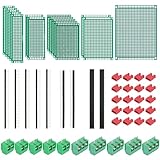
- PCB Perf Board Set: 5 Sizes Perfboard Circuit Protoboard
- Double-Sided Prototype Boards: 5 pcs 20 x 80 mm, 2 pcs 30 x 70 mm, 5 pcs 40 x 60 mm, 2 pcs 50 x 70 mm,1 pcs 70 x 90 mm
- 2.54 mm Header Pins: 5 pcs 1 x 40 pin straight male pin headers, 2 pcs 1 x 40 pin right-angle pin headers and 2 pcs 1 x 40 pin female pin headers
- 5.08 mm Screw Terminal Blocks: 5 pcs 2 pin and 5 pcs 3 pin screw terminal blocks
- 20 pcs 2.54 mm jumper caps
A conventional game renderer writes pixels to a framebuffer. KiDoom instead asks a PCB application to process many object changes and redraw the board. That choice preserves the project’s visual joke while exposing a real engineering problem: an EDA editor is substantially heavier than a purpose-built game renderer for frame-by-frame animation.
Is KiDoom playable?
Yes, the project is presented as playable, but the KiCad view is constrained by the editor’s refresh speed. Project documentation and coverage report approximately 10–25 FPS, with PCB redraw performance—not the game engine or socket transport—identified as the principal bottleneck.
Expect a slow, experimental board visualization rather than smooth modern gameplay. The SDL mode is the sensible way to check ordinary game behavior; the KiCad mode is the point of the demonstration.
How to try KiDoom
The following workflow reflects the repository’s documented Unix-style setup. Package names, plugin directories, and menu labels can change with operating system, repository revisions, or KiCad releases. The available documentation does not establish a fixed minimum or maximum KiCad version or complete Windows support.
Outdated Drivers Are Slowing You Down
One free scan finds every outdated or missing driver and matches the right update for your exact hardware.Free scan · exact hardware matchPC Slower Than It Used to Be?
A free scan shows the junk files, broken settings and background clutter dragging Windows down - then fixes them in one click.Free scan · Windows 10 & 11Rank #3

- ALLECIN 10 Values PCB Boards Kit, 2.54mm Male Female Header Connector and 5mm Screw Terminal Block Kits ### Meet your needs for DIY projects, electronic experiments and designing Arduino kits.
- PCB Circuit Proto Boards Kit: Size: 2x8 3x7 4x6 5x7 6x8 7x9cm & Hole Diameter: 1mm (5% error) & Hole Pitch: 2.54mm(0.1inch) & Thickness: 1.6mm(0.039inch).
- Male Female Header Connector: Pitch: 2.54mm & Number of Pins: 40 Pin & Insulation Resistance: 1,000MΩ & Contact Resistance: 20mΩ.
- Screw Terminal Block: Pitch: 5mm & Rated voltage: 300V & Rated current: 10A & Pin number: 2 Pin and 3 Pin.
- Humanized packaging for easy storage and use. ### Please confirm the size, pitch and number of Pins before purchasing.
1. Install SDL2 development files
# macOS
brew install sdl2

# Debian/Ubuntu-style Linux
sudo apt install libsdl2-dev
2. Build the patched engine
cd doom/source
./build.sh
The project references doom1.wad, the shareware game-data file. Do not assume that commercial episodes or a licensed retail WAD are bundled, redistributable, or automatically compatible.
3. Test a renderer before opening KiCad
./run_standalone_renderer.py
./run_doom.sh dual -w 1 1
Use this step to separate engine or WAD problems from plugin-discovery and PCB-update problems.
4. Link the KiCad plugin
ln -s $(pwd)/kicad_doom_plugin ~/.kicad/scripting/plugins/kidoomThe shown path is Unix-like; Windows uses a different user-plugin location and may require another installation method. Restart KiCad after creating or changing the link.
5. Launch it from PCB Editor
Create or open a PCB, preferably an A4 landscape board for the demonstration, then choose:
Free tools Windows power users keep installed
One-click scans. No signup required.
Rank #4

- 19pcs double sided pcb board kit for diy soldering and electronics projects - includes 5 sizes (6x 20x80mm, 6x 30x70mm, 3x 40x60mm, 3x 50x70mm, 1x 70x90mm) - compatible with arduino kits
- Screw Terminal Block and Jumper caps:8pcs 5.08-301-2p and 6pcs 5.08-301-3p screw terminal blocks; 25pcs 2.54mm pin spacing jumper caps in 5 colors (5pcs each)
- 2.54mm pitch header connectors: 8pcs 40-pin male, 8pcs 40-pin right-angle male, and 8pcs 40-pin female headers
- Circuit Board kit is made of FR4 material with a thickness of 1.6 mm, which belongs to glass fiber
- Double sided circuit board features tin-plated holes for soldering diy components and corner mounting holes for easy assembly and installation
Tools → External Plugins → KiDoom – DOOM on PCB
The plugin should begin updating the board with the game scene. Treat the repository as a developer-oriented workflow rather than a one-click installer.
Independent reader supportYour contribution helps us test, update, and keep practical guides available for everyone.Common problems and practical checks
The KiDoom action does not appear
- Confirm that the link points to the repository’s
kicad_doom_plugindirectory. - Check that the link is inside the scripting-plugin directory used by your KiCad installation.
- Restart KiCad after installation.
- Verify permissions and inspect KiCad’s scripting or plugin error output.
- Run the standalone renderer first; if it fails, the problem is not plugin discovery.
The engine starts but the board stays unchanged
Check the socket connection, plugin initialization, coordinate conversion, and KiCad’s event-loop handling. The standalone test helps isolate the engine from the KiCad-side update path.
macOS crashes or freezes
The repository lists a macOS threading limitation involving wx.Timer: timer and UI work must remain on KiCad’s main thread. Do not treat the plugin as a general background renderer.
Best Value

- 32 Boards In Five Sizes: Choose 4 × 6 cm, 3 × 7 cm, 5 × 7 cm, 2 × 8 cm or 7 × 9 cm boards for compact circuits, controller interfaces, classroom soldering exercises and larger point-to-point builds
- Double-Sided FR4 For Soldered Prototypes: Approximately 1.6 mm FR4 provides a rigid base for permanent electronics builds, while pre-tinned plated-through holes provide solderable connections accessible from both sides
- Standard 2.54 mm Grid Fits Common Through-Hole Parts: Lay out resistors, LEDs, DIP sockets, pin headers, terminal blocks, sensors and jumper wires on a 0.1 in pitch, then create each required connection with soldered leads, bridges or insulated wire
- From Breadboard Test To Permanent Build: Transfer a proven circuit into a compact soldered assembly for sensor nodes, controllers, alarms and STEM demonstrations; corner mounting holes help secure finished boards in enclosures or on panels
- Set Expectations Before Soldering: These are isolated-pad perfboards with no breadboard-style buses or stripboard traces, and the kit does not include components, wire, solder or tools; plan the layout and check continuity before applying power
The PCB editor becomes sluggish
Slow redraw is an expected limitation of the design. Updating board objects inside an EDA application is far more expensive than drawing a conventional framebuffer, which is why the documented rate is only about 10–25 FPS.
WAD data is missing or invalid
Check the repository’s current instructions for obtaining doom1.wad. Shareware data is distinct from the complete commercial game, and a retail WAD should not be presumed to be included or legally redistributable.
KiDoom’s relationship to ScopeDoom
ScopeDoom is a related experiment, not another KiCad gameplay mode. It uses the same general idea of extracting vector information from DOOM and sends signals toward an oscilloscope operating in XY mode. Together, the projects show that the notable technique is the geometry-extraction pipeline: once the engine exposes vectors and entities, many unconventional displays become possible.
Who should try it?
- Good fit: KiCad users, makers, open-source developers, and retro-game fans interested in scripting, sockets, engine instrumentation, or unusual displays.
- Poor fit: anyone seeking a smooth, supported DOOM port, a simple installer, universal platform compatibility, or a production PCB design.
KiDoom is best understood as a KiCad scripting showcase and a particularly memorable answer to the question of where DOOM can be rendered. Its achievement is not putting the original engine inside an EDA program; it is making a separate engine communicate enough of its world that KiCad can redraw that world as a living circuit-board scene.
Quick Recap
Product prices and availability are accurate as of the date/time indicated and are subject to change. Any price and availability information displayed on Amazon at the time of purchase will apply.




