The Tool Desk
Outbyte PC Repair FREERepair Windows errors before they cause bigger problemsFix Now →Outbyte Driver Updater FREEFix the driver behind crashes, sound loss and screen glitchesFind Drivers →libmp3lame.dll is the Windows library for LAME, an MP3 encoding engine bundled with some audio editors, converters, media programs, and games. The safest fix is usually to identify the application in the error, then repair or reinstall that application instead of downloading the DLL into a Windows folder.
What this file actually does
libmp3lame.dll is a dynamic-link library built from the LAME MP3 encoder project. An application loads it when it needs to encode audio into MP3 format.
As an Amazon Associate I earn from qualifying purchases.
It is not:
- A normal Windows system component
- A DirectX file
- A .NET file
- A Windows driver
- A file that normally belongs in
C:WindowsSystem32 - A file that normally belongs in
C:WindowsSysWOW64
LAME can be built as a Windows DLL, command-line program, codec, or other integration component. Applications may bundle their own build in the application directory or in a plugins folder. Different programs can therefore use different filenames, builds, exported functions, and CPU architectures.
The filename libmp3lame.dll does not identify one universal replacement. Some older software uses lame_enc.dll, while lame.exe is a separate command-line encoder. FFmpeg may use LAME internally, but an application using FFmpeg may bundle the complete FFmpeg components rather than expose a separate DLL.
#1 Best Overall

- 🛫[USB MP3 Player with Bluetooth 5.3 & Clip] Enjoy smooth audio with the USB MP3 Player with Bluetooth 5.3. Pairs quickly and stays connected to wireless headphones or speakers. The USB MP3 player with clip Jam is easy to attach to clothes or bag, keeping hands free while running, hiking, or working out.💛 Note: The Bluetooth of the USB MP3 player clip on CAN'T connect to computers, cars, or smartphones
- 🚘[AUX and USB, Enjoy Music in Car] 3.5mm AUX port and standard USB plug, the USB MP3 player with Bluetooth seamlessly connects to your car's audio system. Whether you choose the clear, wired sound via AUX (AUX cable not included) or enjoy direct streaming through the USB port, your drives will be filled with crisp, uninterrupted tunes. The USB MP3 player for car is perfect for road trip or daily commute
- 📂[Phone File Transfer, 64GB Large Memory, Long Battery Life] USB & OTG function, easily transfer music from smartphone, laptop or PC. With 64GB of storage and rechargeable battery, enjoy up to 20 hours playtime after just 2 hours charging with the Bluetooth mp3 player USB stick.💝Note: Use an OTG cable or adapter, and make sure your phone supports OTG. For best results, transfer files in batches under 1GB
- 💽[HiFi Sound Quality & Multiple Play Modes] Enjoy clear, crisp sound for an immersive audio experience with this USB music player with Bluetooth. Choose from shuffle, playlist loop, sequential play, folder repeat, and more to customize your music experience. This Bluetooth MP3 player with clip is compatible with MP3, WMA, APE, FLAC, WAV, DRM, ACELP and OGG, providing the flexibility to meet all your music needs
- 🌈[USB MP3 Player with Voice Recorder, FM Radio, Line-in] All in one device for music lovers! Resume playback, Equalizer, bookmarks, file folder, volume limit, line-in function(record music directly from phone to the portable music player with Bluetooth), etc. Plus, the USB stick MP3 player can be used as a flash drive. The digital audio player USB is a great gift for seniors, father, mother or friends. Ideal exercise companion for jogging, riding, climbing, or outdoor activities
Causes matched to the symptom
| What you see | Most likely meaning | Best first action |
|---|---|---|
| “libmp3lame.dll is missing” | The application’s copy was deleted, moved, or quarantined | Repair or reinstall the named application |
| “The code execution cannot proceed” | The loader cannot find a usable copy | Check the application directory and antivirus history |
| “The specified module could not be found” | The DLL may be absent, or a dependency of the DLL may be absent | Reinstall the complete application package |
| “Not designed to run on Windows” | Wrong architecture, corruption, incompatible build, or missing dependency | Install the application’s matching official build |
| The error appears after an update | The update may have left an incomplete or incompatible installation | Use the application’s repair or file-verification feature |
| Only one program fails | The problem is probably private to that program | Repair that program rather than Windows |
| Several unrelated programs fail | Broader Windows, storage, security, or malware trouble is possible | Review security history and consider Windows repair checks |
Fix 1: Identify the application that needs the DLL
Start with the exact program named in the error. Do not begin by searching for libmp3lame.dll on the internet.
Look at:
- The title bar of the error window.
- The sentence that appears immediately before the DLL name.
- The shortcut you used to start the program.
- The executable path, if the message includes one.
- The time the problem began and what changed just before it.
If the error appears while opening an audio editor, converter, media program, or game, that product is the likely owner. A game may use LAME for music, cutscenes, replay audio, or another bundled media feature.
If you are unsure which executable is failing:
- Right-click the program’s shortcut.
- Select Properties.
- Open the Shortcut tab.
- Read the Target field.
- Note the application folder, but do not replace files yet.
You can also open Task Manager while reproducing the error:
Free tools Windows power users keep installed
One-click scans. No signup required.
- Press Ctrl + Shift + Esc.
- Select Details.
- Start the affected application again.
- Watch for its executable name.
- Right-click the process if it appears and choose Open file location.
If the program closes too quickly, use its shortcut properties or search for the application in Start and select Open file location from the result’s context menu.
The relevant copy of the DLL is normally beside the application executable or in a documented plugin directory. Windows’ DLL search behavior gives the application directory an important role, so a copy placed in a global system directory is not a reliable repair.
Fix 2: Repair the application before reinstalling it
A repair operation can restore missing files without removing personal projects or settings.
Windows 11
- Open Start.
- Select Settings.
- Choose Apps.
- Select Installed apps.
- Find the affected application.
- Select the three-dot menu beside it.
- Choose Advanced options, if available.
- Select Repair.
- Start the application again.
Not every desktop application provides Repair or Advanced options. If the button is missing, use the program’s own installer, updater, or launcher.
Quick wins for a faster PC:
Clear out junk files and repair common Windows errorsFree Scan →Scan for outdated or missing drivers - takes under a minuteDriver Scan →Repair Windows errors before they cause bigger problemsFix Now →Windows 10
- Open Start.
- Select Settings.
- Choose Apps.
- Select Apps & features.
- Select the affected application.
- Choose Advanced options, if available.
- Select Repair.
For a traditional desktop program, open its official installer instead. Some installers offer Repair, Modify, or Fix installation. Choose that option and restart Windows if the installer requests it.
After repair, test the exact function that originally produced the error, such as opening an MP3, exporting audio, or launching the game. If the application starts but the error returns during encoding, the missing component may be in a plugin or optional media package rather than the main program.
Fix 3: Verify or reinstall a game or launcher application
Games and launcher-managed applications often keep their DLLs in a private installation directory. Their repair process may be called Verify files, Verify integrity, Scan and repair, or Repair installation.
The exact menu depends on the launcher. Look in the affected game’s library entry for:
- A settings or gear menu
- Manage or installation options
- Verify or repair commands
- An option to scan installed files
Run the launcher as an administrator only if its own repair process cannot access the installation directory:
Rank #2
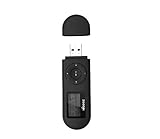
- [MP3 PLAYER WITH USB DESIGN] No data cable is needed, you can connect it directly to your laptop, transfer files with the high speed USB 2.0 port or charge the U2 music player, it can also be used as a USB flash drive.This USB stick MP3 player has a built-in 8 GB flash memory capacity that can save over 2600 songs, and the built-in micro SD card slot can support expansion up to 32 GB.
- [MINI MP3 PLAYER WITH LONG BATTERY LIFE] This USB MP3 player is rechargeable that can be easily charged by placing it directly on a USB outlet. When fully charged, it can play for up to 10 hours at medium volume. Compared to other products, it can be recharged at any time.
- [MULTIFUNCTIONAL USB MP3 PLAYER] This music player supports WMA and MP3 music formats, FM radio, one-touch recording and USB flash drive storage, music playback modes: normal, shuffle, single song repeat, folder song repeat, etc. It supports 7 equalizers and variable speed music playback. [SHUFFLE]: When the song is playing or paused, short press the "M" button on the side of the player, the player will enter the playback settings page then select the repeat option and choose Shuffle play.
- [SPORTS MP3 PLAYER HIGHT SOUND QUALITY] Portable MP3 music player takes you to enjoy clear listening experience, mini portable design, perfect for outdoor or indoor sports, for example, running, cycling, fitness, yoga, or skateboarding, enjoy high-quality music anytime and anywhere.
- [WHAT YOU GET? ] A portable mini MP3 player, a high-quality headphone, welcome guide, our worry-free 365-day warranty and friendly customer service. If you encounter any problems in using it, please contact us directly.
- Close the launcher.
- Open Start.
- Type the launcher’s name.
- Right-click it.
- Select Run as administrator.
- Start the file verification or repair operation.
Do not copy a DLL from another game into the affected game. Even if both programs use LAME, their builds and expected exported functions may differ.
Fix 4: Reinstall from the application’s official source
If repair or verification does not restore the file, reinstall the affected application using its official installer, store, or launcher.
Before uninstalling:
- Back up projects, presets, saved games, recordings, and custom plugins.
- Check whether the application stores files in Documents, AppData, or another profile folder.
- Record any activation or configuration details you will need later.
- Close the application and related background processes.
Then:
- Open Settings.
- Select Apps.
- Open Installed apps on Windows 11, or Apps & features on Windows 10.
- Select the affected application.
- Choose Uninstall.
- Restart Windows.
- Download or launch the installer from the application’s official source.
- Install the same product edition and architecture that your system and projects require.
- Test the program before adding third-party plugins.
If the installer offers optional components, install the documented audio, codec, or media component. Do not select unrelated runtime packages merely because they contain the word “DLL.”
What’s actually slowing this PC down?
Pick the symptom - the matching free tool is one click away.
A reinstall is the definitive fix when the application’s own libmp3lame.dll was deleted or corrupted. It also restores related dependencies that a standalone DLL cannot provide.
Fix 5: Check Windows Security quarantine
Antivirus software may quarantine a bundled DLL after a detection update or because the original application was obtained from an untrusted source. Do not assume that quarantine proves the file was harmless or malicious.
To inspect Microsoft Defender history:
- Open Start.
- Type Windows Security.
- Open it.
- Select Virus & threat protection.
- Select Protection history.
- Open the event related to the application.
- Check the exact file path and detection name.
If the path points to the legitimate application directory and you trust the installer source, reinstall the application first. This is safer than restoring an isolated file.
Restore or allow a quarantined file only when you have verified the application and binary source. If Windows Security detects the file again after restoration, do not keep overriding the detection. Remove the application, scan the computer, and reinstall it from its official source.
A DLL with a legitimate filename can still be malicious if it was placed in a temporary folder, download directory, email attachment location, or unrelated system folder.
Fix 6: Check 32-bit and 64-bit compatibility
Both 32-bit and 64-bit builds of LAME-based libraries exist. The required architecture is determined primarily by the application, not simply by whether Windows is 64-bit.
- A 32-bit application needs a 32-bit
libmp3lame.dll. - A 64-bit application needs a 64-bit
libmp3lame.dll. - A 64-bit version of Windows can run both 32-bit and 64-bit applications.
- A 64-bit DLL cannot normally replace a 32-bit DLL required by a 32-bit program.
To check the application architecture, consult its official documentation or installer information. You can also inspect the application’s executable with a trusted diagnostic utility, but do not replace files based only on a version or file-size table.
Some indexed files are labeled with versions such as 3.99.2.5, 3.99.2.3, or 0.0.0.0. Those labels describe particular builds and metadata, not a universal official replacement. File size alone cannot establish compatibility.
Do these 3 things before closing this tab:
1Clear out junk files and repair common Windows errors2Scan for outdated or missing drivers - takes under a minute3Repair Windows errors before they cause bigger problemsIf the error says the file is “not designed to run on Windows,” reinstall the application’s matching build. That message commonly indicates corruption, wrong architecture, an incompatible binary, or a missing dependency. It does not mean that registering the file will fix it.
Rank #3

- Direct Type-C & Universal USB Connectivity - Plug this mp3 player directly into Type-C phones for fast file transfer. To connect to laptops, cars, or desktop PCs, simply use the included Type-C to USB adapter/cable. No hunting for extra cables—enjoy seamless, plug-and-play.
- Never Run Out of Power with Swappable AAA Batteries - Escape the anxiety of a dead battery mid-workout or on a long trip. Our unique AAA battery design liberates you from power banks and outlets. Just swap in a fresh battery (easily available anywhere) for instant, uninterrupted music. [Battery not included; USB charging is not supported.]
- Massive 16GB Storage for Music & File Transfer - Comes pre-loaded with a 16GB TF card, ready to hold over 3000+ songs. It fully supports high-fidelity formats like FLAC, APE, and WAV for superior sound quality. Beyond music, it functions as a powerful U disk, letting you easily carry documents, e-books, and study materials. [Bluetooth connection not supported]
- Crisp LED Display - Navigate your music with ease on the bright, energy-efficient LED screen that clearly shows song titles. The body features a soft-touch, rubberized coating that feels great in-hand, resists fingerprints and scratches, and ensures a secure, comfortable grip during any activity.
- Voice Recorder & FM Radio for Added Versatility - More than just an MP3 player. Use the built-in voice recorder to capture lectures, meetings, or ideas on the fly. The FM radio (need wired headset as antenna) keeps you connected to news, sports, and music stations anywhere. Two powerful tools packed into one compact device.
Fix 7: Understand the difference between related LAME files
libmp3lame.dll
This is a library that an application loads to perform MP3 encoding. It is usually kept in the application’s own directory or a plugin directory.
lame_enc.dll
Older applications, including older Audacity-related setups and some older media tools, may expect this filename. Renaming libmp3lame.dll to lame_enc.dll is not a universal solution because the application may require particular exported functions.
lame.exe
This is a command-line executable, not a DLL. An application that expects a library cannot normally use lame.exe as a substitute.
Recommended Free Tools
FFmpeg
FFmpeg is a broader multimedia framework. It can use LAME for MP3 encoding, but the application may require a complete FFmpeg build or its own bundled components. Installing or renaming one LAME DLL may not repair an FFmpeg-related error.
Audacity-specific guidance
Current Audacity versions for Windows include the LAME library rather than normally requiring a separate download.
If Audacity reports a LAME problem:
- Open Audacity’s Help menu.
- Check About Audacity to identify the installed version.
- Update Audacity using its official installer if an update is available.
- If updating does not help, uninstall and reinstall Audacity.
- Preserve recordings and project files before removing the program.
Older Audacity versions may have expected lame_enc.dll and a particular compatible build. A generic libmp3lame.dll may not export what that older release expects. Do not rename files unless the exact Audacity documentation for that release instructs you to do so.
If the error actually concerns FFmpeg import or export, repair the FFmpeg installation required by that Audacity version rather than searching for a standalone LAME DLL.
Outdated Drivers Are Slowing You Down
One free scan finds every outdated or missing driver and matches the right update for your exact hardware.Free scan · exact hardware matchWindows Errors? Fix Them Before They Spread
Repair common Windows errors and clear accumulated junk for a smoother, more stable PC - no reinstall needed.Free scan · no reinstallDo not copy it into System32 or SysWOW64
Do not place libmp3lame.dll in either of these folders as a routine fix:
C:WindowsSystem32C:WindowsSysWOW64
The names are counterintuitive on 64-bit Windows: System32 normally contains 64-bit system binaries, while SysWOW64 supports 32-bit system binaries. Neither directory is automatically the correct home for an application-private LAME library.
Global copying can create new problems:
- The wrong application may load the wrong build.
- A 32-bit and 64-bit program may need different files.
- Windows may continue loading a conflicting copy.
- An unsafe DLL may become available to unrelated programs.
- Removing the file later becomes difficult.
Keep the application’s own library with the application unless its vendor documents another location.
Do not use regsvr32 for this error
regsvr32 is intended for DLLs that provide a registration entry point such as DllRegisterServer. A LAME encoder library is normally loaded by an application as an ordinary encoding library.
Running this command is usually irrelevant:
regsvr32 libmp3lame.dll
It may produce an error stating that the module was loaded but the DllRegisterServer entry point was not found. That does not prove the DLL is damaged, and repeating the command will not restore a missing application dependency.
Rank #4

- 【Type-C & USB 2 in 1 Plug and Play】 No data cable is needed, you can directly connect it to mobile phones and laptops with type-c ports. A type-c to USB adapter cable is included, so it can also be used to connect to desktop computers or car audio systems with traditional USB ports. Use High-speed port to transfer files or charge U5 music player.
- 【Portable Back Clip Design】The back clip design can be strongly clipped on any of your clothes. The size is only 3.1 inch * 1 inch and as light as 25g (0.88 ounce). You won't even notice you're wearing it. Supports FM Radio.
- 【64gb Large Memory】 Comes with 64 gb of storage space and it can be used as a flash drive as well. It supports formats such as mp3, wma, ape, flac, ogg. It can store about 13,000+mp3 music or 2000+ flac music to meet your needs. Used as a flash drive you can store large amounts of office and study files. It is recommended to transfer files in batches, each time within 1gb.
- 【Bluetooth 5.3 & Automatic Reconnection】AGPTEK U5 MP3 music player adopts Bluetooth 5.3 technology, more stable connection, better compatibility, and lower consumption. You can pair the Bluetooth MP3 Player with wireless headphones or a Bluetooth speaker, automatically connects to the last Bluetooth device it was connected to, as soon as it is activated. Please use a 3.5mm audio cable to connect to the car. Some cars are not compatible with Bluetooth.
- 【Long Battery Life】AGPTEK U5 music player can play music continuously for about 16 hours (tested at maximum volume), and it takes 2 hours to fully charge. Powerful battery life fully meets your needs for enjoying leisure, music, travel, sports, etc.
Only register the file if the application’s vendor explicitly says that its particular DLL is a self-registering component.
Fix 8: Check related Microsoft runtimes only when named
Do not install Visual C++, DirectX, or .NET merely because the error contains .dll. None of those packages supplies libmp3lame.dll.
A LAME build may have a Microsoft runtime dependency, but install or repair that runtime only when the error separately names a file such as:
VCRUNTIME*.dllMSVCP*.dll- Another Microsoft runtime component
Install the architecture required by the application. On 64-bit Windows, both x86 and x64 applications may be installed, so both runtime architectures can sometimes be relevant.
Do not use Windows Features to search for LAME. Optional Windows features do not normally provide this application-private encoder library.
Independent reader supportYour contribution helps us test, update, and keep practical guides available for everyone.Fix 9: Repair Windows only when other components also fail
Because libmp3lame.dll is normally supplied by a third-party application, System File Checker should not be expected to recreate it.
Use Windows repair commands when several unrelated applications fail, Windows Update is damaged, or Windows reports broader system-file corruption.
First:
- Open Start.
- Type Command Prompt.
- Right-click it.
- Select Run as administrator.
- Run:
DISM.exe /Online /Cleanup-Image /RestoreHealth
Wait for DISM to finish. Then run:
sfc /scannow
Restart Windows and test the affected application.
Success means DISM completes without an unrepaired image error and SFC reports that it found no integrity violations or repaired protected Windows files. These commands do not normally restore a missing copy inside an application folder. If only one program still fails, return to that program’s repair or reinstall process.
Repeating SFC and DISM without checking which component changed can make troubleshooting harder. Outbyte PC Repair can show what its free scan detects, while repair actions are performed by the full version; it is optional, and reinstalling the affected application remains the definitive fix for an application-owned DLL.
Fix 10: Check drivers only when the timing points to them
libmp3lame.dll is not a device driver, so updating a graphics, sound, or chipset driver is not the normal fix. Consider a driver check only if the error began immediately after a driver or audio-device change and other media applications also fail.
To inspect drivers:
- Right-click Start.
- Select Device Manager.
- Expand Sound, video and game controllers.
- Right-click the affected audio device.
- Select Properties.
- Open the Driver tab.
- Note the provider, date, and version.
- Use Update Driver only with a driver supplied by Windows or the device manufacturer.
- Restart Windows and retest.
Do not uninstall a working driver simply because a program reports libmp3lame.dll. If the program still fails after a driver change, restore the application before changing more system components.
Recommended Free Tools
When several driver versions must be checked manually, Outbyte Driver Updater can use its free scan to identify outdated drivers, while installation is handled by the full version; it is optional and does not replace reinstalling the application that owns this DLL.
Why random DLL downloads are risky
Avoid anonymous DLL download sites websites and copied files from forums, file-sharing services, or another computer.
A replacement can have:
- The wrong 32-bit or 64-bit architecture
- An incompatible exported API
- Missing dependent files
- Corruption or tampering
- Malware
- A different search-path behavior
- A version that works in one application but breaks another
The safe source is the affected application’s official installer, store, launcher, or documented vendor package. The LAME project distributes source rather than one universal official Windows DLL for every application. If software explicitly documents a manual LAME installation, follow that software’s filename, architecture, directory, and build requirements.
Best Value
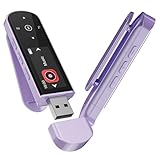
- 🛫[USB MP3 Player with Bluetooth 5.3 & Clip] Enjoy smooth audio with the USB MP3 Player with Bluetooth 5.3. Pairs quickly and stays connected to wireless headphones or speakers. The USB MP3 player with clip Jam is easy to attach to clothes or bag, keeping hands free while running, hiking, or working out.💛 Note: The Bluetooth of the USB MP3 player clip on CAN'T connect to computers, cars, or smartphones
- 🚘[AUX and USB, Enjoy Music in Car] 3.5mm AUX port and standard USB plug, the USB MP3 player with Bluetooth seamlessly connects to your car's audio system. Whether you choose the clear, wired sound via AUX (AUX cable not included) or enjoy direct streaming through the USB port, your drives will be filled with crisp, uninterrupted tunes. The USB MP3 player for car is perfect for road trip or daily commute
- 📂[Phone File Transfer, 64GB Large Memory, Long Battery Life] USB & OTG function, easily transfer music from smartphone, laptop or PC. With 64GB of storage and rechargeable battery, enjoy up to 20 hours playtime after just 2 hours charging with the Bluetooth mp3 player USB stick.💝Note: Use an OTG cable or adapter, and make sure your phone supports OTG. For best results, transfer files in batches under 1GB
- 💽[HiFi Sound Quality & Multiple Play Modes] Enjoy clear, crisp sound for an immersive audio experience with this USB music player with Bluetooth. Choose from shuffle, playlist loop, sequential play, folder repeat, and more to customize your music experience. This Bluetooth MP3 player with clip is compatible with MP3, WMA, APE, FLAC, WAV, DRM, ACELP and OGG, providing the flexibility to meet all your music needs
- 🌈[USB MP3 Player with Voice Recorder, FM Radio, Line-in] All in one device for music lovers! Resume playback, Equalizer, bookmarks, file folder, volume limit, line-in function(record music directly from phone to the portable music player with Bluetooth), etc. Plus, the USB stick MP3 player can be used as a flash drive. The digital audio player USB is a great gift for seniors, father, mother or friends. Ideal exercise companion for jogging, riding, climbing, or outdoor activities
When to suspect malware
Investigate more seriously if:
- The DLL is in a temporary or download folder.
- The file appeared after opening an email attachment.
- Its path is unrelated to the affected application.
- Antivirus history shows a detection.
- The error started after installing pirated or modified software.
- Multiple applications suddenly load DLLs from an unexpected directory.
Scan with Windows Security, remove untrusted copies, and reinstall the affected program from a trusted source. Microsoft documents DLL preloading risks because an application can sometimes load a malicious library from an attacker-controlled location.
Outdated Drivers Are Slowing You Down
One free scan finds every outdated or missing driver and matches the right update for your exact hardware.Free scan · exact hardware matchPC Slower Than It Used to Be?
A free scan shows the junk files, broken settings and background clutter dragging Windows down - then fixes them in one click.Free scan · Windows 10 & 11Do not whitelist a suspicious file merely because its name is libmp3lame.dll.
If reinstalling still does not help
Work through this checklist:
- Confirm the exact application and executable that fails.
- Check whether the application is 32-bit or 64-bit.
- Open the application directory and see whether its installer restored the DLL.
- Review Windows Security → Virus & threat protection → Protection history.
- Check whether the error names a dependent DLL instead.
- Remove manually copied versions from unrelated directories.
- Test the application with third-party plugins temporarily disabled.
- Preserve projects and settings before resetting the application profile.
- Test with a new Windows account if the program works there.
- Use System Restore only if the problem began after a known system or software change and normal repair failed.
A program that works in a new Windows account may have damaged profile settings or permissions rather than a defective DLL.
Frequently asked questions
Is libmp3lame.dll malware?
LAME is legitimate open-source MP3 encoding software, but a file with a legitimate name is not automatically safe. Verify its path, source, digital signature where available, and antivirus history.
Is it a Windows file?
No. It is normally bundled by a third-party application. Windows does not usually provide it in System32 or SysWOW64.
Quick wins for a faster PC:
Clear out junk files and repair common Windows errorsFree Scan →Fix the driver behind crashes, sound loss and screen glitchesFind Drivers →Which program installed it?
The error message, shortcut target, executable path, and application folder usually identify the owner. Common possibilities include audio editors, converters, media applications, games, and programs that bundle FFmpeg or LAME. It does not always belong to Audacity, FFmpeg, REAPER, or Mixxx.
Should I download the latest version?
There is no single universal latest libmp3lame.dll that is correct for every program. Use the application’s official installer and matching architecture.
Should I run regsvr32?
Normally, no. LAME encoder libraries are generally loaded by the application and are not COM or ActiveX components.
Should I install Visual C++, DirectX, or .NET?
Only when the error separately identifies a missing runtime component. Those packages do not supply libmp3lame.dll.
The Tool Desk
Outbyte PC Repair FREEClear out junk files and repair common Windows errorsFree Scan →Outbyte Driver Updater FREEScan for outdated or missing drivers - takes under a minuteDriver Scan →What information should I provide when asking for help?
Include the application name and version, full error text, executable path, Windows architecture, location of any existing libmp3lame.dll, and relevant antivirus history. Do not upload an unknown DLL as a proposed fix.
What is the most likely solution?
Repair or reinstall the application named in the error using its official source. That restores the correct file, dependencies, architecture, and directory together.
Quick Recap
Product prices and availability are accurate as of the date/time indicated and are subject to change. Any price and availability information displayed on Amazon at the time of purchase will apply.




