Outdated Drivers Are Slowing You Down
One free scan finds every outdated or missing driver and matches the right update for your exact hardware.Free scan · exact hardware matchWindows Errors? Fix Them Before They Spread
Repair common Windows errors and clear accumulated junk for a smoother, more stable PC - no reinstall needed.Free scan · no reinstallIn Minecraft: Bedrock Edition, “game icons and banners” can refer to three different things: a resource-pack icon shown when choosing packs, an item icon displayed in the game UI, or an in-game banner decorated with patterns. They use different systems. A resource pack can include pack_icon.png; custom item icons are documented through the minecraft:icon component and resource-pack texture data; banner patterns are in-game customization items.
What “game icons and banners” means in Bedrock
| Visual | What it represents | Where it appears | Bedrock reference |
|---|---|---|---|
| Pack icon | A resource pack | Pack-selection interface | pack_icon.png in the resource-pack structure, documented by Microsoft’s comprehensive list of pack contents. |
| Item icon | An item | Item representation in the UI and elsewhere | The minecraft:icon item component and item texture references in Microsoft’s item-component documentation. |
| Banner pattern | A decorative pattern applied to an in-game banner | On the banner object in the world | Banner Pattern items and their names are described in the Bedrock 1.21.30 changelog. |
These are not interchangeable assets: a pack icon identifies the pack, an item icon represents an item, and a banner pattern customizes an in-game object.
How resource-pack and item icons work
Pack icon
Microsoft’s Bedrock pack-contents documentation lists pack_icon.png at the resource-pack root. The same reference describes pack folders and supported file types; Bedrock only uses add-on files when both the file type, folder name, and location are correct. Follow the live documentation for the pack structure rather than assuming that an image placed anywhere in a pack will be recognized.
Custom item icon
The minecraft:icon component “Determines the icon to represent the item in the UI and elsewhere.” Its documented texture references connect to entries in the resource pack’s item_texture.json data. Microsoft marks the component’s texture property as deprecated and no longer in use, and documents a textures map with a default entry. The component documentation specifies format version 1.20.0 or higher; check the current page for syntax and version details before building a pack.

For the complete file and folder context, consult the pack-contents reference alongside the icon component reference.
How Bedrock banner patterns differ from icons
Banner patterns are in-game customization items, not pack-selection graphics or item-icon definitions. The Bedrock 1.21.30 changelog states that each Banner Pattern item includes its pattern type in its name and that “Illager Banner” was renamed “Ominous Banner” for parity with Java Edition. Those label changes are specific to that release; older versions may use different terminology.
The official documentation referenced here does not provide an exhaustive, current method for replacing banner-pattern artwork across Bedrock platforms. Do not assume that instructions for Java Edition’s banner textures or pack workflow apply to Bedrock. For implementation questions, start from Minecraft’s creator resources and the current Bedrock pack documentation.
Making visual content for Bedrock
Create a local resource pack
A local resource pack is the relevant route for organizing supported pack graphics and textures for personal use. Minecraft’s creator resources link to tutorials for creating resource packs and customizing player skins. Use the Bedrock-specific documentation for file names, folders, and component versions; having a PNG alone does not establish that the game will load it as an icon or banner pattern.
Free tools Windows power users keep installed
One-click scans. No signup required.
Apply to publish on Marketplace
For creators seeking a public release, Minecraft’s Partner Program describes a reviewed publication path for eligible content, including skin packs and texture packs. Submissions are assessed for quality and suitability before any content appears on Marketplace; applying does not guarantee acceptance or income. The creator page provides entry points to tutorials and creator information.
#1 Best Overall

- The Minecraft Player Survival Pack provides everything a new player needs to get started
- Includes a workbench, wood pickaxe, wood sword, bed, chest and fully-articulated Steve action figure
- It's part of the Minecraft Series 1 collection and features detailed designs that are true to the game
- Begin your adventure with the Minecraft Player Survival Pack
- Collect all Series 1 Minecraft action figures!
Affiliate links are a separate route
Minecraft’s Affiliate Program lists eligible actions that include Marketplace offers and game sales, including Minecraft: Bedrock Edition. The page excludes Persona items and subscriptions and requires application and approval. This is distinct from creating or publishing a pack, and an unapproved publisher should not imply that links earn commissions.
Quick Recap
Rank #4

- Each 3.25-inch scale Minecraft figure comes with 1 Accessory and 1 Portal Piece. You can collect them all to build a complete giant Portal.
- Figures have movable joints, so Minecraft fans can pose them for action and storytelling play!
- Design and personality details stay true to the unique, pixelated world of Minecraft. Perfect for collecting!
- Adventurous fun for kids who love exploration, creativity and survival the Minecraft way.
- A great gift for video-game players and fans who love adventure, ages 6 years old and up!
Rank #3
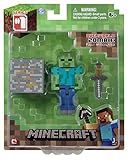
- Overworld Zombie
- Overworld Zombie
- Iron Ore Block
- Collect all Series #1 Minecraft action figures
Rank #2

- Complete Minecraft-Themed Sets: Both sets include a backpack, lunch bag, and a kids’ water bottle, along with other cute Minecraft Stuff. Check the dropdown for images and choose your favorite set!
- Unique Extras in Each Bundle: One set features a pencil case and drawstring bag, while the other includes a rubber charm Minecraft keychain and a kawaii lanyard, adding fun and useful accessories to the mix.
- Functional Lunch Bag and Water Bottle: Each set comes with a matching insulated lunch box bag and reusable water bottle, making it easy to pack food and drinks for day trips or regular routines.
- Durable and Spacious Backpacks: Designed to carry everyday essentials for gamer fans, the Minecraft backpack sets offer plenty of space and are built to handle frequent use with comfort and style.
- A Great Gift for Minecraft Fans: With themed designs and practical items, these sets make a thoughtful and cute gift for any gaming Minecraft enthusiast, ideal for birthdays, party favors, or special occasions.
Product prices and availability are accurate as of the date/time indicated and are subject to change. Any price and availability information displayed on Amazon at the time of purchase will apply.
Independent reader supportYour contribution helps us test, update, and keep practical guides available for everyone.



