A Minecraft server is an online multiplayer world where people play together, often in a community built around a particular style of play. To join one, first check whether you use Java Edition or Bedrock Edition, then choose a server that supports your edition and suits your preferred play style and comfort level. If you want a private world for friends with little setup, Minecraft Realms is an invite-based option.
What is a Minecraft server?
A server is an online world that lets multiple players meet and play together. Community-run servers may focus on different experiences, such as minigames or competitions, and set their own rules and social norms. Minecraft’s official server page is one place to explore community servers.
“Server” can also describe a private world hosted through Realms or a world run by a player or group using their own hosting arrangement. The right choice depends on who should be able to join, how much setup the group wants, and whether the world needs to stay available when its owner is offline.
What’s the difference between a server and a Realm?
A public community server is generally open to players who meet its access requirements. It has its own community, play style, rules, and moderation approach. A Realm is a private, cloud-hosted world that players join by invitation; it stays available when its owner is offline. Minecraft describes Realms as a low-setup way to play online with friends.
#1 Best Overall

- PLEASE SEE PICTURE for wall outlet requirement** Requires NEMA 5-20 wall outlet. If 20 amp wall outlet is unavailable, please purchase optional (NEMA 5-15P to 5-15/20R adaptor plug)
- OPTI UPS TS2000E 2000VA / 1200W (110v / 115v / 120v) Battery backup system, 50 / 60 Hz frequency auto sensing and selection, simulated sine wave design. Protection for your computers, network devices, gaming systems, home entertainment, and internet connections
- Auto Voltage Regulator (AVR), adjusts voltage up (boost) or down (buck) to a safe rage without using the 2 rechargeable internal battery power (user replaceable). This line interactive design saves battery power to be available when you needed it the most, during a power outage
- 6 NEMA 5-15R outlets in the back of UPS for all of your devices. Quiet design, perfect for home or work office. Worry free operation to automatically shutdown your PC with included software. Light weight and smaller form factor design for 2000 voltage amp UPS
- Uninterruptible power supply (UPS) provides surge, short circuit and overload protection to prevent data loss. Connect your data / phone lines to UPS for total protection against outside environments / 3 Year manufacturer warranty / TUV Certification / Made in Taiwan. This is the updated version of OPTI UPS TS2250B TS1700B.
| Choice | Who can join | Availability | What to consider |
|---|---|---|---|
| Public community server | Players who meet the server’s access requirements | Depends on the server | Check the rules, play style, edition and version support, and moderation before joining. |
| Private Realm | Players invited by the owner | Available while the owner is offline | Players must use the same Minecraft edition. The owner pays for the subscription; invited friends do not need their own Realm subscription. |
| Self-hosted or third-party-hosted server | Set by the group running it | Depends on its hosting arrangement | Offers more direct control, but setup, hosting, and costs depend on the chosen arrangement. |
Realms plans and listed prices
Minecraft’s official Realms page, accessed October 8, 2026, lists the following U.S. dollar monthly prices and simultaneous-player capacities. Prices, taxes, features, and platform requirements can change; check the page for current terms. Console multiplayer may also require a separate platform subscription.
| Plan listed by Minecraft | Listed price | Simultaneous players |
|---|---|---|
| Bedrock Realms | $3.99 USD/month | Owner plus two players |
| Bedrock Realms Plus | $7.99 USD/month | Owner plus ten players |
| Java Realms | $7.99 USD/month | Owner plus ten players |
Can Java and Bedrock play together?
Realms support cross-play within an edition, not between Java and Bedrock. Bedrock players can play together across supported Bedrock devices; Java Realms support Windows, Linux, and macOS. A public server may advertise support for more than one edition, but do not assume that a Java player can join a Bedrock server, or vice versa, without checking that specific server.
Rank #2

- 【AMD Ryzen 3 5300U CPU: Outperforms N150 & 3500U】 BOSGAME E5 mini PC is powered by the TSMC 7nm FinFET architecture AMD Ryzen 3 5300U processor (4 Cores, 8 Threads, up to 3.8GHz boost, 6MB total cache). Compared to low-end Intel N150 or 3500U chips which only have 4 single threads and throttle under load, the 5300U delivers over 30% faster multi-core speed. Run 30+ browser tabs, large Excel sheets, and Zoom meetings simultaneously without system lag.
- 【8GB DDR4 RAM & 256GB NVMe SSD Storage】 Installed with high-speed 8GB DDR4 dual-channel memory and a fast 256GB M.2 2280 SSD, eliminating slow boot times and application loading delays. To accommodate growing data requirements, the upgradeable hardware design features dual SODIMM slots that allow you to expand memory up to 64GB RAM, ensuring smooth operation during heavy multitasking.
- 【High-Capacity Dual M.2 SSD Storage Expansion】 Never worry about running out of space for your business files. In addition to the pre-installed 256GB system drive, the motherboard houses an extra empty internal M.2 2280 NVMe PCIe 3.0 slot. This allows you to easily add a second solid-state drive for up to an additional 2TB of storage capacity (upgrades not included) without needing to remove or reinstall the original operating system.
- 【Radeon 6-Core Graphics & Triple 4K Displays】 Integrated with official AMD Radeon Graphics (6 Graphics Cores, 1500 MHz frequency) for casual gaming, photo editing, and crisp 4K media decoding. Featuring 1x HDMI 2.0 port, 1x DisplayPort, and 1x Full-Function Type-C port, the E5 outputs true 4K@60Hz resolution to three monitors at once. This multi-screen setup eliminates constant window-switching for traders, programmers, and office workers.
- 【Dual 2.5GbE LAN Ports for Advanced Networking】 Experience fast wired network transmission speeds up to 2500Mbps without lagging or buffering. The integration of dual 2.5 Gigabit Ethernet ports (powered by Realtek RTL8125 controller) makes this compact computer an exceptional hardware choice for tech enthusiasts. Easily configure it into software routers, hardware firewalls (pfSense, OpnSense), home NAS servers, or local homelabs.
Before choosing a world, identify the edition on each player’s device and confirm the server’s edition and version requirements. Device and edition support are not the same thing: a server’s compatibility information, rather than the device alone, determines whether a player can connect.
How do I join a Minecraft server?
- Identify your edition. Check whether you are playing Java Edition or Bedrock Edition. If you are joining friends, ask which edition they use.
- Find a server. Bedrock players can browse featured servers in the in-game Servers tab. You can also consult Minecraft’s official server list or get connection information from a server owner you trust.
- Check the details first. Read the server’s rules and confirm its edition and version support, play style, access requirements, and moderation approach. A listing does not mean every server is suitable for every player.
- Use the game’s server controls. Select a listed server or add an existing one using the controls available for your edition and device. Labels and steps vary, so use the relevant Minecraft Java multiplayer guidance or the in-game instructions for your platform.
- For a Realm, get an invitation. Ask the owner to invite you, and make sure you both use the same edition.
How should you choose a server?
Match the world to the people who will play, not just to its name or player count. Check these details before committing time to a community or subscription:
Rank #3
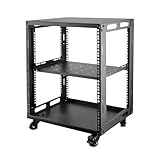
- SIZE: Width 15.75" (400 mm), Depth 19.49" (495 mm), Height 25.79" (655 mm). Additional heights of 6U and 9U are also available. The portable rolling network rack series is designed for versatility.
- STURDY: Featuring a robust 4-post construction, this 12U rack is manufactured using stringent sheet metal processes and high-quality spray treatments, making it resistant to scratches and rust.
- VERSATILE: This exceptional rack series is perfect for housing various electronics and equipment such as AV systems, TVs, NAS devices, data servers, internet routers, amplifiers, hard recorders, computers, and gaming consoles like the Xbox.
- INSTALLATION: Assembly is straightforward with clear instructions provided. The universal wheels equipped with brakes offer enhanced stability to ensure an uninterrupted online gaming experience and enjoyable entertainment moments.
- ACCESSORIES: The product will be delivered in a single box containing the 6U network rack along with essential accessories including screws & cage nuts and casters.
- Edition and version: Confirm that every player can connect with their edition and game version.
- Access: Decide whether the group wants a public community or an invite-only world.
- Play style: Look for a server whose activities and community suit the group, whether that means minigames, competitions, or another style.
- Rules and moderation: Read the rules and understand how players can report problems and who handles moderation.
- Capacity: Check how many people can play at once. For Realms, compare the listed capacity with the size of the group.
- Availability: If friends need to play while the owner is away, choose an arrangement that keeps the world online; Realms are designed to do this.
- Cost: Public server access and hosting arrangements vary. For Realms, check the current plan price and any platform subscription requirements before the owner signs up.
What should parents know about multiplayer safety?
Access controls and moderation depend on the account and the type of server. Minecraft says multiplayer is disabled by default for child accounts, and players under 13 cannot join servers or Realms unless a parent changes the settings. Review the child account’s multiplayer and chat settings before enabling access.
Minecraft says official partner servers use chat filters. On private servers, moderation is controlled by the server owner, so families should also review that server’s rules and understand how the owner handles reports. Safety features do not make every community risk-free; choose a world with an access and moderation approach that fits the player.
Rank #4
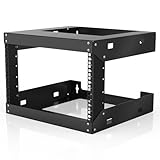
- Specifications - 6U Wall Mount Rack Open Frame Dimensions: 19.7" W x 18" D x 14.2" H
- Heavy Duty - Open rack constructed with heavy-duty steel material, supporting up to 230 lbs of equipment; powder coating ensures effective rust and corrosion protection
- Easy Equipment Configuration - The 6U network rack features an open design that optimizes airflow circulation, facilitating easy access to equipment and cabling
- Application - 6U wall mount rack is suitable for 19-inch-wide electronic equipment and devices, such as audio-visual equipment, data equipment, servers, network routers, switches, computer equipment, and gaming consoles equipped with rack shelves
- Optimize Storage Space - Wall mount rack open frame supports wall-mounted devices, creating a more efficient and convenient operating environment
See Minecraft’s server safety guidance and child account social features information for more on multiplayer access and safety controls.
Quick Recap
Product prices and availability are accurate as of the date/time indicated and are subject to change. Any price and availability information displayed on Amazon at the time of purchase will apply.




