MSI’s NX8800GTS-T2D320E-HD OC was a factory-overclocked GeForce 8800 GTS with 320 MB of GDDR3. In Hardware Secrets’ March 2007 tests, it averaged about 10% faster than the same card at reference clocks. That was a useful but not transformative gain: the card’s standout strength was its G80-era performance, while its 320 MB framebuffer was the important compromise.
This is a retrospective on the original card and its period results, not a claim about how it performs with modern games or operating systems.
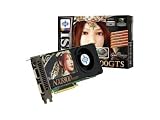
What was the MSI NX8800GTS-T2D320E-HD OC?
It was MSI’s factory-overclocked version of NVIDIA’s G80-based GeForce 8800 GTS 320 MB, a PCI Express x16 graphics card from 2007. Hardware Secrets’ original review, published March 16, 2007 and republished with an update date of February 24, 2023, describes a board closely following NVIDIA’s reference design. MSI’s main changes were its BIOS clock settings, branding, and retail bundle—not a radically different GPU design. Hardware Secrets’ original review
| Specification | Reference GeForce 8800 GTS 320 MB | MSI NX8800GTS-T2D320E-HD OC |
|---|---|---|
| GPU family | NVIDIA G80 | NVIDIA G80 |
| Shader units | 96 | 96 |
| Core clock | 500 MHz | 575 MHz |
| Shader clock | 1.2 GHz reference | Approximately 1.35 GHz, estimated by the original review rather than confirmed as an MSI specification |
| Memory | 320 MB GDDR3 | 320 MB GDDR3 |
| Effective memory clock | 1.6 GHz | 1.7 GHz |
| Memory interface | 320-bit | 320-bit |
| Host interface | PCI Express x16 | PCI Express x16 |
| Outputs | Two DVI; mini-DIN for S-Video/component output | Two DVI; mini-DIN for S-Video/component output |
The MSI card used ten Hynix 256-Mbit, 1.1 ns GDDR3 chips. The 1.35 GHz shader-clock figure deserves special care: Hardware Secrets said it inferred the value from the GeForce 8800 GTX rather than verifying it as an official MSI specification. Specifications and period pricing
The Tool Desk
Outbyte PC Repair FREERepair Windows errors before they cause bigger problemsFix Now →Outbyte Driver Updater FREEFix the driver behind crashes, sound loss and screen glitchesFind Drivers →#1 Best Overall
Cooler and retail bundle
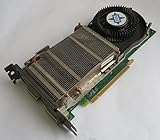
The review documented a copper cooler base linked to heatsink fins by a heat pipe, with the cooler also contacting the memory chips. It did not establish a complete temperature, noise, or power profile, so those should not be inferred from the cooler’s appearance.
The reviewed retail package included Company of Heroes, two DVI-to-VGA adapters, an S-Video cable, a component-video adapter, a power adapter for supplies without an auxiliary PCI Express connector, and three CDs/DVDs. That is the package Hardware Secrets examined, not a guarantee that a used card will include those items. Hardware, cooler, and package contents
How was it tested?
Hardware Secrets compared the MSI card at its factory settings with the same model configured at standard GeForce 8800 GTS 320 MB clocks. That makes the review useful for separating the factory-overclock benefit from differences between GPU models. Other comparison cards were generally run at manufacturer reference speeds.
Rank #2

- Chipset: NVIDIA GeForce GT 1030
- Video Memory: 4GB DDR4
- Boost Clock: 1430 MHz
- Memory Interface: 64-bit
- Output: DisplayPort x 1 (v1.4a) / HDMI 2.0b x 1
- 3DMark03 Professional Edition 3.6.0 and 3DMark06 Professional Edition 1.10.
- Quake 4 version 1.3, F.E.A.R. version 1.08, Far Cry version 1.4, and Battlefield 2142 version 1.01.
- Test resolutions included 1600×1200, 1920×1440, and 2048×1536; some game tests used 4× antialiasing and 16× anisotropic filtering.
These are results from a particular period test platform, software versions, drivers, and settings. They are not directly comparable to modern GPU reviews. 3DMark03 results, 3DMark06 results, Quake 4 results and methodology, F.E.A.R. results and methodology, Far Cry results, and Battlefield 2142 results and methodology
What’s actually slowing this PC down?
Pick the symptom - the matching free tool is one click away.
How much faster was the factory overclock?
Across Hardware Secrets’ selected tests, the MSI’s factory settings delivered roughly a 10% average gain over reference clocks. Individual results varied substantially, and one Battlefield 2142 high-quality result favored the stock-clocked configuration. The overclock improved the card’s performance; it did not move it into a wholly different class.
| Test and setting | MSI factory OC | Reference clocks | Difference |
|---|---|---|---|
| 3DMark03, 1600×1200 | 17,022 | 15,392 | About 10.6% |
| 3DMark06, 1600×1200 | 8,199 | 7,504 | About 9.3% |
| Quake 4, 1600×1200, low quality | 125.44 fps | 123.46 fps | About 1.6% |
| F.E.A.R., 1600×1200, low quality | 265 fps | 237 fps | About 11.8% |
| Far Cry, 1920×1440, low quality | 131.54 fps | 120.16 fps | About 9.5% |
| Battlefield 2142, 2048×1536, low quality | 232.74 fps | 214.35 fps | About 8.6% |
The uplift was not a simple reflection of the core-clock increase. A game could be limited by memory bandwidth, CPU speed, shader workload, engine behavior, or another bottleneck; in those cases, higher GPU clocks did not translate into an equal frame-rate increase. The original review’s aggregate conclusion was around 10%, not a promise of 10% in every game. Original conclusions and period value judgment
Rank #3
- API Supported - DirectX 10 & OpenGL 2.0
- RAMDAC Clock Speed - 400 MHz
- Video Input - Dual DVI,HDTV-out
- Stream Processors - 112
What did 320 MB mean in practice?
Memory capacity and memory bandwidth are different constraints. The card’s 320-bit interface and 1.7 GHz effective memory rate provided bandwidth, but the total framebuffer capacity remained 320 MB. A wide interface cannot compensate when a game’s textures, antialiasing buffers, and other graphics data need more space than the card can hold.
In 2007, the card could still deliver strong frame rates in many contemporary games. The risk increased with higher resolutions, antialiasing, and demanding texture loads, but the original review does not establish a universal resolution ceiling or prove that the card always stuttered when memory filled. Outcomes depended on the game and settings. Its review flagged a weak Far Cry result with image quality maxed out and suggested driver differences as a possible explanation.
The 640 MB GeForce 8800 GTS was the safer choice for workloads more likely to need additional framebuffer capacity. The 320 MB model’s lower price was attractive when the buyer accepted that limitation; it was not simply a slower version under every condition.
Rank #4

- Chipset: NVIDIA GeForce GT 710; Maximum displays: 2
- Video memory: 2gb DDR3/memory clock: 1600 MHz/memory interface: 64 bit
- 300w system power supply requirement; Interface is PCI express 2.0 x16 uses x8
- Connectors: VGA, dvi d dual link, HDMI; Form factor: Low profile.Avoid using unofficial software
- HDMI connectors is maximum resolution 4096 x 2160 at 24 hertz; DVI connectors is maximum resolution 2560 x 1600 at 60 hertz
How did it compare with other 2007 cards?
The review included the GeForce 7950 GX2, 7950 GT, 7900 GT, 7800 GTX, 7800 GT, and Radeon X1950 Pro. In its selected tests, Hardware Secrets found the MSI card substantially ahead of the 7950 GT: reported gains ranged from roughly 11–23% in 3DMark03, 75–84% in 3DMark06, 25–55% in Quake 4, 17–46% in F.E.A.R., 16–34% in Far Cry under selected settings, and 40–50% in Battlefield 2142. These are comparisons within that review’s test setup, not universal rankings across all games and conditions.
The review did not find an across-the-board win over the 7950 GX2: the MSI scored higher in 3DMark06, while the dual-GPU 7950 GX2 was faster in other programs. That distinction matters more than compressing the contemporary field into a single winner. Hardware Secrets’ comparison and conclusion
Independent reader supportYour contribution helps us test, update, and keep practical guides available for everyone.Was the original value verdict fair?
Hardware Secrets called the card arguably the best video card around the $300 price point. That was a March 2007 US-market judgment. The specification page listed an average US price of $337.50, while the conclusion cited a contemporaneous Newegg price of about $290 after a $20 mail-in rebate. Those figures describe period pricing, not current value or a present-day buying recommendation.
Best Value

- Dual core center
- MSI Afterburner Overclocking Utility
- Low Profile Design-One slot thermal and low profile design work perfect with slim or smaller system
- Military Class Concept Components
Within that context, the argument was plausible: buyers got a fast G80 card, early DirectX 10 capability, and a factory overclock for less than the 640 MB GeForce 8800 GTS and far less than the GeForce 8800 GTX. The conclusion must remain tied to its time and market. The review did not test current drivers, Windows 10 or 11, Linux, modern games, power draw, noise, temperatures, frame times, or long-term reliability, so it cannot establish those outcomes.
What should a retro-hardware buyer inspect?
For a collector or period gaming build, the card’s condition and intended use matter more than its old benchmark rank. Check the individual board rather than assuming every surviving card behaves like the review sample.
- Inspect the PCB, capacitors, cooler, and fan for damage, corrosion, dust, or signs of repair; confirm the fan spins freely and does not make abnormal noise.
- Verify the auxiliary PCI Express power connection and that the card fits the motherboard slot and case. The included adapter in the original package does not make an inadequate power supply suitable.
- Test under load in an appropriate legacy setup and look for persistent colored blocks, flashing textures, or geometry errors. Artifacting may indicate failing GPU or memory hardware, though it is not a diagnosis by itself.
- Ask whether the BIOS or cooler has been modified. Factory overclocking does not guarantee that a decades-old card will remain stable at its original clocks or have extra overclocking headroom.
- Account for age-related fan wear and degraded thermal compound, as well as missing original accessories. A used listing should be judged on the actual card and included items.
For period authenticity, collecting, and benchmarking with software from its era, the MSI card remains a historically interesting example of the first GeForce 8800 generation. The original review supports that historical assessment, not a claim of present-day mainstream gaming suitability.
Quick Recap
Product prices and availability are accurate as of the date/time indicated and are subject to change. Any price and availability information displayed on Amazon at the time of purchase will apply.



