MSI’s MEG VISION X AI is a real retail gaming desktop, not just a CES concept. First unveiled on January 7, 2025, the flagship system combines Intel Core Ultra processors, GeForce RTX 50-series graphics, a 13-inch front-mounted AI HMI touchscreen, liquid cooling, and a large upgrade-oriented chassis. The unusual display is the main attraction—but it is a control panel and secondary screen, not a replacement for a conventional gaming monitor.
MSI now lists the family as MEG VISION X AI 2nd, with global configurations ranging from the RTX 5070 Ti to the RTX 5090. In the U.S., MSI has listed RTX 5080 and RTX 5090 models, including an RTX 5080 system observed in stock at $5,239 on August 16, 2026.
As an Amazon Associate I earn from qualifying purchases.
What MSI announced at CES 2025
MSI positioned the MEG VISION X AI 2nd as its flagship AI gaming desktop at CES 2025. The company said the design received dual CES 2025 Innovation Award recognition. Its appeal was the combination of top-end desktop hardware and an interface built directly into the case: users could monitor the system, adjust controls, and access AI-related functions without relying entirely on the main display.
The original announcement was a product reveal rather than an independent performance review. MSI established the hardware direction and feature set, but it did not provide benchmark evidence proving a particular frame rate, temperature, or noise level. Those results will vary by configuration, game, resolution, power limit, and use of technologies such as DLSS and frame generation.
#1 Best Overall
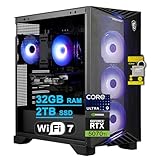
- 32GB RAM | 2TB SSD
- Equipped With The Powerful and Fast Intel 24-core Ultra 9 285 Processor
- Dedicated NVIDIA GeForce RTX 5070 Ti Graphic
- 5 x USB-A 3.2, 1 x USB-C 3.2, 4 x USB 2.0, 1 x HDMI 2.1, 3 x DisplayPort 1.4a, 1 x 5Gb RJ45 Ethernet
- Windows 11 Home, RGB CPU Air Fan Cooler, 750W 80+ Gold Power Supply, Wi-Fi 7, MSI Gaming Keyboard & Mouse, Auth USB-C Hub
MSI’s launch announcement dates the unveiling to January 7, 2025.
What the 13-inch AI HMI display actually does
The front-mounted 13-inch touchscreen is called an AI HMI, or human-machine interface. MSI describes it as an integrated control and information display with a built-in microphone and speaker. Depending on the region and configuration, it can provide:
- Real-time hardware monitoring and telemetry.
- Voice interaction.
- Application recognition.
- User-interface adjustments.
- Access to MSI AI applications.
- Controls related to compatible MSI gaming-monitor settings.
- AI-assisted temperature and fan-management functions.
- Secondary-screen functionality.
That makes the display more practical than a purely decorative case screen. A streamer could keep system information visible while the main monitor handles the game, while a creator could use it for controls or status information. It also gives the machine a distinctive showroom-quality design.
Do these 3 things before closing this tab:
1Clear out junk files and repair common Windows errors2Scan for outdated or missing drivers - takes under a minute3Repair Windows errors before they cause bigger problemsThere are limits, however. MSI does not describe the HMI as a full Windows tablet or an independent computer. It is an integrated interface and secondary display connected to the desktop. The precise applications and controls can differ by region and model, so buyers should check the software listed for their exact system.
The HMI is also separate from the graphics card’s external display outputs. It is not the primary 4K, ultrawide, or high-refresh gaming screen; a compatible external monitor is still required for normal PC gaming.
Rank #2
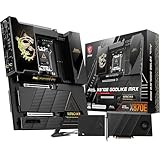
- ULTRA POWER+ and DYNAMIC DASHBOARD III - SUPPORTS THE LATEST RYZEN 9000 PROCESSORS - The MEG X870E GODLIKE MAX employs a 24 DRPS (110A, SPS) for the AMD X870E chipset (AM5, Ryzen), 3.99" LCD for hardware monitoring and personalization
- FROZR GUARD - Premium cooling features such as Wavy fin design, Direct-touch Cross Heat-pipe, 9W/mK MOSFET thermal pads, extra choke thermal pads, double-sided EZ M.2 Shield Frozr II, and Combo-fan (for pump & system) header (3A)
- EZ DIY DESIGN - Multiple DIY-friendly features, such as EZ Link with the EZ Bridge and EZ Control Hub, simplify the PC building process. EZ PCIe Release, EZ Magnetic M.2 Shield Frozr II, and EZ M.2 Clip II simplify assembly for SSD and GPU swaps.
- SEPTUPLE M.2 CONNECTORS and DDR5 MEMORY - Storage include onboard 2 x M.2 Gen5 and 3 x M.2 Gen4 slots with double-sided Shield Frozr. M.2 XPANDER-Z SLIDER GEN5 provides 2 additional M.2 Gen5 slots. 4 x DDR5 DIMM SMT slots (1DPC 1R, 9200+ MT/s OC)
- ULTRA CONNECT - Network hardware includes a full-speed Wi-Fi 7 with Bluetooth 5.4 & 10Gbps plus 5Gbps LAN; Rear ports include USB4 Type-C 40Gbps with display output and 7.1 USB High Performance Audio with Audio Boost 5 HD (supports S/PDIF output)
More details appear in MSI’s CES 2025 product overview.
RTX 50-series and Core Ultra configurations
MSI’s global specification page lists three graphics options:
- GeForce RTX 5070 Ti with 16GB of memory.
- GeForce RTX 5080 with 16GB of memory.
- GeForce RTX 5090 with 32GB of memory.
Exact board designs vary by SKU and can include MSI Shadow, Ventus, and Gaming Trio cards. The U.S. listings specifically include RTX 5080 and RTX 5090 systems; the RTX 5070 Ti should not be assumed to be available in every country.
Listed processors include the Intel Core Ultra 7 265K, Core Ultra 7 270K Plus, and Core Ultra 9 285K on Intel’s Z890 platform. These Core Ultra chips include an NPU for supported AI workloads. The U.S. retail configurations observed use the Core Ultra 9 285K.
MSI also announced in March 2026 that its AI desktops were being updated with Intel Core Ultra 200S Plus-series processors. That does not mean every MEG VISION X AI 2nd listing has the newer chip. The model number and regional specification page should be checked before describing a particular unit as a refreshed configuration.
Rank #3

- ULTRA POWER+ - SUPPORTS THE LATEST RYZEN 9000 PROCESSORS IN HIGH PERFORMANCE - The MEG X870E GODLIKE employs a 24 DRPS (110A, SPS) for the AMD X870E chipset (AM5, Ryzen) with Core Boost architecture, 3.99" LCD for hardware monitoring and personalization
- FROZR GUARD - Premium cooling features such as Wavy fin design, Direct-touch Cross Heat-pipe, 9W/mK MOSFET thermal pads, extra choke thermal pads, double-sided EZ M.2 Shield Frozr II, and Combo-fan (for pump & system) header (3A)
- EZ DIY DESIGN - Multiple DIY-friendly features, such as EZ Link with the EZ Bridge and EZ Control Hub, simplify the PC building process. PCIe Release, EZ Magnetic M.2 Shield Frozr II, and EZ M.2 Clip II simplify assembly for SSD and GPU swaps.
- SEPTUPLE M.2 CONNECTORS and DDR5 MEMORY - Storage include onboard 2 x M.2 Gen5 x4 and 3 x M.2 Gen4 x4 slots with double-sided Shield Frozr. M.2 XPANDER-Z SLIDER GEN5 provides 2 additional M.2 Gen5 slots. 4 x DDR5 DIMM SMT slots (1DPC 1R, 9200+ MT/s OC)
- ULTRA CONNECT - Network hardware includes a full-speed Wi-Fi 7 with Bluetooth 5.4 & 10Gbps plus 5Gbps LAN; Rear ports include USB4 Type-C 40Gbps with display output and 7.1 USB High Performance Audio with Audio Boost 5 HD (supports S/PDIF output)
Memory, storage, and cooling
The platform is more expandable than many compact gaming prebuilts. MSI lists four DDR5 UDIMM slots and up to 128GB of memory, with DDR5-5600 support under specified one-DIMM-per-channel conditions. Shipped memory remains SKU-specific: the U.S. models observed include 64GB of DDR5.
PC Slower Than It Used to Be?
A free scan shows the junk files, broken settings and background clutter dragging Windows down - then fixes them in one click.Free scan · Windows 10 & 11Crashes, No Sound, or Screen Glitches?
Random freezes, missing sound and display glitches usually trace back to one bad driver. Find and replace yours safely.Free scan · under a minuteStorage support includes:
- One PCIe Gen5 x4 M.2 slot.
- Two PCIe Gen4 x4 M.2 slots.
- One 2.5-inch drive bay.
- One 3.5-inch drive bay.
- Four SATA connectors on the global specification page.
The observed U.S. RTX 5080 and RTX 5090 systems include a 2TB PCIe Gen5 NVMe SSD. Gen5 support is useful for fast sequential transfers, but it should not automatically be treated as a major gaming advantage over a good Gen4 SSD. Game-loading improvements depend heavily on the game and its storage behavior.
Cooling combines a 360mm liquid CPU cooler with MSI’s Silent Storm Cooling AI system. MSI says the fan-management system uses telemetry and considers temperatures from components beyond the CPU and GPU, including the SSD. The system also uses Glacier Armor heatsinks for areas such as the memory, SSD, PCH, and VRM. An additional onboard 8-pin PCIe power connector is intended to help sustain demanding GPU loads.
These are design claims, not independent proof that every configuration will be quieter or cooler. The defensible conclusion is that MSI has built dynamic fan control and broad component cooling into the platform.
Connectivity and external displays
Depending on the model, the MEG VISION X AI 2nd offers modern connectivity including Wi-Fi 7, Bluetooth 5.4, Intel Killer 5Gbps Ethernet, Thunderbolt 4, and a mix of USB Type-A and Type-C ports. MSI also lists DisplayPort 2.1 support and claims support for up to 8K at 60Hz or 4K at 240Hz with a compatible monitor and configuration.
The Tool Desk
Outbyte PC Repair FREERepair Windows errors before they cause bigger problemsFix Now →Outbyte Driver Updater FREEFix the driver behind crashes, sound loss and screen glitchesFind Drivers →Rank #4

- 💪 [TOUGH AND FLEXIBLE] BoxWave Screen Protector Compatible With MSI MEG Vision X AI 2nd. With a hardness rating of 9H, the ClearTouch Anti-Glare ToughShield has the STRONGEST possible rating to protect the screen on your precious device. Just as strong as glass but without the possibility of chipping and cracking. ⭐ *** PLEASE NOTE, MEG VISION X AI 2ND DEVICE NOT INCLUDED ***
- 🌞 [ANTI-GLARE] This award-winning screen protector disperses light so that the glare does not reflect back into your eyes. Whether you're using the device outdoors with natural lighting, or viewing indoors with overhead lights, the ClearTouch Anti-Glare ToughShield 9H REDUCES 90% of UV rays caused by reflected light, protecting your eyes.
- 😎 [SMOOTH SURFACE] Ultra smooth matte surface gives you a FUTURISTIC high-end look and feel to your device screen. Has a paper-like surface that is comfortable to the touch, and pleasing to the eye!
- 👔 [PERFECT DESIGN] Specifically designed for your device. These ClearTouches will fit your device screen perfectly, GUARANTEED! All ClearTouches are PRECISION-CUT to fit your device screen's exact dimensions along with any contours and cut-outs. All functionality will be fully accessible.
- ✌ [TWO-PACK] Comes with TWO (2) ClearTouch Anti-Glare ToughShield 9H screen protectors and installation accessories. Save the extra one for later, or share it with a friend! Disclaimer: ClearTouch Packaging may not be the exact one pictured on this listing.
Those output capabilities describe what the hardware and connections can support; they are not a promise that every game will run at 4K and 240 frames per second. Actual performance depends on the selected RTX card and the title.
Large chassis, easier access, and important upgrade caveats
The desktop uses MSI’s Project Zero design, which routes cables toward the rear of the motherboard to create a cleaner interior. A transparent side panel and Mystic Light RGB make the system intended to be displayed rather than hidden under a desk.
It is also physically substantial. MSI lists a chassis volume of about 42.6 liters, dimensions of approximately 502.7 × 299.3 × 423.4mm, and a weight of around 18.23kg without the keyboard. Check desk depth, radiator clearance, ventilation, and the viewing angle of the front touchscreen before buying.
MSI presents the chassis as accessible and upgrade-friendly, and the multiple memory slots, M.2 connectors, and drive bays support that description. “Upgrade-friendly” does not guarantee compatibility with every future component. The U.S. RTX 5090 listing identifies an MSI Z890 PZ proprietary motherboard, so motherboard swaps and case changes may be less straightforward than in a standard DIY build. Before planning an upgrade, verify:
Recommended Free Tools
- GPU length, thickness, and clearance.
- Power-supply capacity and connector requirements.
- Radiator and fan placement.
- Motherboard and front-panel compatibility.
- BIOS and firmware support.
- Warranty consequences.
U.S. price and availability
MSI’s U.S. store listed the MEG VISION X AI 2NVV9-043US with Windows 11 Pro, a Core Ultra 9 285K, RTX 5080 16GB GDDR7 graphics, 64GB of DDR5 memory, a 2TB Gen5 NVMe SSD, Wi-Fi 7, 5Gbps Ethernet, and a 360mm liquid cooler.
Best Value

- Tri-certified Titanium certification (80 PLUS / Cybenetics / PPLP)
- PCIe 5.1 and ATX 3.1 Ready
- Dual-native 12V-2x6 Connectors
- 100% all Japanese 105 C capacitor
- Industrial level protection with OCP/ OTP/ OPP/ SCP/ OVP/ UVP/ SIP/ NLO
When observed on August 16, 2026, the store showed the system in stock at $5,239, reduced from a reference price of $6,228. The listing also showed a free 27-inch OLED gaming monitor promotion. That offer should be treated as temporary: price, inventory, eligibility, and bundle terms can change.
MSI’s U.S. specification page also lists an RTX 5090 configuration. The observed RTX 5090 model has 64GB of DDR5, a 2TB Gen5 SSD, and a 1300W 80 Plus Gold power supply, while the RTX 5080 listing shows an 850W 80 Plus Gold unit. MSI’s U.S. page lists a one-year warranty. Confirm the current terms for the exact SKU and country before purchase.
See the official RTX 5080 store listing and U.S. model specifications.
Who should consider it?
The MEG VISION X AI 2nd makes the most sense for buyers who want a turnkey, high-end RTX 50-series system and place real value on its integrated interface, premium visible chassis, and single-vendor design. Enthusiast gamers, streamers, creators, and users interested in local AI workloads can all benefit from the combination of powerful graphics, fast storage, substantial memory capacity, and modern connectivity.
It is less compelling for a value-focused buyer. At the observed $5,239 RTX 5080 price, a DIY build or conventional premium prebuilt may devote more of the budget to core gaming hardware rather than the touchscreen, custom chassis, lighting, and integrated software. A DIY system also offers more predictable use of standard parts, though it requires assembly and leaves troubleshooting and warranty claims spread across separate components.
A boutique system integrator may be a better fit for buyers who want custom part selection, quieter component choices, or different warranty options. Conversely, those alternatives generally will not reproduce MSI’s front-mounted HMI or its Project Zero aesthetic.
What to check before ordering
- Confirm the exact model number. RTX 5070 Ti, RTX 5080, and RTX 5090 versions are not interchangeable in price or power requirements.
- Check the shipped CPU. Some listings use the Core Ultra 9 285K, while MSI lists other CPUs globally and has announced a 200S Plus refresh.
- Separate maximum support from included hardware. “Up to 128GB” does not mean the system ships with 128GB; the observed U.S. models include 64GB.
- Verify the display’s role. The 13-inch HMI is a control and secondary display, not the included primary gaming monitor.
- Read the current promotion terms. The OLED monitor offer was shown on the RTX 5080 page and should not be assumed to apply to another SKU.
- Measure the installation space. This is a large, heavy tower with a front display and liquid-cooling hardware.
- Review warranty and regional software availability. MSI notes that features and applications can vary by region, and the U.S. specification page shows a one-year warranty.
Verdict
MSI’s MEG VISION X AI is genuinely available as a premium RTX 50-series desktop, and its 13-inch AI HMI is more than a novelty: it can expose telemetry, provide controls, support voice interaction, and serve as a secondary screen. The platform also offers serious hardware, modern networking, multiple storage paths, and a spacious chassis.
What’s actually slowing this PC down?
Pick the symptom - the matching free tool is one click away.
But it is a luxury prebuilt, not an automatic value winner. The touchscreen and showpiece design command a substantial premium, while the exact performance, pricing, ports, warranty, and upgrade limits depend on the regional SKU. Buy it if the integrated display and turnkey MSI experience are central to what you want. Skip it in favor of a DIY build or conventional prebuilt if your priority is maximum frames per dollar or unrestricted use of standard components.
Quick Recap
Product prices and availability are accurate as of the date/time indicated and are subject to change. Any price and availability information displayed on Amazon at the time of purchase will apply.




