Recommended Free Tools
If your Nintendo Switch shows a solid orange screen and will not respond, first force it to shut down and restart. Nintendo’s U.S. instructions say to hold POWER for at least 20 seconds; Nintendo UK specifies at least 12 seconds. If the screen stays solid after restarting, Nintendo directs you to arrange service.
Check that this is the right troubleshooting path
This guidance is for a handheld Nintendo Switch, Switch Lite, or Switch OLED showing a full orange screen that does not respond to button presses. Nintendo groups orange, blue, and other solid-color, unresponsive screens together in its solid-color screen troubleshooting.
If the problem appears only on a television while the console is docked, it is a different issue. Use Nintendo’s TV-mode display troubleshooting instead; it covers checking handheld operation, the dock, HDMI connections, and TV settings. Switch Lite does not support TV mode.
Force the console to shut down and restart
Use the shutdown duration for your region. Nintendo’s U.S. support instructions specify at least 20 seconds, while Nintendo UK specifies at least 12 seconds; these are regional differences, not one universal duration.
#1 Best Overall

- 【Compatible – Check Your Console Model】Suitable for Nintendo Switch HAC-001 V1 and HAC-001(-01) V2.This is a full LCD + touch screen assembly – touch is fully functional. Does NOT fit Switch Lite or Switch OLED. Please check your model in System Settings before ordering.
- 【What This Fixes – LCD + Touch Together】Replaces both cracked LCD and broken touch at once. Fixes: cracked screen, dead pixels, touch not working, unresponsive touch, display issues, wrong colors, frozen screen. One assembly restores full display + touch function.
- 【Installation Warning – Read Before You Start】⚠️ Test before final mounting – connect the new screen first without mounting accessories. Confirm display and touch work. Do not bend the LCD cable over 90°. Professional installation recommended if you lack experience. Watch a YouTube tutorial before starting.
- 【What‘s in the Box – No Hidden Costs】Includes: 1x LCD + Touch Screen Assembly for Switch HAC-001 V1 / HAC-001(-01) V2, 1x Tempered Glass Screen Protector, 1x Repair Tool Kit (screwdrivers, pry tools, etc.), 1x Mounting Accessories. Everything you need – open the box and start.
- 【Warranty & Support】All screens are fully tested before shipment. 6-month warranty for manufacturing defects (non-man-made damage). 24/7 customer support via Amazon message – we reply within 24 hours.
- Press and hold the console’s POWER Button continuously for the duration given by your local Nintendo support page: at least 20 seconds in the U.S. or at least 12 seconds in the UK.
- Release POWER, then press it again to turn on the console.
- Give the console time to start. If it returns to the HOME Menu, continue with the update check below. A successful restart does not by itself establish that the underlying issue is resolved.
See Nintendo’s U.S. solid-color instructions or UK solid-color instructions for the guidance applicable to your region.
If the HOME Menu returns, check for a system update
Nintendo’s follow-up step is to check whether a system update is available. On the console, open System Settings > System > System Update and follow the prompts if an update is offered. This is a recommended check, not a guaranteed fix for a recurring solid-color screen.
Rank #2
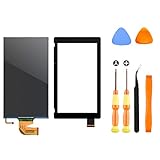
- √【COMPATIBILITY】: Compatible with Nintendo Switch 2017, replace your broken Nintendo Switch screen. (Warning: its the 2017 LCD replacement not for 2019 Switch, not for switch lite or switch OLED).
- √【STRICT QUALITY CONTROL】: We tested every NS Screen before shipment, make sure the screen has no scratches or spots.(Remove The 2 Sides Film Before Installation)
- √【EASY INSTALLATION】: Installing this replacement screen is simple and easy. It comes with an installation kit and can also be installed in Youtube with the video. Need professional skills.
- √【PACKAGE INCLUDE】: 1 X LCD screen, 1 X Digitizer, 2 X warp tabs,1*Y Screwdriver, 1*+ Screwdriver, 1* Tweezer, 1* Opener
- ❤【WORRY-FREE-AFTER SALES】: If you have any dissatisfaction after purchasing the product, please feel free to contact us by email, we will do our best to solve your problem and 7*24 hours waiting for you.
If the screen remains orange, arrange service
If the display is still a solid color after the forced shutdown and restart, Nintendo says the console needs service. Start with the official support or repair process for your country or region. The troubleshooting guidance does not identify a failed component, and repair cost, warranty coverage, turnaround time, and data handling depend on the region and individual case.
Do not open the console, heat it, press on the screen, or buy a replacement display based on this symptom alone. Nintendo’s published next step for a persistent solid-color screen is service, not a particular part replacement or home repair.
Rank #3

- TheCoolCube Touch Digitizer Window Panel Replacement Screen Glass Compatible with Nintendo Switch (2017) (Not include LCD)
- It’s front Touch screen glass only, not include LCD. No instructions manual include. Professional technician is needed for installation. We won’t responsible for any damage due to improper operation.
- Repair/Replacing old, broken, cracked, damaged faulty touch screen
- Compatible with: Nintendo Switch (2017) (Please check the model before your purchase)
- Pacakge include: 1x Touch screen
Do not confuse an orange screen with a blank or TV-only display
Nintendo has separate troubleshooting for a blank screen or a console that will not power on. That guidance includes resetting the AC adapter and identifies adapter model HAC-002; it is not presented as a fix for a solid-orange screen. Follow that separate blank-screen/no-power guide only if your symptoms match it.
Likewise, a discolored or missing image limited to TV mode belongs to the TV troubleshooting path, not the handheld solid-color procedure. The symptom distinction matters: the official steps differ, and Nintendo’s orange-screen guidance does not say the cause is overheating, Wi-Fi, an update, or any specific display or motherboard component.
Quick Recap
Best Value

- COMPATIBILITY----Touch Screen Replacement only For Nintendo Switch V1 HAC-001 (Only Digitizer Screen Replacement, without LCD Screen). Please check your tablet's model carefully before ordering.
- Package List----1x Screen, 1x Opening Tools Kits, 1x Double-sided Adhesive Tape. Our products are professionally packaged to ensure that the products will not be damaged during transportation. If the packaging is damaged when you receive the product due to uncontrollable reasons and the product is damaged, please take a photo and send it to us, we will immediately reissue a new product for you.
- APPLICATION----It is used to replace or repair faulty screen: such as the touch screen been damaged, the touch function does not work, and the touch function is not sensitive. Note: If your device is not only a problem with the touch screen, if the LCD screen is also not working, please do not buy the screen from this link, you need to replace both the LCD screen and the touch screen.
- INSTALLATION PRECAUTIONS----Removal and installation of touch screen requires professional equipment to separate the touch screen and the LCD screen, If you are not a professional maintenance personnel, you have no experience in installing screens and no professional maintenance equipment, we recommend that you go to local repairs shop to have a professional replace the screen for you to avoid unnecessary damage to your device.
- LIFE-TIME SERVICE----There is a 100% inspection by professional QC team for each screen before shipping. We provide LIFE-TIME exchange for non-human damages to make your purchase risk-free. If you need further help for any problem about this touch screen replacement, we highly suggest to contact us for technical support and to get satisfactory solutions.
Rank #4

- 【Device Match – Check Before Order】Suitable for Nintendo Switch HAC-001 and HAC-001(-01) (original model, 6.2 inch). ⚠️ This is LCD display only – touch screen is NOT included. Does NOT fit Switch Lite or Switch OLED. Please check your console model before ordering.
- 【What This Fixes】Perfect for: cracked glass, dead pixels, display issues, wrong colors, or frozen screen. ⚠️ Does NOT fix touch issues – if your touch screen is broken or unresponsive, this LCD only replacement will not help. You need a full LCD + digitizer assembly.
- 【Quality You Can Trust】Each screen is fully tested before shipment – no dead pixels, no scratches, no display defects. We don‘t ship flaws. Just reliable quality for your repair.
- 【What’s in the Box】Complete kit – no hidden costs. Includes: 1x LCD Screen, 1x Tempered Glass Screen Protector, 1x Repair Tool Kit (screwdrivers, pry tools, etc.), 1x Mounting Accessories.
- 【Installation Tips】Test before installation – connect the screen without mounting accessories first. Watch YouTube tutorial "For Switch screen replacement" before starting. Professional installation recommended if you lack experience. Contact us via Amazon message for help – we reply within 24 hours.
Product prices and availability are accurate as of the date/time indicated and are subject to change. Any price and availability information displayed on Amazon at the time of purchase will apply.




