Nintendo Japan stopped accepting Wii U repair requests on July 3, 2024. The cutoff covers Wii U consoles in every color, the Wii U GamePad, and Wii U peripherals. Nintendo said the required repair parts had been exhausted. This ended Nintendo’s official repair channel—not every possible repair option. Independent technicians, donor hardware, replacement parts, and offline use remain possible, subject to compatibility, safety, and availability.
What Nintendo actually ended
Nintendo’s May 23, 2023 notice said Wii U repairs would end when remaining parts ran out. An update to that notice records July 3, 2024 as the date Nintendo Japan stopped accepting requests. The scope includes the console, all console colors, the Wii U GamePad, and related accessories and peripherals. See Nintendo’s notice at Nintendo Japan.
This is the end of official repair support, not a remote shutdown. A working Wii U is not disabled by the repair cutoff, and Nintendo did not announce a new hardware ban. Nintendo’s Japanese troubleshooting page still states that repair intake for the Wii U and GamePad has ended (Nintendo support).
“Aftermarket support” can therefore be misleading: Nintendo ended its own after-sales service, while independent repair, used hardware, and community preservation continue outside Nintendo.
Free tools Windows power users keep installed
One-click scans. No signup required.
#1 Best Overall

- It's a Replacement DVD driver (not new, dismantling one) is an original one.
- The Replacement DVD driver is only compatible with Nintendo Wii U Console.
- Professional repairment skills requried.
- The DVD driver is only for replacing your broken, damaged or defective Wii U disc driver reader .
- Package: 1 pcs * DVD driver
How the shutdown unfolded
| Date | Event |
|---|---|
| December 8, 2012 | Wii U launched in Japan. |
| March 28, 2023, 9 a.m. JST | Japanese Wii U eShop sales of software and downloadable content ended (Nintendo announcement). |
| May 23, 2023 | Nintendo announced repairs would stop when remaining parts were exhausted. |
| April 2024 | Online play and other Wii U functions requiring online communication ended. |
| July 3, 2024 | Nintendo Japan stopped accepting Wii U and peripheral repair requests. |
| August 18, 2026 | Nintendo’s Japanese support pages continue to show repair intake as closed. |
These are separate milestones. The repair cutoff did not itself close the eShop or disable every local function. Nintendo lists system software version 5.5.5J, released March 2, 2021, as the latest Japanese Wii U version (system support page).
What Nintendo documentation and parts listings still mean
Nintendo’s Wii U warranty terms said repair parts were normally retained for six years after manufacturing ended, while warning that repairs could become impossible sooner if parts were unavailable. The same terms say Nintendo does not sell repair parts directly (Wii U warranty PDF).
Nintendo’s online catalog still has a Wii U category and a Wii U GamePad AC-adapter listing (Nintendo parts catalog). A surviving product page is not proof of stock, worldwide shipping, compatibility with every regional model, or renewed repair eligibility. Check the live listing before paying.
Rank #2

- Replacement Left and Right analog 3D Joystick sticks with PCB board for Wii U GamePad Controller.
- Perfect to replace your old, broken cracked, damaged controller parts. Let your controller work well.
- Each item has been checked and in good condition before shipping.
- Professional installation is highly recommended. We will not be responsible for any damages to your controller that you may cause during the changing of replacement parts.
- 100% brand new and high quality.
Nintendo previously described a period in which redownloads and software updates would remain available after eShop sales ended. That was not a lifetime guarantee; do not assume every download or account feature will remain indefinitely (Nintendo online-service guidance).
Recommended Free Tools
Choose the response that matches the fault
The console still works
- Continue using physical games and locally stored content offline.
- Keep the console and its paired GamePad together; avoid unnecessary modifications.
- Preserve the original charger, stands, sensor bar, HDMI or AV cable, and other proprietary accessories.
- Back up save data using the options available on your setup, recognizing that Nintendo’s future download and account support is not guaranteed.
- Replace an aging GamePad battery before it swells.
The GamePad will not power or charge
A battery connection, charging contact, or charger fault can resemble a dead GamePad. Nintendo’s troubleshooting material covers power issues and battery reseating (power troubleshooting; battery instructions). Test the charger and contacts, then reseat the battery connection before buying another GamePad.
If the lithium-ion pack is swollen, hot, leaking, punctured, or physically damaged, stop using it. Do not squeeze or puncture it, and do not put it in household trash. Use local battery-recycling guidance or a qualified technician.
Rank #3
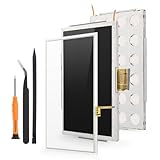
- Compatibility: For Nintendo Wii U Gamepad screen replacement LCD Display(Not for Nintendo Wii U).Please make sure your model before place the order. The LCD and the touch screen was seperate, do not install together.
- Application: for Nintendo Wii U Gamepad replacement screen are used for fix a faulty screen,and cure-replace cracked, broken, dead pixels, touch is not working, touch response issues, display problems,wrong color issues ,non-functional screen.etc
- Quality Guarantee: All for Nintendo Wii U Gamepad LCD have passed strictly QC double tested and 100% in good condition before shipment.To Make sure no scratch/no dead area/ no dot pixel or line in the screen
- Professional Tools: High quality for Nintendo Wii U Gamepad LCD screen replacement and repair tools. Help to disassemble and install the screen more convenient .Our screens are packed in strong boxes,avoid damage during shipping
- Installation Suggestions: Please test the screen replacement for Nintendo Wii U Gamepad before installation, make sure the screen is normal to use.Not recommend Installation without any experiences.If you need link of installation guide video, please leave a message
The GamePad has a broken screen, stick, button, or charging assembly
Options include a Wii U-experienced repair shop, a tested replacement GamePad, a donor unit, or a DIY parts replacement. iFixit’s Wii U resources list screens, LCDs, joysticks, charging assemblies, wireless boards, fans, and other components (parts catalog; GamePad repair information).
A replacement GamePad is not automatically universal. Confirm region and model, screen and touchscreen behavior, battery condition, charger compatibility, and whether the unit is already linked to another console. A console-side wireless or pairing fault can remain even after changing the GamePad.
Crashes, No Sound, or Screen Glitches?
Random freezes, missing sound and display glitches usually trace back to one bad driver. Find and replace yours safely.Free scan · under a minuteWindows Errors? Fix Them Before They Spread
Repair common Windows errors and clear accumulated junk for a smoother, more stable PC - no reinstall needed.Free scan · no reinstallThe console has HDMI, fan, drive, port, or motherboard trouble
Specialist diagnosis matters more as the fault moves beyond a battery or control. Possible work includes cleaning, fan or port replacement, optical-drive work, board repair, or donor-console repair. Some assemblies are paired or model-specific; iFixit lists a Wii U motherboard and paired optical-drive assembly rather than treating every board and drive as interchangeable (iFixit parts information).
Rank #4

- Compatible with all Nintendo Wii models (D4 D3-2 D2A D2B D2C D2E DMS).
- Great replacement for your broken or defective DVD drive
An accessory is missing
Search Nintendo’s catalog first, then reputable used-game sellers. Verify the exact Japanese model, voltage, connector, and included cable before ordering. A listing alone does not establish that an adapter is in stock or suitable for your hardware.
Repair, replacement, or a donor system?
| Route | Best when | Main risks |
|---|---|---|
| Independent repair | The fault is localized or the console contains valuable saves or a rare setup. | Labor, scarce parts, uncertain diagnosis, and no Nintendo warranty. |
| Used or refurbished GamePad | The original GamePad has a bad screen, controls, or board and a tested replacement is available. | Swollen battery, hidden screen defects, pairing problems, region mismatch, and weak return protection. |
| Donor console or bundle | Several components have failed or a tested bundle costs less than parts and labor. | Unknown history, missing accessories, corrosion, and another aging battery or drive. |
| DIY repair | You have suitable tools and experience with small electronics. | Stripped screws, torn ribbons, damaged clips, electrostatic damage, and incompatible parts. |
For a shop, request a diagnosis, written estimate, parts provenance, warranty period, and a no-repair return policy. Confirm that it can test console/GamePad pairing and accepts Japanese-region hardware. For marketplace purchases, favor clear photographs, explicit testing, a return window, and confirmation that the console and GamePad work together.
Independent reader supportYour contribution helps us test, update, and keep practical guides available for everyone.OEM, pulled, and third-party parts
- OEM or pulled parts: Usually the safest model match, but often used, aged, scarce, and expensive.
- Third-party parts: More available, but quality, fit, battery age, calibration, and safety vary. Do not assume a claimed capacity or runtime has been independently verified.
- Refurbished assemblies: Convenient when the seller explains what was tested and provides a meaningful return policy.
iFixit’s catalog showed a 3,600 mAh, 3.7-volt GamePad battery at US$19.99 when crawled, along with other component price snapshots. Prices and stock change, and the catalog can include new, used, replacement, or assembly-specific parts (iFixit Wii U parts). Its battery listing identifies compatibility with WUP-010 GamePads (battery product page).
Best Value

- It's a Replacement Button Conductive Film Original.
- The Replacement Button Conductive Film is only compatible with Nintendo Wii U Gamepad.
- Professional repairment skills requried.
- The Repair Button Conductive Film is only for replacing your broken, damaged or defective Wii U gamepad buttons.
- Package: 1 pcs * Button Conductive Film
DIY safety and preservation priorities
- Photograph cable routing and screw locations before opening hardware.
- Disconnect power and handle ribbon cables and lithium-ion batteries without force.
- Match the model and region before installing a board, drive, screen, or battery.
- Test charging, controls, display, wireless communication, and console/GamePad pairing before closing the case.
- Dispose of damaged batteries through an approved collection route.
Owners who want to preserve a working Wii U should secure a reliable GamePad, charger, stand, sensor bar, video cables, and reputable spare battery while those items can still be found. Physical games and local saves are especially valuable because future online and redownload access is not promised.
Japan is not every region
The July 3, 2024 date is Nintendo Japan’s confirmed repair-intake cutoff. Do not apply that date automatically to Europe, North America, or another market. Nintendo’s North American support pages also say Wii U service requests are no longer offered, but regional policies and dates should be checked separately (Nintendo North America service information; North American troubleshooting).
Independent repair is not a legal ruling or a ban on fixing hardware. Community-run online replacements are a separate, unofficial preservation subject and can raise security, compatibility, account, and legal questions.
Bottom line
Nintendo Japan’s official Wii U repair route is closed because its repair-part supply was exhausted. The console remains usable offline, and many failures can still be addressed through batteries, independent technicians, donor hardware, or careful DIY work. From now on, owners—not Nintendo—must verify parts, pairing, safety, region compatibility, and the economics of each repair.
Quick Recap
Product prices and availability are accurate as of the date/time indicated and are subject to change. Any price and availability information displayed on Amazon at the time of purchase will apply.




