
Quick wins for a faster PC:
Scan for outdated or missing drivers - takes under a minuteDriver Scan →Clear out junk files and repair common Windows errorsFree Scan →Fix the driver behind crashes, sound loss and screen glitchesFind Drivers →No. A Nintendo Switch dock does not contain a built-in battery. The rechargeable lithium-ion battery is inside the Switch console. The dock is a powered accessory: Nintendo’s documented setup connects the dock to a wall outlet through the Nintendo Switch AC Adapter (model HAC-002).
That distinction matters if you want to play away from an outlet. You can charge and use the console without the dock, but removing the dock from the power system does not turn it into a battery pack. The dock’s TV connection and charging functions depend on external power.
As an Amazon Associate I earn from qualifying purchases.
What powers a Nintendo Switch dock?
Nintendo identifies the battery as a component of the Switch console, not the dock. The console contains a rechargeable lithium-ion battery; the dock has no stated battery capacity, battery runtime or independent charging system in Nintendo’s technical specifications.
Recommended Free Tools
For the standard dock (model HAC-007) or the dock with a wired-LAN port (HEG-007), Nintendo’s documented arrangement is:
#1 Best Overall

- Speedy 30W Charging: Experience cutting-edge 30W fast charging technology—twice as fast as 5V/3A chargers. Boost an iPhone 16 Pro Max to 50% in just 27 minutes, compared to an hour with traditional power banks.
- Ready for Endless Use: Crafted for durability, the 5.4-inch built-in USB-C cable is tested to endure over 10,000 bends, ensuring it stands up to the rigors of everyday use.
- Mighty Compact Power: This powerful 10,000mAh power bank is only 4.32 × 2.58 × 0.98". It delivers up to 2 full charges for an iPhone 15, 1.94 charges for a Samsung S24, 2 charges for an iPhone 14 Pro, and 10 charges for AirPods Pro 2, making it perfect for travel. (Note: For iPhone 14 series and earlier, please use your own Lightning cable and connect it via the USB-A or USB-C port.)
- 30W Bi-Directional Charging: Enjoy two-way fast charging, a feature found in many Anker power banks, with up to 30W output and 20W input. (Note: Compatible with iPhone 15 Series, MacBook, Galaxy, iPad, Nintendo Switch, Steam Deck, and more.)
- What You Get: Anker Zolo Power Bank (10K, 30W), 5.4-inch (13.7 cm) built-in USB-C cable, 18-month warranty, and our friendly customer service.
- Connect the HAC-002 AC adapter to the dock’s AC adapter port.
- Connect the other end of the adapter to a wall outlet.
- Place the Switch console in the dock.
The adapter supplies the dock and allows the docked console to charge. It is therefore more accurate to think of the dock as a power-and-connection hub than as a portable power source. Nintendo specifies the HAC-002 for Switch systems; a dock that is not connected to external power has no documented internal reserve to draw on.
Is the dock itself a charger, a battery, or both?
It is a powered charging and connection accessory, not a battery. The dock passes externally supplied power to the console while also handling the docked, television-oriented setup. Energy flows from the wall outlet to HAC-002, then to the dock and console. When the adapter is unplugged, the dock cannot keep supplying power after any charge already stored in the console is used.
There is also no Nintendo specification for charging the dock separately, no dock battery indicator and no dock-runtime estimate. A replacement dock therefore does not replace a worn console battery, and a replacement battery for the console does not make an unpowered dock operate.
Can you use the dock without plugging it in?
Not for Nintendo’s normal docked functions. Without external power, the dock cannot provide the documented charging setup, and you should not expect it to run a television connection from its own battery because it has no built-in battery. The console itself may still have charge, but that charge belongs to the console and does not make the dock self-powered.
If your goal is handheld play, take the console out of the dock instead of trying to make the dock portable. Handheld mode uses the battery in the console. If your goal is television play, keep the dock connected to the HAC-002 adapter and a wall outlet as Nintendo describes.
The model number helps identify the hardware, but it does not change the power answer. HAC-007 is the standard Switch dock, while HEG-007 is the OLED-model dock with a LAN port. Both are documented with the HAC-002 adapter and external AC power.
How to charge a Switch without the dock
Nintendo also documents direct charging. You do not need the dock to recharge the console.
The Tool Desk
Outbyte PC Repair FREEClear out junk files and repair common Windows errorsFree Scan →Outbyte Driver Updater FREEFix the driver behind crashes, sound loss and screen glitchesFind Drivers →- Find the USB-C charging connector on the bottom of the Switch console.
- Plug the Nintendo Switch AC Adapter, model HAC-002, directly into that connector.
- Plug the adapter into a wall outlet.
- Leave the console powered off or in sleep mode for the fastest charging result.
Nintendo states that Switch systems are compatible with the Nintendo Switch AC adapter only (model HAC-002). Using the specified adapter is the clearest way to follow Nintendo’s support guidance, particularly when diagnosing a charging problem.
Direct charging is useful when the dock is packed away, unavailable, or being tested for a fault. It also separates the console’s charging path from the dock: if the console charges normally with HAC-002 plugged directly into USB-C, the battery and adapter are at least accepting charge, so attention can shift to the dock connection.
Rank #2
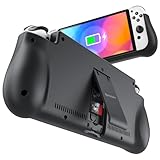
- 【Compatible for Nintendo Switch 6.2" LCD and 7.0" OLED Model 】This battery charging pack is compatible with Nintendo Switch - 7.0" OLED Model And for Nintendo Switch - 6.2" LCD Model. Please confirm the size of your Switch before purchasing this battery case.
- 【Portable Battery Charger】 Battery case for Nintendo Switch built-in 10000 mAh rechargeable Li-polymer battery pack, Effectively provide 160% extra battery life. Charge the case at night, enjoy a ultra long game time on next day!
- 【High-Speed Charging】Support PD & QC 3.0 Fast Charging. 18W/ 3.0A Faster USB Charging for Nintendo Switch only takes about 1.75 hours (Faster than the 3 hours required for the original charge).
- 【Dual-Port Charging Convenience】Switch battery pack features a USB-C input port for recharging the battery case. USB-A output port to charge other devices like phones, tablets, or other devices. The Switch and external devices can charge simultaneously.
- 【Foldable Bracket & Card Slot】Stand for Nintendo Switch adapt to a variety of angles, and provides you with ultra Comfortable Grip. Conveniently store 2 game cards with the extra game card slots.
Using a USB-C power bank
A compatible USB-C power bank can be useful when you need to charge the console away from a wall outlet. That is an external charging accessory for the console, not a battery inside the dock. Nintendo’s cited instructions do not validate a particular power bank for powering a dock, so do not assume that any bank can operate the dock or provide television output.
When evaluating a portable bank, check that its USB-C output and cable are suitable for the Switch and that the bank can sustain the required charging profile. If the bank repeatedly disconnects, charges very slowly or fails to charge, use the HAC-002 adapter from a wall outlet instead. The dock should remain a wall-powered accessory unless the exact dock, power equipment and compatibility have been independently established.
Free tools Windows power users keep installed
One-click scans. No signup required.
Portable charging and docked TV play are different jobs. A bank may extend handheld time by recharging the console, but it does not give the dock an internal reserve. Unless a specific setup has been verified, do not connect a generic bank to a dock and expect the television mode to work.
How long does the Switch console battery last?
Battery life belongs to the console, and Nintendo gives different estimates for different models. These are approximate ranges, not a runtime rating for the dock. Actual duration changes with the software being played and how the system is used.
| Switch model | Model number | Nintendo’s approximate battery life |
|---|---|---|
| Original Nintendo Switch | HAC-001 | Approximately 2.5–6.5 hours |
| Revised Nintendo Switch | HAC-001(-01) | Approximately 4.5–9 hours |
| Nintendo Switch Lite | HDH-001 | Approximately 3–7 hours |
| Nintendo Switch – OLED Model | HEG-001 | Approximately 4.5–9 hours |
These figures describe time the console can operate on its own battery. They do not mean that a dock can run for the same number of hours, because Nintendo does not assign a battery or a dock-runtime figure to the dock.
Use the model number on the console or its packaging when comparing these ranges. An original HAC-001 can have a substantially shorter quoted range than the later HAC-001(-01), even though both are sold as Nintendo Switch systems. A result near the low end is not automatically a dock problem; software and use determine the actual duration.
What’s actually slowing this PC down?
Pick the symptom - the matching free tool is one click away.
How long does a Switch take to charge?
Nintendo quotes approximately three hours to charge the console when it is powered off or in sleep mode. Charging takes longer while the system is being used. The estimate applies to charging the console, whether the HAC-002 adapter is connected through the dock or directly to the console.
Several conditions can change the time you observe, including active gameplay, the console’s current charge level and the adapter or connection being used. If the battery indicator does not increase, test the HAC-002 adapter directly on the console to separate a dock-connection issue from a console or adapter issue.
Does leaving the Switch in its dock damage the battery?
No. Nintendo says the console can remain docked overnight or after it reaches full charge without that, by itself, harming the battery. Nintendo’s support wording is: “The Nintendo Switch console can be left in the dock while not in use to ensure that it is fully charged.”
Rank #3
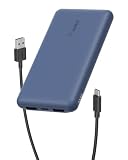
- 3 PORTS FOR CONVENIENT CHARGING: This BoostCharge power bank lets you simultaneously charge up to 3 devices with a USB-C port and 2x USB-A ports. Get a dependable charge to your iPhone or android.
- HIGH CAPACITY & INCLUDED CABLE: Pre-charged and ready to use, with 10,000 mAh of power delivering 40 hours of additional battery life to your smartphone. A 15cm USB-C to USB-A cable is included so you can start charging compatible devices right away.
- FAST CHARGING: The BoostCharge 3-Port Power Bank supports fast charging for smartphones, gaming devices, and tablets with 15W maximum output.
- LED INDICATOR LIGHT: This Belkin power bank is designed with a built-in LED light that tells you the power bank’s status, so you always know when it’s time to recharge.
- STAY PROTECTED: Get a safe and powerful charge to your devices with overcharge protection for assured quality and compatibility, and maintain peace of mind, as it comes with a 2-year warranty and CEW (Connected Equipment Warranty).
Normal lithium-ion aging still occurs over time. Nintendo estimates that after about 800 charge cycles, the console battery may retain roughly 80% of the life of a new system. That is an expected aging characteristic, not automatically a defect. A docked console is still using the console’s battery-management system; the dock is supplying external power rather than storing energy for later use.
What to check when the dock does not power the setup
Work through the power path in order. This avoids treating a dead dock as if it had a depleted battery.
- Check the wall outlet. Confirm that the outlet works with another device or try a different known-working outlet.
- Verify the adapter model. Nintendo’s documented adapter is HAC-002. Confirm that the adapter is firmly connected at both the wall and the dock.
- Inspect the dock connection. Reseat the adapter plug in the dock’s AC adapter port. Do not rely on a loose or partially inserted connector.
- Test direct console charging. Disconnect the dock and connect HAC-002 directly to the console’s USB-C port. If the console charges directly but not while docked, the dock or its connection is the likely part needing attention.
- Check the console separately. If direct charging also fails, look for damage, debris or unusual heat around the USB-C connector and adapter. Stop using visibly damaged equipment.
- Compare battery behavior with the model range. A fully charged console that falls substantially short of Nintendo’s approximate range may need service, especially if the short runtime is repeatable under similar use.
A missing dock battery is not a fault condition; there is no internal dock battery to recharge or replace. The relevant questions are whether the wall-powered adapter is connected correctly and whether the console accepts charge.
Choosing the right setup for your use
| Your situation | Practical setup | What supplies the energy? |
|---|---|---|
| Playing on a television | Console in HAC-007 or HEG-007 dock, HAC-002 connected to a wall outlet | Wall outlet through the AC adapter |
| Playing handheld near an outlet | HAC-002 connected directly to the console | Wall outlet through the AC adapter |
| Playing handheld away from an outlet | Console on its internal battery, or a compatible USB-C power bank for recharging | Console battery or external bank |
| Leaving the console ready overnight | Console left in the powered dock | Wall outlet through the AC adapter; Nintendo says this does not itself damage the battery |
The choice is therefore about where power comes from and whether you need the dock’s TV-oriented connections. None of these arrangements gives the dock an internal battery.
When should a battery problem be serviced?
Use Nintendo’s model-specific ranges as a reference rather than expecting one universal Switch runtime. Software and other usage conditions affect how quickly the console battery empties. A runtime near the lower end of the published range can be normal for demanding use, while a fully charged system that consistently falls far below its expected range is a reason to consult Nintendo support or arrange service.
PC Slower Than It Used to Be?
A free scan shows the junk files, broken settings and background clutter dragging Windows down - then fixes them in one click.Free scan · Windows 10 & 11Outdated Drivers Are Slowing You Down
One free scan finds every outdated or missing driver and matches the right update for your exact hardware.Free scan · exact hardware matchLikewise, a console that charges directly with HAC-002 but fails to charge in the dock points toward the dock-side connection or hardware. A console that will not charge either way points toward the adapter, cable, console connector or battery system. Testing direct charging first is the simplest way to distinguish these cases.
Independent reader supportYour contribution helps us test, update, and keep practical guides available for everyone.Common misconceptions
“The dock stores charge for travel.” It does not. Any charge available after unplugging belongs to the console.
“A dock can be charged like a power bank.” Nintendo provides no dock-charging procedure or dock battery specification. Treat it as an externally powered accessory.
“A longer console runtime means the dock has a larger battery.” Runtime differences come from the console model and usage, not from the dock. The revised Switch and OLED model are both listed at approximately 4.5–9 hours, while the original model is listed at approximately 2.5–6.5 hours.
Rank #4

- Designed for Nintendo Switch 2 Accessories: This 10000mAh magnetic power bank with 20W PD fast charging includes a thin magnetic plate. Simply attach the magnetic plate to your Switch 2 console or Switch 2 case, and the battery pack securely locks into place. No more tangled cables or mid-game power loss-it stays on even with vigorous shaking. Enjoy longer, untethered gaming
- Extended Gaming Sessions: With a capacity of 10000mAh, this power bank provides an extra 2.8 times playtime for your Nintendo Switch 2, ensuring you never worry about power outages in the middle of your game
- Fast Charging Technology: Features 20W PD fast charging capability to quickly recharge for your Nintendo Switch 2, Switch OLED, iPhone, and other smartphones, keeping your devices powered up efficiently
- Lightweight and Portable Design: Weighing only 186g (6ounces) and measuring just 4.7 x 3 x 0.5 inches, this slim power bank won't interfere with your gaming experience and is easy to carry for travel, gaming parties, or long commutes
- Complete Package Contents: Includes 1 PD 20W battery pack for Nintendo Switch 2, 1 USB charging cable, 2 accessory kits with paper stickers, cleaning wipes, cleaning cloth, and 1 user manual for convenient setup and maintenance
“Leaving the console docked ruins the battery.” Nintendo specifically says leaving it docked overnight or when fully charged does not, by itself, harm the battery. Normal aging still occurs over charge cycles.
Frequently Asked Questions
Does a Nintendo Switch dock need to be plugged in?
Yes, for Nintendo’s normal docked setup. Connect the HAC-002 AC adapter to the dock and a wall outlet. The dock has no internal battery to substitute for that external power.
Can I charge a Nintendo Switch without the dock?
Yes. Plug the HAC-002 adapter directly into the console’s USB-C connector and a wall outlet. Nintendo quotes approximately three hours when the console is powered off or in sleep mode; charging takes longer during use.
Can a USB-C power bank power the Switch dock?
Do not assume so. A compatible USB-C power bank can recharge the console for handheld play, but Nintendo does not validate a specific bank for powering the dock or producing television output.
Do these 3 things before closing this tab:
1Scan for outdated or missing drivers - takes under a minute2Clear out junk files and repair common Windows errors3Fix the driver behind crashes, sound loss and screen glitchesDoes the dock have its own battery life rating?
No. Nintendo’s specifications provide battery-life ranges for Switch consoles, not the docks. There is no official dock capacity or runtime figure.
Is it safe to leave a Switch in the dock overnight?
Yes. Nintendo says the console can be left docked while not in use or after it is fully charged without that, by itself, damaging the battery.
How long will a Switch battery last?
Nintendo lists approximately 2.5–6.5 hours for original HAC-001, 4.5–9 hours for HAC-001(-01), 3–7 hours for Switch Lite HDH-001 and 4.5–9 hours for OLED HEG-001. Software and use affect actual duration.
The Bottom Line
The Nintendo Switch dock has no built-in battery. It needs the HAC-002 AC adapter and a wall outlet for Nintendo’s docked charging and TV setup. The rechargeable battery is in the console, which can also be charged directly or with a compatible USB-C power bank for handheld use. A dock that will not work should be checked for external power and connections, not treated as a battery that needs recharging.
Quick Recap
Product prices and availability are accurate as of the date/time indicated and are subject to change. Any price and availability information displayed on Amazon at the time of purchase will apply.

