Recommended Free Tools
First, identify where the buzzing comes from: the console’s fan or vents, its built-in speakers, connected headphones or speakers, or only while charging. Each points to a different check. A fan can get louder during demanding use, but persistent loud or unusual noise—and speaker buzzing that continues after basic troubleshooting—calls for Nintendo service.
Start by locating the sound
Pause the game and disconnect headphones or other audio devices. Listen near the console’s vents, then through its built-in speakers. Note whether the sound appears only when an audio device is connected or while the console is charging. This helps distinguish airflow from audio interference or a charging-related symptom; buzzing alone does not establish a particular faulty part.
As an Amazon Associate I earn from qualifying purchases.
- Near the vents or airflow: follow the fan-noise checks below.
- From the console speakers: use Nintendo’s speaker troubleshooting steps.
- Only through headphones or external speakers: isolate the connected audio device.
- Only while charging: check the adapter and outlet, then follow the relevant audio steps if the sound is from the speakers.
If the fan or airflow is buzzing
Nintendo says the built-in fan expels internal heat and can become louder depending on use. A louder fan during demanding play is not, by itself, proof of a fault. Observe whether the sound rises during play and settles afterward. Keep the vents unobstructed and avoid heat buildup as general care, not as a confirmed repair for a mechanical noise.
Outdated Drivers Are Slowing You Down
One free scan finds every outdated or missing driver and matches the right update for your exact hardware.Free scan · exact hardware matchWindows Errors? Fix Them Before They Spread
Repair common Windows errors and clear accumulated junk for a smoother, more stable PC - no reinstall needed.Free scan · no reinstallIf the fan remains loud or sounds unusual, such as a persistent mechanical buzz, Nintendo recommends inspection or repair. Its troubleshooting page directs users to the symptom-specific flow; service options appear at the end, and warranty status is handled during the service setup. Nintendo does not provide a Switch-specific user procedure for diagnosing an internal fan fault, so do not assume the cause is dust, a bearing, or another component.
#1 Best Overall

- 【Compatibility】This replacement CPU Fan is Compatible with Nintendo Switch NS HAC-001 2017 Console.
- 【Quality Item】All items are TESTED rigorously before shipping.
- 【Warranty】Comes with a 9-month worry-free Warranty if you have any pre-sale or after-sale questions please feel free to contact us,we will be happy to assist you.
- 【What You Get】A Brand New CPU Cooling Fan + Screwdriver + Spatula
If the built-in speakers buzz, crackle, or sound static-filled
Try Nintendo’s speaker checks in this order:
- Install the latest system update.
- Undock the console and unplug any headphones.
- Move the console away from wireless devices, such as cordless phones or microwaves. Nintendo says wireless interference can rarely cause sound problems.
If the noise continues, Nintendo says the console needs service. Nintendo Japan also recommends restarting the console and removing dust from the speaker area with a vacuum cleaner. That is regional support guidance; use care and do not insert tools into the speaker openings. For noise that occurs while charging, see the charging checks below.
If buzzing comes through headphones, Bluetooth audio, or external speakers
Check whether the console speakers themselves sound normal when the external audio device is disconnected. Nintendo’s troubleshooting sequence is:
Rank #2
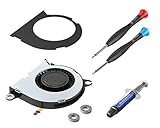
- [Switch CPU Fan] – The replacement cooling fan is compatible with Nintendo Switch video games console. Fits Switch ✅HAC-001 and the battery improved model ✅HAC-001(-01). Not compatible with Switch Lite ❌HDH-001 or ❌2021 OLED. Brand-new and tested in perfect working condition. Well wrapped in ESD protective bag and all the necessary repair tools included. Please study what we have done on improving the fan system below
- [ElecGear vs. Nintendo] – 🔴Newly designed cooling fan at max 8800RPM (100% Duty) which is 10% faster than Nintendo original. 🟠Each piece of fans is tested at fine dynamic balance that is why you might see the red balancing mud on the rotor. 🟡Refined 3x shockproof O-ring feet. 🟢Additional noise absorbing EVA sheet covers the entire metal plate and makes sure 2dB decrease of noise level. We deliberately leave you with the pasting operation for DIY fun
- [Thermal Paste and Tool Kit] – Specially customized thermal compound is the ideal CPU heatsink grease with high thermal conductivity (6.5w/m-k), low thermal resistance, metal-free, non-bleeding and easy to apply. Y-tipped Y00 tri-wing, PH000 Phillips screwdriver and plastic opening tool for easy teardown and assembly. The disposable pre-moistened wipes makes quick and easy removal of the old thermal paste
- [What’s in Package] – 1x Replacement Internal CPU Cooling fan; 1x Thermal Paste Tube; 1x EVA sheet; 3x Silicone O-ring Pads; 1x Y00 Tri-wing Screwdriver; 1x PH000 Cross Screwdriver; 1x Plastic Opening Pry Tool; 1x Wet and Dry Wipes. Installation demonstration offered on ElecGear tech support site
- Undock the Switch and disconnect the wired or Bluetooth audio device.
- Listen through the console speakers. Update the system and restart the console.
- If the audio device has its own power, turn it off and on again.
- Reconnect it and, if possible, test a different audio device.
If more than one audio device reproduces the problem, Nintendo recommends servicing the console. If only one device buzzes, the symptom has not been reproduced across multiple devices; continue isolating that connection or device rather than treating it as a confirmed console fault.
If the noise happens only while charging
Use the AC adapter appropriate for your Switch model and connect it directly to a wall outlet rather than a power strip. Nintendo Japan gives this advice for speaker noise that occurs while charging and recommends trying the supplied adapter. Adapter compatibility varies by model; this check is not a general fix for fan noise or unrelated speaker problems, and it does not establish that a replacement charger is needed.
Rank #3
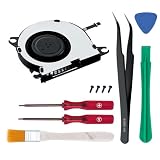
- STRICTLY FOR SWITCH: Perfectly compatible with the original Nintendo Switch (HAC-001) and the V2 battery-improved model (HAC-001(-01)). IMPORTANT: This cooling fan will NOT fit the Switch Lite (HDH-001), Switch 2 or the 2021 OLED model. Please verify your console's model number on the back cover before purchasing.
- SILENCE THE "JET ENGINE" NOISE: Is your console suffering from loud grinding, buzzing, or whining noises? Does it shut down with overheating error messages during heavy gaming? Our premium internal cooling fan restores optimal airflow, keeping your gaming sessions cool, quiet, and stable.
- COMPLETE DIY REPAIR KIT INCLUDED: Stop wasting time at the hardware store. We include an opening tool kit with precision screwdrivers engineered to prevent stripping your console's delicate screws—a common issue with cheap competitor kits. Everything you need for a safe, straightforward teardown is right here.
- PREMIUM QUALITY & EXACT FIT: Our replacement fan is precision-cut to perfectly match the exact dimensions and screw holes of your original hardware. No forced fitting or fragile ribbon cables—just reliable installation.
- COST-EFFECTIVE CONSOLE RESCUE: Don't spend hundreds of dollars buying a new console or waiting weeks for expensive official repairs. With our straightforward DIY replacement part, you can easily save your unplayable console at home and get back to your favorite games in no time.
When to stop troubleshooting and get service
Do not open the console, lubricate the fan, insert objects into vents, or attempt an unverified internal repair. Nintendo’s safety information says not to disassemble or attempt to repair its devices. Use Nintendo’s support process or an authorized repair provider for persistent abnormal fan noise, speaker noise that remains after the listed checks, or a console that produces the problem with multiple audio devices. Service availability and warranty handling depend on region.
If a strange noise occurs together with smoke or an unusual smell, disconnect power and contact Nintendo Support. Do not continue using or charging the console while you investigate.
Quick Recap
Rank #4

- This replacement Part Internal Cooling Fan is Compatible with Nintendo Switch NS HAC-001 2017 Console. Not compatible with Switch Lite HDH-001 or 2021 OLED.
- All of the replacement CPU Fan are TESTED rigorously before shipping.The cooling fan for Switch is at max 8800RPM (100% Duty), enhanced performance.
- The Package include: Replacement Internal CPU Cooling fan with Thermal Paste + Screwdriver + Spatula.
- Warranty-if you have any pre-sale or after-sale questions about Cooling Fan Replacement for Nintendo Switch please feel free to contact us,we will be happy to assist you.
Product prices and availability are accurate as of the date/time indicated and are subject to change. Any price and availability information displayed on Amazon at the time of purchase will apply.




