
Quick wins for a faster PC:
Fix the driver behind crashes, sound loss and screen glitchesFind Drivers →Repair Windows errors before they cause bigger problemsFix Now →Scan for outdated or missing drivers - takes under a minuteDriver Scan →Usually, no. A controller designed to be wired receives operating power through its USB cable, so it does not need AA cells or a rechargeable pack. The important qualification is the controller’s design: a wireless-first pad can also use a USB cable while still having its own battery. Check the exact model rather than relying on the word “wired” or on the connector shape.
What “wired” means on Nintendo Switch
Two different products are commonly described as wired. A wired-first controller is built to operate through its cable. It draws power from the Switch dock and has no separate battery requirement. A wireless-first controller in wired communication mode is normally a wireless pad that can exchange data over USB when connected. Its battery design does not automatically disappear just because a cable is attached.
As an Amazon Associate I earn from qualifying purchases.
Nintendo documents a wired-communication setup for the Switch Pro Controller using a USB cable and the Switch dock. That setup demonstrates the distinction: USB can provide a data connection without proving that every controller connected by USB is battery-free. The model’s manual or product page is the authority.
How a genuinely wired controller gets power
The USB cable carries the electrical power needed by the controller’s electronics while also carrying button and stick input to the console. There is no charging cycle and no battery compartment to maintain. If the cable is unplugged, the controller stops operating because it has no independent power source.
#1 Best Overall
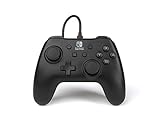
- Matte black design
- Ergonomic controller shape with Nintendo Switch button layout
- Instant plug and play connection (no sync required)
- Detachable 10ft (3m) USB cable with Velcro strap
For the PowerA Enhanced Wired Controller for Nintendo Switch, the manufacturer states “No batteries required.” Its detachable 10 ft (3 m) USB cable plugs into a USB port on the Switch dock and into the controller. The product is specified for use while the Switch is docked, so this is not a battery-free way to play with the console undocked or in handheld mode.
PowerA wired example: what you get and what you give up
The following details apply to the cited Enhanced Wired Controller listing, including the Mario Kart design identified by SKU NSGP0145-01. They are an example of one wired-first pad, not a universal specification for every third-party controller.
| Specification | PowerA Enhanced Wired Controller example |
|---|---|
| Separate batteries | No batteries required, according to the manufacturer’s product listing |
| Power and connection | Detachable USB cable connected to a USB port on the Switch dock |
| Cable length | 10 ft (3 m) |
| Use condition | Switch must be docked |
| HD rumble | Not included |
| Infrared motion camera | Not included |
| Motion controls | Not included |
| Amiibo NFC | Not included |
| Joy-Con-only games | Not supported |
The absence of a battery is therefore only one part of the choice. You trade wireless freedom and several Switch-specific features for a direct, powered USB connection. Games that require motion input, infrared functions, amiibo scanning, or a pair of Joy-Con controllers may need different hardware.
The Tool Desk
Outbyte PC Repair FREERepair Windows errors before they cause bigger problemsFix Now →Outbyte Driver Updater FREEScan for outdated or missing drivers - takes under a minuteDriver Scan →Setting up a battery-free wired controller
- Place the Switch in its dock. The dock supplies the USB power used by the wired-first controller.
- Power on the console and television setup. Confirm that the dock is connected to power and the display.
- Connect the cable to the controller. Use the connector that matches the controller’s port and push it in fully without forcing it.
- Connect the other end to a USB port on the dock. The PowerA manual specifically directs users to a dock USB port, not to a generic assumption that any USB socket will work.
- Press a button to wake or register the controller. Open the Switch controller settings if the console does not detect it immediately.
- Test the controls in a game or the controller test screen. Check both sticks, triggers, directional inputs and every button before settling into play.
Because the cable is detachable on this model, store it without sharp bends and avoid pulling the controller by the lead. A damaged cable can interrupt both power and input even though the controller itself has no battery problem.
Rank #2

- Hall Effect Modules: Say goodbye to stick drift with contract-free magnetic sensors in the thumbsticks giving you smoother control, enhanced precision, and increased longevity
- Advanced Gaming Buttons: Get an edge over the competition with mappable Advanced Gaming Buttons you can program on-the-fly, mid-game—no system settings to configure
- C Button: Easily activate fun GameChat features
- On-board Audio Controls: Quickly adjust the volume of your headset, mute your mic and change the EQ mode for a more immersive gaming experience using the audio button on the back of the controller. EQ Modes: Standard, Bass Boost, Immersive.
- Wired Control: No batteries? No problem. The PowerA Advantage Wired Controller for Nintendo Switch 2 system includes a detachable 10 ft. USB-C cable, giving you plenty of space to get to your favorite spot in the room and play for hours
Can you use a wireless Switch controller with a cable?
Sometimes. A wireless-first controller may support wired communication through USB, but the exact behavior depends on its firmware, console settings and power design. Some models can play while connected; others use USB primarily for charging or updating, and some require wireless pairing even when the cable is present.
Do not assume that attaching a cable converts a wireless controller into a battery-free controller. Look for wording such as “wired communication,” “play while charging,” or a statement that batteries are required. If the manual tells you to charge an internal pack or insert AA cells, those requirements still belong to that model.
Nintendo’s wired Pro Controller instructions use the dock and a USB cable for the communication setup. They do not establish a blanket rule for every controller sold for Switch. Treat each product’s documentation as a separate case.
Windows Errors? Fix Them Before They Spread
Repair common Windows errors and clear accumulated junk for a smoother, more stable PC - no reinstall needed.Free scan · no reinstallOutdated Drivers Are Slowing You Down
One free scan finds every outdated or missing driver and matches the right update for your exact hardware.Free scan · exact hardware matchWhy the USB connector does not answer the battery question
Connector shape identifies a physical interface, not the controller’s power architecture. A PowerA cable article published in January 2021 associates USB Micro-B with both Nintendo Switch wired controllers and certain Enhanced Wireless controllers that use AA batteries. Therefore, seeing a Micro-B socket does not prove that a pad is wired-first.
Rank #3

- Officially Licensed Nintendo Product - Officially licensed by Nintendo for Nintendo Switch, Nintendo Switch Lite, and Nintendo Switch - OLED Model. Also works with Nintendo Switch 2 - C Button not available.
- Custom RGB Lighting - Glow up your setup with eight RGB zones and four preset modes, creating vibrant color combinations to light up your game like never before!
- Mappable Quick-Action Buttons - Re-map functions to the two programmable back buttons for faster reactions and a more personalized, customized gameplay experience.
- Built-in Audio Controls - Stay fully immersed with D-pad audio controls, a 3.5mm headset jack, and USB-chat compatibility, giving you seamless sound and communication without interrupting gameplay.
The same caution applies to USB-C and other connector types. A rechargeable wireless controller can use USB-C, while a wired-only controller can use an older connector. Check the model number, product description and manual before ordering a replacement lead or planning to play without batteries.
Choosing between wired-first and wireless-first controllers
Choose wired-first when these conditions fit
- You normally play with the Switch in its dock.
- You want to avoid AA cells and do not want to recharge a controller.
- A long cable is acceptable in your seating arrangement.
- You do not need motion controls, HD rumble, infrared functions, amiibo NFC or Joy-Con-only game support.
- You prefer a simple connection that draws power from the dock during play.
Choose wireless-first when these conditions matter
- You play in handheld or tabletop mode away from the dock.
- You need freedom from a cable across the room.
- Your games depend on motion controls, rumble, infrared features or amiibo scanning.
- You want a controller that can continue operating briefly when the cable is disconnected.
- You are prepared to charge an internal battery or replace AA cells, depending on the model.
A wireless-first controller that supports wired play can be a compromise: it may work from USB at the dock while retaining the features and portability of its normal wireless design. Confirm whether wired mode is supported during gameplay and whether the cable charges, powers, communicates, or performs all three functions.
Independent reader supportYour contribution helps us test, update, and keep practical guides available for everyone.Troubleshooting a wired controller that will not work
The controller has no lights or input
- Verify that the Switch is seated in a powered dock. The PowerA wired example is not designed for undocked use.
- Move the cable to another USB port on the dock.
- Unplug and firmly reconnect both ends of the detachable cable.
- Inspect the cable for cuts, bent contacts or a loose plug. A wired controller cannot fall back to battery power if the lead fails.
The Switch does not recognize the controller
- Open the console’s controller settings and use the option to change or order controllers.
- Disconnect other USB accessories temporarily to rule out a dock or port issue.
- Restart the console with the controller connected.
- Confirm that the cable belongs to the exact controller model. Similar-looking Micro-B leads can be intended for different products.
Buttons work but a feature does not
Check the specification before treating the behavior as a fault. The cited PowerA wired controller does not include HD rumble, infrared, motion controls or amiibo NFC, and it cannot run games that require Joy-Con-only input. No software setting can add hardware that the controller does not contain.
Recommended Free Tools
The replacement cable fits but still fails
Physical fit is not enough. Verify the connector type, cable wiring and model compatibility from the controller manufacturer. The January 2021 cable guidance covering PowerA products shows that one connector family can appear on both battery-free wired pads and AA-powered wireless pads. A cable selected only by its plug shape can therefore produce unreliable power or no connection.
Rank #4
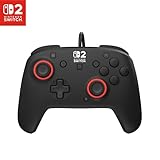
- Hall-Effect thumbsticks for greater precision and durability
- C Button for GameChat features
- 10ft / 3m USB cable for wired gameplay
- 3.5mm jack for audio and USB-chat
- D-pad audio controls
What to check before buying
- Read the power statement. Look specifically for “no batteries required” or an equivalent model-specific claim.
- Check dock dependence. A controller powered from the dock may not function with the console undocked.
- Confirm what the cable does. Determine whether it supplies power, carries data, charges a battery, or supports all of those functions.
- Check included accessories. The PowerA example includes a detachable 10 ft (3 m) cable; other listings may sell a cable separately.
- Compare required features. Verify motion, rumble, infrared, NFC and compatibility with games designed around Joy-Con inputs.
- Record the exact model number. Use it when downloading a manual or replacing a cable, because product families can contain both wired and wireless variants.
Bottom line for Switch owners
A Nintendo Switch controller that is genuinely designed for wired operation normally takes its power from the USB connection and needs no separate batteries. The PowerA Enhanced Wired Controller is a clear example: it has no battery requirement, uses a detachable 10 ft cable and must be connected to a docked Switch. A wireless-first controller connected by USB is a different case, and its battery requirements remain model-specific. Identify the exact controller before assuming that a cable means battery-free play.
Frequently Asked Questions
Can I use a battery-free wired controller in Switch handheld mode?
Not when the model is designed to draw power from the dock. The cited PowerA wired controller is specified for docked use, so it is not a handheld-mode solution.
Does a USB cable always charge a Switch controller?
No. On a wired-first controller, USB supplies operating power and there may be no battery to charge. On a wireless-first controller, USB behavior can include charging, wired communication, or both; check that model’s documentation.
Is USB Micro-B proof that a controller needs no batteries?
No. The same connector type has been used on both wired Nintendo Switch controllers and wireless controllers that use AA batteries, so the model’s power specification matters.
What happens if the cable breaks on a wired controller?
The controller loses both power and communication because it has no independent battery. Replace the lead with one verified for the exact model and test another dock USB port while troubleshooting.
Quick Recap
Product prices and availability are accurate as of the date/time indicated and are subject to change. Any price and availability information displayed on Amazon at the time of purchase will apply.

