The Tool Desk
Outbyte Driver Updater FREEScan for outdated or missing drivers - takes under a minuteDriver Scan →Outbyte PC Repair FREEClear out junk files and repair common Windows errorsFree Scan →For most RTX 2080 Ti gaming PCs, 32 GB of dual-channel system RAM is the practical sweet spot. Sixteen gigabytes remains usable, 8 GB is a constraint on a modern Windows gaming machine, and 64 GB is justified by demanding workloads rather than by the graphics card itself. The RTX 2080 Ti also has 11 GB of dedicated GDDR6 VRAM, which system RAM cannot increase.
Quick recommendation
| System RAM | Verdict for an RTX 2080 Ti PC |
|---|---|
| 8 GB | Historical minimum, but not recommended for a modern gaming PC |
| 16 GB | Usable baseline for focused gaming with limited background software |
| 32 GB | Recommended target for most gaming and multitasking |
| 64 GB | For heavy mods, creation, development, virtual machines or extensive multitasking |
| 128 GB or more | Specialized workstation use, not a normal RTX 2080 Ti gaming requirement |
This is a capacity recommendation, not a claim that the GPU requires 32 GB. The best amount depends on the rest of the computer and what you run at the same time.
System RAM and RTX 2080 Ti VRAM are different
System RAM
DIMMs on the motherboard provide memory for Windows, games, browsers, launchers, voice chat, overlays, recording software and other programs. When this pool fills, Windows can page data to storage, producing sluggishness and frame-time spikes.
GPU VRAM
The RTX 2080 Ti has 11 GB of GDDR6 VRAM, a 352-bit interface and 616 GB/s bandwidth, according to NVIDIA’s specifications. VRAM holds textures, frame buffers, shaders and ray-tracing data on the graphics card. Adding system RAM does not turn the card into a higher-VRAM model or directly raise its rendering performance.
Recommended Free Tools
#1 Best Overall

- 11GB GDDR6
- CUDA Cores: 4352
- Display Connectors: DisplayPort, HDMI, USB Type-C
- Maximum Digital Resolution: 7680x4320
More system RAM can still prevent paging, background-app contention, memory-related crashes and some asset-streaming pauses. It cannot cure a full VRAM pool, a saturated CPU or a GPU that is simply too slow for the selected settings.
What NVIDIA officially specified
The original RTX 2080 Ti user guide listed 8 GB of system memory as the minimum and 16 GB as recommended. That is launch-era manufacturer guidance, not a universal requirement for every 2026 game. The same document describes the original operating-system and power requirements; current driver and operating-system support should be checked separately.
How much RAM fits each workload?
8 GB: upgrade territory
Older or lightweight games may run, but Windows and ordinary background programs consume too much of an 8 GB budget for comfortable modern use. Paging can show up as hitching rather than a dramatic average-FPS drop. Treat 8 GB as a reason to upgrade, not as a target.
16 GB: workable baseline
Sixteen gigabytes is defensible for 1080p or 1440p gaming when you limit background applications, avoid extreme mod packs and do not record, stream or run virtual machines simultaneously. Use a matched dual-channel kit. It is workable, but leaves less breathing room than a modern general-purpose system ideally has.
What’s actually slowing this PC down?
Pick the symptom - the matching free tool is one click away.
Rank #2

- Nvidia GEFORCE RTX 2080 TI Founders Edition. graphics processor Family: NVIDIA.
- Graphics processor: GeForce RTX 2080 Ti
- CPU frequency: 1350 MHz. Dedicated graphics card memory: 11 GB.
- Graphics card memory type: GDDR6
- Memory bus: 352 bit. Maximum resolution: 7680 x 4320 pixels. DirectX version: 12.0.
32 GB: the general recommendation
Thirty-two gigabytes accommodates a game alongside Windows, browsers, launchers, Discord, overlays and recording tools with useful headroom. The largest gains usually occur when moving from 8 GB, when a game is memory-heavy, or when the previous configuration was paging. Moving from 16 GB to 32 GB is mainly about smoother multitasking and more consistent frame times, not guaranteed higher average FPS.
64 GB: workload-driven
Choose 64 GB for large mod lists, flight or city simulators, game development in Unreal Engine or Unity, high-resolution video editing, 3D work, large creative projects, virtual machines, local development environments, or streaming with several production applications. The RTX 2080 Ti itself does not create this requirement.
128 GB and beyond
Such capacities make sense for professional workstation tasks or unusually large development and virtual-machine workloads, not ordinary gaming with this GPU.
Capacity is only part of the configuration
Use matched dual-channel modules
Prefer 2 × 8 GB for 16 GB, 2 × 16 GB for 32 GB, or 2 × 32 GB for 64 GB. Consult the motherboard manual for the preferred slots. Four DIMMs can expand an existing machine, but may reduce maximum stable speed and require more tuning; replacing the kit with two matched modules is often simpler.
Rank #3

- NVIDIA GeForce RTX 2080 Ti 11GB
- NVIDIA CUDA Cores 4352, Clock speeds of 1350 MHz core and 1545 MHz boost
- 24/7 U.S. Based Technical Support
- Blower Edition
- NVIDIA Turing Architecture, combined with the all-new GeForce RTX platform, fuses together real-time ray tracing, artificial intelligence, and programmable shading.
Match the platform’s memory generation
The motherboard and CPU determine whether the system uses DDR4 or DDR5. Do not buy DDR5 for a DDR4 board: the modules are not interchangeable. An RTX 2080 Ti is commonly found in DDR4-era systems, but the card itself does not dictate the system-memory generation.
Choose sensible speed and profiles
The GPU does not require a special RAM speed. Check CPU, chipset, BIOS and motherboard support. A kit may boot at a lower JEDEC speed until its profile is enabled; Intel systems commonly label this XMP, while newer AMD DDR5 systems commonly use EXPO. Menu names vary, so follow the board manual and test stability. A stable 32 GB kit is preferable to an unstable extreme-speed kit.
Be cautious when mixing kits
Two separately sold kits with identical labels are not guaranteed to behave like one factory-matched kit. Update the BIOS and run a memory test; if errors appear, reduce the memory speed or replace the mixed arrangement.
How to check your current memory
- Press Ctrl + Shift + Esc, open Performance, then Memory. Note total memory, speed, slots used and available memory while idle and during a game.
- Press Windows + R, enter
msinfo32, and read Installed Physical Memory (RAM). - Press Windows + R, enter
dxdiag, and review the System tab for memory and Display tab for GPU details.
Task Manager reports capacity and slot usage, but not every detail of kit matching, rank, timings or motherboard topology.
Rank #4
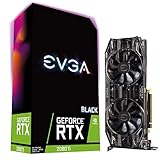
- Real Boost Clock: 1545 MHz; Memory Detail: 11264MB GDDR6
- Dual HDB fans and all-new cooler offer higher performance cooling and much quieter acoustic noise
- Adjustable RGB LED offers configuration options for all your PC lighting needs
- Built for EVGA Precision x1 - EVGA all-new tuning utility monitors your graphics card and gives you the power to overclock like a Pro!
- 3 year & EVGA 24/7 technical support
Tell whether RAM is actually the bottleneck
Evidence of insufficient system memory
- Memory usage stays near full capacity during gameplay.
- Disk activity rises sharply when a hitch occurs.
- Alt-tabbing is slow and Windows feels sluggish with a browser or recorder open.
- Closing background programs improves stutter.
- The page file grows substantially during the session.
- World or texture streaming hitches while GPU utilization is not consistently maxed out.
Evidence to investigate elsewhere
- GPU utilization remains around 95–100% and frame rate is simply low.
- Dedicated VRAM is full and lowering texture quality fixes the issue.
- The CPU or one or more cores is saturated.
- Temperatures cause clock throttling.
- The power supply is unstable, or drivers, BIOS, storage, shaders or a game patch are at fault.
Use a monitoring tool that logs system RAM, dedicated and shared GPU memory, GPU and per-core CPU utilization, frame time and 1% lows, disk activity, temperatures and clocks. Remember that allocated VRAM is not necessarily VRAM actively required every moment.
RAM upgrade or GPU upgrade?
| Symptom | More system RAM helps when… | Consider another fix when… |
|---|---|---|
| Hitching with memory nearly full | Paging or background applications are competing with the game | Memory use is comfortable but shaders, storage or drivers cause spikes |
| Low average FPS | Only if the old capacity was causing severe paging | The GPU is fully utilized, indicating a rendering limit |
| Texture pop-in or quality problems | System memory is exhausted during streaming | Dedicated VRAM is full; lower textures or use a newer GPU |
| Simulation or strategy slowdown | Large datasets and background tools need more capacity | The CPU is saturated and needs a platform upgrade |
A RAM upgrade addresses capacity and multitasking. A GPU upgrade addresses rendering speed and VRAM capacity; a CPU upgrade addresses CPU-bound frame rates and simulation work.
RTX 2080 Ti upgrade checklist
- Measure installed capacity and usage during the games that matter to you.
- Identify the motherboard, CPU, supported DDR generation and available slots.
- Buy a motherboard-compatible matched kit—2 × 16 GB for the normal 32 GB target.
- Install modules in the manual’s recommended dual-channel slots.
- Enable XMP, EXPO or the platform’s equivalent only if desired, then verify stability.
- Recheck memory usage, frame-time spikes and 1% lows in the same workload.
Prebuilt systems and laptops may have soldered memory, proprietary modules, limited slots or BIOS capacity restrictions. Verify the exact model before purchasing. If you are buying a used card, also check cooler and fan behavior, temperatures, coil whine, physical clearance, connectors, warranty and power-supply condition. NVIDIA lists 650 W for its reference configuration, while partner cards and complete systems can differ; see the official specification and your card’s model documentation. MSI’s Lightning Z specifications illustrate how partner designs can vary.
Bottom line
Configure 32 GB of dual-channel system RAM for the best all-around RTX 2080 Ti gaming experience. Keep 16 GB when the budget is tight and monitoring shows no memory pressure. Upgrade from 8 GB whenever possible. Choose 64 GB because your games or applications need it—not because the card’s 11 GB of separate VRAM does.
Quick wins for a faster PC:
Fix the driver behind crashes, sound loss and screen glitchesFind Drivers →Clear out junk files and repair common Windows errorsFree Scan →Scan for outdated or missing drivers - takes under a minuteDriver Scan →Quick Recap
Product prices and availability are accurate as of the date/time indicated and are subject to change. Any price and availability information displayed on Amazon at the time of purchase will apply.




