Recommended Free Tools
For a practical base in Once Human, first choose the right building environment: standard wilderness territories retain technical limits, custom servers may loosen them through host settings, and Eternaland is the official creative-building option. Then plan around how you play—crafting, storage, utilities, production, travel, and defense—rather than chasing an unsupported universal “best” location or build limit.
Choose where to build before planning the base
The rules depend on the environment. Standard wilderness construction is constrained by technical limits tied to the open world, while custom-server freedoms depend on host configuration. Eternaland is presented by the developers as a creative building environment. These are distinct options, not interchangeable settings on every server.

| Environment | What to expect | Best fit |
|---|---|---|
| Wilderness territory on a standard server | Construction has technical limits because of open-world constraints. The developers do not publish a numeric cap in the cited discussion, so do not plan around an assumed territory size or component maximum. Official developer discussion | Players who want a functional base in the shared world and are comfortable working within its limits. |
| Custom server | The host can enable options for structure overlap, floating foundations, construction in restricted areas, and configurable territory auto-packing. Availability depends on that server’s settings. Official custom-server update | Players seeking more flexible construction, after checking what the host has enabled. |
| Eternaland | The official announcement describes construction anywhere on the island and an Eternaland Shop where building materials can be exchanged for Astral Sand, an in-game currency. Check the current client for present details. Official Eternaland announcement | Players whose priority is creative building rather than fitting a design into a standard wilderness territory. |
The official Eternaland announcement puts the distinction plainly: “In Eternaland, the universe is the limit, with construction possible anywhere on the island.” That describes the creative scope announced for Eternaland; it should not be read as a promise that every building option or limit is identical across game environments.
Plan a useful territory around your playstyle
There is no universally best base location. A convenient site for crafting may not be the best choice for defense or travel. Compare candidate areas using practical criteria, then choose the trade-offs that suit your character and group. These are planning recommendations, not mandatory game rules.
#1 Best Overall

- Collects all four Hunger Games paperback novels in one complete box set, including the prequel The Ballad of Songbirds and SnakesFeatures Suzanne Collins' complete dystopian saga from the original trilogy to the origin story of President SnowA must-have collection for Hunger Games fans and lovers of dystopian fiction
- Buildable terrain: Look for an area where the ground and available space suit the shape of the base you want. A complicated footprint can be frustrating if the terrain forces frequent redesign.
- Water and other resources: Consider proximity to water and resources you expect to use. Their value depends on your planned activities and the current game mechanics.
- Travel convenience: Think about how often you need to travel between the territory and the places you visit. A remote location may be appealing, but can add travel friction.
- Utilities and power: Reserve room for utility equipment and connections before filling the site with rooms or production stations. The exact behavior of utilities can depend on current client mechanics.
- Defense needs: If your chosen mode or server involves raids or attacks, consider how the base is arranged for defense. Do not assume a defensive layout is required in every environment.
A flexible starter layout
Group frequently used functions so you can reach crafting and storage conveniently. Leave a clear area for utilities and production inputs, and keep some space open for later expansion. If you want a more elaborate design, sketch the intended production flow first: where inputs arrive, where equipment sits, and where finished items or materials will be stored. This is a general layout method, not a claim about required in-game placement rules.
Use the current Build Mode, but do not rely on guessed controls
The Version 2.3.1 announcement, published January 21, 2026, says construction interaction was reorganized into four independent modes, each with a dedicated purpose. The cited announcement passage does not name the four modes or specify their exact controls, so consult the live interface rather than relying on a guessed list of labels. Version 2.3.1 announcement
Rank #2

- Take the plunge into the 41st Millennium with the Ultimate Starter Set for Warhammer 40,000.
- This box gives you a complete introductory experience, with loads of incredible models, a battlefield to fight over, helpful guides, and all the dice, tools, and rules you need to play your first games.
- Pick the noble Space Marines or swarming Tyranids, give control of the other army to a friend or family member, and battle it out for hours of entertainment.
- There’s no better way to get into the Warhammer 40,000 hobby – this box is also an excellent way to expand your existing collections.
The update also mentions default walls and roofs in starting houses, preset defensive house designs for RaidZone, and battle reports after attacks or successful defense. These are update details, not evidence that RaidZone presets apply to every kind of territory or that every player needs a defensive house.
What announced construction improvements mean for planning
An official March 2025 preview described improvements including automatic generator connections, power-use information in Construction mode, configurable outputs for some water systems, offline output calculation, terrain adaptation during relocation, and automatic clearing of trees and rocks at the target location. Because this was preview material rather than current reference documentation, treat these as announced improvements and verify their availability and behavior in your client before designing around them. Official March 2025 preview
Outdated Drivers Are Slowing You Down
One free scan finds every outdated or missing driver and matches the right update for your exact hardware.Free scan · exact hardware matchWindows Errors? Fix Them Before They Spread
Repair common Windows errors and clear accumulated junk for a smoother, more stable PC - no reinstall needed.Free scan · no reinstallRank #3

- STANDALONE COOPERATIVE GAME: A new, standalone adventure in the Set a Watch series that can be played on its own or with the original game.
- DOOM MECHANIC: Introduces a new mechanic that summons Unhallowed creatures when Doom tokens exceed a certain number, creating a tense new layer of strategy.
- INTRODUCES NEW CHARACTERS: Features new adventurer classes with unique dice and abilities to add variety to your party composition.
- SHORT GAME MODE INCLUDED: The "Hunt for the Kraken" mode provides a quicker 5-round game, perfect for shorter sessions or as a warm-up.
- FULLY COMPATIBLE WITH SERIES: Seamlessly integrates with the original Set a Watch and other expansions, allowing you to mix and match all components.
Blueprints: verify the current workflow in the client
Players often ask how to save a base in construction plans, but the available official material cited here does not establish the current button-by-button workflow, material requirements, or whether a saved plan can be carried across scenarios. Check the current construction interface and any in-game prompts before relying on a blueprint. A saved layout should not be assumed to provide the materials needed to rebuild it.
Quick Recap
Rank #4
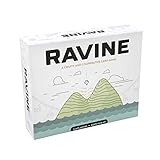
- A unique, cooperative party game
- Includes 193 casino-quality cards
- Comes with 36 screen printed wood health tokens, and 1 large fire token
- Easy to learn and jump right into
- For 3-6 people - AGES 12+
Limits worth checking before committing to a design
- Do not assume a numeric cap: The cited official material supports the existence of technical limits in standard wilderness construction, but does not provide a current territory dimension or component maximum.
- Check custom-server options: Overlap, floating foundations, restricted-area construction, and auto-packing are host-controlled rather than standard-server guarantees.
- Confirm volatile mechanics in-game: Interface labels, relocation behavior, utilities, and blueprint workflows should be checked in the current client, especially after an update.
Product prices and availability are accurate as of the date/time indicated and are subject to change. Any price and availability information displayed on Amazon at the time of purchase will apply.



