The OneXPlayer G1 is not a conventional gaming laptop. It is a Windows 11 handheld PC that combines built-in game controls with an 8.8-inch 144Hz touchscreen and a detachable magnetic keyboard. The Ryzen AI 9 HX 370 version is powered by AMD’s Strix Point platform, but other G1 configurations use the Ryzen 7 8840U or Intel Core Ultra 7 255H.
That makes the G1 unusually flexible, but also expensive and compromised. It is compelling for buyers who want one compact machine for handheld gaming, occasional typing, and desktop use. It is a poor substitute for a full-size laptop, a lightweight handheld, or a discrete-GPU gaming notebook.
As an Amazon Associate I earn from qualifying purchases.
What is the OneXPlayer G1?
The OneXPlayer G1 is best understood as a three-in-one Windows computer:
- Handheld PC: Remove the keyboard and use the integrated controls, including Hall-effect sticks and triggers.
- Mini laptop: Attach the magnetic keyboard through its contact pins for typing, browsing, and keyboard-and-mouse games.
- Desktop-style system: Connect a monitor, dock, storage, or external GPU through its USB4 and OCuLink ports.
The detachable keyboard includes a touchpad and can connect wirelessly over Bluetooth when removed. The G1 also has a built-in touch and virtual-keyboard surface, so the accessory is not required for every text-entry task.
#1 Best Overall
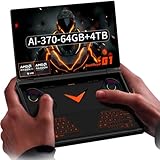
- Laptop-Class Windows Power: Up to Ryzen AI 9 HX 370 (up to 80 TOPS NPU) & Radeon 890M. 64GB LPDDR5x 7500MHz, M.2 2280 4TB PCIe 4.0 SSD. Runs full Windows 11 Home — PC game stores, browser, Office, coding tools, and on-device AI models. A true portable Windows PC.
- 8.8” 2.5K 144Hz Productivity Screen: 2560×1600 (16:10), 144Hz, 500 nits, 97% DCI-P3, 1500:1 contrast. Sharp for spreadsheets/photo editing, fast for modern PC titles. Touchscreen with 2MP camera + Windows Hello fingerprint unlock.
- 3-in-1: Handheld, Mini Laptop, Docked: Detach the dual-mode physical keyboard (magnetic + Bluetooth, RGB, 150mAh) for handheld gaming. Clip it on for mini-laptop productivity (1.5-2mm key travel). Connect OCuLink eGPU + monitor for desktop-class workstation. Includes virtual touch keyboard.
- Precision Control & Pure Copper Cooling: Hall-effect joysticks/triggers, linear motor, gyroscope, OneXConsole center. Single fan (2.8 CFM, hydraulic bearing) + pure copper heat pipes (90% coverage). 51.975Wh battery, 100W fast charge, WiFi 6E, BT 5.2.
- Real I/O & Expandability: OCuLink (PCIe 4.0 x4) for eGPU, USB-C 4.0, USB-A 3.2, 3.5mm audio, microSD 4.0. Weighs 880g (body only). Replaces typical handheld + laptop + small PC in one device.
Calling it a “gaming laptop” is understandable, but imprecise. The G1 is much thicker and heavier than a normal ultraportable, its keyboard is small, and it has no discrete graphics processor. Its defining feature is the combination of a controller-equipped handheld and a tiny Windows computer.
Choose the right G1 processor
Not every OneXPlayer G1 is Strix Point-powered. Check the exact processor before buying:
| Configuration | Platform | Graphics | What it means |
|---|---|---|---|
| Ryzen AI 9 HX 370 | AMD Strix Point, Zen 5/Zen 5c | Radeon 890M integrated graphics | The model described by the Strix Point headline |
| Ryzen 7 8840U | AMD Hawk Point, Zen 4 generation | Radeon 780M integrated graphics | An older and lower-tier AMD option |
| Core Ultra 7 255H | Intel platform | Intel integrated graphics | A separate Intel variant, not Strix Point |
The Ryzen AI 9 HX 370 has 12 cores and 24 threads, boosts to 5.1GHz, supports a configurable 15–54W power range, and includes Radeon 890M graphics and a 50-TOPS NPU according to AMD’s specifications. Those are processor-level capabilities, not a guarantee that every G1 power profile will sustain the maximum performance. The configured TDP, cooling, firmware, game settings, and power source all matter.
Quick wins for a faster PC:
Repair Windows errors before they cause bigger problemsFix Now →Scan for outdated or missing drivers - takes under a minuteDriver Scan →For the specifications, see AMD’s Ryzen AI 300-series material and the official G1 product page.
8.8-inch 144Hz display: impressive specification, important caveats
The G1’s display is an 8.8-inch LTPS touchscreen with a 2560×1600 resolution, 16:10 aspect ratio, and a maximum refresh rate of 144Hz. OneXPlayer lists brightness at 500 nits. Its color coverage is described as 97% DCI-P3 on the company’s Chinese product page and 133% sRGB in the support FAQ.
The 144Hz mode is useful for desktop responsiveness, esports, older games, and lighter titles. It does not mean demanding games will run at 144 frames per second. The HX 370 uses integrated Radeon 890M graphics, and rendering modern games at the native 1600p resolution can be demanding. In many games, 1080p or a lower internal resolution, reduced settings, and supported upscaling or frame-generation features will make more sense.
The display can also run at 60Hz, which is generally the more realistic target for demanding games and can reduce power use. The official FAQ says the panel does not support variable refresh rate (VRR). That makes frame-rate targets and refresh-rate selection more important than they would be on a VRR-equipped handheld.
The Tool Desk
Outbyte Driver Updater FREEScan for outdated or missing drivers - takes under a minuteDriver Scan →Outbyte PC Repair FREERepair Windows errors before they cause bigger problemsFix Now →The portrait-native panel is a real compatibility issue
The panel’s native orientation is portrait, even though it is used as a landscape display. Windows normally handles the rotation, but some games, launchers, BIOS screens, boot menus, recovery environments, and older software may display incorrectly or require adjustment. This is a more meaningful buying consideration than the 144Hz label suggests.
Anyone considering the G1 should test display rotation in the games and tools they actually use. A specification sheet cannot establish how every title will behave.
Detachable keyboard and built-in controls
The keyboard attaches magnetically through pogo-pin contacts and is intended to work immediately in attached mode. When detached, it can operate over Bluetooth and includes a touchpad. OneXPlayer lists its weight at approximately 140g.
This is useful for short emails, launcher searches, command-line work, light office tasks, and games that benefit from keyboard and mouse input. It is not equivalent to a comfortable full-size laptop keyboard. The compact layout, limited palm support, small touchpad, and lack of a conventional rigid hinge can make extended typing less comfortable.
Do these 3 things before closing this tab:
1Repair Windows errors before they cause bigger problems2Fix the driver behind crashes, sound loss and screen glitches3Clear out junk files and repair common Windows errorsWith the keyboard removed, the G1 retains a full set of handheld controls:
Rank #2

- Flagship AMD Ryzen AI 9 HX 370 Performance – Powered by the latest Zen5+Zen5c hybrid architecture, this handheld gaming PC delivers desktop-grade power for AAA gaming, streaming, and productivity. Enjoy smooth multitasking and AI-accelerated workloads in a truly portable game console.
- 8.8" 144Hz 2.5K Ultra-Smooth Display – Immerse yourself in vibrant, tear-free visuals with a high-refresh-rate screen. The 144Hz panel eliminates motion blur during fast-paced action games, while 2.5K resolution provides crisp details for both gaming and media consumption.
- 3-in-1 Versatility: Handheld / Laptop / Desktop – More than a typical gaming handheld, the G1 adapts to your life. Play on the go with built-in controls, attach the keyboard for laptop-like productivity, or connect to an external monitor for a full desktop experience. One device does it all.
- Blazing-Fast Memory & Storage – Equipped with LPDDR5x 7500MHz RAM and a high-speed NVMe SSD, this portable game console loads games in seconds and handles heavy multitasking with ease. Store your entire game library and creative projects without compromise.
- Dual-Mode Keyboard for Seamless Transition – Switch effortlessly between gaming and work. The detachable dual-mode keyboard allows quick text input when needed, transforming this handheld PC into a mini laptop. Perfect for gamers who also need a productivity device.
- Hall-effect analog sticks
- Hall-effect linear triggers
- Micro-switch shoulder buttons
- Built-in vibration
- Six-axis motion sensing
- Integrated gamepad controls
The advantage is obvious: the same machine can be used for controller-based games without carrying a separate gamepad. The trade-off is portability. At approximately 880g before adding the keyboard, the G1 is substantially heavier than many mainstream handhelds, and its 32mm-thick main unit is closer to a compact computer than a tablet.
Performance expectations
The HX 370/Radeon 890M configuration is a strong integrated-graphics platform for its class, but it remains an integrated-graphics handheld. Do not interpret the 144Hz panel as evidence of universal high-refresh AAA performance.
A sensible way to use the display is:
- 144Hz: Desktop use, esports, indie games, older titles, and games that can actually sustain high frame rates.
- 60Hz: More demanding modern games, battery-conscious play, and situations where a stable target matters more than maximum refresh.
- 1600p: Desktop work, slower games, and titles that are easy for the Radeon 890M to drive.
- 1080p or lower internal resolution: Modern games where the integrated GPU is the limiting factor.
Performance will also change substantially with the G1’s power setting. A higher TDP can improve frame rates but increases heat, fan activity, and battery drain. A lower setting can make the device quieter and last longer while requiring lower graphics settings or a lower frame-rate target.
Free tools Windows power users keep installed
One-click scans. No signup required.
Launch coverage and a 2025 hands-on report confirm the HX 370/Radeon 890M configuration and the detachable-keyboard design, but they are not a substitute for a complete independent game-by-game benchmark database. Treat broad claims about “console-level” or “1440p” performance cautiously unless they identify the game, settings, resolution, TDP, and frame-rate result.
Battery, size, and charging
The G1 has a manufacturer-listed 51.97Wh battery, also described as 13,500mAh. Actual runtime depends on power limit, screen brightness, refresh rate, game load, Wi-Fi, Windows background activity, accessories, and whether the system is plugged in while gaming. There is no responsible single battery-life number without controlled testing.
The main unit measures approximately 208×146.5×32mm and weighs about 880g. Adding the approximately 140g keyboard brings the combined hardware weight close to 1kg before the charger and other accessories.
OneXPlayer’s documentation contains a charger discrepancy: the product page lists a 100W GaN adapter, while the support FAQ refers to a 65W GaN charger and says charging to 50% can take about 25 minutes. This may reflect different bundles, regions, or documentation revisions. Confirm the charger included with the exact listing before ordering.
Ports, storage, and eGPU expansion
The official specifications list:
- Two USB-C 4.0 ports
- One USB-A 3.2 port
- One 3.5mm audio jack
- One microSD/TF card slot
- One PCIe 4.0×4 OCuLink port
- M.2 2280 PCIe 4.0 NVMe storage
- Wi-Fi 6E and Bluetooth 5.2
OCuLink is the G1’s most significant expansion feature. With a compatible enclosure or dock and a separate graphics card, it can connect the handheld to a substantially more powerful external GPU setup. OneXPlayer also sells the ONEXGPU 2, an external Radeon RX 7800M-based unit, but adding an eGPU introduces another large expense, a power supply, cables, desk space, and the performance limitations of an external connection.
An eGPU can turn the G1 into a stronger desk system, but it does not make the built-in Radeon 890M equivalent to a discrete GPU. Depending on the combined cost, a conventional gaming laptop or desktop may deliver better value and simpler setup.
The official FAQ says the G1’s NVMe SSD is upgradeable in principle. RAM is offered in 32GB or 64GB capacities and is non-upgradable, so choose that specification carefully. The larger capacity may help with virtual machines, local AI workloads, video editing, or heavy multitasking, but it will not automatically improve game performance. Storage is easier to outgrow because modern PC games can occupy hundreds of gigabytes; the microSD slot is useful for secondary storage, while the internal NVMe drive is the safer choice for demanding games.
Independent reader supportYour contribution helps us test, update, and keep practical guides available for everyone.Windows, firmware, and support considerations
The G1 has more device-specific software dependencies than a simple console. OneXPlayer’s support page provides separate downloads for G1 AMD drivers, G1 BIOS files, touch-keyboard firmware, the G1 system pack, the 8840U BIOS, the 255H driver package, and OneXConsole.
That makes it important to identify the exact G1 variant before installing anything. A buyer should also expect to manage Windows display rotation, power profiles, controller behavior, keyboard firmware, and occasional device-specific updates.
Rank #3

- Performance & Graphics: Powered by Intel Arc G3 Extreme processor and Arc B390 graphics with LPDDR5x 48GB unified memory for Windows 11 gaming, streaming, and multitasking. Capable of handling AAA titles, emulation, and creative workloads at 120Hz.
- Display: Features a 10.95-inch LTPS screen with 2560x1600 resolution, 120Hz refresh rate, 16:10 aspect ratio, 540 nits brightness, DCI-P3 100%, and SRGB 138%. Supports 10-point touch for handheld, tablet, and desktop modes.
- Storage & Connectivity: Comes with 1TB M.2 2280 PCIe 4.0 x4 SSD (user-expandable) plus TF card slot supporting up to 2TB. Connectivity includes USB4 2.0, USB-A 3.2, 3.5mm audio jack, WiFi 7, and Bluetooth 5.4 for docks, peripherals, and fast wireless data transfer.
- Detachable Controller Design: Includes detachable controllers with hall-effect triggers, micro motion shoulder buttons, joysticks, 6-axis gyro/accelerometer, and dual rumble motors. Supports handheld, tablet, and mini-laptop configurations with built-in kickstand and magnetic keyboard attachment.
- Battery, Cooling & Security: Equipped with a 65.02Wh battery, aluminum alloy heat dissipation with heat pipes and single fan for sustained performance. Features fingerprint unlock, Windows Hello, front 1MP camera, and OneXConsole Game Center for TDP and control customization.
After unboxing, check whether:
- The keyboard works immediately when attached.
- Bluetooth reconnection is reliable after detachment.
- The touchpad and controller work after sleep and resume.
- Both screen orientations behave correctly in games and recovery screens.
- Every USB-C port, the USB-A port, microSD slot, audio jack, and OCuLink port function.
- OneXConsole, BIOS, drivers, and keyboard firmware match the correct model.
Keep the serial number, invoice, and accessory list before attempting BIOS or firmware recovery. The existence of official downloads does not by itself prove a particular level of after-sales service, so buyers should check warranty, returns, shipping, taxes, and regional support terms at checkout.
Price and availability
Prices vary by configuration and promotion. On the US-facing official store, the HX 370 model was listed in August 2026 at approximately $1,399 for 32GB/1TB and $1,549 for 32GB/2TB, with a keyboard promotion displayed on the page. These are time-stamped store prices, not a universal MSRP, and bundles can change.
Refurbished listings were seen at roughly $1,059–$1,209 depending on configuration, condition, availability, and promotion. Some listings showed inconsistent stock or accessory options. A refurbished purchase should be checked for the keyboard, charger, warranty, return policy, and exact storage and RAM configuration before payment.
Recommended Free Tools
At new prices, the G1 is expensive for a system without a discrete GPU. Its value depends on whether the buyer genuinely needs the unusual handheld-plus-keyboard format rather than simply wanting the fastest gaming performance per dollar.
How it compares with alternatives
GPD Win Max 2
The GPD Win Max 2 is a more conventional mini-laptop with a built-in keyboard and game controls. It is the better direction for users who prioritize laptop-style typing, while the G1 is more flexible for users who want to remove the keyboard entirely.
Steam Deck OLED
The Steam Deck OLED is a more console-oriented handheld with a mature handheld-focused software experience and a generally lower entry point. It is not a replacement for the G1’s Windows productivity concept or detachable keyboard, but it is the simpler choice for buyers who mainly want handheld gaming.
ASUS ROG Ally X
The ROG Ally X offers a more conventional handheld design and mainstream retail and service coverage. It does not provide the G1’s detachable keyboard concept or native OCuLink port.
Outdated Drivers Are Slowing You Down
One free scan finds every outdated or missing driver and matches the right update for your exact hardware.Free scan · exact hardware matchWindows Errors? Fix Them Before They Spread
Repair common Windows errors and clear accumulated junk for a smoother, more stable PC - no reinstall needed.Free scan · no reinstallConventional gaming laptop
A 13- to 16-inch gaming laptop with a discrete Nvidia or AMD GPU remains the stronger choice for sustained AAA gaming, cooling, screen size, and comfortable all-day typing. It will be less convenient to hold and less compact than the G1, but it can offer considerably more graphics performance for similar money.
Should you buy the OneXPlayer G1?
Buy the G1 HX 370 if you specifically want a large-screen handheld that can become a tiny Windows laptop, value integrated controls, plan to use it with a monitor, or want the option of an OCuLink eGPU later. The 8.8-inch screen, 32GB baseline memory, expandable NVMe storage, and flexible form factor are genuine advantages.
Do not buy it expecting a lightweight handheld, a full laptop keyboard, a discrete-GPU gaming notebook, VRR, or effortless console-style simplicity. The portrait-native display, missing VRR, substantial weight, Windows configuration work, non-upgradable RAM, and high price are meaningful compromises.
The HX 370 is the model that merits the Strix Point description. The 8840U and Core Ultra 7 255H versions should be evaluated as separate configurations, not treated as equivalent products. For most buyers, 32GB is sufficient for gaming and ordinary productivity; 64GB is justified mainly by heavier multitasking or specialist workloads. The 2TB model is the more practical upgrade if a large PC-game library is the priority.
What’s actually slowing this PC down?
Pick the symptom - the matching free tool is one click away.
Quick Recap
Product prices and availability are accurate as of the date/time indicated and are subject to change. Any price and availability information displayed on Amazon at the time of purchase will apply.




