
No—not directly. A standard PlayStation 2 analog controller (DUALSHOCK 2) is not natively compatible with a PlayStation 3. Sony’s PS3 system manual explicitly lists the DUALSHOCK 2 among PlayStation peripherals that do not work with the PS3 system. The officially documented replacement is a PlayStation 3 DUALSHOCK 3 wireless controller, which Sony’s accessory table lists as compatible with the PS3 model families shown there.
An adapter may change the answer for a particular setup, but adapter support is product-specific rather than guaranteed by Sony. You must verify the exact adapter’s PS3 compatibility, supported controller type, button mapping and return policy before relying on it.
As an Amazon Associate I earn from qualifying purchases.
The compatibility answer at a glance
| Controller or setup | Native PS3 support | What the evidence establishes |
|---|---|---|
| Original PS2 DUALSHOCK 2 connected by itself | No | Sony’s PS3 manual says the analog controller (DUALSHOCK 2) is not compatible with the PS3 system. |
| PS3 DUALSHOCK 3 wireless controller | Yes | Sony’s accessory table lists DUALSHOCK 3 compatibility across the PS3 model families shown in that table. |
| PS2 controller plus an unspecified adapter | Not established | Sony’s official materials reviewed do not certify PS2-to-PS3 adapters. Compatibility depends on the exact adapter. |
| Third-party controller advertised for PS3 | Listing-dependent | The official table does not validate individual third-party products, condition or seller claims. |
The practical conclusion is simple: if you want the least uncertain solution, use a genuine, working DUALSHOCK 3 intended for PS3. A DUALSHOCK 2 is not a plug-in substitute.
What Sony’s manual actually says
The distinction is not based on the age of the controller or on whether it has analog sticks. Sony’s PS3 system manual contains a compatibility notice stating: “Some PlayStation® and PlayStation®2 peripherals such as the analog controller (DUALSHOCK®) and analog controller (DUALSHOCK®2) are not compatible with the PS3™ system.”
#1 Best Overall
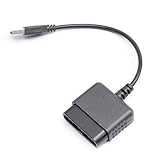
- ★Controller adapter allows PlayStation 2 controllers to be used with the PlayStation 3 consoles or PC | Vibration function supported in compatible games
- ★Easy to use, just connect PS2 controller to the adapter then plug the USB cable into an available port on your PS3 or PC | For best results plug directly in device and not in to USB hub
- ★Does not provide the motion sensing capability featured on PS3's wireless controller | Games requiring motion sensing abilities will not be compatible with adapter
- ★ Compatible with only original PS2 Controllers, PS3 console, and desktops/laptops with an USB Port
- ★Package Contents: 1x Controller Adapter
That wording covers the normal Sony PS2 pad. It means the PS3 does not provide native support for using a DUALSHOCK 2 as a standard game controller. Plugging the controller into a suitable-looking connection, or using a passive cable that only changes the connector shape, does not override the console’s compatibility rules. A device would need to translate the PS2 controller’s signals into an input format the PS3 recognizes.
“Not compatible” also means you should not expect the PS3 menus, games or system settings to recognize every DUALSHOCK 2 function. The manual is a system-level statement, not a promise that a particular accessory converter can never work. That is why an adapter has to be judged separately from the controller itself.
Do PS2 games on a PS3 require a PS2 controller?
No. Controller compatibility and PS2 game playback are separate questions. Some early PS3 models can play games from original PS2 discs, but that does not make a DUALSHOCK 2 a supported PS3 accessory.
Free tools Windows power users keep installed
One-click scans. No signup required.
Sony’s model comparison identifies the CECH-B00 and CECH-A00 families listed there as supporting disc-based PS2 games. It also warns that some titles may not operate properly. Those model and software limitations concern whether a PS2 game runs; they do not cancel the separate manual statement that the DUALSHOCK 2 is not compatible with the PS3 system.
Rank #2

- 【Product Compatibility】: Compatibility with Sony Playstation 1,PSX and Playstation 2 controllers to PS3/PC Controller. support Win98, Win98SE, Win Me, Win2000 & the newly announced Win XP, Win 7 together with the direct X 7.0a or above.
- 【Easy to Use】: Just connect PS2 controller Converter, then plug the USB cable into an available port on your PS3 or PC, Uses this with a guitar hero device for the PS2 and it works flawlessly. Windows 10 recognizes the adapter and will automatically set it up, Didn’t need to install any drivers , Compatible with only original PS2 Controllers, PS3 console, and desktops/laptops with an USB Port.
- 【Enhance Game Experience】:Supports Double shock real vibration function on supported games and digital/analog mode.Supports most of PC games,can be directly used with PC computer.
- 【Perfect Design】:USB Controller adapter Converter Cable for Saved you lots of cash being able to use a PS2 controller instead of buying a new PS3 controller or Wireless controller
- 【After Sales Support】:Our product 100% extremely strictly before selling, You can give it as a gift to your family, friends, classmates and anyone, especially your children.If you have any issues for this product, please contact us by Amazon message, we will provide you satisfied solution at first time.
For a backward-compatible console, the normal approach is still to use a controller that the PS3 supports, such as a DUALSHOCK 3. The game may be from the PS2 library, but the console is handling it through the PS3 hardware and software environment. Do not infer controller support from the presence of a PS2 disc drive, a PS2 logo or a compatible game list.
The officially documented controller choice
DUALSHOCK 3
Sony’s accessory table lists the DUALSHOCK 3 wireless controller as compatible with the PS3 model families shown in that table. This is the straightforward option when you want a controller without an adapter in the signal path.
Because used hardware is common, check that a listing is actually a DUALSHOCK 3 for PS3 rather than a DUALSHOCK 2, a look-alike, or a controller advertised only for a different PlayStation generation. The compatibility table establishes the controller family, not the condition of a specific used unit. Battery health, charging performance, worn sticks and counterfeit hardware are separate purchasing risks.
What’s actually slowing this PC down?
Pick the symptom - the matching free tool is one click away.
What “wireless” changes
DUALSHOCK 3 is described by Sony as a wireless controller, while the DUALSHOCK 2 is the older PS2 controller covered by the incompatibility notice. Wireless operation does not make a DUALSHOCK 2 compatible, and a cable that physically connects the older controller does not turn it into a DUALSHOCK 3. The important difference is the controller protocol the PS3 supports, not simply whether a wire is present.
Rank #3

- Product Compatibility : Compatibility with Sony Playstation 1,PSX and Playstation 2 controllers to PS3/PC Controller. support Win98, Win98SE, Win Me, Win2000 & the newly announced Win XP, Win 7 together with the direct X 7.0a or above
- Easy to Use: Connect your original PS2 controller to the converter, then plug the USB into a PS3 or PC. Works perfectly with PS2 Guitar Hero devices. Windows 10 auto-installs the adapter—no drivers are needed. Compatible only with original PS2 controllers, PS3 consoles, and USB-enabled PCs/laptops. Ensure the controller is securely connected and the USB port functions properly. If issues occur, try another port or restart the system
- Enhance Game Experience : Supports Double shock real vibration function on supported games and digital/analog mode. Supports most of PC games,can be directly used with PC computer
- Perfect Design : USB Controller adapter Converter Cable for Saved you lots of cash being able to use a PS2 controller instead of buying a new PS3 controller or Wireless controller
- After Sales Support : Our product 100% extremely strictly before selling, You can give it as a gift to your family, friends, classmates and anyone, especially your children. If you have any issues for this product, please contact us by Amazon message, we will provide you satisfied solution at first time
Why adapters are a separate, product-specific case
An adapter can contain electronics that read a PS2 controller and present its inputs to the PS3 in a supported format. That is fundamentally different from a passive extension or connector converter. However, the official Sony materials reviewed do not certify a general category of “PS2-to-PS3 adapter.” There is no universal guarantee that an adapter will work with every DUALSHOCK 2 revision, every PS3 model or every game.
Adapter claims should therefore be read as claims about one product, not proof that PS2 controllers work on PS3 in general. Before buying, look for all of the following in the manufacturer’s documentation:
- Explicit PS3 support, not only PS2, PC or another console.
- Support for the specific controller type you own, including DUALSHOCK 2 if that is what you plan to use.
- A stated connection method and any requirement for a wired USB port, separate power or a pairing procedure.
- Information about analog sticks, vibration, pressure-sensitive buttons, Home-button behavior and button mapping.
- A model list or firmware note that covers your PS3 family rather than an unqualified marketplace description.
If one of those details is missing, classify the setup as unverified. An adapter may still be useful, but it is not the same as Sony-supported native compatibility.
Outdated Drivers Are Slowing You Down
One free scan finds every outdated or missing driver and matches the right update for your exact hardware.Free scan · exact hardware matchPC Slower Than It Used to Be?
A free scan shows the junk files, broken settings and background clutter dragging Windows down - then fixes them in one click.Free scan · Windows 10 & 11How to check a setup before you depend on it
- Identify the controller. Confirm whether the label and design identify a DUALSHOCK 2, DUALSHOCK 3 or another product. Do not rely on a seller’s title alone; similar-looking controllers can belong to different generations.
- Identify the console family. Record the CECH model printed on the console label or packaging. This matters for PS2 disc playback and for checking an accessory maker’s model list, even though the DUALSHOCK 2 manual warning applies at the PS3 system level.
- Decide whether you need native support. For dependable menu navigation and ordinary game use, choose the documented DUALSHOCK 3 path. Use an adapter only if keeping the PS2 pad is more important than avoiding an extra compatibility variable.
- Read the exact adapter documentation. Confirm that it names PS3 and the DUALSHOCK 2, then check whether special functions are omitted. “USB controller adapter” by itself is not enough information.
- Test before discarding your return option. Check the PS3 home screen, a game, both analog sticks, every face and shoulder button, the directional pad, vibration if relevant, and any required Home-button function. Test more than one game if your use includes both PS3 and PS2 software.
- Keep the fallback plan. Retain a supported controller or a seller return period until the adapter setup performs the functions you actually need. An adapter that moves a character may still fail to provide menu access, analog control or a required button.
Common failure modes and what they mean
The PS3 does nothing when the DUALSHOCK 2 is connected
This is consistent with Sony’s native compatibility statement. First check that the controller is really a DUALSHOCK 2 and that no adapter is being assumed. If there is no translating adapter, changing cables or reconnecting the same controller is unlikely to create native support. Use a DUALSHOCK 3 for the documented route.
Rank #4

- Type: PS2 To PS3/PC Controller Converter, connect to your PS3 or PC USB Ports.
- Function: Adapter to use your PS2 controller on PS3 console or PC/Laptop, fully compatible with the console and control.
- Use: Converts PS2 or PS1 vibration controller to play with PS3 games on PS3 system, without requiring any external power or driver to operate. Easy to set up and use.
- Compatible With: All original and third party for PS2 Controller (wired and wireless), supports most of for P3 games and for P2 or P1 vibration controllers, can be directly used with PC computer.
- Application: Support wired For PS1/For PS2 hand lever and wireless For PS1/For PS2 hand lever. Applied on PC/For PS3.
An adapter powers up but the buttons do not work correctly
Power or an indicator light only shows that the adapter is receiving electricity. It does not prove that the PS3 has accepted the controller protocol or that the mapping is correct. Consult the adapter’s mapping instructions, test the Home button and analog functions, and check whether the documentation excludes pressure-sensitive inputs or vibration.
The adapter works in one game but not another
That result should be treated as partial compatibility, not a universal success. Record which functions and games work, then compare them with the adapter’s stated limitations. If your requirement includes PS2 disc games, test those on the exact PS3 model you will use; Sony notes that some PS2 titles may not operate properly even on listed backward-compatible families.
A used DUALSHOCK 3 will not stay connected or hold charge
The official compatibility table identifies the controller family, not the condition of an individual unit. A worn battery, damaged cable, failed buttons or counterfeit hardware can make a compatible model unusable. Ask the seller about testing, inspect return terms and avoid treating a low price as evidence of authenticity or reliability.
Choosing between the documented option and an adapter
| Priority | Better fit | Reason |
|---|---|---|
| Lowest compatibility uncertainty | Working DUALSHOCK 3 | It is the controller Sony lists for the PS3 model families in its accessory table. |
| Keeping a familiar PS2 pad | Exact adapter with explicit PS3 and DUALSHOCK 2 support | The adapter may translate the input, but operation remains dependent on that product’s design and documentation. |
| Playing PS2 discs on an older PS3 | Supported PS3 model plus a PS3-compatible controller | Disc playback and controller compatibility are independent checks. |
| Buying used hardware | Seller with clear testing and returns | Official compatibility does not establish the condition or authenticity of a particular listing. |
There is no contradiction between saying “PS2 controllers do not work on PS3” and acknowledging that an adapter might operate one. The first statement describes native console support. The second describes a separate accessory that may translate signals, with results that must be verified model by model.
Best Value

- Strict Compatibility (One-Way): Works ONLY with original PS2 wired controllers connecting to a PS3 or PC. Does NOT support third-party controllers, PS1 controllers, or specialty accessories.
- Compatible with official original controllers only, not for Third Party or OEM controllers.
- Simply connect PS2 controller to the adapter, then plug the other end of the adapter into an available USB port on the PS3
- Length: 18" ,45.72cm
- NOTE: Does not provide the motion sensing capability featured on PS3' s S,XAX,S wireless controller. May not be Compatible With all PS3 games due to Sixaxis function and PS button on PS3 controllers. NOT compatible wit dancing mat, Guitar Hero, drum ..etc but the Joypad controller only.
Questions readers often ask
Can I plug a DUALSHOCK 2 straight into a PS3?
No. Sony’s manual explicitly identifies the DUALSHOCK 2 as not compatible with the PS3 system. A direct connection is not the documented solution.
Will every PS3 play PS2 games?
No. Sony’s model comparison lists the CECH-B00 and CECH-A00 families shown there for disc-based PS2 support and cautions that some titles may not operate properly. Check the exact model rather than assuming all PS3 consoles have the same capability.
Does a PS2 game running on PS3 make the PS2 controller compatible?
No. Game playback and peripheral support are separate compatibility layers. A PS3 can run a supported PS2 disc while still requiring a PS3-compatible controller.
Is a DUALSHOCK 3 guaranteed to be good if the model is compatible?
The model family is the officially documented choice, but an individual used controller can be worn, damaged or counterfeit. Compatibility and physical condition are different checks.
Are all PS2-to-PS3 adapters equivalent?
No. Sony’s official materials reviewed do not certify adapters as a class. Treat each adapter as a separate product and verify its stated PS3, DUALSHOCK 2 and feature support.
Should I buy an adapter or another controller?
Choose a DUALSHOCK 3 when predictable PS3 operation matters most. Choose an adapter only when retaining the PS2 controller justifies checking documentation, testing every required function and accepting product-specific uncertainty.
Quick Recap
Product prices and availability are accurate as of the date/time indicated and are subject to change. Any price and availability information displayed on Amazon at the time of purchase will apply.
Do these 3 things before closing this tab:
1Fix the driver behind crashes, sound loss and screen glitches2Clear out junk files and repair common Windows errors3Scan for outdated or missing drivers - takes under a minute
