If your PS5 won’t turn on, first check its power indicator: no light means it is off, while solid white means it is already on. A blue light that stays blue or a blinking white light signals a frozen or error state. Follow the matching steps below before considering repair; the indicator identifies the console’s state, not the underlying cause.
Identify what the PS5 is doing
PlayStation’s power indicator guide distinguishes between being off, starting, on, and in an error state. Read the light before choosing a fix:
- No light: The console is powered off. If it does not respond when you press the power button, follow the no-indicator steps below.
- Blue transitioning to white: The PS5 is powering on.
- Solid white: The PS5 is powered on. If the TV shows no picture, troubleshoot the display or video output rather than treating the console as having no power.
- Blue that does not turn solid white, or blinking white: PlayStation identifies this as a frozen or error condition that needs troubleshooting.
If there is no light and the PS5 does not respond
Check that the power cable is seated firmly at the console and outlet. If possible, test a known-good outlet and a compatible power cable. Change one item at a time so you can tell whether the response changes; these checks do not prove that the console’s internal power supply has failed or recovered.
If the PS5 remains completely unresponsive, use PlayStation’s power-issues support page and its PlayStation Repairs diagnostic. Sony’s page directs people with power symptoms to the diagnostic, which can check eligibility for in-warranty service; it does not guarantee that a repair will be covered.
Recommended Free Tools
#1 Best Overall

- Compatible with: Sony PS5 / PS5 Slim / PS5 Pro / PS4 / PS4 Slim / PS3 Slim/ PS3 Super Slim ; Xbox Series S, Xbox Series X, Xbox One S, Xbox One X
- UL Listed / Safety: this power cord are Tested, Approved, and Certified by UL to ensure safety for you and your device. UL testing is authorized by OSHA - US Federal Agency, this certification provides peace of mind that this power cord meets rigorous safety standards for electrical products
- Power Cord Type: Non Polarized 2 Prong C7 Figure 8 Power Cord, 125V 7A, 18 AWG (American wire gauge)
- Durable & Sturdy: built with pure copper wire / heavy-duty flame-retardant cable Jacket, resistant to bending and daily wear for long-lasting use
- Wide Compatibility: works with most Game Consoles, TVs, Printers, Speakers and Other Devices that use the same 2-prong figure-8 power connector
If the light stays blue or blinks white
For a console that remains blue without becoming solid white, or only blinks white, PlayStation recommends disconnecting its power cable for three minutes, reconnecting it, and trying to turn the PS5 on again. This is a troubleshooting step, not a guaranteed fix for every power problem.
If the problem continues, Sony points to reinstalling the console software through Safe Mode. Try the Safe Mode steps below if the console responds to its power button. If it does not, go to PlayStation Repairs.
Rank #2

- ETL Certified for Peace of Mind: This power cord features a pure copper core for stable power delivery, dependable durability, and safe daily use—ideal for home, office, and outdoor applications
- Wide Compatibility: Compatible with Sony PS5, PS5 Slim, PS4, PS4 Slim, PS3 Slim, and PS3 Super Slim consoles. Also fit for Xbox Original, Xbox One S, Xbox One X, Xbox Series S, Xbox Series X, and other devices with a matching power port, such as TVs, printers, speakers, and monitors
- Please Check Before Purchase: Not compatible with Sony PS1, PS2, original PS3 Fat, PS4 Pro, Xbox One Fat, or Xbox 360 Core/Pro/Elite/Slim/E models
- Power Cord Type: Non-Polarized 2-Prong Figure 8 Power Cord (IEC 60320 C7 to NEMA 1-15P), 18 AWG, rated for 125V AC, 7A Max
- Multiple Length Options: Choose the length that fits your setup. Please check the product images to confirm the connector type before purchase. Contact us with any questions
If the PS5 is on but the TV is blank
A solid white indicator means the PS5 is powered on, even if the screen is blank. Check the HDMI connection at both ends and confirm the TV is set to the correct input. If the picture does not return, use Safe Mode’s video-output options: Change Video Output includes Change Resolution and Change HDCP Mode. PlayStation lists these as troubleshooting options for a blank screen in its Safe Mode guide.
How to start PS5 Safe Mode
Safe Mode is available only if the console responds to its power button. PlayStation’s instructions for entering Safe Mode are:
Quick wins for a faster PC:
Repair Windows errors before they cause bigger problemsFix Now →Fix the driver behind crashes, sound loss and screen glitchesFind Drivers →Clear out junk files and repair common Windows errorsFree Scan →Rank #3

- FOR 2-PRONG DEVICES: Works with most TVs, monitors, printers, and other devices that require a 2-pin power connector
- PACKAGE INCLUDE: 1 x High Quality 5ft AC 2 Prong Power Cord
- COMPATIBILITY: compatible with PS2, PS3, PS4, PS5, Xbox One S, Xbox One X, Xbox Series S, Xbox Series X, Apple TV, many printer, consumer electronics, and power brick models
- FEATURES: High Quality 2 Prong 5ft AC Power Cord, universal power cable is perfect for bedroom, living room office and home use.
- Turn the console off by holding the power button for three seconds.
- After it is off, press and hold the power button again. Release it after the second beep; Sony says the second beep sounds about seven seconds after the first.
- Connect the controller to the console with a USB cable, then press the PS button.
If Safe Mode will not launch
A USB, HDMI, or power cable may be involved. PlayStation recommends trying a different cable. Substitute one at a time, then attempt Safe Mode again so you can isolate whether changing a cable affects the result.
If Safe Mode still will not start, Sony’s power-issues troubleshooting flow recommends a longer power cycle:
Rank #4
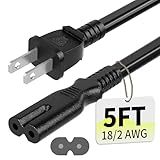
- Specifications: 5 feet tv power cord, non polarized 2 prong figure 8 power Cord (C7 to NEMA 1-15P ), 7A, 18AWG, 125V, NISPT-2, ETL listed
- Compatible: This ac power cable is fit for Sony PS5 / PS4 Slim / PS4/PS3 Slim/ PS3 Super Slim/Microsoft Xbox One S/Xbox One X/ Xbox Series X/Xbox Series S and other electronic devices such as TVs, printers, speakers, monitors, etc
- ETL Listed / Safety: This PS5 power cord is constructed with 100% pure copper and a flexible PVC jacket, providing high conductivity and minimal power loss
- Compatibility Note: To ensure compatibility, please verify that the connector matches your device's power port as illustrated in the product images
- Power Your Devices with the Perfect Reach: Select from multiple lengths to find your ideal match; this cord ensures safe, stable power for your game console, sound bar, speaker system and more
- Hold the power button until the console beeps and the light turns off.
- Disconnect the power cable and wait 20 minutes.
- Reconnect it and try entering Safe Mode again.
If the console still cannot reach Safe Mode or remains faulty, use PlayStation Repairs rather than opening the console as a routine next step.
Independent reader supportYour contribution helps us test, update, and keep practical guides available for everyone.Which Safe Mode option should you choose?
Choose the least destructive option that fits the symptom. PlayStation warns that “Some Safe Mode options will result in the loss of data.” Its Safe Mode option descriptions distinguish options that preserve data from resets that erase it:
Best Value

- [Compatible With] This power cord is compatible with Sony PS3 Slim & Super Slim / PS4 Slim / PS5 ; Microsoft Xbox One S, Xbox One X, Xbox Series S, Xbox Series X. ▶NOTE: NOT Compatible With Original PS3 Fat
- [CompatiIbility] High Quality 18 AWG 2 Slot Figure 8 AC Power Cord (IEC320 C7 to NEMA 1-15P ), Work For: Game Consoles, LED LCD TV, Monitor, Sound Bar, Printers and other devices requiring 2 Slot Power cord.
- Quality Assurance: adopt thickened PVC material, pass 1000+ bending test, the cable has tensile resistance, safety, long service life.
- [materials] Using high quality materials, high quality copper core wire, safe and fast charging your equipment.
- [After-sale] The charging cable is sold under strict quality control. Please rest assured to purchase. If there is any quality problem, please contact us.
| Option | When it may help | Data effect |
|---|---|---|
| Repair Console Storage | If the PS5 does not start properly or has a storage problem. | Does not erase data. |
| Update System Software | To update the console software. | The cited Safe Mode description does not state a data-erasure effect. |
| Change Video Output | For a blank screen; includes changing resolution or HDCP mode. | The cited Safe Mode description does not state a data-erasure effect. |
| Restore Default Settings | To restore default settings. | Keeps console content, including stored games, apps, captures, and saved data. |
| Reset PS5 | To reset the console. | Deletes user data. |
| Reset PS5 (Reinstall System Software) | To reset the console and reinstall its system software. | Deletes user data and removes system software. |
Back up important data before choosing either reset option that deletes user data. If a non-erasing option matches the problem, try that first.
When to stop troubleshooting and request repair
If the PS5 remains unresponsive after basic power checks, cannot enter Safe Mode, or still fails after the relevant Safe Mode steps, start the PlayStation Repairs diagnostic from Sony’s power-issues page. It can check warranty eligibility, but coverage depends on the console and applicable terms. The official support pages cited here do not publish a failure rate or a success rate for these troubleshooting steps, so no single cause or fix can be ranked as most likely on that basis.
Quick Recap
Product prices and availability are accurate as of the date/time indicated and are subject to change. Any price and availability information displayed on Amazon at the time of purchase will apply.




