If you already own a controller and want the easiest setup, use it: a racing wheel is optional in Gran Turismo 7. Choose a supported wheel if physical steering and pedals are part of the experience you want. Polyphony Digital’s official updates confirm support and ongoing tuning for both input types, but do not establish that one is universally faster.
How to choose between a wheel and a controller
Make the choice based on how you want to play, what equipment you have, and whether you can accommodate a wheel setup. The official GT7 records establish game support and software adjustments, not head-to-head results.
| Consideration | Controller | Racing wheel |
|---|---|---|
| Input style | Steer with a wireless controller’s sticks or directional buttons. | Use physical steering and pedal inputs; GT7 provides wheel and pedal settings. |
| Equipment and setup | A straightforward default if you already own a compatible controller. | Requires a supported wheel setup and room to use it. The official sources do not establish current prices or the cost of any additional equipment. |
| Compatibility | Wireless-controller steering is addressed in GT7 update notes. | Support is model-specific and has been added over time; check the exact model and console compatibility before buying. |
| Lap-time advantage | Not established by the official evidence cited here. | Not established by the official evidence cited here. |
Choose a controller for convenience
A controller makes sense if you want to start playing with equipment you already have, prefer a compact setup, or do not specifically want a steering wheel and pedals. Polyphony Digital adjusted steering behavior for wireless-controller sticks and directional buttons in Update 1.31, published March 30, 2023. That update shows the game’s controller handling has been tuned; it does not show that a controller is faster or slower than a wheel.
Choose a wheel for physical inputs
A wheel is worth considering if the physical steering and pedal experience is important to you and you have space for the setup. It is an optional way to play, not a documented requirement or guaranteed competitive upgrade. For example, the Fanatec Gran Turismo DD Pro appears in Polyphony Digital’s GT7 force-feedback notes; its mention is not a recommendation or proof of a performance benefit.
#1 Best Overall

- PlayStation compatible: Officially licensed for PS5 and PS4 consoles. Also works on Windows PC
- 5 Nm Direct Drive servo motor: Custom-designed in Germany for sim racing providing linear, consistent performance with patented FluxBarrier technology to improve motor efficiency and smoothness
- Passively cooled base: Housing is made from aluminum (passive heat sink, core structural component) with composite end caps
- Steering wheel designed by Polyphony Digital: Tactile rubber grip with OLED display and diffused RevLED strip, compact 280 mm diameter, optimized for the PlayStation interface
- Four 5-way directional sticks: Assigned to GT7's rapid-access adjustments for traction control, brake balance, torque split, and fuel mapping
What GT7 supports and lets you adjust
Polyphony Digital’s Update 1.17, published June 23, 2022, added Steering Controller Settings to the Controllers menu. The notice says players can check connected steering-wheel controllers and adjust input values. It also describes pedal sensitivity adjustment through Pedal Calibration.
Those settings provide ways to configure a connected wheel and its pedals. The update notice does not give a universal setting that suits every wheel or player.
Rank #2

- Compatible with PlayStation 5, PlayStation 4, and PC .Use the HORI Device Manager app to download firmware, adjust settings and make up to 4 custom profiles
- Full-size racing wheel and pedals optimized for authentic racing simulation
- 270-degree turn radius with adjustable output options
- Mount security with sturdy clamp system
- Use the HORI Device Manager app to download firmware, adjust settings and make up to 4 custom profiles
Check wheel compatibility before buying
GT7 wheel support is model-specific and has expanded through game updates. Polyphony Digital’s notices name the Fanatec Gran Turismo DD Pro in the Update 1.15 force-feedback notes, dated May 2022; add Fanatec Gran Turismo DD Extreme support in Update 1.46, dated April 25, 2024; and add Thrustmaster T598 support in Update 1.57, dated March 27, 2025.
Before purchasing, verify that the exact wheel model works with your console generation and current GT7 version. A model appearing in an update notice does not establish its present price, stock, bundle contents, or compatibility with every console variant.
Quick wins for a faster PC:
Clear out junk files and repair common Windows errorsFree Scan →Scan for outdated or missing drivers - takes under a minuteDriver Scan →Repair Windows errors before they cause bigger problemsFix Now →Rank #3

- With the return of classic cars, iconic tracks, and fan-favourite modes like GT Simulation and Sport Mode - Gran Turismo 7 is the complete Real Driving Simulator, 25 years in the making.
- Find your line. Whether you're a racer, collector, tuner, designer, photographer or arcade fan - immerse yourself in the facets of automotive culture that matter most to you.
- Connect and compete. Join an international community of drivers to share race strategies, tuning tips, livery designs and photos, before taking to the track to go head-to-head.
Use force feedback carefully
GT7’s force-feedback behavior has changed over time, so avoid treating an old setting as a current universal recommendation. In its Update 1.15 notice, published in May 2022, Polyphony Digital warned that very high Max. Torque or Sensitivity values could cause violent vibration with several listed wheels. A separate notice dated May 27, 2022, said force feedback and torque had been temporarily reduced for the Thrustmaster T-GT, Fanatec Podium, and Fanatec GT DD Pro.
These are version-specific records, not current setup instructions. Start cautiously and consult current information for your particular wheel rather than copying older values.
Rank #4
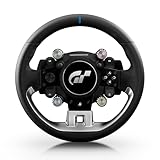
- Wheel rim officially licensed by Gran Turismo and Sony, designed in collaboration with Polyphony Digital
- Features the next-gen Quick Release, natively compatible with the T818 and T598 Direct Drive racing wheel bases
- Round wheel rim (11 inches / 28 cm in diameter) wrapped in fine, smooth-textured leather
- 4 rotary encoders with push-button functionality for a total of 12 controls
- 1 D-pad, 2 mini-sticks, 4 tact-switch action buttons
Is one input method faster?
The official update notices do not provide a controlled wheel-versus-controller comparison or show that either method produces better lap times or race results. They confirm that GT7 supports wireless-controller steering and supported wheels, and that Polyphony Digital has adjusted controller handling and force feedback across updates. Decide based on feel, convenience, space, and equipment—not an assumed speed advantage.
What to know about the announced MOZA wheel
On July 28, 2026, Polyphony Digital announced MOZA as an official Gran Turismo World Series peripheral partner and said the companies are developing a Gran Turismo-branded wheel with native GT7 support. The announcement did not give a retail release date, so it describes a product in development rather than a wheel you can assume is currently available.
Free tools Windows power users keep installed
One-click scans. No signup required.
Gran Turismo Series Producer Kazunori Yamauchi said the partnership would expand possibilities for developing a wheel suited to Gran Turismo. The announcement is not evidence of a release date, price, or performance advantage.
Quick Recap
Product prices and availability are accurate as of the date/time indicated and are subject to change. Any price and availability information displayed on Amazon at the time of purchase will apply.



