Quick wins for a faster PC:
Fix the driver behind crashes, sound loss and screen glitchesFind Drivers →Repair Windows errors before they cause bigger problemsFix Now →Scan for outdated or missing drivers - takes under a minuteDriver Scan →Verdict: The 2023 Razer Blade 14 is one of the more convincing compact gaming laptops of its generation. In the reviewed configuration, AMD’s Ryzen 9 7940HS and NVIDIA’s RTX 4070 Laptop GPU deliver strong 2560×1600 gaming performance, while the 14-inch 240Hz 16:10 IPS display and replaceable DDR5 memory make the machine more versatile than many similarly compact notebooks.
The trade-off is physics: native 1600p performance varies sharply by game, sustained CPU workloads can favor larger laptops, and demanding use requires active cooling and the supplied 230W adapter. This is a premium portable gaming system, not a silent ultraportable or a substitute for a larger high-wattage workstation.
As an Amazon Associate I earn from qualifying purchases.
Configuration reviewed
The configuration covered here pairs AMD’s Ryzen 9 7940HS with NVIDIA’s GeForce RTX 4070 Laptop GPU, 16GB of DDR5-5600 memory, a 1TB NVMe SSD, and the 14-inch 2560×1600 240Hz IPS display. It is the high-end version of the 2023 Blade 14 family, rather than a generic description of every regional SKU.
| Component | Reviewed configuration | What it means |
|---|---|---|
| Processor | AMD Ryzen 9 7940HS | 8 cores, 16 threads, Zen 4 architecture, up to 5.2GHz boost |
| Graphics | NVIDIA GeForce RTX 4070 Laptop GPU | 8GB VRAM; power behavior varies by firmware, workload, and performance mode |
| Memory | 16GB DDR5-5600 | Two replaceable SO-DIMM modules; PCWorld reports support for up to 64GB |
| Storage | 1TB NVMe SSD | Accessible M.2 2280 storage for replacement or expansion |
| Display | 14-inch, 2560×1600, 16:10 IPS, 240Hz | QHD+ resolution, cited 3ms response time, AMD FreeSync Premium |
| Battery | 68.1Wh | SKU-specific capacity reported by the cited retailer specification |
| Weight and size | Approximately 4.06 pounds; 12.2 × 9.0 × 0.71 inches | Compact for this performance class, with measurements that may vary by SKU |
Razer announced the 2023 family in the United States with a starting MSRP of $2,399.99. That is historical launch pricing, not a current price recommendation. Availability, condition, and pricing can differ considerably now, particularly between new, refurbished, and used machines.
#1 Best Overall

- Optimized storage: Keep your gear orderly and accessible with dedicated spaces for all your essentials.
- Secure inside and out: Breathable 3D mesh protects devices from overheating in the laptop and tablet sleeves. A molded outer shell and inside top bumper protects from jolts and drops.
- Undeniably alien: The 3D reflective Alienware logo tosses iridescent colors when illuminated, while gradient aura zipper pullers provide night visibility.
- Move in comfort: The ergonomic design features comfortable shoulder pads and a chest buckle for weight distribution.
- Fit all your essentials: Our optimized and spacious backpack fits all everything you need for on-the-go gaming, keeping gear organized, accessible and protected.
Gaming performance: strong 1600p results, but not a native-240Hz machine in every game
The Blade 14’s RTX 4070 is well matched to its 2560×1600 panel, but the display’s 240Hz maximum should not be confused with a promise of 240 frames per second. In demanding games, the practical target is generally a good 60fps-plus experience at 1600p, with DLSS, frame generation, reduced settings, or a lower output resolution used when necessary.
The following results come from Tom’s Hardware’s testing of an RTX 4070 Blade 14. They are useful reference points, not universal guarantees: game patches, drivers, laptop firmware, power mode, ambient temperature, and background tasks can all change the result.
| Game and test | Reported result | How to interpret it |
|---|---|---|
| Cyberpunk 2077, 2560×1600, High, ray tracing, DLSS Balanced, frame generation enabled | Approximately 70fps | A demanding ray-traced game can be enjoyable at the panel’s native resolution when reconstruction and frame generation are enabled. |
| Cyberpunk 2077, 1920×1080, broadly the same settings | Approximately 110fps | A lower output resolution gives the GPU considerably more headroom for high-refresh play. |
| Cyberpunk 2077, 2560×1600, DLSS Quality, ray tracing disabled | Approximately 90fps | This is a more favorable high-frame-rate configuration, but it still is not a native-rendered 240fps result. |
| Far Cry 6, 2560×1600, Ultra | Approximately 68fps | Strong performance at the native resolution, although not close to the panel’s maximum refresh rate. |
| Red Dead Redemption 2, 2560×1600, Medium | Approximately 45fps | Some demanding titles require reduced settings or upscaling to maintain a consistently smooth result. |
| Borderlands 3, 2560×1600, Badass | Approximately 64fps | Around-console-refresh performance at an aggressive preset. |
| Metro Exodus RTX loop, 2560×1600, 15 loops | 61.44fps average | The loop also provides a useful sustained-load reference for temperatures. |
These figures need one important qualification. A result with DLSS is not the same as native rendering, and a result with frame generation includes generated frames rather than only conventionally rendered frames. When comparing laptop reviews, match the resolution, preset, ray-tracing setting, upscaler mode, and frame-generation setting before drawing conclusions.
Crashes, No Sound, or Screen Glitches?
Random freezes, missing sound and display glitches usually trace back to one bad driver. Find and replace yours safely.Free scan · under a minuteWindows Errors? Fix Them Before They Spread
Repair common Windows errors and clear accumulated junk for a smoother, more stable PC - no reinstall needed.Free scan · no reinstallThe RTX 4070 Laptop GPU’s 8GB of VRAM is appropriate for the Blade 14’s intended 1600p class, but it is not a reason to expect maximum texture settings in every future game. Newer or poorly optimized titles may require texture reductions, DLSS, or 1080p output sooner than a larger laptop with a more powerful GPU and more memory would.
Why published RTX 4070 power figures differ
Power descriptions for this particular laptop should be treated carefully. Notebookcheck identifies the RTX 4070 configuration as a 140W design, while Tom’s Hardware’s review materials describe the tested RTX 4070 with a 100W TDP figure in its configuration or measurement context. Those numbers are not necessarily contradictory measurements of identical operating behavior.
Mobile GPU power can change with the laptop’s firmware, the selected performance profile, the workload, temperature limits, and whether the system is running from its supplied adapter. The accurate general description is therefore “RTX 4070 Laptop GPU,” not a claim that every Blade 14 (2023) RTX 4070 operates at one fixed wattage in every situation.
The 240Hz 16:10 display is a major part of the appeal
The 14-inch IPS panel combines a tall 16:10 aspect ratio with 2560×1600 resolution and a 240Hz refresh rate. PCWorld identifies a 3ms response time, AMD FreeSync Premium, and a QHD+ presentation. That combination gives the Blade 14 two distinct strengths:
- Competitive games: esports titles and less demanding games can make better use of the high refresh rate, especially at reduced settings or 1080p output.
- General productivity: the 16:10 shape provides more vertical space than a conventional 16:9 laptop display, which is useful for documents, timelines, and web pages.
The screen is also demanding. Rendering modern games at 2560×1600 places more load on the GPU than 1920×1080, and ray tracing can reduce frame rates sharply. The best experience is consequently game-dependent: use native 1600p when the title and settings allow it, then choose DLSS, frame generation, lower settings, or a 1080p output when you want higher frame rates.
Rank #2

- Spacious interior - the dedicated PC compartment fits gaming laptops up to a whopping 17. 3". Perfectly placed pockets provide quick access to your tools when you need them
- Unbeatable durability - Protect your favorite gear with an ultra-tough, high-density EVA molded front shield lined with water-resistant PU fabric
- Unwavering comfort - This laptop backpack comes equipped with back padding, ventilation, and adjustable shoulder and chest straps that provide comfort that never quits
- Sleek style - With its neat and sleek design, the Legion 17" Armored backpack II beautifully combines gaming performance with style that fits any situation
- Dedicated gear storage - separate pockets designed to hold your keyboard and palm rest, mouse, headphones, water bottle, and more
Ryzen 9 7940HS: powerful for a compact gaming system, but chassis size still matters
The Ryzen 9 7940HS is an 8-core/16-thread Zen 4 mobile processor with a maximum boost clock of 5.2GHz. It gives the Blade 14 ample CPU capability for gaming, everyday work, photo and video tasks, and mixed workloads where the fast RTX GPU is also important.
It is not automatically the best choice for every workstation task simply because it carries a Ryzen 9 label. In Tom’s Hardware’s Geekbench 5 comparison, the Blade 14 scored 11,121 in multi-core, behind larger Intel-based competitors in that test group. That result says more about sustained power and cooling limits in a compact chassis than it does about the processor being weak.
For gaming, the 7940HS is a sensible match for the RTX 4070. For long-running CPU rendering, large code builds, or other workloads that keep all cores busy for extended periods, compare sustained-load results from larger 15- and 16-inch laptops. Those systems often have more thermal and electrical headroom, even if their peak CPU specifications look similar on paper.
What’s actually slowing this PC down?
Pick the symptom - the matching free tool is one click away.
Premium portability comes with compact-gaming compromises
The Blade 14’s central design achievement is performance density: it puts a high-end mobile processor and RTX 4070 graphics into a 14-inch body weighing approximately 4.06 pounds. The cited retailer specification lists dimensions of about 12.2 × 9.0 × 0.71 inches and a 68.1Wh battery for the relevant configuration.
That makes it substantially easier to carry than many larger gaming notebooks, but the compact format does not eliminate the physical demands of high-performance hardware. A smaller chassis has less room to dissipate heat than a larger high-wattage gaming laptop. Expect the system to rely on active cooling and its substantial power adapter during demanding gaming and rendering sessions; this is not a passive or low-power ultraportable.
The reviewed evidence supports calling the Blade 14 premium and portable. It does not support promising silent operation, a cool exterior under every load, or the same sustained performance as a larger laptop. Those are separate attributes that depend on a particular test and performance profile.
Thermals: acceptable for the class, with no shortcut around cooling
In Tom’s Hardware’s 15-loop Metro Exodus RTX test, the reviewed unit recorded an average CPU temperature of 81.4°C and an average GPU temperature of 76°C. Those are internal review-lab measurements under a defined workload. They are not guarantees of keyboard-surface temperature, fan noise, or behavior in every game.
Do these 3 things before closing this tab:
1Clear out junk files and repair common Windows errors2Scan for outdated or missing drivers - takes under a minute3Repair Windows errors before they cause bigger problemsThe results are reasonable for a thin, high-performance gaming notebook. They also reinforce the ownership trade-off: the Blade 14 is designed to deliver substantial performance in a small body, so demanding work should be done on a hard surface with unobstructed ventilation and, ideally, while connected to the supplied adapter. Buyers who prioritize very quiet operation under load should investigate larger or lower-power alternatives rather than assuming the Blade 14 will behave like a quiet office laptop.
Rank #3
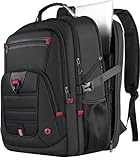
- 【100% LIFETIME-PROMISE】: You can get 100% lifetime promise and 7*24 hours friendly customer service. Experience the durability and style with our Z-MGKISS gaming laptop travel backpack. Extra large laptop backpack for men is the perfect companion for your journey and trip whether near or far. (NOTE: The extra large backpack is intended for TALL PERSON)
- 【Extra Large & Gaming Laptop Bag】: Big size of the travel backpack for women: 22.44 x 15.35 x 11.81 inch. Capacity: UP to 60L. Multi compartments provide excellent protection for 2 laptop computers and tablets. Mens backpack fits most 15.6'', 17'', 17.3'', 18'', 18.4'', 19'' laptops. Fits most large size laptops: Compatible for Acer HP Lenovo, Dell xps 18 1810/Asus G752VT/Asus rog g752vl-dh71/Asus G752jz/Msi ge72 apache 235/ROG G751JT MSI, etc
- 【Multi-Pockets】: Our waterproof laptop bag backpack has 3 spacious compartments and 18+ pockets which can provide roomy space for your computer, notebook, iPads, power bank, passport, wallet, clothes and more items. Functional front pocket has many small pockets. The personal item travel bag has a sturdy handle on top. A hole in the big travel backpack is used for the outside of the earphone. As a backpack for men women/travel carry on backpack/airlines personal item bag, you will enjoy it
- 【TSA Approved & Comfy】: Unfolds the travel backpack carry on freely 90-180 degree to make you quickly pass through the airport security and keep items tidy. Adjustable shoulder straps padded help relieve stress from your shoulder. A luggage strap allows black backpack fit on the trolley of your luggage/suitcase; Adjustable chest strap brings the shoulder straps in tighter to the chest, help you lock your backpack in place securely. Mens backpack is perfect for indoor/outdoor activities
- 【Ideal Gift For Anyone】One gift. A thousand memories. Perfect for Valentine’s Day, Mother’s Day, Birthdays, Christmas, Thanksgiving, and every moment in between. Whether you’re shopping for your mom/dad, wife/husband, girlfriend/boyfriend, best friend, or work wife, this is the present that proves you care
Battery life is good for light work, not a gaming figure
Tom’s Hardware measured 8 hours and 34 minutes in a Wi-Fi test involving web browsing, light graphics work, and video streaming at 150 nits. For a high-performance gaming notebook, that is a useful light-use result.
It is not an estimate for gaming endurance. Running the RTX GPU from battery introduces much tighter power and performance constraints, and demanding games will drain the 68.1Wh battery far faster than web browsing or video playback. Treat the test as a reference for mobile productivity, not as an all-day gaming claim.
Razer’s own battery disclosure used a different setup: an RTX 4060 model, 33% brightness, wireless enabled, and video playback. That manufacturer test should not be substituted for the independent RTX 4070 result because it uses different hardware and conditions.
Free tools Windows power users keep installed
One-click scans. No signup required.
Upgradeability is one of the 2023 model’s best ownership improvements
Unlike compact laptops with soldered memory, the 2023 Blade 14 redesign provides two accessible SO-DIMM slots behind a removable plastic shield. Tom’s Hardware found two 8GB DDR5-5600 modules installed in its review unit, and PCWorld reports a maximum upgrade path of 64GB DDR5-5600.
That does not mean every memory kit will work identically. Before buying an upgrade, confirm the complete laptop submodel, the supported capacity and speed in current documentation, and the compatibility of the specific modules. Matching modules as a kit is generally the safer approach than mixing an old stick with a new one.
A reader planning a memory upgrade can compare DDR5-5600 laptop RAM alongside the laptop purchase, but should treat the category label as a starting point rather than a compatibility guarantee.
Storage replacement and expansion
The SSD is also accessible, making an M.2 2280 NVMe replacement a credible upgrade path. The important limitation is that accessibility does not prove that every physical SSD or every heatsink combination is suitable. Confirm the M.2 2280 format and the laptop’s clearance before ordering an M.2 2280 NVMe SSD.
- Back up important files before opening the laptop.
- If replacing the boot drive, plan how you will clone the existing installation or reinstall the operating system.
- Confirm the replacement drive’s physical 2280 size and interface before purchase.
- Shut the laptop down completely, disconnect external power, and use appropriate static and handling precautions.
- After installation, verify that the drive is detected before restoring or deleting the original data.
The cited retail and product examples establish that PCIe 4.0 M.2 2280 NVMe drives are readily searchable products; they do not establish that any particular listing is the optimal choice for this exact chassis. Capacity, controller behavior, thermals, warranty, and price still need to be checked.
Rank #4

- Strong Protection for Gaming Laptop: Dimensions: 19.3 x 13.4 x 7.1 in. Designed specifically for large gaming laptop, TSA approved gaming backpack fits sizes up to 18.4 inches laptop and meets airline carry-on requirements. Inner plush and thickened soft padding cushions protect laptop and your expensive e-sports gears during transport. 18 inch theftproof laptop backpack provides all-round protection for your devices. Carry your laptop on the outgoing without any worry
- Waterproof Rain Cover & Insulated Side Pockets: Water-proof extra large laptop backpack with a detachable rain cover to cover your backpack during rainy days, protecting gaming gear from getting wet. The versatile side pockets include a waterproof pocket for umbrella and an insulated pocket for your drinks keeping cold and preventing your gaming keyboard or mouse getting wet. It's suitable for e-sports tour, gaming meetups, and daily commutes
- Anti-Theft Lock: Heavy duty backpack with lock for men equipped with a combination lock, prevents your gaming accessories from theft such as laptop and gaming headset. The hidden anti-theft zipper pocket at the back is for storing personal items like passport and wallets. The RFID card pocket on the shoulder strap protect the card safe. With triple anti-theft designs, it fully protects the safety of all your belongings
- Intelligent Organization: The main compartment includes a dedicated headphone loop and two mesh pockets, good for store over-ear gaming headsets, gaming mouse, keyboard and power bank without clutter. 18 inch gaming laptop backpack has front pocket with pen slots, a key ring, and mesh zipper pockets for easy organizing small essentials, earbuds. For even more versatility, 18 inch big backpack for men with an extra tech organizer bag is provided for cables and adapters
- Comfortable Design for Gamers: TSA approved backpack for gaming laptop has thick and widened soft shoulder pad to ease shoulder pressure. Its breathable back panel stops sweat buildup when you carry your gaming laptop, controller and accessories for hours. An adjustable chest strap ensures a snug fit, evenly spreading the backpack's weight to lower fatigue
Ports and wireless connectivity
The cited configuration includes:
- Two USB4 Type-C ports with video Alt Mode and power delivery
- Two USB-A ports
- HDMI 2.1
- A 3.5mm headset connection
- Wi-Fi 6E
- Bluetooth 5.2
- A 1080p webcam
The specification does not list built-in wired Ethernet or a memory-card reader. That is the main practical limitation of the otherwise useful port selection for desktop setups, creators, and anyone who regularly transfers files from cameras or other wired devices.
A USB4 hub for the Blade 14 is a sensible accessory category if you need Ethernet, a card reader, more USB ports, or one-cable desk connectivity. Check the hub’s actual display outputs, bandwidth, power-delivery behavior, and operating-system support rather than assuming every USB-C hub provides the same capabilities. A hub can add ports; it does not change the laptop’s internal graphics power.
The 230W adapter matters
Razer’s support material states that the RTX 4060 and RTX 4070 versions ship with a 230W adapter and recommends using the supplied adapter for the highest performance under heavy loads. That is important when evaluating portability: the laptop may be relatively light, but the complete high-performance travel kit includes a substantial power brick.
Recommended Free Tools
Do not treat a generic lower-wattage USB-C charger as a full-performance replacement. The Blade 14 has USB-C power delivery, but exact charging and performance behavior depend on the charger and the laptop’s operating conditions. If a replacement is needed, verify the complete Razer model suffix and connector specifications before considering a Razer Blade 14 230W replacement charger.
Firmware, drivers, and model identification
Razer identifies the 2023 Blade 14 family under the RZ09-0482x model range and provides model-specific firmware and driver resources, including a firmware updater. The final character sequence matters: identify the complete model suffix from the laptop label or Razer’s support utility before installing firmware.
Driver and firmware listings are volatile. Check Razer’s current support page at the time of installation rather than relying on a review’s version number or assuming that the newest-looking download applies to every RZ09-0482x variant. The available research confirms the model-specific support resources, but does not establish a permanently current BIOS or driver version.
Independent reader supportYour contribution helps us test, update, and keep practical guides available for everyone.Who should buy the Razer Blade 14 (2023)?
At the right market price and condition, this laptop makes the most sense for someone who wants a single portable machine for gaming and general productivity, and who values a high-refresh 1600p screen and replaceable memory more than maximum performance per dollar.
It is a good fit if you want:
- RTX 4070-class gaming performance in a compact 14-inch body
- A sharp 16:10 2560×1600 display with a 240Hz refresh rate
- Strong 1600p gaming with the option to use DLSS or frame generation in demanding titles
- Accessible RAM instead of permanently soldered memory
- An accessible M.2 2280 SSD
- A premium portable gaming system rather than the largest possible chassis
Be more cautious if you prioritize:
- Maximum sustained CPU rendering or compilation performance
- The lowest cost per frame
- Quiet operation during long, demanding workloads
- The highest possible GPU power limit
- Long gaming sessions away from a wall outlet
- Built-in Ethernet or a memory-card reader
For those priorities, a larger gaming laptop may provide more cooling and power headroom. Newer generations may also offer better efficiency or newer display technology. That is comparative buying guidance based on the Blade 14’s compact design and cited results, not a claim that every competing model is superior.
Best Value

- COMPARTMENT CAPACITY & POCKETS:Separate laptop compartment fits 17/15/14/13 Inch Macbook/Laptop.Separate compartment Fits Maximum 9.7” iPad.Main compartment roomy for tech electronics accessories,3-5 days clothing,5 A4 Books.Front compartment with 2 Pockets for power Bank and Shaver,2 Pen pockets and key fob hook.Pocket for socks and gloves.Front hidden zipper pocket fits papers.2 mesh pockets for water bottle and compact umbrella.Strap pocket fits bus card and Metro Card,One glasses hold strip.
- COMFY&STURDY: Comfortable airflow back design with thick but soft multi-panel ventilated paddingand Lightweight material, gives you maximum back support. Breathable and adjustable shoulder straps relieve the stress of shoulder. Foam padded top handle for a long time carry on.
- FUNCTIONAL&SAFE: A luggage strap allows backpack fit on luggage/suitcase, slide over the luggage upright handle tube for easier carrying. With a hidden anti theft pocket on the back protect your valuable items from thieves. Well made for international airplane travel and day trip as a travel gift for men .
- BUILD-IN USB PORT : The backpack comes with built in USB charger outside , built in charging cable inside, offers you a convenient way to charge your phone when you are walking, riding.
- DURABLE MATERIAL&SOLID: Made of Water Resistant and Durable Polyester Fabric with metal zippers. Ensure a secure & long-lasting usage everyday & weekend.Serve you well as professional office work bag,slim USB charging bagpack,college backpacks for men women.THIS ITEM IS NOT INTENDED FOR USE BY CHILDREN 12 AND UNDER.
What to check before buying one now
- Confirm the exact configuration. Make sure the listing has the Ryzen 9 7940HS, RTX 4070 Laptop GPU, 16GB DDR5-5600, 1TB SSD, and 2560×1600 240Hz panel if those are the specifications you want. The Blade 14 family contains multiple configurations.
- Separate launch price from current value. The $2,399.99 U.S. MSRP was the 2023 starting price. Compare today’s asking price with the machine’s age, warranty, storage, and condition instead of using that launch figure as a current recommendation.
- Inspect battery health on used units. The published 8-hour-34-minute result came from a controlled light-use test on a review unit and cannot establish the condition of a second-hand battery.
- Check the included adapter. An RTX 4070 model should be evaluated with the correct 230W power supply, particularly if the seller is offering a used or refurbished system.
- Verify upgrade details. Confirm the RAM modules, SSD format, installed firmware, and physical condition before budgeting for upgrades.
- Look at the actual return and warranty terms. Current retailer availability, used-market condition, and coverage were not verified for this review and can vary by seller and region.
If you are comparing listings for this exact machine, search for Razer Blade 14 (2023) RTX 4070 and then verify the specification details above rather than relying on a shortened product title.
Verdict
The Razer Blade 14 (2023) is a convincing compact gaming laptop because it does not reduce its identity to portability alone. Its Ryzen 9 7940HS and RTX 4070 deliver strong gaming results, including roughly 60–70fps-class performance in several demanding 1600p tests, while the 240Hz 16:10 display gives lighter games and competitive titles room to run faster.
The compromises are equally clear. Native 1600p performance depends heavily on the game and settings, the 8GB GPU memory is not a guarantee of maximum textures for years to come, sustained CPU performance can trail larger laptops, and heavy workloads require serious active cooling and the 230W adapter. Its 8-hour-34-minute battery result applies to light Wi-Fi use, not gaming.
For buyers who want high performance in a genuinely compact premium body, the 2023 RTX 4070 Blade 14 remains an appealing design. For buyers chasing the lowest price, the quietest load behavior, or the strongest sustained workstation performance, a larger or newer system is likely the more rational choice.
Frequently Asked Questions
Can the Razer Blade 14 (2023) run games at native 1600p?
Can the Razer Blade 14 (2023) run games at native 2560×1600?
Yes, but performance varies by game and settings. The tested RTX 4070 averaged about 68fps in Far Cry 6 Ultra and 64fps in Borderlands 3 Badass at 1600p. In demanding ray-traced games, DLSS, frame generation, reduced settings, or a lower output resolution may be needed.
Is the Razer Blade 14 (2023) RAM upgradeable?
Yes. The 2023 redesign has two accessible SO-DIMM slots, with 16GB installed as two 8GB DDR5-5600 modules in the reviewed unit. PCWorld reports a maximum upgrade path of 64GB, but confirm the exact submodel, BIOS behavior, and module compatibility before buying a kit.
The Tool Desk
Outbyte PC Repair FREERepair Windows errors before they cause bigger problemsFix Now →Outbyte Driver Updater FREEFix the driver behind crashes, sound loss and screen glitchesFind Drivers →Can a USB-C charger replace the Blade 14’s 230W power adapter?
Use the supplied 230W adapter for maximum performance under heavy loads. Although the laptop supports USB-C power delivery, a generic lower-wattage USB-C charger should not be treated as a full-performance replacement. Verify the exact model suffix and connector specifications before buying another adapter.
Is the Blade 14’s battery life good for gaming?
No. The independent 8-hour-34-minute result was measured during web browsing, light graphics work, and video streaming at 150 nits. Gaming on battery is substantially more demanding and should not be expected to deliver the same endurance or plugged-in performance.
The Bottom Line
Bottom line: The Razer Blade 14 (2023) with Ryzen 9 7940HS and RTX 4070 is best understood as a high-performance portable gaming system, not a desktop replacement. It offers excellent performance density, a superb 240Hz 1600p display, and unusually useful RAM and SSD access, but demanding games still need sensible settings and sustained workloads expose the limits of its compact chassis.
Quick Recap
Product prices and availability are accurate as of the date/time indicated and are subject to change. Any price and availability information displayed on Amazon at the time of purchase will apply.




