Free tools Windows power users keep installed
One-click scans. No signup required.
Rebuilding a ColecoVision can mean three different things: getting an original console working again, replacing failed hardware, or modifying it for a newer display. Those are not the same job, and a working console does not automatically need an AV mod, new power supply, or recap. Begin with the exact unit and its symptoms, then use the ColecoVision Repair Manual to guide diagnosis before replacing parts.
Start with the repair manual and the specific console
The archived ColecoVision Repair Manual is the best starting point for work on the base console. It includes theory of operation, disassembly and assembly instructions, schematics, parts lists, test-equipment requirements, and troubleshooting flow charts. The manual says its purpose is to help a repair person locate system problems “in a minimum amount of time.”
Before buying parts or opening the case, write down what the console does: whether it powers on, what appears on screen, whether the symptom changes after warming up, and whether it occurs with more than one game. Also identify the console’s region and board revision if possible. Compatibility can vary, and the available documentation does not establish one repair procedure that fits every unit.
A digital multimeter is a reasonable basic tool for electrical diagnosis because the manual includes electrical troubleshooting and test-equipment guidance. A meter is not, by itself, a complete diagnosis: use the manual’s circuit information and troubleshooting process, and do not probe or replace components without understanding the relevant circuit.
Quick wins for a faster PC:
Fix the driver behind crashes, sound loss and screen glitchesFind Drivers →Repair Windows errors before they cause bigger problemsFix Now →Scan for outdated or missing drivers - takes under a minuteDriver Scan →#1 Best Overall

- Officially licensed Atari titles. Titles include Asteroids, Centipede, Millipede, Breakout, Missile Command, Crystal Castles and many more. Game save options.
- Packed with over 200 built-in Atari games + bonus titles. Pac-Man & Galaga not included. Full Game list listed below.
- Includes Atari console, games instructions, 2 wireless joysticks, USB power cable, HDMI cable, and user manual. System connects directly to TV.
- Includes two 2.4 GHz wireless joysticks, inspired by the original Atari joysticks, include paddles for paddle games like Breakout, Warlords and many more.
- User Guide Languages: English, French, Spanish, Italian, Portuguese, German, Dutch, Japanese and Arabic. Dynamic RGB LED lights.
Diagnose the symptom before replacing hardware
No power or uncertain power behavior
Start by checking the power path and the console’s power-supply section against the manual, rather than assuming the supply is the failed part. Confirm the particular console’s electrical and regional requirements before using a replacement. A replacement that is mechanically convenient is not necessarily electrically compatible.
Garbled graphics
Garbled graphics do not prove that video memory has failed. Specialist repair guidance lists a dirty power switch as one possible cause; consult the manual’s diagnostic flow before attempting component-level work. See the Garbled Graphics Fix guide alongside the manual.
Rank #2

- 50 Classic Games including: 1942, Super Street Fighter II, Tetris, Mega Man I & II, Galaga, Dig Dug, Burger Time
- HDMI Video Output (720p)
- Comes with two Wired Game Controllers
- SD Card Slot for Downloadable Games
- Save/Load/Rewind all Games
Intermittent or unclear faults
Record the conditions under which the failure happens and work through the manual’s tests in sequence. This is more useful than changing several parts at once, which can obscure the original fault and introduce new ones. No single symptom in the available guidance establishes a universal culprit.
Choose a power-supply path carefully
There are distinct approaches to a power problem: repair the original supply, install a modern replacement, or build a replacement design. The sources identify these options but do not provide an independently tested head-to-head comparison. Decide based on electrical compatibility, region, installation needs, repairability, and whether preserving original hardware is important.
Rank #3

- TIMELESS ‘80s DESIGN. The 7800 console takes its place among other ‘80s design icons like shoulder pads, crop tops, and aviator sunglasses.
- ATARI+ PLATFORM. Atari+ Platform games and accessories are backward and forward compatible. Consoles, accessories, and games work together and are also compatible with most original accessories and cartridges.
- ARE YOU POWER-READY? Includes a USB-C power cable but does not come with a wall charging plug for your outlet. You’ll need to pick up a 1A USB power adapter if you don’t have an extra one at home.
- Includes Bentley Bear’s Crystal Quest Cartridge - In this brand-new sequel to Crystal Castles, you’ll find power-ups, hidden paths, a challenging variety of enemies…and one adorable bear. Everything a platforming fan could possibly want.
- 2 Systems in 1 - Plays both Atari 2600 and 7800 game cartridges. HDMI-Ready - Connect to any screen via HDMI so you can enjoy every last pixel.
| Approach | What the sources establish | What to verify before proceeding |
|---|---|---|
| Repair the original supply | The repair manual documents the console’s power-supply section and provides circuit and troubleshooting information. ColecoVision Repair Manual | Confirm the fault with the manual’s tests and ensure the work is within your electrical repair skill. The cited materials do not establish a universal repair cost or difficulty. |
| Modern replacement | A ColecoVision replacement power-supply product is documented by the Collection Manager listing. | Check the exact design’s electrical requirements, region, connectors, and whether installation modifies the console. Current stock and compatibility with every revision are not established here. |
| DIY replacement design | The ColUSB description documents a separate modern approach; it should not be conflated with the other replacement design. | Review its specific requirements and installation details against your console before building or buying. The cited material does not provide a verified comparative test or universal fit claim. |
Decide whether you need an AV modification
The original ColecoVision outputs RF. If your intended display accepts that signal, an AV modification is not a prerequisite to restoring stock operation. If you want a different connection, the ColecoVision AV Mod guide describes adding composite video and audio.
Treat this as a display-compatibility choice, not a required repair. Before modifying a working console, weigh whether the target display supports its original RF output, the effort and risks of the modification, how reversible the change is, and whether preserving original hardware matters to you. The cited guide establishes that a modification exists; it does not establish that composite is the best choice for every setup.
Rank #4

- Authentically Designed Controllers Included
- Limited Overlays for Authentic User Experience
- 60 Classic Games Built-in
- Features Hit Titles: World Championship Baseball and Astrosmash
Be cautious with invasive board work
Replacing or modifying VRAM is more invasive than external troubleshooting. Specialist guidance on the 5V VRAM mod warns that careless chip removal can lift pads or traces. Do not treat a graphics symptom alone as justification for this work; first follow the manual’s troubleshooting process and establish that the relevant circuitry is at fault.
If a repair requires soldering or component removal beyond your experience, stop before risking board damage. The evidence here does not establish one universally safe removal technique or a single VRAM procedure suitable for every board revision.
What’s actually slowing this PC down?
Pick the symptom - the matching free tool is one click away.
Best Value
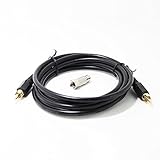
- This cable is for Atari 2600 Jr Atari 7800 Most models of Atari computers, Commodore 64, Colecovision, Intellivision
- This cable is for Atari 2600 Jr Atari 7800 Most models of Atari computers, Commodore 64, Colecovision, Intellivision
- Adapter: Nickle plated copper high quality
- Package: 1PCS Video Cable+ 1PCS connector
Expand the documentation only when the scope expands
For a base-console restoration, begin with the repair manual. If the project extends to an expansion module, the ColecoVision internal documents archive lists additional internal repair documents for the console and expansion modules. Check that a document applies to the specific hardware under repair rather than assuming base-console instructions cover an accessory.
Quick Recap
A practical order of work
- Identify the goal. Decide whether you are restoring stock operation, replacing a confirmed failed part, or changing the video connection for a display.
- Identify the unit. Note its region, board revision if known, and the exact symptom or symptoms.
- Consult the manual. Use its theory, schematics, test requirements, and troubleshooting flow charts before opening the console or ordering a replacement.
- Test before swapping. Follow the manual’s diagnostic sequence; use a multimeter only where the circuit and procedure call for it.
- Choose a compatible remedy. Compare original-supply repair, a specific replacement, and a DIY design against the console’s electrical needs and your repair skills.
- Modify only for a defined need. Consider composite video if the intended display requires it, and avoid VRAM or other invasive work unless diagnosis supports it.
Product prices and availability are accurate as of the date/time indicated and are subject to change. Any price and availability information displayed on Amazon at the time of purchase will apply.



