Retro Lite CM4 is an open-source Raspberry Pi handheld project built around a Compute Module 4 and housed in a machined aluminum shell inspired by the Nintendo Switch Lite. It is a demanding DIY fabrication project, not a ready-to-play handheld or a generally available kit. Its documented emulation target reaches Dreamcast and PSP, while GameCube, Wii, and 3DS are listed as unplayable on the CM4.
What is Retro Lite CM4?
StonedEdge and Dmcke5 designed Retro Lite CM4 as a portable RetroPie-class system. Its enclosure is machined from anodized 6061 aluminum; inside, a custom carrier and controller electronics connect the Raspberry Pi Compute Module 4 to the screen, controls, audio, battery, and other hardware. The project publishes its design and build materials rather than selling a standard consumer device. Raspberry Pi’s project feature and the project repository document the build.
What hardware does it use?
The compute core is the CM4, based on Broadcom’s BCM2711 platform. The repository documents 2GB of LPDDR4-3200 memory, Wi-Fi 5, Bluetooth 5, and optional overclocking. The finished handheld is built around a 5-inch-class, 800×480 HDMI TFT display with tempered-glass protection.
| Subsystem | Documented design |
|---|---|
| Display | 5-inch-class 800×480 HDMI TFT, described as IPS, with tempered-glass protection |
| Controls | Dual analog sticks, resin-cast controls, and separate left/right controller PCBs plus a button daughterboard |
| Audio | Stereo speakers, headphone switching, and a WM8960 I2S audio amplifier |
| Video and charging | Mini-HDMI output and USB-C charging |
| Battery | Custom 4000mAh Li-Po design with battery-management circuitry and a fuel gauge |
| Expansion and cooling | USB hub, SD storage, HDMI conversion, and custom cooling |
| Main custom board | Four-layer all-in-one carrier board |
These are project specifications, not a guarantee that any off-the-shelf replacement part will fit. In particular, the documented 4000mAh battery is a custom pack: a generic Li-Po cell may not match the enclosure or provide the required protection and management circuitry.
What’s actually slowing this PC down?
Pick the symptom - the matching free tool is one click away.
#1 Best Overall

- 1. Barebones Kit for Raspberry Pi CM4 – Made for users who want to add their own Raspberry Pi CM4 module to a portable handheld Linux computer kit.
- 2. Multiple Configurations Available – Choose from with WiFi-only or WiFi + 4G LTE connectivity options.
- 3. 5 Inch QWERTY Handheld Design – Features a 5 inch IPS display, compact QWERTY keyboard, mini trackball, speakers, and handheld cyberdeck-style layout.
- 4. ClockworkPi v3.14 Rev 5 Mainboard – Uses the ClockworkPi v3.14 revision 5 mainboard platform with CM4 adapter support for Raspberry Pi CM4 users.
- Important Package Note – Raspberry Pi CM4 module, 18650 batteries, TF card, SIM card, and cellular service plan are not included.
How much can it emulate?
Raspberry Pi’s 2022 feature reports full-speed emulation up to Dreamcast and PSP and about four hours of gameplay per charge. Those figures describe the completed project, not a guaranteed result for every game, software image, or build. StonedEdge also noted that some games have compatibility issues. Raspberry Pi’s account and a Hackster.io report quoting the maker provide that performance context.
The repository says GameCube, Wii, and 3DS are currently unplayable on the CM4. The maker’s comments similarly place those systems beyond the handheld’s practical target, suggesting a later Pi generation or streaming for GameCube and Wii. Treat this as project-era guidance: performance varies by emulator, image, configuration, and individual title, and “full speed” for one game does not mean every game in a system’s library runs equally well.
Rank #2

- The GamePi43 is a portable retro video game console based on Raspberry Pi, recalls you all the gaming pleasures in the memory. This accessory pack includes add-ons required to build your own GamePi43, excerpt for the Raspberry Pi and micro SD card.
- With 4.3inch IPS display, 800×480 pixels. 60 fps smooth gaming experience
- Compatible with Raspberry Pi B+/2B/3B/3B+.(Note PI is NOT included)
- Integrates battery charge circuitry, powered from 18650 lithium batteries (NOT included), plays anywhere anytime. Onboard Battery life indicator.
- Onboard speaker and earphone jack, listen to the familiar BGM from the old days. Volume and backlight adjustment keys, adjust the device status according to specific game, better experience.
Can you build one yourself?
Yes, if you are prepared to source parts and do substantial fabrication and assembly. This is not a matter of putting a standard Pi board in a generic case: the design relies on four custom PCBs, a custom enclosure and controls, and project-specific wiring and software setup.
- Get the design files. The Retro-Lite-CM4 repository publishes CAD and STL files, Gerbers, source code, and setup notes.
- Source the core and components. Obtain a compatible Compute Module 4 and the electronic components specified by the project. The enclosure, controls, screen, and custom battery also need to match the design.
- Fabricate the boards and enclosure. The repository describes the four-layer carrier board, left and right controller boards, and button daughterboard. It recommends a four-layer board fabrication service such as JLCPCB; that is a fabrication suggestion, not evidence of a commercial relationship. The aluminum shell and custom controls add further fabrication work.
- Assemble and configure the handheld. The documented software route uses RetroPie for Raspberry Pi 4/400 compatibility; Lakka and Batocera are also named as possible images. Setup involves audio drivers, WiringPi-based utilities, a configuration file, and the Retro Lite on-screen display code.
Expect hands-on troubleshooting. The maintainers say some code was unfinished in the project documentation, and WiringPi is deprecated. Builders may need to resolve software and compatibility issues rather than follow a fully maintained, turnkey installation process.
Rank #3
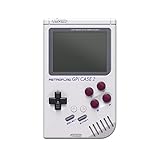
- 【Compatibility】Works with Raspberry Pi Compute Module 4 (CM4). CM4 Lite with WiFi is recommended for SD card access. eMMC models not supported.
- 【Handheld Design】Turns your CM4 into a portable retro gaming handheld with built-in controls and screen.
- 【DIY Friendly】Ideal for DIY projects — assemble your own classic game console using Raspberry Pi CM4.
- 【Built-in Battery】Includes a 4000mAh rechargeable battery inside the case for on-the-go play.
- 【Retro Gaming Display】Features a 3.0-inch TFT screen (640x480 resolution) , perfect for retro game visuals.
Where can you get the files, or buy one?
For a DIY build, start with the project’s GitHub repository, which contains the design files and setup material. The maintainers say they do not generally sell kits. They have mentioned occasional commissions through social media, but no authoritative current price, production quantity, or commission schedule is established. Do not assume a finished unit is in retail stock.
Independent reader supportYour contribution helps us test, update, and keep practical guides available for everyone.Who is this project for?
Retro Lite CM4 makes the most sense for someone who values an open, custom hardware project and is comfortable with electronics, fabrication, and software troubleshooting. Its published CAD and Gerbers offer more visibility into the design than a closed mass-produced handheld, but that openness comes with the work of making the parts and integrating them.
Rank #4

- Part Number: GamePi43-Pi4
- Compatible with Raspberry Pi B+/2B/3B/3B+/4B. Portable Video Game Console Based on RPi, 4.3inch IPS Display, US Plug
- Pi 4B inside, 64-bit 1.4G frequency quad-core CPU, 1G RAM
- 4.3inch IPS display, 800×480 pixels, 60 fps smooth gaming experience
- Integrates battery charge circuitry, powered from 18650 lithium batteries (NOT included), plays anywhere anytime
If the priority is playing games immediately, this project’s custom-board and machining requirements are a major drawback. If the priority is a Switch Lite-inspired enclosure and a hands-on Raspberry Pi build, its 800×480 screen, dual sticks, HDMI output, and documented Dreamcast/PSP-class target give it a clear purpose—within the limitations of CM4 emulation.
Quick Recap
Best Value

- [Adjustable Brightness] When paired with raspi, this touch screen supports software adjustment for backlight brightness, making it suitable for bookworm, bullseye, and buster systems.
- [Fluid Visuals] Directly driven by the digital visual interface, this capacitive touchscreen achieves a 60hz high refresh rate, providing fluid visuals and high image definition for an immersive experience.
- [ Design] Featuring a fully laminated process display and a 6h hardness tempered glass cover plate, this touch screen ensures durability and enhances image quality.
- [Wide Compatibility] Compatible with raspi 5, cm5, 4b, cm4, 3b+, 3a+, 3b, cm3+, cm3 , this touch screen offers versatile integration options for various systems.
- [Enhanced Visibility] This 6.25-inch capacitive touchscreen offers 5-point touch control and a 720x1560 resolution, providing a wide 178° viewing angle for clear visuals.
Product prices and availability are accurate as of the date/time indicated and are subject to change. Any price and availability information displayed on Amazon at the time of purchase will apply.
Do these 3 things before closing this tab:
1Repair Windows errors before they cause bigger problems2Scan for outdated or missing drivers - takes under a minute3Clear out junk files and repair common Windows errors



