Free tools Windows power users keep installed
One-click scans. No signup required.
Roblox Error Code 106 on Xbox One is usually associated with a friend or session relationship that Roblox and Xbox have not recognized consistently. The most targeted fix is to add the other player as a Roblox friend, have them accept, confirm the Xbox connection when applicable, then have the Xbox player enter the experience first.
Roblox does not currently list a dedicated official definition for Error 106 in its Xbox support index. The friend-relationship explanation is a community-reported diagnosis, not a confirmed Roblox error specification.
Quick fix
- On a phone, tablet, PC, or supported browser, sign in to the Roblox account used on Xbox.
- Search for the other player’s exact Roblox username and select Add Friend.
- Have the other player accept the request, then confirm both accounts appear in the Roblox Friends list.
- If both players use Xbox, confirm they are also connected through Xbox Friends.
- Fully quit and reopen Roblox on Xbox.
- Have the Xbox player enter the experience first. The other player should open that player’s Roblox profile and select Join Experience.
Roblox documents this cross-platform joining sequence and notes that complete friend management may require a PC or mobile device: Roblox’s Xbox friend guide.
What Error 106 usually means
Error 106 generally appears while joining a friend or multiplayer session rather than while launching Roblox itself. Current third-party coverage commonly associates it with an incomplete or unsynchronized Roblox/Xbox friendship, but Roblox has not published a dedicated Error 106 definition. Treat the number as a symptom and use the point at which it appears to choose the fix.
What’s actually slowing this PC down?
Pick the symptom - the matching free tool is one click away.
#1 Best Overall

- HIGH QUALITY: 2 metal thumbsticks are made of high quality stainless steel metal, perfect fit, very durable and not easy to wear out.
- PERFECT COMPATIBILITY: Perfectly compatible with Xbox Elite Series 2 and Elite Series 2 Core controllers. These grips can be remapped to other buttons or functions to enhance the game control experience.
- RUN SMOOTHER: Enhance your gaming experience with our carefully crafted Xbox controller kits. They work perfectly with the official Xbox Elite Series 2 and Elite 2 Core controllers. It improves force, sensitivity and precision with pulse triggers for more feedback and a fully immersive gaming experience.
- GREAT GAMING FEEL: With the joystick, players can more easily trigger specific buttons or commands without taking their finger off the joystick or trigger.
- CONVENIENT AND SIMPLE: You don't need to disassemble the joystick, just place the metal paddle replacement into the correct hole and start gaming without any tools! Every step is very simple and convenient.
If you can play solo but cannot join one particular friend, the relationship or joining flow is the strongest first lead. If every friend and experience fails, check privacy, account linking, age restrictions, network state, and service status instead.
Add the player on Roblox
Use the exact Roblox username
- Open Roblox on a phone, tablet, PC, or supported browser.
- Sign in to the same Roblox account linked to the Xbox profile.
- Search for the other player’s exact username, not only their display name.
- Open the correct profile and select Add Friend.
- Have the other player accept the request.
- Verify that the account appears in the Roblox Friends list.
Display names are not necessarily unique, so check the profile carefully before sending the request. After acceptance, close Roblox completely on Xbox and reopen it before trying again.
Verify the Xbox friendship and platform route
Adding someone on Roblox may not be sufficient for every Xbox joining method. Both Xbox users should be signed in to the intended Xbox profiles and should be able to see each other in the Xbox Friends or social interface.
- Both players on Xbox: try joining through the Xbox Friends screen after confirming the Xbox friendship.
- One player on PC, Mac, mobile, or tablet: use the Roblox profile-based Join Experience route after the Xbox player has entered the game.
- Either player appears offline: refresh the Xbox presence and confirm that the correct Roblox and Xbox accounts are being used.
Roblox supports cross-platform play with PC, Mac, and mobile, and the Xbox Store listing identifies Roblox as supporting Xbox cross-platform multiplayer: Roblox’s friend instructions and the Xbox Store listing.
The Tool Desk
Outbyte PC Repair FREEClear out junk files and repair common Windows errorsFree Scan →Outbyte Driver Updater FREEScan for outdated or missing drivers - takes under a minuteDriver Scan →Join in the correct order
- The Xbox player launches Roblox and enters the desired experience.
- The other player opens the Xbox player’s Roblox profile.
- That player selects Join Experience.
If Join Experience is missing, check that both users are Roblox friends, the Xbox player is online and actually in the experience, the experience permits the other platform, and Xbox privacy settings allow multiplayer and user-created content.
Rank #2

- Compatibility - Accessories for Xbox Elite Wireless Controller Series 2 – Core (White) and for Elite Wireless Series 2 Controller(Model 1797). DO NOT for Xbox Elite Wireless Controller(Model 1698).
- Provide A Nice Component Pack for Your Xbox Elite Series 2 Core!
- Easy to Use - You can install or remove any button effortlessly, and each replacement button and D pad is held firmly by magnetic attraction and won't fall off unless you deliberately take them off.
- High Quality - The top and sides of joysticks are coated with rubber. Paddles and D-pads are made of chrome plating stainless steel. Replace the old, broken or missing buttons, install 4 interchangeable paddles to get better gameplay.
- Package Included - 1 D-pads, 4 interchangeable thumbsticks (2 classic, 1 tall, 1 dome), 4 paddles (2 medium, 2 mini), 1 small black box. (PLEASE NOTE: The small black case is for storing controller accessories, not the controller.)
Check Xbox family and privacy settings
Child-account restrictions can block multiplayer or user-created experiences and can look like a friend-join failure. Only the parent or family organizer should change these controls. Menu labels can vary between Xbox console software, the Microsoft family website, and the Xbox Family Settings app.
- Sign in with the account that manages the family group.
- Open All Settings → Account → Family.
- Choose the child account.
- Open Privacy & Online Safety → Xbox Live privacy → View Details & Customize.
- Under Communication & multiplayer, set You can join multiplayer experiences to Allow.
- Under Experience Content, set You can see and share content to Everybody.
- Back out, save, restart Roblox, and retry the Xbox-player-first sequence.
These permissions are described in Roblox’s family-account guidance. Changing them may reduce parental restrictions, so review the setting with the account owner.
Check age compatibility
Roblox’s account-linking guidance says Xbox play is intended for ages 10 and up and advises matching the Xbox age settings with the Roblox account’s age settings. Check Roblox under Settings → Personal, then review the Microsoft account’s birth date and family restrictions. A parent or organizer may need to approve access for a younger account. Do not falsify an age or bypass parental controls.
Check account linking before unlinking anything
One Roblox account can be linked to only one Xbox Gamer Tag. A linking message such as “already linked to a different Xbox account” is a different problem from a normal friend-join failure.
When unlinking is appropriate
Consider unlinking only when the wrong Roblox account or Gamer Tag is genuinely linked, you have confirmed which account owns the progress, and you can sign in again afterward. If you do not know the Roblox password or email, recover the account first.
Rank #3
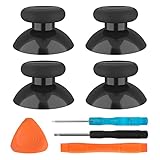
- SAVE MONEY! Perfectly fit for Xbox One/ Xbox One S controllers, replace your broken or worn-out original controller thumbsticks. This repair kit contains everything you need to switch the old analog joysticks out and save you from spending $60 on a new controller
- COMPATIBILITY: Only official orginal controller,compatible for Xbox One, for Xbox One S, for Xbox One X, for PS4 controllers,NOT compatible with PS5,NOT compatible with Nintendo switch pro,Power A controllers.NOT FOR any Third-party Brands controller
- MORE DURABLE THAN THE ORIGINAL - The top and sides are coated with hard rubber, which makes them last longer than the original rubber joystick.
- PACKAGE INCLUDE: 4 x Joystick Thumbsticks, 1 x T8 Screwdriver, 1 x Phillips Screwdriver, 1 x Prying Tool, 1 x Triangle Opening Picks
- At TOMSIN we stand by our products. That's we offer a 1-year warranty for all of our products. Any problems, please feel free to contact us via Amazon Email System and we will do our best to solve it
Unlink from the Xbox app
- Open the Roblox Home screen.
- Press the Xbox button and open Settings.
- Select Account.
- Select UNLINK [YOUR GAMERTAG].
Disconnect from Roblox on the web
- Sign in to Roblox on the web.
- Open Settings → Security.
- Under Xbox, select Disconnect.
Roblox documents both routes in its Xbox login and linking help. Unlinking is disruptive and is not the first response to an error that occurs only when joining a friend.
Refresh the session if the relationship does not update
Use this sequence after accepting a request or changing an approved setting:
- Leave the Roblox experience.
- Quit Roblox from the Xbox Home screen rather than merely switching apps.
- Restart the Xbox.
- If the friend still appears offline, sign out of and back into the Xbox profile.
- Relaunch Roblox and repeat the Xbox-player-first join order.
This refresh can clear stale presence information, but it cannot correct a wrong account, a privacy block, or a service outage.
Check Roblox status and test another experience
Check Roblox Status before changing account settings. If Xbox App or Game Join is degraded, wait for the incident to be resolved. The status page was operational for those components on August 18, 2026, but that result is time-sensitive and must be checked again when you troubleshoot.
Then test the scope of the problem:
| Result | Most useful next check |
|---|---|
| Cannot join any friend or experience | Xbox privacy, family settings, account linking, age compatibility, network, or service status |
| Can play solo but cannot join one friend | Roblox friendship, Xbox friendship, presence, and joining order |
| Only one experience fails | That experience’s server, permissions, age rating, private-server settings, or developer-side issue |
A working status page does not rule out a regional, account-specific, or experience-specific fault.
Rank #4

- Custom designed joysticks to perfectly fit for Xbox Series X/S, for Xbox Core controller (Model 1914) , for Xbox One standard (Model 1537/1697), for Xbox One X/S (Model 1708), for Xbox One Elite V1 (Model 1698) controller; Not compatible with Xbox Elite Series 2 and other controllers. Work exactly like the original thumbsticks
- Unique replacement to add much more personality to your controller. The replacement thumb sticks will make your controller distinct when playing with friends, no more boring standard color
- Made of premium PC & TPE plastic material, durable and practical. Ideal replacement for your broken or cracked controller thumbsticks
- The black color looks great; Would be awesome if you combine it with the custom shell from eXtremeRate (You can find these shells in our store.)
- Easy to install, requires internal fitting, the screwdriver tool included can help you easily open the shell and install the gaming parts
When to contact Roblox Support
Use Roblox Support if the account appears linked to the wrong Gamer Tag, you cannot identify or access the linked Roblox account, the error persists with multiple friends and experiences after privacy checks, or you suspect an age, moderation, or account-security problem. Avoid VPNs, paid “repair” downloads, and unofficial account-recovery services; they do not address a likely friend/session relationship and can create security risks.
Recommended Free Tools
How this differs from other Xbox errors
Error 106 is not the same as Roblox Error 901 or a login failure. Follow the exact wording and trigger shown on screen. A sign-in problem belongs in Roblox’s login and linking guidance; a friend-join problem should start with the relationship and session checks above.
Frequently Asked Questions
Do both players need to be Roblox friends?
For the profile-based cross-platform join flow, Roblox friendship is the safest prerequisite. Xbox’s Friends-screen route also depends on the relevant Xbox relationship.
Can I fix Error 106 without a PC or phone?
Sometimes. Two Xbox users can try the Xbox Friends screen, but Roblox says full friend management may require a PC or mobile device.
Should I unlink my Roblox account?
Not for a friend-join failure alone. Unlink only for a confirmed wrong-account or Gamer Tag linking problem, after verifying account access and progress ownership.
Quick wins for a faster PC:
Clear out junk files and repair common Windows errorsFree Scan →Fix the driver behind crashes, sound loss and screen glitchesFind Drivers →Repair Windows errors before they cause bigger problemsFix Now →Best Value
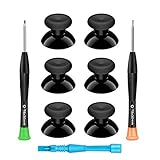
- 🎮 BEST XBOX THUMBSTICKS IN THE MARKET - Don't continue playing with those ratty old Xbox One thumbsticks! Game longer, better and more comfortably with original Xbox thumbsticks. Our inexpensive analog sticks are designed to be direct replacement of the original One/One S/One X Controller joystick, makes your controller stand out from the crowd with a new, fresh look and unique styling unlike any other.
- 🎮 ENJOY YOUR FULLY FUNCTION XBOX ONE CONTROLLER - Personalize and enhance your gaming experience with feedback based rubber design. True rubberized on the top and side, you will no longer have to worry about slipping off the analog stick of your controllers, and provide more accuracy and sensitivity, give you the most complete game pleasures.
- 🎮 UPGRADED PREMIUM QUALITY - Created with the gamer in mind, perfectly fit for your controller with aggressive textured grip. Also all products from us will be put under professional quality inspection before packaging to make sure the joysticks you received are in good condition.
- 🎮 MONEY SAVER & EASY TO INSTALL - There are plenty of YouTube videos that will walk you through the process, T8 T6 screwdrivers included help you open the shell very easily, then just replace the worn out or broken controller thumbsticks which will make your controller look awesome again, everybody is able to save $60 controller with our cheap parts in 10 minutes.
Does Error 106 affect Xbox Series X|S?
The documented joining and privacy steps apply to Xbox accounts, while the Xbox Store listing currently includes Xbox One and Xbox Series X|S. Interface labels can vary by console software.
Why can I play alone but not join my friend?
That pattern points first to Roblox/Xbox friendship, presence, joining order, or the friend’s experience permissions rather than a completely broken installation.
What if the Join Experience button is missing?
Confirm the users are Roblox friends, the Xbox player is online and in the experience, the experience accepts the other platform, and multiplayer and content permissions allow access.
Is Error 106 the same as Error 901?
No. They are separate error numbers. Use the exact message and whether the failure occurs at login, launch, or friend joining to choose the appropriate guidance.
Do these 3 things before closing this tab:
1Repair Windows errors before they cause bigger problems2Fix the driver behind crashes, sound loss and screen glitches3Clear out junk files and repair common Windows errorsCan a VPN fix Error 106?
A VPN is not a targeted fix for an account or friendship relationship and may introduce additional connection or security complications.
Quick Recap
Product prices and availability are accurate as of the date/time indicated and are subject to change. Any price and availability information displayed on Amazon at the time of purchase will apply.




