The RX 590 is usually faster, but the RX 580 is often the better-value buy. Expect roughly 5–12% more gaming performance from the RX 590, not a generational leap; its higher clocks come with more power draw. If you already own an RX 580, moving to an RX 590 rarely makes sense. For a new-to-you card, compare the exact model, condition, memory and price—not just the name.
RX 580 vs. RX 590 specifications
The RX 590 is a higher-clocked Polaris refresh, not a substantially redesigned GPU. AMD’s specifications show the same core configuration and memory interface for both standard models.
| Specification | RX 580 | RX 590 |
|---|---|---|
| GPU family | Polaris 20 | Polaris 30 |
| Architecture and process | GCN 4 / Polaris, 14nm | GCN 4 / Polaris, 12nm |
| Compute units | 36 | 36 |
| Stream processors | 2,304 | 2,304 |
| Texture units / ROPs | 144 / 32 | 144 / 32 |
| AMD-listed base clock | 1,257MHz | 1,469MHz |
| AMD-listed boost clock | Up to 1,340MHz | Up to 1,545MHz |
| Typical memory configuration | 8GB GDDR5 | 8GB GDDR5 |
| Memory bus / bandwidth | 256-bit / up to 256GB/s | 256-bit / up to 256GB/s |
| Typical board power | 185W | Approximately 225W |
| Launch date | April 18, 2017 | November 15, 2018 |
Specification figures are AMD-listed values for the product families; partner cards can vary in clock behavior, power limits, cooling and connectors. See AMD’s RX 580 specifications and AMD’s RX 590 specifications.
How much faster is the RX 590?
Across comparisons, the RX 590 generally leads by about 5–12%. The exact gap depends on the game, resolution, settings, driver, CPU and card model. That is a useful increase when choosing between similarly priced cards, but usually too small to transform the experience or justify replacing a working RX 580.
Crashes, No Sound, or Screen Glitches?
Random freezes, missing sound and display glitches usually trace back to one bad driver. Find and replace yours safely.Free scan · under a minutePC Slower Than It Used to Be?
A free scan shows the junk files, broken settings and background clutter dragging Windows down - then fixes them in one click.Free scan · Windows 10 & 11#1 Best Overall

- 【Smooth Gaming Performance】Powered by 12nm technology and 8GB GDDR5 memory, the RX 590 delivers high frame rates and smooth gameplay in popular titles at 1080p resolution. Enjoy a fluid, immersive experience with consistent performance.
- 【Advanced Cooling System】Equipped with dual 90mm fans and copper heat pipes, this graphics card effectively manages heat during intense gaming sessions. It maintains low temperatures and stable operation, ensuring longevity and reliability.
- 【Multi-Monitor】Features 2x DisplayPort and 1x HDMI outputs, enabling flexible multi-display setups for gaming or productivity. (Support up to 2 monitors display)
- 【Versatile for Work and Play】Ideal not only for gaming but also for demanding tasks like video editing, graphic design, and office applications. Switch between work and play seamlessly with powerful, responsive performance.
- 【Great Value for Money】The RX 590 offers a balanced combination of performance, cooling, and connectivity at an affordable price point. It’s a reliable choice for budget-conscious gamers and PC enthusiasts seeking quality.
- Tom’s Hardware’s legacy GPU hierarchy places the RX 590 at 32.4% and the RX 580 8GB at 30.9% in its aggregate ranking. Those figures describe that hierarchy’s test methodology, not guaranteed in-game frame rates. See the GPU hierarchy.
- NanoReview reports 57 FPS for the RX 590 and 51 FPS for the RX 580 at 1080p High in its selected-game comparison, roughly a 12% difference in that dataset. Its results should not be combined with other test suites as if they were one benchmark. See NanoReview’s comparison.
The higher clock is the main reason for the RX 590’s lead. A GPU-limited game can show more of it; at low settings or in esports titles, a CPU limit can narrow the difference. Factory-overclocked models and power limits also affect results.
What to expect at each resolution
1080p
This is the natural target for both cards. An RX 580 can suit older games, esports and many titles at medium-to-high settings. The RX 590 offers extra headroom for higher settings or frame rates, but demanding newer games may still call for lower settings, reduced textures or upscaling. Neither guarantees 60 FPS in every modern game.
Rank #2

- Smooth 1080P Gaming Performance-Powered by 2304 stream processors and 8GB GDDR5 memory, this RX 590 graphics card delivers stable frame rates in popular games under high settings at 1080p resolution.
- Dual Fan Silent Cooling Design-Equipped with dual low-noise fans and aluminum heatsink, the GPU ensures efficient heat dissipation and quiet operation, keeping your system cool during intense gaming or video editing sessions.
- Multi-Monitor & 1080 Display Ready-Supports HDMI and DPx2 outputs for triple-screen setups. Capable of running 1080 video playback and multitasking environments, perfect for gamers, streamers, and content creators.
- PCIe 3.0 x16 Interface, Wide Compatibility-Seamlessly fits into most standard ATX desktop PCs. Compatible with Win 7/10/11 systems and major platforms, requiring only a 500W power supply.
- One-Year Warranty & Customer Support-Backed by OKAMUS’s 1-year limited warranty. If you encounter any issues, our dedicated support team is here to help ensure a smooth experience.
1440p
Both can handle older or well-optimized games at 1440p, often with medium settings or upscaling. An 8GB version is preferable, but neither is a dependable high-refresh-rate 1440p choice; newer games can run into limits beyond memory capacity.
4K
Neither is a practical choice for modern 4K gaming. Support for a 4K display output is not the same as enough performance to render demanding games smoothly at that resolution.
The Tool Desk
Outbyte Driver Updater FREEFix the driver behind crashes, sound loss and screen glitchesFind Drivers →Outbyte PC Repair FREERepair Windows errors before they cause bigger problemsFix Now →Rank #3

- High-Performance 1080p Gaming AMD Radeon RX 590 GPU with 8GB 256-bit GDDR5 memory delivers excellent 1080p gaming performance
- Triple Operating Modes Features OC Mode (1591 MHz) Default Mode (1560 MHz) and Silent Mode (1498 MHz) for customizable performanc
- Advanced Cooling Solution 3-Phase Motor Fan with double ball bearings XXL aluminum alloy heatsink and heatpipe design
- Premium Build Quality Stylish metal backplate enhances durability improves heat dissipation and provides structural support
- Comprehensive Display Options 2x DisplayPort 2x HDMI and DVI outputs support multi-monitor setups up to 4K resolution
Power, cooling and PSU fit
The RX 590’s roughly 225W board-power rating is about 40W above the RX 580’s 185W rating. These are reference or typical figures, not a promise that every partner card draws exactly that amount in every workload. AnandTech’s launch review also records the RX 590’s 225W board-power rating. Read AnandTech’s RX 590 review.
- PSU: AMD’s RX 580 specifications list a 500W minimum PSU recommendation. Treat that as a baseline recommendation, not a universal system calculation. A quality 500W supply is a normal starting point for a stock system; a 550W–650W unit may be more comfortable with a power-hungry CPU, overclocking, extra components or an older PSU.
- Connectors: Connector needs depend on the exact board. Many RX 580 cards use one 8-pin PCIe connector; RX 590 designs vary and can use one 8-pin or an 8-pin plus 6-pin arrangement. Check the card label and manufacturer specifications before buying. Avoid relying on adapters to make an unsuitable PSU fit.
- Cooling and airflow: A well-cooled RX 590 can be a better purchase than a poorly cooled one, but compact or blower-style designs may run hotter or louder under load. Case airflow, fan condition and cooler design matter more than the GPU name alone.
- Efficiency: If electricity use, heat or noise matters, the RX 580 has the advantage. A modest undervolt or power-limit adjustment can reduce draw, but the result depends on the individual card and should be stability-tested.
As one board-partner example, MSI lists an 8-pin connector and a 500W PSU recommendation for its RX 580 8G; that does not establish the requirements of every RX 580 or RX 590. See MSI’s RX 580 8G specifications.
Rank #4
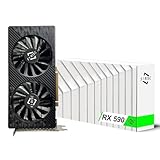
- Excellent gaming performance: The 51Risc RX 590 GME is a great choice for gaming enthusiasts, as it is compatible with many popular games, including Battlefield V, Doom Eternal, Assassin’s Creed Valhalla, Call of Duty: Warzone, and many more. With a base clock of 1340MHz and 2304 unified shaders, this card can handle even the most demanding games with ease.
- Powerful Polaris 20 GPU: With a Polaris 20 GPU, this graphics card delivers smooth and fast performance for your favorite games, making it perfect for serious gamers.
- Dual Fan Cooling: The Mllse RX 590 GME graphics card features dual fans that keep your card running cool even during intense gameplay, so you can keep playing without worrying about overheating.
- High-speed memory: With 8GB of GDDR5 memory and a 256bit bus width, this card delivers lightning-fast performance to keep up with even the most demanding games.
- Versatile output options: The RX 590 GME video card comes with a range of output options, including HDMI, DP, and DVI-D, so you can easily connect it to your display of choice.
4GB vs. 8GB—and model names to verify
Choose an 8GB version when the price difference is reasonable, especially for newer 1080p games. A 4GB card can face texture-quality or stutter limitations in some games. More VRAM does not make either GPU equivalent to a newer card: both retain older GCN-era processing and GDDR5 memory.
Before paying, verify the exact model and memory capacity. “RX 580” on a listing is not enough.
Best Value
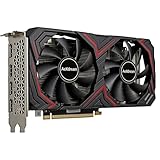
- RX 590 Graphics Card with 8GB VRAM: This rx series gpu is equipped with 8gb GDDR5 memory to provide stable performance for 1080P gaming and high-definition video playback; It serves as a reliable graphic card for pc users looking to upgrade their computer graphics for popular esports titles; The rx590 architecture delivers smooth frame rates while maintaining clear hd visual quality for daily multimedia tasks
- Dual Fan Cooling for Stable Operation: Featuring an advanced thermal design with dual low-noise fans, this graphics card keeps your pc cool during intensive gaming sessions or video editing; The optimized airflow of the gpu graphics card makes it a durable video cards choice for any desktop computer; This cheap yet efficient graphic solution prevents overheating, ensuring your tarjeta gráfica performs consistently under standard pcie loads
- PCIE 3.0 Express Compatibility: Designed with a standard pci express interface, wide compatibility-seamlessly fits into most standard ATX desktop PCs, compatible with Win 7/10/11 systems and major platforms; It is a versatile pc graphics card that supports pci 3.0 for efficient data transfer; Whether you are upgrading an older pc or building a budget gaming setup, this pcie card provides the essential graphics power needed for modern display requirements
- Reliable Graphic Solution for Content Creators: This rx590 8gb is a cost-effective tarjetas gráficas option for video editing and graphic design on a pc computer; The large 8gb memory capacity allows for smoother rendering in creative applications; While it is an entry level gaming card, it remains a solid video card for pc enthusiasts who value pcie express stability and hd performance over expensive high-end gpu models
- Power Efficiency and Display Connectivity: Equipped with 1 HDMI and 3 display interface ports, this gpu graphics card supports multi-monitor setups for enhanced productivity; To ensure optimal performance of this tarjeta de video, we recommend a reliable 500W power supply; This computer graphics card is built for those who need a practical graphic upgrade for their desktop without overcomplicating their cards configuration
- RX 580 2048SP: This variant has fewer shader processors than the full RX 580 and is closer to an RX 570-class product. Buy it only if you understand that distinction and the price reflects it.
- RX 590 GME: Treat it as a variant, not automatically as a full-clock standard RX 590. Confirm its specifications and performance for the exact board.
- OEM and mining cards: These may have unusual power limits, modified BIOSes, missing outputs or worn fans. Mining history alone does not prove a card is bad, but it makes testing, BIOS verification and return protection especially important.
- Misidentified listings: Ask for photos of the actual card, exact model number, GPU-Z details, memory size and display outputs. Be cautious with stock-only photos, unclear specifications or implausible pricing.
Used-card buying checklist
- Confirm the exact GPU variant, including whether an RX 580 is a 2048SP model or an RX 590 is a GME variant.
- Verify that the card has 8GB if that is what the listing promises; check the model number and GPU-Z evidence.
- Ask for a recent game or benchmark run, and look for crashes, visual artifacts or unexplained throttling.
- Check fan operation, bearing noise, temperatures under load and the condition of the cooler.
- Inspect the actual display outputs and confirm the card has the PCIe power connectors your PSU provides.
- Check the seller’s return policy and any warranty before buying; prefer a listing that shows the actual card.
- Compare the total asking price with newer used GPUs. Active listings are not completed-sale values, and legacy-card prices can be inflated.
Used and refurbished availability varies by seller and region. Newegg has RX 580 listing pages, while eBay maintains RX 590 category listings; neither category page establishes a reliable market price. Compare specific models, seller ratings, return terms and completed sales rather than treating an active asking price as the going rate. Newegg RX 580 listings · eBay RX 590 listings.
Drivers, features and non-gaming work
AMD’s support pages list operating-system and driver information for these cards, but driver availability does not mean every new game will be optimized for Polaris or that the hardware meets every game’s feature requirements. Check AMD’s current page for your operating system before purchase. Linux users should also verify distribution, kernel and Mesa compatibility, plus any Vulkan features their applications require.
Neither card has hardware ray tracing or AV1 video decode, capabilities found on newer GPU generations. AMD lists H.264/H.265 encode and decode support and HDMI 4K support for these product families; that does not make either a strong new professional editing or compute purchase. A legacy application or a very low price may justify one, but check the software’s specific requirements.
Which card should you buy?
- Choose the RX 590 if it is only a little more expensive than a comparable RX 580, has 8GB, a capable cooler and a suitable PSU is already in place. It is the faster option for a tightly budgeted 1080p build.
- Choose the RX 580 if it is meaningfully cheaper, your system has limited cooling or PSU headroom, or the particular RX 580 has better condition, warranty or cooler quality.
- Keep an RX 580 you already own. The RX 590’s modest uplift generally does not justify buying another old card as an upgrade.
- Consider neither if either listing approaches the price of a newer used GPU, or if you need high-refresh 1440p, ray tracing, AV1 decode or more modern media features. Compare a newer used RX 6600-class card rather than paying a premium for old stock.
Current prices vary by region, condition and seller, so there is no fixed price gap at which the RX 590 always wins. Compare like-for-like 8GB cards with comparable condition, warranty and cooling; if the premium buys only a small performance uplift but forces a PSU or cooling upgrade, the cheaper RX 580 may no longer be the better total-cost choice.
Recommended Free Tools
Quick Recap
Product prices and availability are accurate as of the date/time indicated and are subject to change. Any price and availability information displayed on Amazon at the time of purchase will apply.




