The Samsung Odyssey G7 G75F is a 40-inch, 5K2K ultrawide gaming monitor, and recent price reports put it well below the $899.99 deal highlighted in 2025. But the old “lowest price ahead of Prime Day” claim is historical: it referred to a June 23, 2025 price check, not a live offer. Best Buy pages have shown $649.99 and $699.99, while Slickdeals reported an Amazon price of $630.23 on July 5, 2026. Those conflicting, dated signals do not establish today’s checkout price or an all-time low.
What is the deal, and is it still live?
The original PC Guide article said the Samsung Odyssey G7 G75F had dropped from $1,199.99 to $899.99, a claimed $300 or 25% reduction. Its price note was dated June 23, 2025; the article was last updated September 29, 2025. Its Prime Day framing belongs to that 2025 context, not to a current promotion. PC Guide’s dated deal article
Later price signals are lower, but they are not a single verified live offer. Best Buy listings have appeared at $699.99 and $649.99, while a Slickdeals post reported $630.23 at Amazon on July 5, 2026. Treat these as dated observations, not a guaranteed current price. Check the final cart total, seller, condition, shipping, and local availability before deciding. Best Buy listing · Another Best Buy listing · Slickdeals’ July 2026 Amazon report
The available evidence does not prove $899.99 was an all-time low, nor does it establish a current all-time low. The defensible takeaway is that the monitor has been reported substantially below its earlier $899.99 deal price; any “lowest price” wording needs a date and attribution.
#1 Best Overall

- Samsung’s 40” Odyssey G7 G75 WUHD 180Hz Curved Gaming Monitor provides breathtaking realism for epic gameplay.
- 40” 1000R curved display with a 21:9 screen and brilliant Ultrawide 4K resolution wraps around the field of vision for next-level gaming.
- VESA DisplayHDR 600 delivers more contrast, with deeper blacks and brighter whites for greater clarity even in dark scenes.
- 180Hz refresh rate and near-instant 1ms response time (GtG) minimizes lag for ultra-smooth gameplay.
What does the Odyssey G7 G75F offer?
The exact US model is LS40FG75DENXZA. Samsung lists a 40-inch curved WUHD display with a native resolution of 5,120 × 2,160, a 21:9 aspect ratio, a 180Hz maximum refresh rate, and 1000R curvature. This is often called 5K2K; it is not standard 4K UHD, which is 3,840 × 2,160. Samsung product specifications
| Feature | What the specification says |
|---|---|
| Panel and curve | VA LCD, 1000R curve |
| Refresh and response | Up to 180Hz; 1ms response-time claim |
| HDR and adaptive sync | VESA DisplayHDR 600, HDR10+ Gaming listed in the specification sheet, and AMD FreeSync Premium Pro |
| Video inputs | 1 × DisplayPort 1.4 and 2 × HDMI 2.1 |
| USB connections | 1 × USB-B upstream and 2 × USB-A downstream; no USB-C |
| Other hardware | No built-in speakers; 100 × 100 VESA mount; stand supports height, tilt, and swivel |
| Footprint with stand | Approximately 36.5 × 23.5 × 11.9 inches; specification sheet lists 140W maximum power consumption |
Samsung’s product page covers the core display and gaming features; the product specification sheet provides further connection, dimension, and feature details. The listed 1ms figure is a specification, not evidence that every pixel transition performs like an OLED panel.
How useful is 5K2K at 180Hz?
For games
The 21:9 screen gives compatible games a broad field of view, while 5,120 × 2,160 offers more detail and workspace than a conventional 3,440 × 1,440 ultrawide. The format can suit simulation, open-world, strategy, and MMO games. Compatibility and the benefit of the wider view vary by game.
Driving all those pixels at high frame rates is demanding. A 180Hz ceiling does not mean a PC will reach 180 frames per second at native resolution in demanding games. Results depend on the graphics card, game, settings, and chosen input and cable path. Before buying, check that the GPU supports the resolution and refresh combination you want over DisplayPort 1.4 or HDMI 2.1, then look at performance for the games you actually play. You may need to lower settings or render at a reduced resolution to target higher frame rates.
What’s actually slowing this PC down?
Pick the symptom - the matching free tool is one click away.
Rank #2
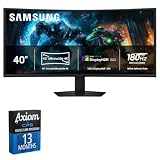
- This bundle includes a 13-month Axiom care plan extension, beyond the original factory plan.
- Display built for everyday desktop use
- Standard HDMI and DisplayPort connectivity
- Adjustable stand for a comfortable viewing angle
For work and mixed use
The wide desktop can make room for side-by-side documents, coding windows, or a video-editing timeline without placing two separate panels on the desk. Picture-by-Picture and Picture-in-Picture support can also help when using multiple sources, such as a gaming PC and a work laptop; check the product’s input and display-mode details for the combination you plan to use.
That convenience has limits: there is no USB-C video or laptop charging, and the monitor has no built-in speakers. Its 1000R curve is pronounced, which some users may find immersive but others may dislike for straight-line design work or general office use. If color-critical work is central, a gaming-oriented VA monitor is not a substitute for a professionally tested display.
What are the main trade-offs?
VA panel, HDR, and viewing angles
This is a VA LCD, not an OLED. DisplayHDR 600 provides HDR compatibility and a brightness-class label; it does not by itself establish OLED-like blacks or contrast. VA panels can also show dark-level motion artifacts, and response behavior varies by transition, so the 1ms claim should not be read as a guarantee of uniform real-world motion clarity.
Some Best Buy buyers have praised image quality and refresh rate while also raising viewing-angle concerns. Those comments are anecdotal customer feedback, not controlled testing. With a large curved screen, consider whether you will sit centered in front of it or share the display with people viewing from the side. Best Buy customer reviews · Additional Best Buy customer reviews
Do these 3 things before closing this tab:
1Clear out junk files and repair common Windows errors2Fix the driver behind crashes, sound loss and screen glitches3Repair Windows errors before they cause bigger problemsRank #3

- EPIC VISUALS IN VIVID DETAIL: 4K UHD resolution elevates your gaming with crystal-clear visuals that shine brighter, making worlds feel more real with incredible detail.
- FAST IPS: Fast IPS panel delivers clear colors and clarity from any viewpoint. With a 178º wide viewing angle, colors stay consistent from any angle. Quick response time reduces motion blur and ghosting, providing an immersive gaming experience.
- SMOOTH GAMEPLAY: The 144Hz refresh rate delivers ultra-smooth gameplay, reducing lag and motion blur. Combined with a near-instant 1ms response time (GtG), every movement is captured in real-time, allowing for unbeatable gaming precision.*
- UNINTERRUPTED GAME FLOW: G-Sync compatibility syncs the GPU and panel to reduce choppiness, screen lag and image tearing. Along with AMD FreeSync Premium, it creates ultra-smooth scenes that flow smoothly to the next.**
- 4K AI UPSCALING: The NQM AI Processor upscales lower resolutions to nearly 4K, so you get higher quality images through the Gaming Hub and Smart TV apps.***
Space and setup
At approximately 36.5 inches wide and nearly 12 inches deep with the stand, it needs a substantial desk and appropriate viewing distance. Measure desk width and depth, clearance behind the screen, and the rated load of any monitor arm. The stated VESA pattern is 100 × 100; confirm that an arm also supports the monitor’s weight.
Independent reader supportYour contribution helps us test, update, and keep practical guides available for everyone.Who should consider it—and who should skip it?
- Consider it if you want one expansive screen for gaming and multitasking, have a GPU suited to 5K2K gaming, like a strong curve, and find a new unit around $650–$700.
- It may suit simulation players who value a broad view and high refresh potential, provided their games and hardware can use the resolution and aspect ratio.
- Consider another type of monitor if OLED contrast is a priority, you need USB-C docking or built-in speakers, share the screen from off-axis, or need a flatter panel for design work.
- Look elsewhere or wait if your PC struggles at high resolutions, your desk is small, or the asking price is close to the earlier $999.99–$1,199.99 reference range.
Category alternatives involve different compromises: a 34-inch 1440p ultrawide is easier to drive but offers less workspace; a 39- or 45-inch OLED ultrawide prioritizes contrast and motion response but can cost more and may have lower pixel density at some sizes; a 49-inch 32:9 monitor is wider and changes the layout; and a 40-inch 5K2K productivity monitor may offer stronger office connectivity at the expense of gaming features. No current prices for those categories are established here.
How to check a listing before checkout
- Confirm the model number is LS40FG75DENXZA so you are comparing the same G75F.
- Check whether the item is new or open-box and who sells and fulfills it. Best Buy exposes separate condition and buying options, so confirm the selection rather than assuming the lowest shown price is for a new unit.
- Review the final cart price, shipping, local stock, return terms, and warranty coverage. A price report or search result may not match your available offer.
- Check your GPU’s output support and the monitor input and cable needed for your intended resolution, refresh rate, HDR, and adaptive-sync setup.
- Measure the desk and verify any mount’s dimensions, load rating, and 100 × 100 VESA compatibility.
For an Amazon offer, verify the live product page, seller, condition, shipping, and final price directly; the $630.23 figure cited above comes from a July 2026 deal report, not a current first-party price confirmation.
Quick Recap
Product prices and availability are accurate as of the date/time indicated and are subject to change. Any price and availability information displayed on Amazon at the time of purchase will apply.
Free tools Windows power users keep installed
One-click scans. No signup required.




