Recommended Free Tools
Rocksmith 2014 lag is usually a signal-path problem, not a single game setting. First determine whether the delay is in the guitar sound, the note display, or an unstable audio buffer. The quickest reliable baseline is a Real Tone Cable connected directly to the computer or console and wired headphones or speakers connected directly to that device. Bypass Bluetooth, TV audio, soundbars, ARC/eARC, surround processing, and other enhancement layers while testing.
Identify the kind of lag first
The guitar sounds late after you strum
This points to the audio path: Bluetooth, a TV or soundbar, an AVR, excessive buffering, a mismatched sample rate, or an interface driver. A constant delay usually comes from a stable processing stage rather than from visual calibration.
Notes look late or early against the backing track
That is more likely display latency. TV scaling, motion interpolation, noise reduction, cinema modes, and HDMI synchronization can delay the note highway even when the audio path is acceptable.
Audio crackles, pops, cuts out, or sounds robotic
These are usually buffer underruns, driver conflicts, USB instability, a sample-rate mismatch, or a computer that cannot sustain an aggressive low-latency setting. A lower number is not automatically better.
#1 Best Overall
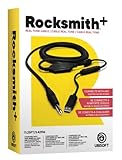
- Compatible with all consoles that support the Rocksmith Game as well as PC
- Plug any real guitar into Xbox, PS4, PS3, etc
- Features breakaway design
- 11.25ft / 3.429m Cable
- Rocksmith video game not included
The game detects no input or output
Check the selected default device, the Real Tone Cable connection, exclusive-mode conflicts, unsupported input hardware, ASIO configuration, and any modified installation before changing latency values.
Build a low-latency baseline
Quit Rocksmith 2014 and temporarily simplify the chain:
- Connect the guitar to the Real Tone Cable and plug the cable directly into the PC or console.
- Use wired headphones or analog speakers connected directly to the same device running the game.
- Disconnect Bluetooth headsets, wireless speakers, virtual mixers, unnecessary USB audio devices, and audio-heavy applications such as DAWs, browsers playing media, and voice-chat software.
- On a TV, enable Game Mode and disable motion smoothing, frame interpolation, noise reduction, cinema/movie modes, virtual surround, and lip-sync processing.
- On a console, set audio output to Linear PCM and avoid routing sound through the TV before it reaches a soundbar or receiver.
- Change one setting at a time, test in the main menu and during a song, and revert the most recent change if the result worsens.
Ubisoft recommends direct audio paths and warns that Bluetooth commonly adds too much latency for real-time Rocksmith-style play (Ubisoft’s console latency guidance).
Windows PC: set the expected audio format
Ubisoft’s Rocksmith 2014 PC configuration guide uses 48,000 Hz, 16-bit, two-channel stereo and exclusive control for both the playback device and Real Tone Cable. Treat this as the Rocksmith baseline, not a universal best setting for every program.
The Tool Desk
Outbyte Driver Updater FREEScan for outdated or missing drivers - takes under a minuteDriver Scan →Outbyte PC Repair FREERepair Windows errors before they cause bigger problemsFix Now →Rank #2

- Allows users to plug any guitar, bass, or piano to their PC
- Allows for real-time, responsive guitar or piano play for a recording at 16 bit (up to 48kHz). Plus, the analog-to-digital interface connects the instrument directly to any Windows PC
- Open the Windows Sound control panel. On Windows 10 or 11, this is usually available through Settings → System → Sound → More sound settings; labels vary by build and driver.
- On the Playback tab, select the headphones or speakers you will use, set them as Default Device, and choose Configure for two-channel stereo.
- Open Properties → Advanced and select 16 bit, 48000 Hz.
- Enable Allow applications to take exclusive control of this device and exclusive-mode priority when those options are present.
- Repeat the format and exclusive-mode checks for the Real Tone Cable under recording/input devices.
The cable and playback device should agree on format. A mismatch can force resampling or extra buffering and may produce crackling. If a driver does not expose exactly these labels, use the closest documented controls and avoid adding enhancement effects.
Adjust Rocksmith’s audio engine without over-tuning it
Open the game’s audio configuration and test gradually. A lower buffer can reduce latency, but it gives the computer less time to process each audio block. The correct value is the lowest one that remains clean for an entire song.
| Symptom | First adjustment |
|---|---|
| Clean sound but obvious delay | Check the output route first, then test one lower buffer step. |
| Crackling after lowering latency | Raise the Audio Engine setting or restore the previous buffer. |
| USB output crackles | Try direct analog output or increase buffering. |
| No improvement from buffer changes | Bypass TV, ARC/eARC, soundbar, receiver, and Bluetooth processing. |
| Sound is stable but the screen is out of sync | Use Game Mode and then calibrate display timing. |
| No audio at all | Restore the default device and exclusive-mode settings. |
When crackling occurs, Ubisoft specifically suggests trying a higher Audio Engine setting such as 3 or 4. Its documentation also notes that fast systems may tolerate LatencyBuffer=2, and exceptionally fast systems may run at 1; those are experiments, not guarantees (Ubisoft’s PC configuration FAQ).
Use Rocksmith.ini as a controlled experiment
On Steam, open the file through Library → right-click Rocksmith 2014 → Properties → Local Files → Browse Local Files, then open Rocksmith.ini in a text editor. Back it up before editing. A documented baseline is:
Free tools Windows power users keep installed
One-click scans. No signup required.
Rank #3

- [ Widly Used ] The guitar cable is widly compatible with mainstream operating systems (Windows/macOS) and PS2/3/4/XBOX.Compatible with most eletronic instruments such as guitar.
- [ Plug & Play ] A high-performance digital conversion cable designed for electric guitars/basses, enabling direct connection between 6.35mm audio interfaces and USB devices.Supports recording, live streaming, teaching, and other scenarios.
- [ High-Fidelity Sound Quality ] Signal-to-Noise Ratio (SNR) ≥90dB, 48kHz sampling rate, low latency (≤5ms).Gold-plated connectors resist oxidation and minimize signal loss.
- [ Portability & Ease of Use ] 3.05-meter cable length with lightweight design.
- [ Enjoy Music ] USB Guitar Cable record high-quality digital tracks, ideal for content creators, aspiring artists, or anyone ready to amplify their sound online!
ExclusiveMode=1
LatencyBuffer=4
ForceWDM=0
ForceDirectXSink=0
Win32UltraLowLatencyMode=1
MaxOutputBufferSize=0
DumpAudioLog=0| Setting | How to use it safely |
|---|---|
ExclusiveMode |
Keep 1 initially. Setting 0 permits other audio programs to share the device, but Ubisoft warns that a higher latency buffer may then be required. |
LatencyBuffer |
Start at 4. Test 3, then 2, then 1 only while the sound remains clean. Stop at the first crackle or dropout. |
Win32UltraLowLatencyMode |
Keep 1 for the baseline. Try 0 if the low-latency path causes instability; this can add delay while improving reliability. |
MaxOutputBufferSize |
Leave 0 so Rocksmith chooses the buffer. Ubisoft notes that some systems may benefit from a fixed value such as 512; treat that as an advanced, one-change-at-a-time test. |
ForceWDM |
Try 1 only after the normal configuration fails. It returns the game to an older Windows audio mechanism, may increase latency, and causes some other audio settings to be ignored. |
ForceDirectXSink |
Use only as a last-resort compatibility switch. Ubisoft says it will almost always impose high latency, although it can make the game run when other paths fail. |
DumpAudioLog |
Set to 1 temporarily, reproduce the problem, then return it to 0. Leaving logging enabled can reduce performance; the resulting log can be given to Ubisoft Support. |
Recover from a bad edit
- Close the game completely.
- Undo the most recent change or restore the baseline values above.
- Relaunch and test before changing anything else.
- If the behavior remains abnormal, preserve a backup and rename or remove the configuration file so the installation can recreate it, where supported.
USB, analog, and wireless headphones
Wired does not mean zero latency, but it removes wireless transmission and codec delay. Bluetooth is generally unsuitable for precise real-time play; Ubisoft discourages it for most players. USB headphones can work, yet driver and buffer behavior varies. Ubisoft notes that analog output may permit more aggressive, stable settings on some PCs.
- Compare wired headphones from the computer’s analog jack with a USB headset.
- If analog is faster or cleaner, use it for Rocksmith sessions.
- If the computer has no analog output, use a compatible wired USB device or a low-latency interface and test its driver rather than assuming every USB headset behaves the same.
TV, HDMI, soundbar, and console fixes
Console settings
Set PS4 or Xbox One audio to Linear PCM, enable TV Game Mode, and disable Dolby Atmos, DTS, virtual surround, and enhancement modes. The goal is a direct, minimally processed route.
PS4 and Xbox One routing
Ubisoft’s connectivity guidance recommends HDMI directly to the TV for video and optical audio directly from the console to the external audio system where that connection is available. Optical taken from the TV can retain delay introduced before the signal leaves the television.
When an HDMI extractor helps
An HDMI audio extractor can send video to the TV while splitting analog 3.5 mm or optical audio to headphones, speakers, a soundbar, or an AVR. Ubisoft lists this as a possible alternative but does not endorse a manufacturer, and results depend on the extractor and the rest of the chain (Ubisoft’s console latency guidance).
Windows Errors? Fix Them Before They Spread
Repair common Windows errors and clear accumulated junk for a smoother, more stable PC - no reinstall needed.Free scan · no reinstallCrashes, No Sound, or Screen Glitches?
Random freezes, missing sound and display glitches usually trace back to one bad driver. Find and replace yours safely.Free scan · under a minuteRank #4
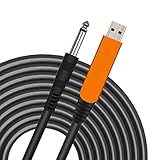
- 【GREAT COMPATIBILITY】★ In order to meet the needs of customers for XBOX and PS use. After our guitar cable has been improved and tested, it can play the game which you used to practice your guitar.Compatible with USB 2.0. Fit for almost all kinds of computers with USB port, such as Windows 98SE/ 2000/ XP/ VISTA/ Win7/ Win 8/ Win 10, Mac OS, XBOX, PS.Compatible with most recording software like GarageBand ,Yousician,Guitar Combo Amps and ect.The cable can be directly used on PC.No need the patch.
- 【PLUG & PLAY 】Use our USB Guitar Cable, plug the 1/4" TS plug into the guitar you love, plug the usb interface into your Computer/Mac/Xbox/PS, your equipment will be converted to guitar amplifier and recording system without the need for any other hardware,driver and patch, plug and play.★ Before leaving the factory, each guitar cable has been manually inspected one by one. If you have any questions, please contact us in time. We will solve it for you one by one.
- 【BUILT-IN HIGH-END CHIP】This usb guitar interface supports both 44.1 kHz and 48 kHz sample rate. Designed to transmit the electric guitar/ piano/ bass signal into your computer/Mac/Xbox/PS. Build-in a high-end D/A conversion chip, it can perfectly compatible with Computer/Mac/Xbox/PS without additional drivers patch.★ Our chip is improved, you can try to buy our guitar cable. I believe you can enjoy music better and record better quality music.
- 【HIGH SOUND QUALITY】 Low noise high fidelity, the usb guitar cord diameter 64mm(22AWG )with oxygen-free copper (OFC) center conductors provides enhanced signal transfer.High quality silver-plated USB & 6.35mm Connectors, the usb guitar cord with 1/4 end has Spring-Style Strain Relief Prevents Cables from Pulling Out.The usb guitar cable with 1.6PVC insulation material and the high-density stranded coppershield provide noise rejection for quiet operation.
- 【HIGH-QUALITY AFTER-SALES SERVICE 】We have free alternative product service. There is also a service that does not need to return the goods to you to arrange a refund.If you encounter any problems including technical problems while using the product, you can contact the seller's customer service via Amazon or contact us via email. We will provide you with quality service 24 hours a day.
HDMI itself is not automatically the cause. The important questions are whether audio passes through the TV, whether ARC/eARC or a soundbar buffers it, and which processing modes are active. If direct wired audio from the console fixes the problem, the downstream route was responsible.
Display calibration is compensation, not an audio cure
Audio latency is the time from guitar input to processed sound. Display latency is the time from game rendering to the note appearing. A synchronization offset can align repeatable audio and video delays, but it cannot make a Bluetooth headset, TV processor, or soundbar physically faster. If the delay changes during play, calibration will not solve it.
- Fix or bypass the audio path.
- Enable Game Mode and disable display processing.
- Confirm that the guitar sound and backing track are stable.
- Use the game’s visual/display calibration afterward.
- Recalibrate whenever you change the TV, headphones, console audio route, or interface.
Players commonly report menu paths such as Tools → Options → Audio Engine Settings and Options → Visual Settings → Display Lag Settings, but labels can differ by platform and build; these paths are documented in community discussion rather than guaranteed universal UI (Steam community discussion).
Independent reader supportYour contribution helps us test, update, and keep practical guides available for everyone.Advanced PC option: an audio interface with RS ASIO
The Real Tone Cable remains the official baseline. An interface is worth considering if you already record guitar, need a combined input and headphone device, or cannot obtain acceptable results with the cable and direct output.
Best Value
![ROCKSMITH REAL TONE CABLE (WORKS WITH PS3 & XB3) [video game]](https://m.media-amazon.com/images/I/51xppX6WIdL._SL160_.jpg)
- Compatible with all consoles that support the Rocksmith Game as well as PC
- Plug any real guitar into Xbox, PS4, PS3, etc.
- Features breakaway design
- 11.25ft / 3.429m Cable
- Rocksmith video game not included
RS ASIO is an unofficial community project for the Steam version that routes Rocksmith through compatible ASIO drivers. It is not Ubisoft-supported and modifies the installation with third-party DLLs. Its documentation instructs users to copy avrt.dll, RS_ASIO.dll, and RS_ASIO.ini into the game folder, configure the device and channels, keep ExclusiveMode=1 and Win32UltraLowLatencyMode=1 initially, set the interface clock to 48 kHz, restart the game after changes, and inspect RS_ASIO-log.txt when diagnosing.
- The project documentation says only 32-bit ASIO drivers are detected; some newer interfaces no longer include one.
- Hot-plugging may not be recognized while the game is running.
- Some devices require particular buffer sizes.
- ASIO4ALL is not equivalent to a native low-latency hardware driver.
- A configuration that works in a DAW does not guarantee a working Rocksmith setup.
Use this route only if you are comfortable restoring files and troubleshooting drivers. Buying an interface does not guarantee compatibility.
When crackling is really a performance problem
Audio stability can deteriorate when the game is struggling to render frames. Lower resolution or visual quality, test fullscreen versus windowed mode, and reduce graphics settings if gameplay is not smooth. Ubisoft specifically notes that low frame rates can contribute to crackling (Ubisoft’s PC configuration FAQ).
Quick Recap
- Constant delay: suspect the output route or a stable buffer.
- Intermittent delay and crackling: suspect underruns, driver contention, USB instability, or overall performance.
- Visual stutter with normal sound: focus on graphics and display settings rather than audio latency.
Symptom-based test matrix
| Test | Result | Likely interpretation |
|---|---|---|
| Wired headphones directly from PC | Delay becomes low | TV, wireless, or downstream output processing caused the delay. |
| Bluetooth headphones | Delay becomes large | Wireless transmission or codec latency is contributing. |
| Analog output versus USB headset | Analog is faster | The USB device or its driver is buffering more. |
| PC display versus TV | Monitor is better | TV display or audio processing is contributing. |
| Game Mode on versus off | Game Mode is better | Display processing was adding delay. |
| Higher buffer | Crackling disappears | The previous buffer was too aggressive. |
| Lower buffer | Delay improves but crackling starts | The system cannot sustain that buffer reliably. |
| Delay changes during play | No stable offset | Investigate underruns, drivers, or performance instead of calibration alone. |
A practical decision tree
- Is the guitar sound late? Test direct wired audio. If fixed, remove TV, Bluetooth, ARC/eARC, soundbar, or receiver processing. If not fixed, verify 48 kHz/16-bit stereo and tune buffers.
- Are notes visually out of sync while audio is stable? Enable Game Mode, disable display processing, and calibrate display timing.
- Is audio crackling or cutting out? Increase the buffer, reduce graphics load, check drivers and sample rates, and undo the latest advanced setting.
- Is there no audio or input? Restore the default devices, reconnect the Real Tone Cable, check exclusive-mode conflicts, and remove unsupported routing before considering RS ASIO.
Product prices and availability are accurate as of the date/time indicated and are subject to change. Any price and availability information displayed on Amazon at the time of purchase will apply.
Quick wins for a faster PC:
Scan for outdated or missing drivers - takes under a minuteDriver Scan →Clear out junk files and repair common Windows errorsFree Scan →Fix the driver behind crashes, sound loss and screen glitchesFind Drivers →



