BlueputDroid can make some rooted Android phones act as Bluetooth keyboard, mouse and limited controller-style devices for a PlayStation 3. It is not official PS3 Remote Play, does not stream the console screen, and is not a dependable DualShock 3 replacement. In 2026, it is best treated as a legacy experiment for an older, compatible phone—not a plug-and-play solution for a current Android handset.
What BlueputDroid actually does
BlueputDroid emulates Bluetooth input devices. Its most defensible PS3 uses are navigating the XMB, moving a pointer in the web browser, entering text and performing basic menu or media control. The app also includes a Sixaxis-style layout in some versions, but that does not guarantee complete gamepad emulation.

- Mouse-style pointer movement and selection.
- On-screen keyboard input.
- Controller-oriented buttons, depending on the app version and phone.
- Bluetooth connection to a PS3 or, historically, other hosts such as Linux computers.
It is not a Sony application, official Remote Play client, screen-streaming tool or guaranteed replacement for a DualShock 3. Sony documents Remote Play registration as a separate PS3 feature: Register Device.
The PS3 treats keyboard, mouse and controller input as different categories. Its own documentation has separate keyboard and mouse settings, which is why a phone that works for text entry may still fail in games: PS3 keyboard settings.
Recommended Free Tools
#1 Best Overall

- 🎮【Compatible with Playstation3 】The wireless controller is fully compatible with PS3/Slim.
- 🎮【Double Vibration and Shock& Motion Sensor Supported】 Feel every hit, crash, and explosion with PS3 controller dual vibration response. Truly intuitive game play through the 6-axis motion sensing technology
- 🎮【Long Battery Life & Long Bluetooth Connection Distance】The controller is design with perfect sensitive buttons and product shape, more comfortable playing feeling to press the buttons with suitable hand-held size and with a large battery capacity,allowing you to have great fun in games for longer time.
- 🎮【Upgraded Version】The buttons are with high sensitivity and provide an accurate gaming experience. The layout of controller buttons is optimized with excellent dual analog gamepad design.
- 🎮【Package Content /What You Get】wireless controller * 2, USB charging cable * 2, User Manual * 1 (NOTE: Please activate device with USB charging cable for the first match connection).
Does BlueputDroid still work?
Sometimes, but only when the phone, Bluetooth chipset, Android build, kernel and ROM expose the low-level functions the app expects. The surviving app description says root is required and warns that an “invalid or inactive Bluetooth device” error indicates an unsupported Bluetooth implementation, potentially requiring different kernel-level support: BlueputDroid app description.
The commonly archived package is version 1.5.0, listed by third-party archives for Android 2.0 or later and ARM/armeabi hardware. Those listings do not establish current developer support, Play Store availability or compatibility with modern Android: APK.Gold listing and Uptodown listing.
Rank #2

- 【Compatible with Sony Playstation 3 and PC Windows 7/8/10】Controller wireless for Sony PlayStation 3/PS3. Plug and Play. No installation is required. To use it on a PC, a USB cable is required (included).
- 【Double Shock 3 & Motion Sensor Supported】The controller wireless for Sony PS3 supports the double shock 3 function. The grips vibrate with each explosion, shocking, firing in supported games, giving you more fun and a more immersive gaming experience. 6-axis motion sensing function is also supported for the remote controller for PS3 so that you can control the games freely with the moving of your hands.
- 【Long Battery Life & Long Bluetooth Connection Distance】Remote for PS3 with a large battery capacity of 600mAh, providing 5~8h long playtime (auto-sleep function is provided for saving power).
- 【Sensitive Buttons Passed 10,000,000 Strokes Test】The high-quality controllers 2 pack for PS3 are upgraded to be close to the original. It has a zero-delay quick response. The control for PS3 uses first-class material and is of first-class craftsmanship. It has passed a strict durability test of 10,000,000 times of strokes. The two 360 degree analog joysticks of the controller wireless for PS3 enable you to control the games effortlessly and precisely. No dead zone.
- 【Package Content & Lifetime Carefree After-sales Service】The delivery package includes 2 Controllers Wireless for PS3, 2 USB Charging Cables (2.5 feet), 1 User Manual; The wireless controllers for Sony PlayStation 3 offer a lifetime unconditional return and refund service.
Installing an APK is not the same as creating a working Bluetooth HID connection. A current, unrooted phone is an especially poor candidate; an older rooted device that already supports legacy custom-ROM software has a more realistic chance.
Compatibility checklist before you try
- Root access: the archived developer description identifies root as required. Rooting can affect warranty or support, wipe data during bootloader unlocking, break banking or DRM apps and cause boot loops or soft-bricks.
- Exact device details: record the phone model, Android version, CPU architecture, ROM and kernel before installing anything.
- Compatible Bluetooth stack: Bluetooth being present is not enough; the implementation must support the low-level HID behavior BlueputDroid needs.
- Trusted APK provenance: archive pages are not proof that a package is authentic or maintained. Do not disable Android security protections broadly or force-install an unverifiable build.
- Recovery input: keep a PS3 controller, USB keyboard or another known-good input device available.
- Power and radio conditions: charge both devices, keep the phone close to the PS3 and disconnect headphones, watches or other Bluetooth hosts while testing.
How to pair BlueputDroid with a PS3
Menu wording can vary with PS3 system software and region. Sony’s documented Bluetooth path is:
Rank #3

- The 2 pack wireless controller is fully compatible with PS3/Slim.
- Feel every hit, crash, and explosion with controller dual vibration response. Truly intuitive game play through the 6-axis motion sensing technology.
- Our controller has undergone a comprehensive upgrade to close to the original version. It has refined thumbsticks, precise triggers, responsive action buttons and a 4-way directional pad.
- The controller uses high-quality materials and exquisite craftsmanship, and passed 12,000,000 durability tests.
- What You Get: wireless controller * 2, USB charging cable * 2, User Manual * 1 (NOTE: Please activate device with USB charging cable for the first match connection).
- On the PS3, open Settings.
- Select Accessory Settings.
- Open Manage Bluetooth Devices.
- Choose Register New Device.
- Select Start Scanning.
- Select the Android phone when it appears.
- Enter or confirm the passkey if the PS3 requests one. Use the code shown by the console or device; 0000 is not a universal passkey.
Some older PS3 software shows a direct Register Keyboard/Mouse route instead. Both labels refer to the console’s Bluetooth registration workflow. See Sony’s guide: Manage Bluetooth Devices and the older Bluetooth registration guide.
Complete the connection in BlueputDroid
- Install a copy whose source and integrity you can assess, then grant superuser access when requested.
- Turn on Bluetooth and open BlueputDroid. Inspect its log window.
- Stop if it immediately reports “invalid or inactive Bluetooth device.” That normally points to phone, ROM, kernel or Bluetooth-stack incompatibility, not a missed PS3 menu.
- After PS3 pairing, tap the app’s lens or search button to refresh discovered devices.
- Select the PS3 entry and wait for the connected state; the archived instructions describe a green screen.
- Test a single press, which the app describes as left-click behavior, then a double press for right-click behavior.
- Open the app menu to show, hide or change the on-screen keyboard and input layout.
Test first in the XMB or browser. A connected status only proves that a Bluetooth link exists; it does not prove that every button, analog axis or game will work.
Rank #4
What you can expect in practice
Navigation and text entry
Pointer movement, selecting menu items and typing searches or browser addresses are the strongest use cases. A phone keyboard can be faster than entering characters with a controller.
Games and controller features
Do not assume that the Sixaxis-style screen provides DualShock-equivalent controls. Generic keyboard or mouse input does not supply every game’s analog sticks, triggers, pressure-sensitive buttons, vibration, motion sensors or expected controller profile. Game compatibility is therefore limited and device-dependent; a physical PS3 controller remains the appropriate choice for gameplay.
Outdated Drivers Are Slowing You Down
One free scan finds every outdated or missing driver and matches the right update for your exact hardware.Free scan · exact hardware matchPC Slower Than It Used to Be?
A free scan shows the junk files, broken settings and background clutter dragging Windows down - then fixes them in one click.Free scan · Windows 10 & 11Best Value
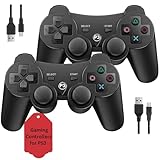
- Two Controllers, Ready to Play: Get two wireless PS3 controllers plus two USB charging cables in the box - everything two players need, at a low cost per controller. Designed for Sony PlayStation 3 and Windows PC (7/8/10); it does not support PS4, PS5, or Mac.
- Wireless on PS3, Wired PC: Connect once with the USB cable to pair, then play wirelessly on PS3 up to 33 feet via Bluetooth. On PC, use the USB cable for instant plug-and-play (wireless on PC needs built-in Bluetooth). The PS button powers on your console.
- Responsive Buttons and Sticks: Dual analog sticks and tactile buttons are built and tested for responsive, low-lag play, with anti-slip grips for control. Components are endurance-tested, and every controller is backed by our lifetime warranty if anything wears out.
- Familiar, Comfortable Design: A classic 3-inspired layout with dual vibration and 6-axis motion means no learning curve and a comfortable grip for long sessions. Lightweight by design as an affordable replacement; it is a solid budget controller, not an OEM clone.
- Rechargeable, Backed for Life: A 600mAh battery delivers about 5-8 hours per charge over the included USB cables, with an auto-sleep mode that conserves power when idle. If a controller ever fails to charge or wears out, our lifetime hassle-free return and refund has you covered.
Troubleshooting by symptom
| Symptom | Likely cause | Recommended action |
|---|---|---|
| PS3 does not see the phone | Discovery problem or stale registration | Toggle Bluetooth, restart both devices, remove unused PS3 registrations, then scan again. Start the PS3 scan before refreshing BlueputDroid. |
| “Invalid or inactive Bluetooth device” | Unsupported chipset, Bluetooth stack, ROM or kernel | Stop troubleshooting pairing. Try only a different known-compatible legacy device; the archived advice about CyanogenMod is historical, not a current universal fix. |
| Pairing succeeds but there is no input | BlueputDroid’s device list was not refreshed or the wrong entry is selected | Delete the PS3 registration, restart both devices, pair again, refresh the app list and select the PS3 entry. |
| Keyboard works but games do not | Keyboard/mouse HID is not full controller emulation | Use a compatible physical controller for games. |
| APK will not install or crashes | Architecture, signature, Android-version, permission or package incompatibility | Do not force-install a modified or unverifiable APK. Use another input method instead. |
The PS3 has a finite registration list for wireless devices, so deleting old entries may be necessary before adding the phone: Sony Bluetooth device instructions.
When BlueputDroid is worth trying
- You already have a rooted older Android phone and understand its recovery tools.
- Your goal is occasional typing, browser navigation or menu control—not reliable gaming.
- You can tolerate trial and error and have a backup controller or keyboard.
- You can evaluate the APK’s provenance before sideloading it.
Skip it if your phone is a current unrooted model, you cannot risk rooting, you need guaranteed controls or you have no backup way to operate the PS3.
Safer alternatives
| Need | Better option | Why |
|---|---|---|
| Typing, searching or web browsing | USB keyboard | No root or APK; inexpensive and broadly compatible, though wired. |
| Wireless typing and pointer control | Bluetooth keyboard and mouse | Uses the PS3’s documented Bluetooth keyboard/mouse support without modifying a phone. |
| Games and complete controls | Official or compatible PS3 controller | Provides the controller profile, analog input, triggers and other game features games expect. |
| Movies and media playback | PS3 BD Remote | Dedicated couch-control buttons; Sony lists BD Remote registration separately in PS3 settings: PS3 Settings guide. |
Separate community projects also attempt to turn rooted Android hardware into a DualShock 3 over USB. For example, Droidshock3 describes on-screen or Bluetooth-gamepad input forwarded as USB controller reports. It is a technical project requiring compatible USB-gadget and kernel support, not a drop-in BlueputDroid replacement.
The Bottom Line
Bottom line: BlueputDroid can still be useful on the right rooted, older Android device, mainly as a Bluetooth keyboard and mouse for PS3 menus and text entry. It is not a reliable modern Android solution or a full game controller. For most people, use a USB or Bluetooth keyboard for typing and a PS3 controller for games.
Free tools Windows power users keep installed
One-click scans. No signup required.
Quick Recap
Product prices and availability are accurate as of the date/time indicated and are subject to change. Any price and availability information displayed on Amazon at the time of purchase will apply.




